
A GDPR compliant link in bio is a page that collects only the visitor data it needs, tells visitors what it collects, and asks for consent before any tracking that is not strictly necessary. No regulator certifies link in bio tools as compliant. Compliance comes from two places: the tool’s contracts and data transfers, and what you add to the page yourself.
That second part is the one most guides skip. You can pick a tool with a signed data processing agreement and still break the rules by adding a Meta Pixel, an autoplaying YouTube embed or a newsletter form with no notice. The tool does not choose those blocks. You do.
This guide covers who is responsible for what, which page elements need consent, how US data transfers stand in November 2026, and a 9-step checklist you can run on your own page in an afternoon. It is not legal advice; if you run ads at scale or sell to EU customers, a short review with a privacy lawyer is worth the cost.
Key Takeaways
- You are usually the controller for your visitors’ data. Linktree’s data processing addendum, for example, says the creator is “generally” the controller of profile visitor data (linktr.ee/s/data-processing-addendum, November 2026).
- Pixels and third-party embeds need consent before they load. The EU Court of Justice made a site that embeds a Facebook plugin jointly responsible for the data it sends (Fashion ID, C-40/17).
- An IP address can be personal data. That makes analytics, fonts and embeds a GDPR question, not only cookies (Breyer, C-582/14).
- US transfers are legal today, with open risk. The EU-US Data Privacy Framework is in force, and an appeal against it is pending at the Court of Justice.
- Maximum fines reach EUR 20 million or 4% of worldwide turnover, whichever is higher (GDPR Article 83).
What makes a link in bio GDPR compliant?
A link in bio is GDPR compliant when every piece of visitor data it collects has a lawful basis, visitors can read what is collected and why, non-essential tracking waits for a clear yes, and every company that receives the data is covered by a contract.
GDPR applies to you if you are based in the EU. It also reaches creators outside the EU who offer goods or services to people in the EU or monitor their behaviour, under Article 3(2) of the General Data Protection Regulation. A creator in Texas selling a preset pack to buyers in Berlin is inside that scope.
For the basics, start with what a link in bio is and how it works.
Who is responsible: you or the link in bio tool?
Usually both, for different things. GDPR splits roles into the controller, who decides why and how data is processed, and the processor, who processes it on the controller’s behalf under a contract (Article 28). When you build a page, choose its blocks and collect emails on it, you decide the purpose. That makes you the controller for most visitor data.
The tools say so in their own paperwork. Linktree’s data processing addendum, effective 27 April 2022, names the creator as “generally” the controller of profile data, including data about profile visitors. Linktree acts as controller itself when it uses its own cookies to analyse profile visitors (linktr.ee/s/data-processing-addendum, November 2026).
Two EU court rulings extend your share. In Wirtschaftsakademie (C-210/16), the Court of Justice held that the admin of a Facebook fan page is jointly responsible with Facebook for visitor data. In Fashion ID (C-40/17), a retailer that embedded a Facebook Like button became joint controller for collecting and passing on visitor data. Its duty stopped at that point. For a bio page, every pixel and embed you add is partly your responsibility.
Which parts of a bio page need consent?
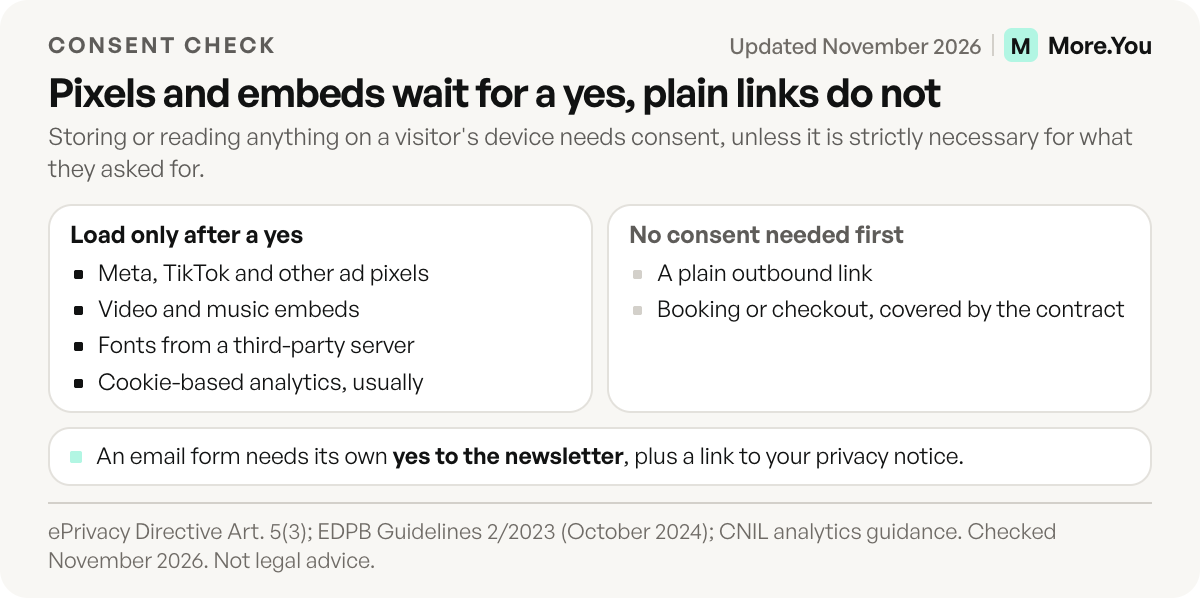
Not everything on the page needs a cookie banner. The test comes from Article 5(3) of the ePrivacy Directive: storing or reading information on a visitor’s device needs consent, unless it is strictly necessary for a service the visitor asked for. The EDPB’s Guidelines 2/2023 apply that rule to tracking pixels and URL tracking.
| Page element | What it sends, and to whom | Consent before it loads? |
|---|---|---|
| Plain outbound link | Nothing until tapped; the destination then collects its own data | No |
| Page-view and click analytics | IP address, device, referrer, to the tool | Depends on the method; cookie-based analytics usually yes |
| Meta Pixel, TikTok Pixel, ad tags | Visit and click data, to the ad network | Yes |
| YouTube, Spotify or video embed | IP address and cookies, to the embed provider | Yes, or use click-to-load |
| Fonts loaded from a third-party server | IP address, to the font host | Yes, or host fonts locally |
| Email capture form | Name and email, to you and your email tool | Consent to the newsletter itself, plus a notice |
| Booking or checkout | Contact and payment data, to you and the processor | No; the contract is the lawful basis |
Analytics is the grey row. France’s regulator, the CNIL, exempts audience-measurement cookies from consent only under strict conditions: visitors are informed and can object, and the data is used only for measurement and never combined with other data (cnil.fr). Other countries apply the rule differently. If your tool’s analytics drop cookies or share data with ad partners, treat them as consent-only. For what the numbers should tell you once you have them, see how to track link in bio clicks.
In January 2022, the Munich Regional Court ordered a site operator to pay a visitor EUR 100 because the site loaded Google Fonts from Google’s servers and sent the visitor’s IP address without consent (LG München I, 3 O 17493/20). The ruling set off a wave of copycat demand letters, which the Hessen data protection authority has written about (datenschutz.hessen.de).
What a valid consent banner looks like
If your page needs consent, the banner has to meet the standard set by the courts and regulators:
- Reject is as easy as accept. The EDPB cookie banner taskforce flagged banners with no reject option on the first layer, and reject shown as a link while accept is a button (EDPB report, January 2023).
- No pre-ticked boxes. The Court of Justice ruled a pre-ticked checkbox is not valid consent (Planet49, C-673/17).
- Nothing fires before the answer. A pixel that loads first and asks second has already collected the data.
- Withdrawal is easy. Article 7(3) of GDPR says withdrawing consent must be as easy as giving it.
In the UK, the ICO published final guidance on storage and access technologies on 29 April 2026, reflecting the changes the Data (Use and Access) Act made to PECR (ico.org.uk). If your audience is mostly in the UK, read it before setting up analytics.
Does sending data to the US break GDPR?
Not by itself, as of November 2026. Article 44 of GDPR only allows transfers outside the EU under a safeguard. For the US, that safeguard is the EU-US Data Privacy Framework, adopted in Implementing Decision (EU) 2023/1795 on 10 July 2023 and listed as in force. Companies outside the framework use standard contractual clauses instead.
The framework carries live risk. The EU General Court dismissed the Latombe challenge on 3 September 2025, and the appeal, C-703/25 P, is pending at the Court of Justice. On 31 July 2026, the EDPB wrote to the European Commission about the US Supreme Court’s Trump v. Slaughter ruling, which affects the independence of the FTC, one of the bodies the framework relies on (edpb.europa.eu). Two earlier EU-US arrangements, Safe Harbor and Privacy Shield, were struck down. Pick a tool that also names standard contractual clauses as a fallback.
A tool can store data in the EU and still use US providers. LinkDash’s privacy policy puts its database and file storage on EU servers in Frankfurt and lists US hosting, email and AI providers under standard contractual clauses (linkdash.eu/privacy, November 2026).
The 9-step checklist for your own page
Run these in order. Most take minutes.
- List every block on your page. Note which ones load content from a third party: video, music, maps, booking widgets, fonts.
- Remove any pixel you do not use. An unused Meta or TikTok pixel collects data with no benefit to you.
- Gate the pixels you keep behind consent. Use a banner that meets the rules above.
- Switch embeds to click-to-load where you can. Or link out to the video instead of embedding it.
- Check how your analytics work. Ask the tool whether it sets cookies and whether it shares data with partners.
- Add a privacy notice link. Article 13 requires telling visitors who you are, what you collect, why, for how long and what rights they have.
- Fix your email capture form. Say what people sign up for, keep the box unticked, and link the notice. Our guide to growing an email list from your link in bio covers the form itself.
- Get the tool’s data processing agreement. Save a copy. If the tool cannot provide one, that answers the question.
- Repeat after every page change. A new embed or pixel resets the checklist.
Questions to ask any link in bio tool
Use the same six questions for every provider, More.You included:
| Question | Why it matters | Where to find the answer |
|---|---|---|
| Do you offer a data processing agreement? | Article 28 requires a contract with every processor | Legal or DPA page |
| Where is visitor data stored? | Transfers outside the EU need a safeguard | Privacy policy |
| Which safeguard covers transfers? | DPF certification, standard contractual clauses or both | Privacy policy or DPA |
| Do you publish a sub-processor list? | You answer for the whole chain | Legal page |
| Do your analytics set cookies or share data? | Decides whether analytics need consent | Help center or privacy policy |
| Can visitors’ data be exported and deleted? | Access and erasure requests land on you | Help center |
A custom domain, a Pro feature on More.You, also helps here: visitors see your name in the address bar, and your privacy notice sits on a domain you control. See how to set up a custom domain for your link in bio.
What happens if your page is not compliant?
For most creators, the realistic risk is a complaint to a data protection authority, a demand letter or a damages claim, not a headline fine. Article 82 of GDPR gives visitors a right to compensation, which is how the Munich font case reached EUR 100. Article 83 sets the ceiling for regulator fines at EUR 20 million or 4% of total worldwide annual turnover, whichever is higher, for breaches of the core principles, lawful basis, consent and transfer rules.
Under Article 77, a visitor can file that complaint where they live or work. The authority can then order you to bring the page into line, or limit or ban the processing, under Article 58(2).
Build a page you can explain line by line
The easiest page to audit is one where you know what every block does. More.You builds the page from labeled blocks, so your list in step one is the page itself. Each page has its own SEO settings with an optional noindex, and its own AI-crawler policy, so you set per page whether AI crawlers are allowed or sent a no-AI signal. Ask us the six questions above, and start with the More.You privacy policy. Then create your More.You page and run the checklist on it.
FAQ
Is Linktree GDPR compliant?
No regulator certifies link in bio tools, so no tool is officially “GDPR compliant”. Linktree offers a data processing addendum effective 27 April 2022 and states it transfers data under standard contractual clauses or adequacy decisions (linktr.ee/s/privacy, November 2026). Your page’s compliance still depends on the pixels, embeds and forms you add.
Do I need a cookie banner on my link in bio?
You need one if your page stores or reads anything on the visitor’s device that is not strictly necessary. Ad pixels, most third-party embeds and cookie-based analytics fall into that group. A page with plain links and cookieless analytics may need no banner, but it still needs a privacy notice.
Am I the data controller for my link in bio page?
Usually yes. You decide what the page collects and why, which makes you the controller for most visitor data. The tool acts as your processor for that data and as a controller for its own purposes, such as fraud prevention. Embedded third parties can make you a joint controller under the Fashion ID ruling.
Does GDPR apply to creators outside the EU?
It can. Article 3(2) covers organisations outside the EU that offer goods or services to people in the EU or monitor their behaviour. Selling to EU buyers or running pixels on EU visitors brings you in scope, even if you live elsewhere.
Can I use a Meta Pixel on a GDPR compliant link in bio?
Only after consent. The EDPB’s Guidelines 2/2023 apply the ePrivacy consent rule to tracking pixels, so the pixel should fire only after the visitor says yes through a banner with an equal reject option. A pixel that loads before the answer has already collected data without consent.
Sources
- General Data Protection Regulation (EU) 2016/679, Articles 3, 6, 7, 13, 28, 44, 58, 77, 82, 83, EUR-Lex, November 2026
- ePrivacy Directive 2002/58/EC, consolidated, Article 5(3), EUR-Lex, November 2026
- CJEU, Fashion ID, C-40/17, press release, curia.europa.eu, July 2019
- CJEU, Wirtschaftsakademie, C-210/16, press release, curia.europa.eu, June 2018
- CJEU, Breyer, C-582/14, press release, curia.europa.eu, October 2016
- CJEU, Planet49, C-673/17, press release, curia.europa.eu, October 2019
- LG München I, 3 O 17493/20, 20 January 2022, gesetze-bayern.de, November 2026
- Hessen data protection authority on Google Fonts demand letters, datenschutz.hessen.de, November 2026
- EDPB Cookie Banner Taskforce report, edpb.europa.eu, January 2023
- EDPB Guidelines 2/2023 on the technical scope of Art. 5(3) ePrivacy Directive, edpb.europa.eu, October 2024
- CNIL, use of analytics on websites and applications, cnil.fr, November 2026
- ICO, guidance on storage and access technologies, ico.org.uk, April 2026
- Commission Implementing Decision (EU) 2023/1795, EU-US Data Privacy Framework, EUR-Lex, November 2026
- Case C-703/25 P, appeal notice, EUR-Lex, November 2026
- EDPB letter to the European Commission on the US Supreme Court judgment, edpb.europa.eu, July 2026
- Linktree data processing addendum (linktr.ee/s/data-processing-addendum, November 2026)
- Linktree privacy notice (linktr.ee/s/privacy, November 2026)
- LinkDash privacy policy (linkdash.eu/privacy, November 2026)



