Link in bio for shops

Opening hours, new stock and your online store on one link. More.You gives your shop one page for your bio and your window. Customers see if you are open, see what is new and order it from your online store.

more.you/
Hazel and HartKnitwear, ceramics and small gifts in central Utrecht.
Open now
Tue to Fri10:00 to 18:00
Saturday10:00 to 17:00
Sun and MonClosed
Merino scarf, mustard€48Shop
New this week
Stoneware mug, blue
Linen tea towels, set of 2
Wool socks, oat
26NovLate opening, winter giftsThursday, 18:00 to 21:00Details
Our online store
Directions to the shop

more.you/hazelandhart

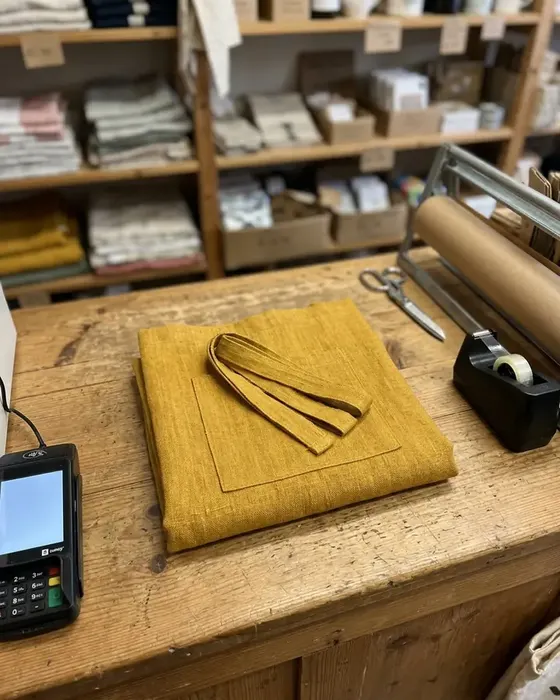
A wrapped scarf on a shop counter next to a card reader

A shopper's path from your window to your store

Anouk walks past your shop on a Sunday evening, when the door is locked. She likes a mustard scarf in the window, and a QR code sits next to it.

  1. Hazel and HartScan for hours and new stock
    01Sunday, 19:10

    Anouk scans the code on your window

    Your window card shows the QR code and your page name. Her phone camera opens your page in one tap.

  2. On your page
    Closed now
    Tue to Fri10:00 to 18:00
    Saturday10:00 to 17:00
    02Your page

    She sees you open on Tuesday

    Your opening hours block shows closed now and the hours for each day. The shop opens again on Tuesday at 10:00.

  3. On your page
    Merino scarf, mustard€48Shop
    New this week
    Stoneware mug, blue
    Wool socks, oat
    03One tap

    She taps the mustard scarf

    The scarf sits above your New this week collection. Its product block shows the price and a Shop button.

  4. Your online storeHazel and HartMerino scarf, mustard, €48Ordered
    04Your online store

    Anouk orders the scarf that night

    The button opens the scarf's page in your online store. She pays there, and you pack the parcel on Tuesday morning.

Four blocks for a shop page

Customers ask when you are open, what is new and where to buy it online. These four blocks give each question a place on your page.

Opening hours

Opening hours for each day of the week

Write your hours once for each day, with Sunday and Monday as closed. The block shows open now or closed now, so customers know before they leave home.

Open now
Tue to Fri10:00 to 18:00
Sun and MonClosed

Products

New stock with a price and a button to your store

Each product block shows the name and the price of one item. Its button opens that item in your online store, where the customer pays.

Merino scarf, mustard€48Shop
Collections

A New this week group near the top

A collection puts several blocks under one heading. Change the items each week, or make a second collection for small gifts.

New this week
Stoneware mug, blue
Linen tea towels, set of 2
Wool socks, oat
Events

Late openings, sale days and launch evenings

One event block per date, with the time and a button to the details. Put your next late opening near the top of the page.

26NovLate opening, winter giftsThursday, 18:00 to 21:00Details

Where a shop puts its link

A shop has a window, a till and an Instagram account. Each one can send people to the same page.

A QR code on the window and till

Print the code on one card for the window and one for the till. People who pass after closing time still see your hours and new stock.

Shopping bags and receipts

Print more.you/hazelandhart on your paper bags or at the bottom of each receipt. A customer who bought a gift can order a second one from home.

Your Instagram bio

Add the link to your Instagram bio. Each Reel of new stock can end with link in bio, and the page shows where to buy it.

What AI assistants read on your shop page

People ask AI assistants where to find a gift nearby. An assistant can read your shop's hours, each product with its price and each event with its date.

What an AI assistant reads here

name
Hazel and Hart
about
Knitwear, ceramics and gifts in Utrecht
hours
Tue to Fri, 10:00 to 18:00
product
Merino scarf, mustard
event
Late opening, 26 Nov, 18:00 to 21:00

Your shop page in three steps

  1. 01

    Claim your name

    Type the name you want after more.you/ and create your free account.

  2. 02

    Add your hours and this week's products

    Add an opening hours block. Then add a product block for each new item, with the link to its page in your online store. Group them in a collection.

  3. 03

    Print the code for your window and till

    Every page has a QR code. Print it on a window card, a till card and your receipts. The code opens your page, so you keep the same cards when your stock changes.

Plans for shops

  • The Free plan holds every block a shop page needs: opening hours, products, collections, events and links.
  • Product blocks send each customer to your online store. The order and the payment happen there.
  • Analytics show views and clicks for each product, by source, device and country. The Free plan keeps 30 days.
  • With Premium, one account holds up to 5 pages, one for each shop. Premium is $15/month billed annually ($19 month to month).
  • Pro removes the More.You branding and puts your page on your own domain. Pro is $5/month billed annually ($7 month to month).

Questions from shop owners

How do customers buy a product from my page?

Each product block shows a name, a price and a button. The button opens that product in your online store, and the customer pays there. The order arrives in your store with all the others, so your stock and your orders stay in one place.

Can I show a late opening or a sale day?

Add an event block for each date, with the start and end time and a button to the details. Your opening hours block keeps the normal week. Put the next event near the top, and delete it when the evening is over.

Where should I put the QR code in my shop?

Put it where people stand still: the window, the till and the fitting room door. Print it on receipts and bags too. The code opens your page, so you can change products and hours later and keep the same printed cards.

Do I need to add every product from my online store?

No. Add the products you want people to see this week, such as new stock or a gift idea, and group them in a collection. One link block can open your whole online store for everything else.

We have two shops. Can each one have its own page?

Each shop can have its own page with Premium, which holds up to 5 pages on one account. Every page gets its own hours, events and directions link. Premium is $15/month billed annually ($19 month to month). With the Free plan, each account has one page.

Can AI assistants read our products and hours?

Yes. AI assistants can read your shop's hours in the opening hours block. They can also read the name and the price on each product block. What an assistant says about your shop is its own choice.

More pages: Online brands, Salons and barbershops, Restaurants and cafes, Blocks, QR codes, Templates, every industry or pages for creators.

Guides: Link in Bio for Ecommerce: Turn Social Traffic Into Sales, Shoppable Bio Page Layout: What Goes Where.

One link for your window, your till and your bio

Add your hours and this week's products, then print the QR code for your window. Customers can see what is new even when the door is locked.

more.you/

Language