When your Instagram link in bio is not working, the fault sits at one of three points: Instagram won’t save the link, the link shows but won’t open, or it opens and the page breaks. Find your point first. Most cases come down to the wrong field, a missing https://, an outdated app, a flagged domain, or a destination that fails inside Instagram’s in-app browser.
You notice it when a follower comments “link doesn’t work” under your newest Reel. By then the post has had its best hours, and every tap in that window went nowhere. A broken bio link costs you the clicks your best content earns.
This guide sorts the problem by symptom, then gives 9 fixes in the order to try them. It’s for anyone who sends Instagram traffic to a shop, a booking page, a newsletter or a link in bio page.
Key Takeaways
- Find where it fails before you fix anything. A link that won’t save and a link that won’t load have different causes.
- The Links field is the only clickable spot. A URL typed into your bio text stays plain text.
- Edit links in the mobile app. Instagram’s help page for links says the feature isn’t available on computers, and users report a message in the browser version.
- A link in a caption or comment is plain text. Clickable caption links need a Meta One plan, from Advanced.
- Test the page outside Instagram. The in-app browser breaks some pages that work fine in Safari or Chrome.
- “Link in bio” in a caption does not cut your reach. Instagram’s head said so on the record in July 2025.
Why is my Instagram link in bio not working?
Your Instagram link in bio fails at one of three checkpoints. At the first, Instagram refuses or silently drops the URL when you save it. At the second, the link appears on your profile but a tap does nothing or lands in the wrong place. At the third, the tap works but the page loads blank, errors out, or sends people to an app store.
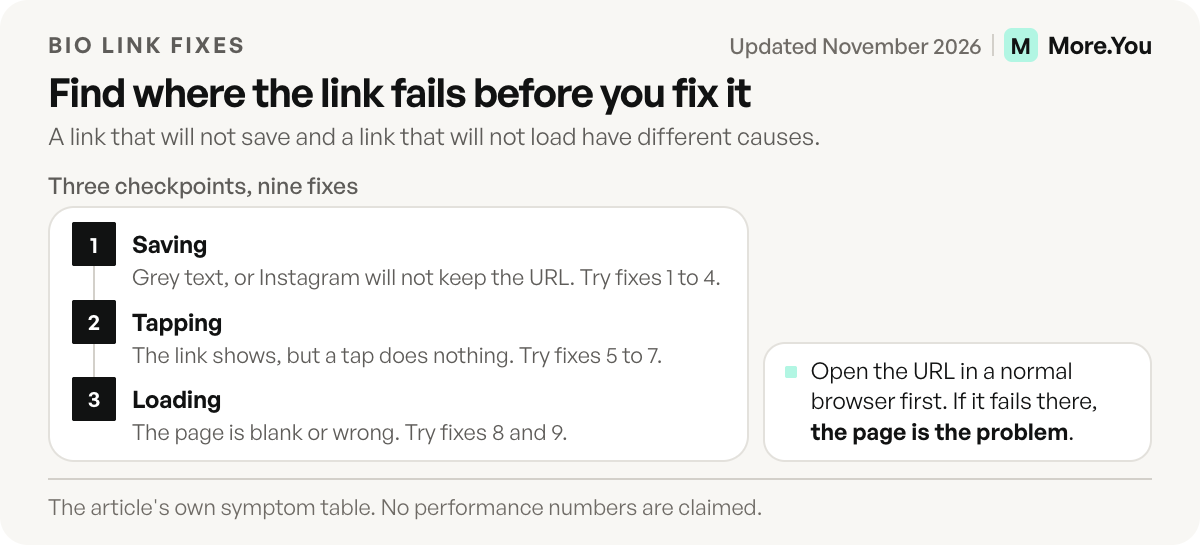
Match what you see to a row, then jump to that fix.
| What you see | Where it fails | Likely cause | Fix |
|---|---|---|---|
| URL shows as grey, untappable text | Saving | Typed into the bio text, not the Links field | 1 |
| Instagram won’t save the link | Saving | Missing https://, or editing from a browser | 2, 3 |
| Error when you add a specific domain | Saving | Domain flagged as unsafe, or a shortener | 4 |
| Link is there, tap does nothing | Tapping | Outdated or cached app | 5 |
| Link features greyed out or missing | Tapping | A restriction on your account | 6 |
| Works for some people, not others | Tapping | An app bug on one platform | 7 |
| Page loads blank or errors | Loading | Destination breaks in the in-app browser | 8 |
| Page loads the wrong thing | Loading | Expired campaign URL or redirect chain | 9 |
Fixes when Instagram won’t save the link
1. Put the URL in the Links field, not the bio text
Instagram only makes links clickable in the dedicated Links field. Go to your profile, tap Edit profile, tap Links, then Add external link (Instagram Help Center, November 2026). A URL pasted into the 150-character bio text displays as plain text and nobody can tap it. You get up to five links, a limit Instagram rolled out to all accounts in April 2023 (engadget.com, April 2023) and still applies (Instagram Help Center, November 2026). If a sixth link will not save, you have hit the limit: it is five, or 20 with a Meta One plan (Meta Help Center, November 2026). The full walkthrough is in how to add a link to your Instagram bio.
2. Add the full address, starting with https://
Paste the complete URL, protocol included. Copy it from the browser’s address bar rather than typing it, so a stray space or a missing letter can’t slip in. Then tap Save on the link screen and Save again on Edit profile. Leaving after the first save is a common reason a link “disappears”.
3. Edit your links in the mobile app
Instagram’s help page for adding links says the feature isn’t available on computers and lists the Android and iPhone apps (Instagram Help Center, November 2026). Since May 2025, people editing profile links in a desktop browser have also reported the message “You can only edit your links on mobile devices” (gaminghq.eu, May 2025). If you manage your profile on a laptop, switch to the Instagram app on your phone for any link change.
4. Check whether the domain itself is flagged
If one specific URL fails while others save fine, the domain is the suspect. Run it through Google’s Safe Browsing site status check. A domain marked dangerous there will struggle on every platform, not only Instagram. Clean the site, then request a review through Google Search Console.
Generic URL shorteners are the other usual cause. Many unrelated links share a shortener’s domain, so one bad link can affect them all. Link to your own domain or a dedicated bio page instead.
Fixes when the link shows but won’t open
5. Update the app and clear its cache
Update Instagram from the App Store or Google Play first. On Android, go to Settings, Apps, Instagram, Storage, then Clear cache, and force-stop the app. iPhone has no cache button, so delete and reinstall the app. If the link still fails, remove it from Links and add it again, so Instagram stores it fresh.
6. Check Account Status for restricted features
Instagram can restrict features on an account that breaks its Community Guidelines. Account Status shows it. Tap the menu on your profile, open Settings and activity, then type “Account Status” in the settings search. It lists removed content and tells you when “some features on your account may be restricted”. It also lets you tap Request a Review if you think Instagram got it wrong (about.instagram.com, June 2023).
7. Rule out an Instagram bug
Instagram app builds ship with link bugs sometimes. In February 2026, and again in May 2026, an Android build sent taps on shared Instagram links to the home feed instead of the linked post. Reinstalling did not fix it, but opening the link in Chrome did (piunikaweb.com, May 2026).
To test for a bug, tap your bio link from a second account on a different phone, one iPhone and one Android if you can. If it works on one platform only, the fault is Instagram’s. Wait for the next app update, and post a story telling followers how to reach the page from their browser for now.
Fixes when the link opens but the page breaks
8. Test the destination outside Instagram
Paste the URL into a normal browser tab. If it fails there, the problem is your page, not Instagram. If it works there but fails inside Instagram, the in-app browser is the cause.
Instagram opens links in its own in-app browser, and some pages behave differently there. App links don’t fire, so a tap meant to open your app lands on a web page instead. On iPhone, a person who already has your app can get sent to its App Store page (airbridge.io, November 2026). PDFs, logins and checkout pages that depend on a saved session are other frequent failures. Point the bio link at a plain, fast web page and put the app, PDF or checkout one tap further in.
9. Remove redirect chains and expired campaign links
A link that worked last month can point at a sold-out product or a finished sale page today. Every extra redirect, from a shortener to a tracker to the final page, is one more step that can fail inside the in-app browser. Use one stable URL that goes straight to a page you control. Change what the page shows, not the link.
Why is the link in my caption or comment not clickable?
A URL in a caption, a comment or a Reel description is plain text on a normal account. Instagram only makes links tappable in the Links field and in Story link stickers. The one exception is a paid plan: Meta One Advanced, Expert and Max accounts can add clickable links to a set number of posts and Reels each month (Meta Help Center, November 2026). Without a plan, write a call to action and keep the address in your bio. If a Story link sticker is the part that fails, adding a link to your Instagram Story lists its causes, and Instagram links in captions covers the paid option.
Does saying “link in bio” hurt your reach?
No. Adam Mosseri, head of Instagram, said: “You’re more than welcome to say ‘link in bio,’ it will not affect your reach one way or another” (socialmediatoday.com, July 2025). If a post with that phrase gets fewer views, look at the content’s engagement, not at the words. Say what the link gives instead of only “link in bio”. “The preset pack is in my bio link” tells the viewer what they get and where to tap. Then check that the first link in your list is that pack, so the tap lands where the post promised.
How do you stop the link from breaking again?
Most broken bio links break during an edit. Run a two-minute test every time you touch the link:
- Tap the link from your own profile in the app.
- Tap it from a second account on another phone.
- Open the page and press the main button on it.
- Paste the URL into a desktop browser.
Then remove the reason to edit at all. A single bio page URL means the Instagram link never changes, even when your offers do. If you use the native five slots too, multiple links in your Instagram bio covers how they display. A custom domain for your link in bio keeps the URL yours if you ever switch tools.
Finally, watch the numbers. A sudden drop to zero clicks is usually the first sign of a broken link, often days before a follower tells you. Tracking your link in bio clicks catches it early.
A bio link that stays current
A More.You page gives Instagram one stable URL, and you change what the page shows instead of the link. On Pro, Auto-Pin puts your newest post’s link at the top when the post goes live. Analytics show clicks per block by source and device, so a sudden drop is visible the same day. Pages are server-rendered web pages, with no app link or login between the tap and the content. The Free plan gives you one page with every block and basic analytics. Test the page link like any other: tap it from your own profile and from a second account. Create your More.You page and keep the link in your bio working.
FAQ
Why is my Instagram bio link not clickable?
The URL is almost always in the bio text instead of the Links field. Instagram only makes links clickable in Edit profile, Links. Move the URL there, include https://, and save twice.
Why does my Instagram link open the wrong page?
The link points at an old URL, or a redirect sends people somewhere else. Paste the URL into a desktop browser and see where it lands. Replace expired campaign links with one stable URL to a page you control.
Why does my link work in Safari but not on Instagram?
Instagram opens links in its in-app browser, and some pages fail there. App links, PDFs and pages that need a saved login are the common cases. Point the bio link at a plain web page and put the app or file one tap further in.
Can I edit my Instagram bio link on a computer?
Use the app to be safe. Instagram’s help page for links says the feature isn’t available on computers. Since May 2025, users have reported that Instagram’s browser version shows the message “You can only edit your links on mobile devices”. The Instagram app on your phone adds, edits and removes links.
Does Instagram block certain links in bio?
A link can fail to save if the domain is flagged as unsafe. Check the domain in Google’s Safe Browsing site status, avoid generic shorteners, and check Account Status for restricted features on your account.
Sources
- Instagram Help Center: Add links to your Instagram profile, November 2026
- Instagram Help Center: Add a website to your Instagram profile, November 2026
- Meta Help Center: link page with Meta One and links in posts and Reels with Meta One, November 2026
- engadget.com: Instagram lets you add five links to your profile, April 2023
- gaminghq.eu: Instagram blocks web users from editing profile links, May 2025
- Google Transparency Report: Safe Browsing site status, accessed November 2026
- Instagram: Outages and Account Status, June 2023
- piunikaweb.com: Instagram links open home screen bug, May 2026
- airbridge.io: Deep link opened in a social app browser, what breaks, November 2026
- socialmediatoday.com: Instagram doesn’t penalize posts that include “link in bio”, July 2025
- More.You feature pages: more.you/features/auto-pin and more.you/features/analytics-attribution (November 2026)
Platform rules and prices checked November 2026.