
To add a WhatsApp link to your Instagram bio, open Edit profile, tap Add links, then Add WhatsApp link, and enter your number. Instagram offers that option in some countries only. If you don’t see it, add a wa.me link as one of your five external links, or connect a WhatsApp Business account to show a Click to WhatsApp button on a professional profile.
Instagram DMs work for a quick question. But many customers, clients and fans already talk to businesses on WhatsApp. Without a link, they copy your number, save the contact, open WhatsApp and search for you. A tappable link turns those four steps into one tap.
Below are the three ways to put WhatsApp on your Instagram profile, who can use each one, and the exact link format WhatsApp asks for. Every rule was checked on Instagram’s and WhatsApp’s own help pages in November 2026. The last sections cover TikTok and a bio page that holds WhatsApp next to your other links.
Key Takeaways
- Instagram has a built-in WhatsApp link. Go to Edit profile, then Add links, then Add WhatsApp link, in the countries where Instagram offers it.
- A wa.me link works anywhere you can paste a URL. Write your full number in international format, with no plus sign, leading zeros, brackets or dashes.
- Professional accounts can show a Click to WhatsApp button. It needs a Business or Creator account and the WhatsApp Business app.
- TikTok needs a different route. TikTok says it no longer supports profile links that open other social media apps, so send TikTok visitors to a bio page with your WhatsApp link on it.
- Your number is public in a wa.me link. Use a number you are happy to share, such as a business line.
How to add a WhatsApp link to your Instagram bio: 3 ways
You can add WhatsApp to an Instagram profile in three ways. The built-in WhatsApp link is the simplest, but it is not offered in every country. A wa.me link works on any account, anywhere. The Click to WhatsApp button needs a professional account and the WhatsApp Business app. Pick the one that matches your account:
| Way | Who can use it | What visitors see | What you need |
|---|---|---|---|
| 1. Built-in WhatsApp link | Any account, in countries where Instagram offers it | A WhatsApp link on your profile | Your WhatsApp number |
| 2. Click to WhatsApp button | Business and Creator accounts | A WhatsApp button on your profile | The WhatsApp Business app, linked to Instagram |
| 3. wa.me external link | Any account | A link in your bio, one of up to five | A correctly written wa.me link |
You can use more than one. A shop might show the Click to WhatsApp button and also keep a wa.me link with a ready-made message among its bio links.
Way 1: Instagram’s built-in WhatsApp link
Instagram’s built-in WhatsApp link lets friends and customers start a WhatsApp chat from your profile. Instagram’s help page gives these steps (Instagram Help):
- Open your profile and tap Edit profile.
- Tap Add links, then Add WhatsApp link.
- Enter your WhatsApp number, then tap Done.
Two rules apply. If your account is private, only your followers see the WhatsApp link. And the feature is not available in every country: where it is missing, Instagram’s help center says “This feature is not currently available in your country.” In that case, use Way 3.
Way 2: Link WhatsApp Business to Instagram for a contact button
Linking a WhatsApp Business account to an Instagram professional account adds a Click to WhatsApp button to your profile (WhatsApp Help Center). If you want to link WhatsApp to Instagram for a business, this is the route.
You need three things: an Instagram professional account (Business or Creator), an account on the WhatsApp Business app, and the latest version of both apps. Then:
- If your Instagram account is personal, switch it to a professional account and choose Business or Creator.
- In the WhatsApp Business app, open the Tools tab and tap Facebook & Instagram.
- Tap Instagram, then Continue, and follow the steps to connect your Instagram account.
The WhatsApp Business app also creates a short link for your business when you open an account. You find it under Tools, then the menu, then Short link. There you can copy the link and set a default message that fills in when someone opens it (WhatsApp Help Center).
If you also want booking or call buttons on the same profile, our guide to Instagram action buttons covers the other contact options.
Way 3: A wa.me link in your bio links
A wa.me link is WhatsApp’s click to chat address. Anyone who taps it opens a chat with your number, on a phone or on WhatsApp Web (WhatsApp Help Center). It works on any Instagram account, in any country, as one of your bio links.
To add it to Instagram:
- Write your wa.me link (format below).
- Tap Edit profile, then Links, then Add external link.
- Paste the link, give it a title such as “WhatsApp me”, and save.
Instagram allows up to five links in a bio (Instagram Help). If all five are taken, how to fit more links into your Instagram bio explains your options.
How to write a wa.me link that works
WhatsApp’s rule: use your full phone number in international format, and leave out any zeros, brackets or dashes. In practice that means country code first, no plus sign, no spaces and no leading zero from the local number. The table applies that rule to two example numbers (both are numbers reserved for fiction):
| Your number as you write it | Wrong link | Right link |
|---|---|---|
| US: +1 (555) 012-3456 | wa.me/+1(555)012-3456 | wa.me/15550123456 |
| UK: 07700 900123 | wa.me/07700900123 | wa.me/447700900123 |
The UK example drops the leading 0 and adds the country code 44. Test your link on your own phone before you post it: it should open a chat with the right name at the top.
Our guide on how to create a WhatsApp link has five link formats to copy, including the prefilled message.
Add a ready-made message to your wa.me link
A ready-made message tells you where each chat came from. Add a question mark and “text=” after the number, then write the message with each space replaced by %20. WhatsApp calls this the URL-encoded text (WhatsApp Help Center). Copy this and change the number and the words:
https://wa.me/15550123456?text=Hi%2C%20I%20saw%20your%20Instagram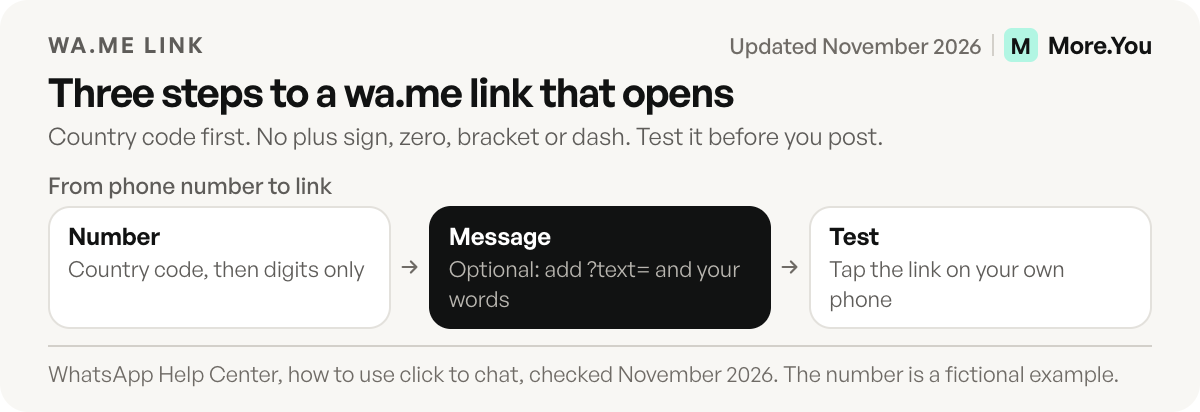
The chat opens with “Hi, I saw your Instagram” in the message box. The person taps send, so nothing is sent for them. Use a different message on each profile, such as “I saw your TikTok” on your TikTok page, and your first messages show which profile each person came from.
What to check when the WhatsApp link does not work
| What you see | Likely cause | Fix |
|---|---|---|
| No Add WhatsApp link option | Instagram does not offer it in your country | Add a wa.me link as an external link |
| The link opens a blank or wrong chat | The number has a plus sign, zero, bracket or dash | Rewrite it as country code plus number, digits only |
| No Click to WhatsApp button | Instagram is not a Business or Creator account, or the apps are old | Switch the account type and update both apps |
| Followers see the link, others do not | The Instagram account is private | Make the account public, or use a bio page link |
Can you add WhatsApp to your TikTok bio?
TikTok shows a website link only on accounts with at least 1,000 followers or a Verified Business Account (TikTok Support). The same page says TikTok no longer supports profile links that open or log you into other social media apps, while links to those platforms’ websites still work.
TikTok’s page does not name WhatsApp. The safer route is to put a website in your TikTok bio, such as a link in bio page, and place your WhatsApp link on that page. The same page then works for Instagram, TikTok, YouTube and anywhere else you have a profile. If you are new to the format, what a link in bio is explains how one page sits behind every profile link.
Put WhatsApp on your link in bio page
More.You is an AI-native link in bio platform. Every page on every plan includes link blocks, booking blocks and opening hours, and you can pin any link to the top. Add your wa.me link as a link block, label it “Message me on WhatsApp”, and pin it so it is the first thing visitors see.
For a business, the WhatsApp button usually sits with three other blocks: opening hours, a booking link and a map or menu link. The More.You blocks page lists every block type you can add. Our guide to link in bio for small business shows how those blocks fit on one page.
Put your WhatsApp chat one tap from every profile you own. Create your More.You page, add a link block with your wa.me link, and paste the page URL into your Instagram and TikTok bios. Visitors who prefer WhatsApp tap once and start a chat.
FAQ
Why can’t I see the Add WhatsApp link option on Instagram?
Instagram offers the built-in WhatsApp link in some countries only. If the option is missing under Edit profile and Add links, add a wa.me link as an external link instead. It opens the same WhatsApp chat.
Can a personal Instagram account add a WhatsApp link?
Yes. The built-in WhatsApp link works on personal accounts in the countries where Instagram offers it, and a wa.me external link works on any account. Only the Click to WhatsApp button needs a Business or Creator account and the WhatsApp Business app.
Does a WhatsApp link show my phone number?
Yes. A wa.me link contains your full phone number, so anyone who sees the link can read it. Use a number you are happy to make public, such as a business line.
Which WhatsApp option should a business use on Instagram?
If you use the WhatsApp Business app, link it to a Business or Creator account for the Click to WhatsApp button. Then add a wa.me link with a ready-made message to your bio or bio page, so people who skip the button still reach you in one tap.
How many links can I add to my Instagram bio?
Instagram allows up to five links in your bio. Each one can have a title, and a wa.me link counts as one of them.
Sources
- Instagram Help Center, Add a WhatsApp link to your Instagram profile
- Instagram Help Center, Add links to your Instagram bio
- WhatsApp Help Center, How to use click to chat
- WhatsApp Help Center, Connect your WhatsApp Business account to Instagram
- WhatsApp Help Center, About short links for your business
- TikTok Support, Add a link to your TikTok profile
- More.You bio page blocks (more.you/features/bio-page-blocks, November 2026)
Platform rules and prices checked November 2026.