
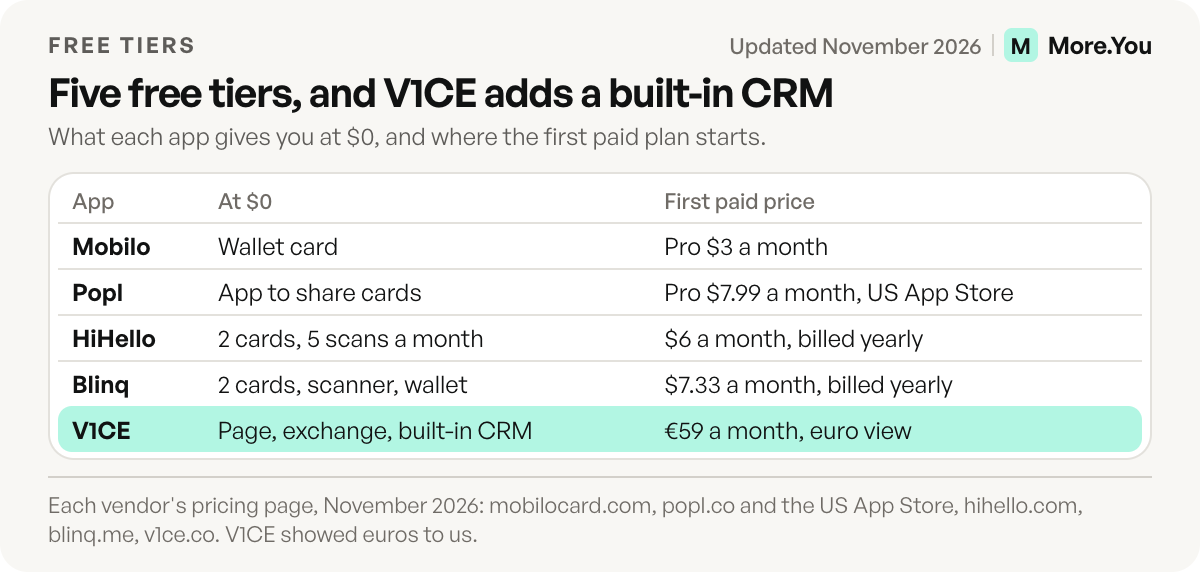
The best free digital business card depends on what happens after the tap. HiHello and Blinq each give you two free cards, Mobilo a free wallet card, Popl a free app for sharing cards, and V1CE free contact exchange with a built-in CRM. Most apps charge for capturing the other person’s details. If you only need people to reach your links, a free link in bio page with a QR code does the job.
You meet someone at a market stall or a meetup. Your paper card ends up in a coat pocket, and your handle is hard to spell over the noise. A digital card swaps both for a tap or a scan.
This guide shows what five apps include for $0, read from their pricing pages in November 2026, plus when NFC is worth buying and when a free bio page does the job.
Key Takeaways
- Every app here has a $0 tier, from two free cards on HiHello and Blinq to a free page with contact exchange on V1CE.
- Free tiers stop at lead capture and CRM sync. V1CE is the exception, with a built-in CRM on its free plan.
- NFC is optional. Phone cameras open a QR code for free, and NFC cards are a separate purchase.
- A link in bio page can be your card when the goal is getting people to your links, bookings and products.
- Card apps keep three jobs: a save-contact button, two-way contact exchange and CRM sync.
What do free digital business card apps include?
Free digital business card apps include a shareable profile, a QR code and, in most cases, an Apple or Google Wallet pass. The limits sit in three places: how many cards you get, whether you can capture the other person’s details, and whether contacts sync to a CRM. Most apps keep lead capture and CRM sync for paid plans and sell NFC cards separately.
More.You publishes this blog and competes with these tools, so every number below names its source. It appears in the last row.
| App | Free tier | Paid from | NFC card | Lead capture | CRM sync |
|---|---|---|---|---|---|
| Mobilo | Free wallet card | Pro $3/mo; Teams $4/mo billed yearly | From $19.99 list | Pro | Zapier on Pro; CRM integrations on Teams |
| Popl | Free app for sharing cards | Pro $7.99/mo (US App Store); teams by quote | Accessories via Amazon, US only | Paid plans | Salesforce, HubSpot, Zoho on team plans |
| HiHello | 2 cards, wallet pass, 5 scans a month | Professional $6/mo yearly, $8 monthly | Program your own, from Professional | Lead forms on Business | Salesforce, HubSpot, Dynamics on Business |
| Blinq | 2 cards, wallet pass, contact scanner | Premium $7.33/mo yearly, $9.99 monthly | Cards from $24.99, no subscription | Business | Native CRM integrations on Business |
| V1CE | Page, contact exchange, built-in CRM | Client Capture OS €59/mo | From €74, paid once | Free | Free: built-in CRM, synced to yours |
| More.You (link in bio page) | One page, every block type, QR code | Pro $5/mo yearly, $7 monthly | n/a | n/a | n/a |
Sources: each vendor’s pricing page, November 2026, in US dollars. V1CE showed euros to us, so its prices are in euros. Popl’s Pro price is from the US App Store and varies by country.
The 5 digital business card apps, one by one
Each app gets three checks: what the free tier includes, what the first paid plan adds, and what a physical card costs.
1. Mobilo
Mobilo pitches itself to teams that meet people at events. Its free digital business card lives in Apple or Google Wallet and shares by QR code. Pro is listed at $3 a month, and its plan table lists lead capture and 6,000 integrations through Zapier. Teams, at $4 a month billed yearly, adds team management, and Business, at $5 a month billed yearly, adds a custom domain (mobilocard.com/pricing, November 2026).
The Mobilo card is sold separately. List prices run from $19.99 for a branded NFC card to $139 for metal, each with 90 days of Pro, and the page showed sale prices and “75% off cards” wording, with two different sale-end dates (mobilocard.com/pricing, November 2026).
2. Popl
Popl serves two buyers: event teams that scan leads, and individuals who want a digital card. You can download the app for free and start sharing digital cards, while Universal Lead Capture, AI enrichment and event reporting sit on paid plans (popl.co, November 2026).
Popl doesn’t publish prices on its website, and teams get a quote. In the US App Store, Popl Pro lists at $7.99 a month or $76.99 a year, and Popl Pro Plus at $14.99 a month (apps.apple.com, November 2026). Team plans add CRM integrations such as Salesforce, HubSpot and Zoho, and accessories for individual plans sell only through Popl’s US Amazon store (popl.co and support.popl.co, November 2026).
3. HiHello
HiHello’s free Personal plan covers one person well: two cards, wallet passes, an email signature, virtual backgrounds and five paper card or badge scans a month. Recipients don’t need the app to view your card (hihello.com, November 2026).
NFC card programming starts on Professional, at $6 a month billed yearly or $8 monthly, with 8 cards. Lead forms and Salesforce, HubSpot and Microsoft Dynamics sync sit on Business, at $5 per user a month billed yearly or $6 monthly, with a five-user minimum (hihello.com/pricing, November 2026).
4. Blinq
Blinq’s Free plan gives you two cards, unlimited sharing and contacts, a contact scanner and wallet passes. Premium, at $7.33 a month billed yearly or $9.99 monthly, adds up to five cards and custom design, and removes Blinq branding (blinq.me/pricing, November 2026).
Lead capture and native CRM integrations sit on Business, from $4.99 per card a month billed yearly or $6.99 monthly, with a five-card minimum. Blinq also lists a Pro plan for individuals at $16.58 a month billed yearly or $22.49 monthly, with AI contact enrichment (blinq.me/pricing, November 2026). Its NFC card lists at $24.99 and a phone sticker at $19.99, with 30% off shown in November 2026, and each ships with two free Blinq profiles (blinq.me, November 2026).
5. V1CE
V1CE’s free plan includes what the other four keep for paid tiers: two-way lead capture and a built-in CRM, “synced to yours”. It also includes one live page and one booking link (v1ce.co, November 2026).
Selling services on the free plan carries a 5% fee, and the card starts at €74, paid once. Client Capture OS costs €59 a month on the pricing page we saw, with a 0% selling fee and unlimited booking links. V1CE showed euros to us, so we quote no dollar price (v1ce.co, November 2026).
Do you need an NFC business card?
You don’t need NFC to share a digital business card. A QR code on your phone, a sticker or a printed card opens the same profile through any phone camera. NFC adds a faster tap. Buy a card if you meet people in volume, such as at trade shows, and skip it if you swap a few contacts a week.
On iPhone, reading a tag shows a notification that the person taps to open, and Apple notes that not all devices support background tag reading (Apple Developer, November 2026). A QR code printed on the same card covers those phones.
What should you put on the card? Keep it short, because people scan it on a phone in a hurry.
Name and role: one line
One photo or logo
One main action: book a call, see my work or save my number
Two or three links, in order of use
A short line on who you help
Between two iPhones, NameDrop swaps contact cards for free when you hold the phones a few centimeters apart. It needs an iPhone or Apple Watch on the other side (Apple Support, November 2026), so it can’t be your only card.
Can a link in bio page work as a free digital business card?
Yes, for most creators and small businesses. A link in bio page puts your contact links, bookings, products and FAQ on one URL, and its QR code works on a printed card, a sticker or your phone screen. It doesn’t save your details into the other person’s contacts, capture their details back or sync to a CRM. Card apps keep those jobs.
If the format is new to you, read what a link in bio is and how it works.
The More.You route
We make More.You, so weigh this section with that in mind. A More.You page holds links, social icons, products, events, bookings, opening hours with a live open-now state, and an FAQ, with a QR code and share cards included. The Free plan is free forever, with no card required, one page and every block type. Pro is listed at $5 a month billed yearly or $7 monthly (more.you/pricing, November 2026).
Your page is read by people and by AI. Every page ships an llms.txt file, an agent manifest and structured data built from its blocks, such as LocalBusiness from your opening hours and FAQPage from your FAQ. The QR code and sharing options point at the live page, so a printed code opens your current version.
The page can also update itself. Auto-Pin, on Pro, puts a scheduled post’s link at the top when the post goes live, for a window you set. Attribution, also on Pro, ties each click to the post and platform that sent it. To move from another link in bio tool, paste its URL, and import proposes your links for you to confirm.
If you work trade shows and need NFC cards, a save-contact file or leads synced to a CRM, a card app does those jobs. For print sizes, see how to size and place a QR code for your bio page.
Digital business card vs link in bio: which fits you?
A digital business card app is built for the handshake: it moves contact details both ways and into a CRM. A link in bio page is built for what happens next: links, bookings, products and answers in one place. Pick by the job you repeat most often, or use both.
| Your situation | Better fit | Why |
|---|---|---|
| You work trade shows and log every contact in a CRM | Card app with lead capture | Two-way exchange and CRM sync are the point |
| You want your number saved in their phone | Card app | A save-contact button adds you to their contacts |
| You sell, take bookings or post content | Link in bio page | Products, bookings and your newest post sit on one page |
| You use one link on Instagram, TikTok and print | Link in bio page | The same URL and QR code work everywhere |
| You need both | Card app plus bio page link | Add the bio page as a link on your card profile |
Shops and studios can follow our link in bio setup for a small business. If you go the bio page route, compare free link in bio tools first. Either way, test your code on an iPhone and an Android phone before you print.
Make the scan land somewhere useful
A card starts the conversation, and the page behind it decides what happens next. Put the one action you want first, and keep the rest below it. Test the QR code on two phones before you print or share it. A broken link on a printed card cannot be fixed until you reprint it, so check the link as well.
Create your More.You page, free forever with no card required, then print its QR code. The people you meet, and the AI assistants that read your page, get one place to find you, book you and see what you make.
FAQ
Is there a completely free digital business card?
Yes. HiHello, Blinq, Mobilo, Popl and V1CE all offer a $0 route. HiHello and Blinq include two cards each, and V1CE includes contact exchange and CRM sync. Paid tiers add cards, branding, lead forms or team tools. A free link in bio page with a QR code is another $0 route.
How much does a Mobilo card cost?
Mobilo lists its branded NFC card at $19.99, a custom design at $39, wood at $59 and metal at $139, and its page showed sale prices and 75% off wording in November 2026. The digital wallet card is free. Each physical card includes 90 days of the Pro plan, which is listed at $3 a month.
Do people need an app to open a digital business card?
No. HiHello says recipients don’t need its app to view a card, and a QR code opens a web page through the phone’s camera. An NFC tap opens a link too, though Apple notes that not every device reads tags in the background.
What should a digital business card include?
A name, a role, one photo or logo, one main action and two or three links. Add a short line on who you help. Keep the card to what a person needs in the first ten seconds, because most people open it on a phone in a hurry.
Can I use my link in bio as a digital business card?
Yes. Put your bio page’s QR code on a printed card, a sticker or your phone screen, and anyone who scans it lands on your links, bookings and products. You give up the save-contact button, two-way contact exchange and CRM sync that card apps offer. If you sell or take bookings, the page matters more.
Sources
- Mobilo pricing, plans and card prices (mobilocard.com/pricing, November 2026)
- Mobilo free digital business card (mobilocard.com/product/classic-digital-business-card, November 2026)
- Popl free app, quote-based pricing and CRM integrations (popl.co/pages/pricing and popl.co/pages/download-popl, November 2026)
- Popl accessories ordering (support.popl.co, November 2026)
- Popl in-app purchases, US App Store (apps.apple.com, November 2026)
- HiHello pricing and plan comparison (hihello.com/pricing, November 2026)
- HiHello digital business cards (hihello.com/digital-business-cards, November 2026)
- Blinq pricing (blinq.me/pricing, November 2026)
- Blinq NFC business cards (blinq.me/accessories/nfc-business-cards, November 2026)
- V1CE digital business card and pricing (v1ce.co/digital-business-card and v1ce.co/pricing, November 2026)
- Adding support for background tag reading, Apple Developer Documentation (November 2026)
- Use NameDrop on iPhone to share your contact info, Apple Support (November 2026)
- More.You blocks (more.you/features/bio-page-blocks, November 2026)
- More.You AI-native pages (more.you/features/ai-native-pages, November 2026)
- More.You QR codes and sharing (more.you/features/qr-sharing, November 2026)
- More.You Auto-Pin (more.you/features/auto-pin, November 2026)
- More.You analytics and attribution (more.you/features/analytics-attribution, November 2026)
- More.You pricing (more.you/pricing, November 2026)
Platform rules and prices checked November 2026.