
A business card QR code is a printed square that does one of two things when scanned. A vCard code saves your name, number and email straight into their contacts. A link code opens a web page. Print a vCard when the only next step is a phone call. Print a link to a page you can edit when people should book, buy or follow you after you meet.
Cards get printed by the box and sit in wallets for months. Your phone number may stay the same for years, but your prices, your booking calendar and your newest work change every few weeks. Whatever the code holds on print day is fixed, so the choice of what to encode matters more than the design around it.
This guide compares the two codes using three sample codes we encoded ourselves, then covers print size, a five-step setup and scan tracking. It is for freelancers, small business owners and creators who still hand over cards at events, shops and markets.
Key Takeaways
- Two kinds of code: a vCard code saves your contact details to the phone, and a link code opens a page in the browser.
- Only one of them can change: a vCard is fixed once printed, while a page behind a link code can be edited any day without a reprint.
- vCards print denser: in our test, a full vCard needed 69 modules per side against 25 for a short page link, so its squares printed nearly 3 times narrower at the same size.
- Size: test-print the code at 2.5 cm (1 inch) on the back of the card, with a blank margin four modules wide, and go bigger if a phone hesitates.
- Best of both: print your number as text on the card, and point the code at a page with booking, hours and links.
What can a business card QR code open?
A business card QR code can open almost anything with an address, but four destinations cover most cards. Each one decides what the person can do right after the scan.
| Destination | What the scan does | Can you change it after printing? |
|---|---|---|
| vCard (contact file) | Offers to save your name, phone, email and address to the phone | No |
| Website or bio page | Opens a page with your links, booking, hours or products | Yes, edit the page |
| One social profile | Opens a single profile, such as LinkedIn or Instagram | No, and a new handle breaks it |
| Review or booking link | Opens one task, such as a Google review form | No, it always opens that one task |
The vCard format is an open standard. The IETF’s RFC 6350 defines vCard 4.0 as a format “for representing and exchanging a variety of information about individuals”, with fields for the formatted name, phone, email, address, job title and a URL. When that file sits inside a QR code, the contact travels in the code itself and nothing loads from the internet.
On most current phones, the camera app reads a vCard code and offers to save the contact. QR vendor QRStuff documents that prompt in the iPhone Camera app (qrstuff.com, checked November 2026). Apple’s and Android’s own scanning help pages do not mention contact codes, so test on your own phones before you print.
vCard QR code vs link QR code: which should you print?
A vCard QR code suits a card whose only job is to put you in someone’s phone. A link QR code suits a card that should lead somewhere: a booking calendar, a portfolio, a shop or a menu. The table below sets them side by side.
| vCard QR code | Link QR code to a page you edit | |
|---|---|---|
| What a scan does | Offers to save your contact | Opens a page in the browser |
| Needs internet at scan time | No | Yes |
| Change after printing | No, reprint the card | Yes, the code stays and the page changes |
| What it can hold | Name, phones, email, address, job title, one website | Anything the page holds: links, booking, hours, products, FAQ |
| Code density (our test) | 49 to 69 modules per side | 25 modules per side |
| Counted in analytics | No, nothing loads | Yes, each scan is a page visit |
| Best for | Sales reps, consultants, trades where the next step is a call | Creators, salons, shops and freelancers where the next step is booking or buying |
There is a middle route that most cards should use. Print your name, phone and email as plain text on the card, where anyone can read them without a phone. Use the code for the page, because the page is the part that changes. If you prefer a vCard anyway, put your page address in its URL field, so the saved contact still leads to your current offer.
If you are weighing an app-based card instead of paper, our comparison of free digital business card apps covers what the free tiers include.
How big should a QR code be on a business card?
No standard sets one minimum size for a QR code on a business card. Start your test print at 2.5 cm (about 1 inch) square, with a blank margin around it, and grow the code if a phone hesitates. The more data the code holds, the bigger it needs to be, because a longer message adds more squares to the same space.
DENSO WAVE, the company that invented the QR code, explains that a version 1 code is 21 by 21 modules and that each higher version adds 4 modules per side, up to 177 by 177. A module is one black or white square. Longer data needs a higher version.
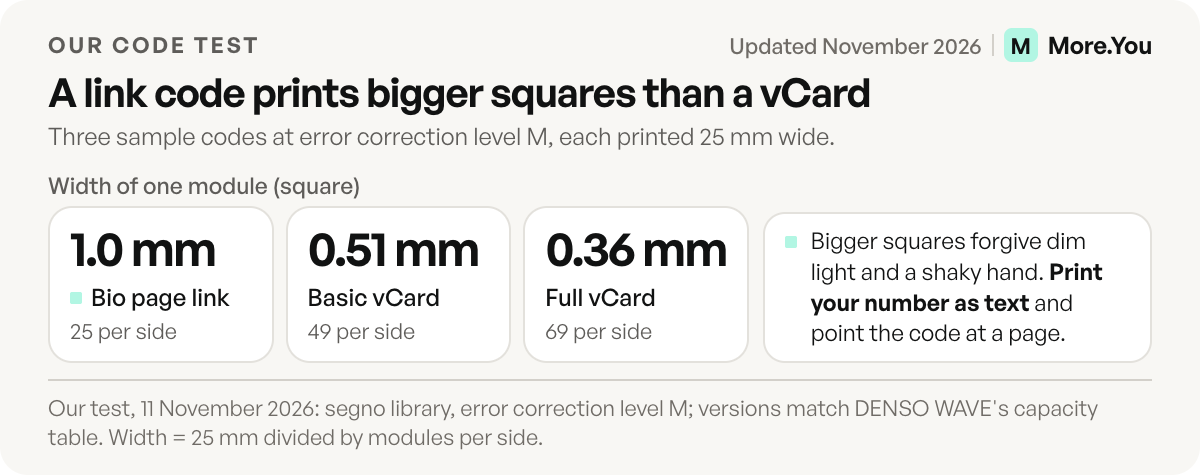
To see what that means on a card, we encoded three samples on 11 November 2026 with the open-source segno library at error correction level M, then worked out how wide each module prints in a 25 mm code.
| Sample encoded | Characters | QR version | Modules per side | Module width at 25 mm |
|---|---|---|---|---|
| Bio page link (more.you/yourname) | 25 | 2 | 25 | 1.0 mm |
| Basic vCard: name, mobile, email | 126 | 8 | 49 | 0.51 mm |
| Full vCard: adds company, job title, work phone, website, address | 294 | 13 | 69 | 0.36 mm |
The full vCard prints squares about 2.8 times narrower than the link code at the same size. To give it the same 1 mm modules, the code would need to be 69 mm wide. A standard US business card is 3.5 by 2 inches, or 89 by 51 mm, and the common European size is 85 by 55 mm (4over4.com, checked November 2026). That code would not fit on the card’s short side.
Smaller modules leave less room for a shaky hand, dim light, a glossy finish or a scuffed corner. DENSO WAVE advises printing a code as large as the space allows, so treat 2.5 cm as the size you test, not a rule (step 5 below). Our guide to a QR code for your link in bio covers sizes for flyers, packaging and signs.
Keep the margin clear too. DENSO WAVE’s spec asks for a blank margin four modules wide on every side of the code. Card designs that crop it, or print a pattern behind it, fail first.
What to put on the page behind the code
More.You is an AI-native link in bio platform. Every page comes with its own QR code, and the same page ships an llms.txt file and structured data built from its blocks, so AI agents can read what you offer as well as people.
The page behind the code should answer what someone wants right after meeting you. Use blocks for the jobs a card cannot do:
- Bookings: a booking block for calls, sessions or appointments. Our guide to bookings through your link in bio covers the setup.
- Opening hours: shows a live open-now state, and More.You turns valid hours into LocalBusiness structured data.
- Links and social icons: your portfolio, website and profiles in one place.
- Products or events: what you sell or where you appear next.
- FAQ: prices, service area or turnaround, in the words customers use.
Put the most likely next step at the top. A photographer’s card might open on the booking block, while a market stall’s card opens on hours and products. If you are new to the format, start with what a link in bio is and how it differs from a full website.
How to add a QR code to a business card in 5 steps
Adding a QR code to a business card takes five steps, and the page comes before the code.
- Build the page first. Add the blocks from the section above and check them on your phone.
- Get the code. Every More.You page has its own QR code, with no separate generator. Any other method works too: our guide on how to make a QR code lists 8 free ones. Pick a static code that points at your own page, so it does not stop working when a generator’s trial ends.
- Size and place it. Put the code on the back of the card at 2.5 cm or larger, dark on a light background, with the four-module margin clear.
- Add a label and the address. Write what the scan gets them, such as “Scan to book a session”. Print the short page address under the code for anyone who cannot scan.
- Test a printed proof. Scan it with an iPhone, using Apple’s Camera steps, and with an Android phone, using Android’s scanning steps. Try it in dim light and at arm’s length before you order the full run.
Can you track business card QR code scans?
You can track scans of a link QR code, because each scan loads a page. A vCard scan cannot be counted, because the contact data sits inside the code and nothing is requested from a server.
On a More.You page, scans open the page like any other visit, so they appear in your page analytics with views and clicks. The free plan keeps 30 days of history. If you hand out cards at one event, a jump in views over those days shows whether people scanned. Two habits make card scans easier to read:
- Check clicks per block, not only views. They show whether people who scanned went on to tap the booking or hours block.
- Tag a website link before you make the code. If the code opens your own site, Google Analytics shows the card as its own source when the link carries the three campaign parameters Google asks for:
https://yourdomain.com/?utm_source=business_card&utm_medium=print&utm_campaign=spring_eventMake the code from the tagged link, not the bare address. A tagged link is longer, so it adds modules: test the print size again.
Print the card once, keep the page current
Three changes still force a reprint: a new page address, a new name or number on the front, or a new card design. Prices, dates, booking slots and links all live on the page.
Add a booking block and an opening-hours block to your page, then print the page’s own QR code on the back of your card. People who scan it can book you or see if you are open today, and you can change both without a reprint. Create your More.You page before you send the card file to the printer.
FAQ
Can a QR code on a business card save my contact automatically?
Yes, if the code holds a vCard. Most current phone cameras read a vCard code and offer to save the contact, but the person still taps to confirm. Test the code on an iPhone and an Android phone before printing.
What size should a QR code be on a business card?
No standard sets a single minimum. Start with a test print at about 2.5 cm (1 inch) square, with a blank margin four modules wide on every side, and scan it with two phones. A code that holds a full vCard needs more space than a code that holds a short link, because it has more modules.
Can I change a business card QR code after printing?
No, the printed code is fixed. If the code points at a page you control, you change the page instead, and every card already handed out opens the new version.
What is the downside of a QR code on a business card?
A printed code can’t change, and a small code can fail in dim light or on a glossy finish. A link code also needs a data connection at scan time. Print your name, number and email as text too, so the card still works without a scan.
Do I need an app to scan a business card QR code?
No. The built-in camera on current iPhones and Android phones reads QR codes. Apple also offers a Scan Code control in Control Center, and Android phones offer a scanner in Quick Settings.
Sources
- IETF, RFC 6350: vCard Format Specification, August 2011, checked November 2026
- DENSO WAVE, QR code versions and modules, checked November 2026
- DENSO WAVE, QR code margin and module size, checked November 2026
- DENSO WAVE, module size and print size, checked November 2026
- Apple Support, Scan a QR code with your iPhone or iPad, published September 2026, checked November 2026
- Android, How do you scan QR codes on Android, checked November 2026
- QRStuff, adding a business card contact from a QR code on iPhone (qrstuff.com, June 2026)
- Google Analytics Help, URL builders: collect campaign data with custom URLs, checked November 2026
- 4over4, standard print sizes reference chart (4over4.com, February 2026)
- Sample codes encoded with the open-source segno library, error correction level M, 11 November 2026
- More.You QR codes and sharing (more.you/features/qr-sharing, November 2026)
- More.You bio page blocks (more.you/features/bio-page-blocks, November 2026)
- More.You pricing (more.you/pricing, November 2026)
Platform rules and prices checked November 2026.