A link in bio for creators is one page that holds everything your audience might want after a post: who you are, your best content, what you sell, how brands can work with you, and a way to join your email list. One URL goes in every profile. The page changes as your work changes, so the bio never points at an old launch.
You post on three or four platforms and each one gives you one link slot, sometimes a few. Instagram’s help page says you can add up to 5 websites to your profile (checked November 2026). Without a bio page, your audience is spread across YouTube, a course platform, a newsletter tool and a shop, and nobody sees all of it.
This guide is for creators who want the page to do more than list links. It covers the 7 sections of a creator bio page, in the order they should appear, how to change the page for each launch, and which numbers show what is working. If you have not picked a tool yet, start with the best link in bio tools for creators, 13 options compared on free plans, prices and fees.
Key Takeaways
- Lead with one action. The top of the page holds the one thing you want people to do this week: a launch, a new video, a booking.
- Show the content, not only the links. Feature your best videos and posts near the top so visitors see your work before they follow you elsewhere.
- Put income on the page. Services, courses, digital products and a brand contact turn attention into revenue.
- Own the relationship. An email list reaches your audience without an algorithm in between.
- Measure per block and per post. Click data shows which offer works and which post sent the traffic.
What should a creator put in their link in bio?
A creator’s bio page should include a clear profile (photo, name, one-line intro), one featured action at the top, your social profiles, your best or newest content, your offers (services, courses or products), a contact for brand collaborations, and an email signup. Keep the order fixed: who you are, what to do now, then everything else.
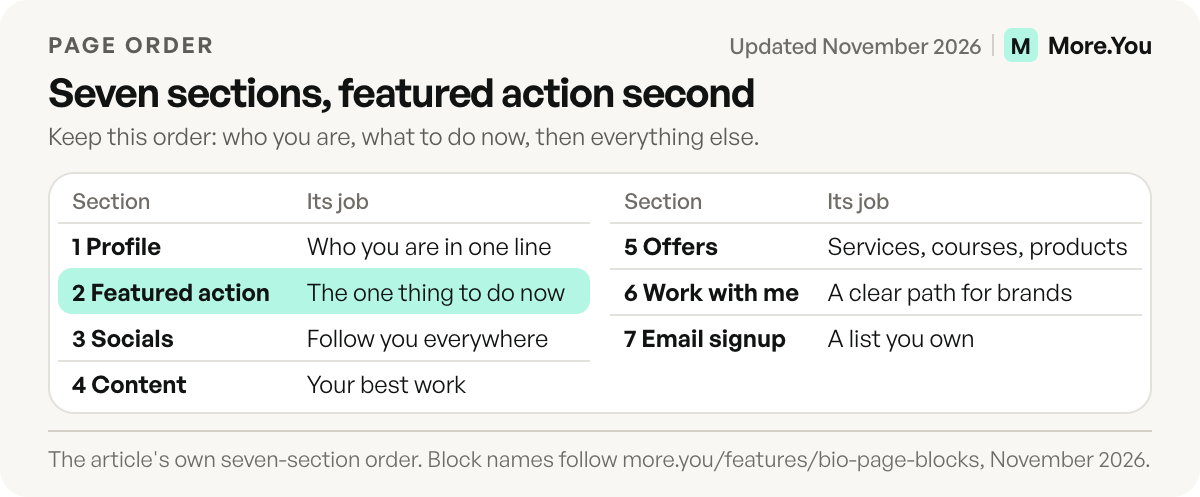
New to the format? Read what a link in bio is first. The 7 sections, top to bottom:
| # | Section | What it does | More.You block |
|---|---|---|---|
| 1 | Profile | Tells a new visitor who you are in one line | Header: avatar, name, bio |
| 2 | Featured action | The one thing you want people to do now | Pinned link or hero header |
| 3 | Socials | Lets fans follow you everywhere | Social icons |
| 4 | Content | Points to your best work | Links in a collection, podcast episodes |
| 5 | Offers | Turns attention into income | Products, bookings, links |
| 6 | Work with me | Gives brands a clear path to you | Links, FAQ |
| 7 | Email signup | Builds a list you own | Link to your newsletter sign-up form |
A layout you can copy
Use this order as a starting point and rename each line for your own work. The words in brackets are placeholders.
Photo, name, [one line: what you make, for whom]
FEATURED: [this week's launch, video or booking]
Social icons: [TikTok] [Instagram] [YouTube]
Collection "Best work": [video 1] [video 2] [video 3]
Collection "Work with me": [booking] [media kit] [contact]
Email: [one reason to join + sign-up link]
Six lines is enough for a first version. Add a block only when a visitor asks for it.
Make the first screen convert
The first screen on a phone decides whether a visitor taps or leaves. Put three things there: your photo, a one-line intro that says what you make and for whom, and one featured action.
The featured action changes with your calendar. During a course launch it is the course. The week a new video drops, it is the video. If you take paid calls, it is the booking block. More.You header layouts include classic, hero, banner, cutout and shape, so a launch can get a full-width image and a headline instead of a plain button.
Write the intro for a stranger. “Budget travel tips for students, new video every Friday” tells someone from a Reel exactly where they landed. “Living my best life” does not.
Bring all your content together
A visitor who found you through one Reel does not know your YouTube channel, your podcast or your newsletter. The bio page is where they find out.
- Social icons link every profile in one row, so a fan who found you on TikTok can follow you on YouTube.
- Titled links to your three best videos or posts, named for what the viewer gets (“My 10-minute budget meal prep”).
- Podcast episode blocks put your episodes on the page, if you have a show.
- Collections group long lists under headings such as “Guides”, “Podcast” and “Courses”, so the page stays readable on a phone.
Each collection opens and closes as a group. A creator with 20 resources can show three headings instead of 20 buttons.
Turn your content into income
Most creators earn from more than one source: sponsorships, services, courses, digital products, affiliate links, tips. The bio page is where the audience sees those options together. The guide to creator income streams covers which ones fit which audience size.
On the page, each income stream gets a block that does one job:
- Product blocks for courses, presets, templates and other digital products, each pointing to where you sell it.
- Booking blocks for paid calls, coaching or consultations.
- Event blocks for workshops, live sessions or meetups.
- A “Work with me” section for brands: a link to your media kit, past collaborations, and a contact. The influencer link in bio guide covers the brand-deal side in depth, including affiliate disclosure.
Write your combined reach into the about text (“80K across TikTok and Instagram”), so brands checking you out see it without asking. Keep the number current.
Change the page with what you are promoting
A bio page that never changes stops getting taps. The audience learns that the link leads to the same thing it led to last month.
Three habits keep it current:
- Swap the featured action every launch. Course week, video week and merch week each get their own top slot.
- Reorder blocks by drag. Move the offer you are pushing to the top and older items down.
- Let Auto-Pin handle routine posts. On Pro, when a scheduled post goes live, its link pins to the top of the page and comes down after 24 hours, 3 days or 7 days. Read how auto-pin keeps your latest post on top for the setup.
For design changes, the theme gallery, wallpapers, button styles, fonts and colors all run through a draft with undo and redo. You can try a new look without the live page changing until you publish it.
Where to put the link on each platform
The same page goes in every profile, but each platform sets its own rules. Instagram’s help page says you can add up to 5 websites to your profile. Open the link on your phone after you save it, to see what a visitor sees. Do the same check on every platform where you add the link.
On TikTok, a link in your profile needs at least 1,000 followers or a Verified Business Account (TikTok support, checked November 2026). If you are under that, use the same page link in a caption or in your YouTube channel links until you reach it.
Grow and own your audience
Followers belong to the platform. An email list belongs to you. If a platform changes its reach or your account has a problem, the list still works.
Give people a reason to sign up. “Weekly newsletter” is weak. “Get my packing checklist” or “Be first to know when the course opens” gives a clear trade. Link to your newsletter tool’s sign-up form high enough on the page to see without much scrolling, and repeat the offer in your captions. Check the result by clicks on that one block over a full week, and change the offer text if few people tap it.
Which numbers should a creator track?
Track clicks and click-through rate per block, traffic by source, and post attribution. CTR per block shows which offer people want. Source shows which platform sends real visitors. Post attribution shows which piece of content drove the clicks, so you know what to make again.
More.You analytics show page views, clicks and CTR per block, with breakdowns by source, device and country, on every plan. On Pro, attribution ties clicks back to the post that sent them. You can also see how often AI crawlers read your page. For a full setup, see how to track link in bio clicks.
Mistakes that make a creator bio page slow to use
| Mistake | Why it costs taps | Fix |
|---|---|---|
| Ten links at the same level | Visitors do not know where to start | One featured action, then collections |
| Link names such as “Click here” | Nobody knows what they get | Name the result: “My 10-minute meal prep” |
| An old launch still on top | Followers learn the page never changes | Swap the top slot every launch |
| No contact for brands | Brands leave without writing | Add a “Work with me” collection |
| Never reading the numbers | You keep what does not work | Check clicks per block each week |
Can a creator bio page help people find you in search and AI?
Yes, if the page has words on it. Set the meta title and description, write a clear about text, and use a custom domain if you have one (a Pro feature on More.You). Search engines and AI assistants need text to understand who you are.
This is where a plain list of buttons falls short. AI assistants such as ChatGPT and Perplexity get asked “who is this creator and what do they sell.” Every More.You page ships an llms.txt summary, an agent manifest and structured data from its blocks, such as FAQPage from the FAQ block and Product from product blocks. You decide per page whether AI crawlers may read it.
Build the page once, then keep it moving
Your bio link is the one place all your work meets. Give it a clear intro, one featured action, your best content, your offers and an email list, then let the numbers decide what moves up. Create your More.You page and give both your audience and the AI tools they ask about you a page they can act on.
FAQ
What is a link in bio tool for creators?
It is a tool that turns one URL into a page with all your links, content and offers. You put that URL in every social profile. Visitors land on the page and choose where to go next.
How many links should a creator have in their bio page?
Keep the first screen to one featured action and a few key links. Group everything else into collections with clear headings. A short page is easier to scan on a phone than a long flat list.
Should I show past brand collaborations on my link in bio?
Yes, if you want more brand deals. A short “Work with me” section with past partners and a link to your media kit helps a brand decide quickly. Add a contact so they know how to reach you.
Can I collect emails on my creator bio page?
Yes. Add a link to your newsletter tool’s sign-up form and offer a clear reason to join, such as a checklist, early access or a weekly tip. Place it near the top so visitors see it without scrolling far.
Where do I put my link in bio on Instagram and TikTok?
On Instagram, add it under Edit profile, then Links. You can add up to 5 websites. On TikTok, you need at least 1,000 followers or a Verified Business Account before a link in your profile is available.
Sources
- Instagram Help: add a website to your profile
- TikTok Support: add a link to your profile
- llmstxt.org: the llms.txt proposal
- More.You feature pages: more.you/features/bio-page-blocks, more.you/features/design-themes, more.you/features/auto-pin, more.you/features/analytics-attribution and more.you/features/ai-native-pages (November 2026)
Platform rules and prices checked November 2026.



