
Digital products for passive income work when the file sells without you. Templates, presets, printables and stock assets come closest, because a finished file needs little support after launch. Courses, memberships and software only look passive, since buyers expect updates and answers. No product brings its own buyers, so the traffic from your posts to your bio page is the work you keep doing every week.
You’ve heard the pitch: make it once, sell it forever. Then a buyer emails because a template broke after an app update, a guide quotes a rule that changed, and sales slow down the month you post less. The file stayed the same. The support, the updates and the posting kept going.
This guide sorts 8 common digital product types by how much work they keep asking for after launch. You get a table with example build and upkeep hours, the fee math for one product, and the one job no tool runs for you: sending people from your posts to the product. It’s written for creators who sell to social traffic through a link in bio.
Key Takeaways
- Finished files come closest to passive: templates, presets, printables and stock assets need the least support once they ship.
- Courses, memberships and software keep a weekly cost: buyers expect new lessons, answers, fixes and fresh content.
- Fees are the predictable part: a $25 sale through your own Gumroad link costs $3.00 in platform fees (gumroad.com, checked November 2026).
- Traffic never runs itself: in the worked example below, posting takes 18 of the 20 monthly hours.
- Your bio page is where posts meet products: one product block per offer, and click data per block to see which one sells.
Which digital products for passive income stay passive?
A digital product stays passive when three things hold after launch: the file does not go out of date, buyers rarely need help to use it, and the price does not promise new content. Templates, presets, printables and stock assets pass all three most of the time. Courses, memberships and software fail at least one, so they keep asking for hours every week.
Call these the three upkeep tests, and run them before you build anything:
- Decay: does the file age? A dated planner expires every January. A guide about Instagram’s rules ages every quarter. A colour preset barely ages at all.
- Support: does a buyer need you to use it? A spreadsheet with formulas gets questions. A photo pack gets almost none.
- Promise: did the sales page promise more? “Lifetime updates”, “new lessons monthly” and “access to me” turn a file into a job.
“Passive” also has a narrower meaning in US tax rules. The IRS page on passive activities (Topic 425) describes them as trade or business activities in which you don’t materially participate, and it defines material participation as regular, continuous and substantial involvement. A creator who builds the product, posts about it and answers buyers is involved in exactly that way. Use “passive” to describe the workload, and ask a tax professional how your sales are reported. The IRS page on self-employment tax (Topic 554) says you usually owe it once your net earnings from self-employment reach $400 (checked November 2026).
8 digital product types ranked by upkeep
The table ranks 8 product types from least to most ongoing work. The hours and prices are example estimates for one solo creator, not measurements or market data. Your numbers depend on your niche, your audience and how polished the first version is. Use the table to compare types against each other, not to forecast income.
| Product type | Example build time | Example upkeep per month | Example price | What keeps it selling | Upkeep verdict |
|---|---|---|---|---|---|
| Stock photos, clips or sound packs | 20-40 hours per pack | Under 1 hour | $10-$50 per pack | New packs and clear previews | Mostly passive |
| Printables and planners | 5-15 hours | Under 1 hour, plus a new edition each year if dated | $5-$20 | Seasonal posts | Mostly passive |
| Photo or video presets | 10-30 hours | 1-2 hours (app and camera updates) | $10-$35 | Before-and-after posts | Mostly passive |
| Canva, Notion or spreadsheet templates | 10-20 hours | 1-2 hours (tool changes, setup questions) | $15-$40 | Posts that show the template in use | Mostly passive |
| Ebook or PDF guide | 20-40 hours | 1-3 hours (facts and screenshots go stale) | $10-$30 | Posts that answer one question from the guide | Semi-passive |
| Pre-recorded course | 40-100 hours | 4-8 hours (questions, re-recording changed lessons) | $50-$300 | Launch windows, email, free sample lessons | Semi-passive |
| Membership or paid community | 10-20 hours to set up | 15+ hours (new content, moderation) | $5-$30 a month | Fresh content every month | Active |
| Plugins, apps or code templates | 40-200 hours | 5-20 hours (bugs, platform updates, support) | $20-$200 | Staying compatible with the platform it runs on | Active |
Read the table by the upkeep column first. The top four pass all three upkeep tests most months. The ebook and the course fail the decay test, because facts, screenshots and software menus change. The membership fails the promise test by design: buyers pay every month for something new. Code fails all three, because the platform it runs on keeps moving.
Presets and templates are the most common first product for a reason. They are small, visual and easy to show in a post. For that format, the presets and templates selling guide walks through before-and-after packaging and tier prices.
Why do passive income digital products still need weekly posts?
Passive income digital products still need weekly posts because every sale starts with someone seeing your content and choosing to click. A file can sell for years, but buyers do not find it on their own. When you publish less, fewer people reach your profile, so fewer reach the product. The posting schedule is the real ongoing cost of a digital product.
Traffic work for a product looks like this:
- Posts that show the product in use: a template filled in, a preset before and after, one page of the guide.
- Replies: answering the comment that asks “where do I get this?” with the same link every time.
- An email list: people who joined your list can hear about a new edition without depending on reach. Growing an email list from social media covers how to start one.
- Launch windows: a new edition, a bundle or a seasonal version gives you a reason to post about an old product.
Marketplaces are the one way to buy traffic instead of making it. Gumroad takes 30% of a sale that comes from its Discover marketplace, and 10% + $0.50 of a sale that comes through your own links (gumroad.com/pricing, checked November 2026). That difference is the price of someone else doing the traffic work.
The arithmetic of one digital product
Example: a $25 Notion template sells 20 copies in a month through a Gumroad link in your bio. These are illustrative numbers, not a result anyone reported.
| Line | Amount |
|---|---|
| Sales | 20 × $25 = $500 |
| Gumroad fee at 10% + $0.50 | $3.00 per sale, $60 in total |
| You keep | $440 |
| Product upkeep (fixes, setup questions) | 2 hours |
| Traffic (3 posts a week at 1.5 hours, 4 weeks) | 18 hours |
| Hours in total | 20 hours |
| Kept per hour of work | $22 |
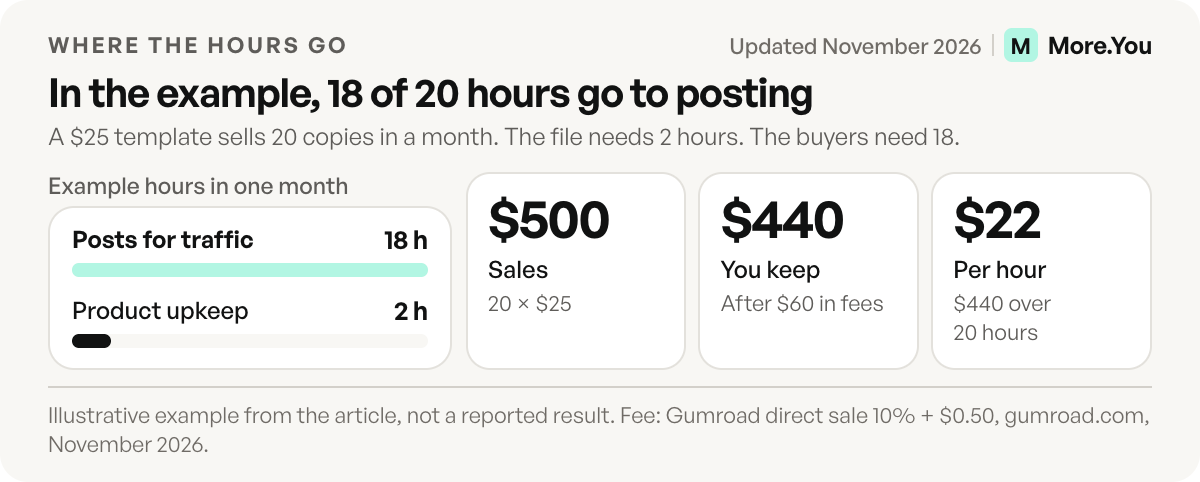
The product took 2 of those 20 hours. The other 18 went into the posts that brought the 20 buyers. If you stop posting and the template still sells 20 copies the next month, that month was passive income. Check your seller platform’s sales report to find out, instead of assuming it.
When a paid seller plan pays for itself
Fees per sale also change with the plan you pick. At a $25 price, the platform fee per sale looks like this (checked November 2026):
| Platform and plan | Monthly fee | Platform fee per $25 sale |
|---|---|---|
| Gumroad, sales through your own link | $0 | $3.00 (10% + $0.50) |
| Lemon Squeezy | $0 | $1.75 (5% + 50¢) |
| Payhip Free | $0 | $1.25 (5%) |
| Payhip Plus | $29 | $0.50 (2%) |
| Payhip Pro | $99 | $0 |
Payhip says PayPal and Stripe still charge their standard rates on every plan, so card fees come on top (payhip.com/pricing, checked November 2026). Lemon Squeezy lists 5% + 50¢ per transaction and no monthly fee (lemonsqueezy.com/pricing, checked November 2026).
The break-even points at $25 are simple division. Payhip Plus costs less than Free from 39 sales a month ($975 in sales). Pro costs less than Free from 80 sales ($2,000), and less than Plus above 140 sales ($3,500). Below those numbers, the free plan keeps more of each month. For where the checkout sits and a wider fee comparison, see how to sell digital products from your link in bio.
Where the bio page fits in a passive income setup
More.You is an AI-native link in bio platform. Its product blocks link out to the checkout you already use, and each one is published as Product structured data, which gives AI assistants a machine-readable list of what you sell.
The bio page is the step between your post and the checkout, so set it up to need as little attention as the product does:
- One block per product: add product blocks for each offer, best seller first. A collection block groups a catalog under one heading.
- Pin during a launch: pin the new product to the top on any plan. On Pro, Auto-Pin puts the link from a scheduled post on top when the post goes live and removes it after 24 hours, 3 days or 7 days.
- Answer buyer questions on the page: an FAQ block holds the three questions buyers ask most, so fewer of them reach your inbox.
- Read the clicks per block: basic analytics on the Free plan show views, clicks and CTR per block for 30 days. On Pro, attribution ties each click to the post that sent it.
Attribution matters most for the traffic hours in the example above. When you know which post sent the clicks, you post more like it and drop the rest. Our guide to post attribution for creators shows how to read it, and the shoppable bio page layout guide covers where each product block goes.
Start with the product that needs the least of you
Pick a type from the top of the table, build it once, and give it a product block with a clear name and price. Create your More.You page for free, add the product block, and watch its clicks per block to see which posts bring buyers.
FAQ
What is the most passive digital product to sell?
Stock assets, printables, presets and templates need the least work after launch. They rarely go out of date, buyers seldom need help to use them, and the sales page promises no new content. They still need posts or a marketplace to bring buyers, because no product finds its own customers.
Is income from digital products passive income for taxes?
Usually not in the IRS sense. The IRS describes passive activities as trade or business activities in which you don’t materially participate, meaning regular, continuous and substantial involvement. A creator who builds, posts and supports a product is involved that way. The IRS also says you usually owe self-employment tax once net earnings from self-employment reach $400. Ask a tax professional about your own case.
How much upkeep does a digital product need each month?
The amount depends on the type. In the example estimates in this guide, printables and stock packs need under an hour a month, templates and presets one to two hours, courses four to eight hours, and memberships fifteen or more. Add the time you spend posting about the product, which in the worked example was 18 of 20 monthly hours.
Can digital products sell without social media?
Yes, through marketplaces and search. Gumroad’s Discover marketplace brings buyers to your product for a 30% fee, against 10% plus $0.50 for sales through your own links, checked November 2026. You trade a larger share of each sale for traffic you did not create yourself.
Do I need a website to sell digital products for passive income?
No. Payhip, Gumroad and Lemon Squeezy each host the checkout and deliver the file. Your bio page shows the product and links to that checkout, so a follower goes from your post to the purchase without a separate website.
Sources
- IRS, Topic no. 425, Passive activities: losses and credits (page reviewed 24 September 2026)
- IRS, Topic no. 554, Self-employment tax (page reviewed 9 November 2026)
- Gumroad pricing, direct and Discover fees (gumroad.com/pricing, November 2026)
- Payhip pricing: Free, Plus and Pro with their fee rates (payhip.com/pricing, November 2026)
- Lemon Squeezy pricing (lemonsqueezy.com/pricing, November 2026)
- More.You feature pages: more.you/features/bio-page-blocks, more.you/features/ai-native-pages, more.you/features/auto-pin and more.you/features/analytics-attribution (November 2026)
Platform rules and prices checked November 2026.