A link in bio for influencers is one page that sends followers to what you’re promoting today, shows brands your audience and past results, and tells AI assistants who you are and how to work with you. The setup that works puts the current campaign on top, a brand inquiry path second, disclosed affiliate links below, and keeps click data you can hand to a sponsor.
You post a sponsored Reel at 6pm. The brief says the link has to be live for 72 hours. Your bio still points at last week’s discount code, three affiliate links share one unlabeled list, and when the brand asks for click numbers on Friday, you send a screenshot of story taps. Most influencer bio pages are built for followers only, and they fail the other two readers.
This guide covers what an influencer bio page needs to do, the seven blocks to put on it, how to disclose affiliate links on the page itself, and how the same page becomes the proof you send a brand after a campaign. It’s written for creators who earn from sponsorships, affiliate commissions or both.
Key Takeaways
- Three readers, one page. Followers want today’s link, brands want proof and a contact path, AI assistants want a clean summary of who you are.
- Put the live campaign on top. The sponsored post’s link belongs in the first slot for the whole window the brief specifies.
- Disclose on the page, next to the link. FTC staff guidance says a single disclosure elsewhere on a site is not enough; “Paid link” next to an affiliate link should be adequate.
- Your bio page is your campaign report. Clicks per block and per post give you numbers a sponsor can use, instead of screenshots.
- Instagram’s five native links are a start. A bio page holds the campaign, the media kit and the disclosed affiliate links in an order you control.
What does a link in bio for influencers need to do?
An influencer’s link in bio serves three readers at once. Followers tap it to buy or watch what you posted. Brands open it to check your niche, reach and contact details before they reply to a pitch. AI assistants read it to answer questions like “who is this creator and how do I work with them”. A page that only lists links serves the first reader.
Each reader looks for something different, and the page has to show it:
| Reader | What they want in 10 seconds | What the page shows |
|---|---|---|
| Follower from a new post | The thing you talked about in the video | The current campaign or drop, pinned first |
| Brand manager checking you out | Niche, audience size, past work, how to reach you | Reach in the about text, social icons, media kit link, inquiry email |
| AI assistant answering a question | A plain summary of who you are and what you offer | An about text, labeled blocks, structured data |
The follower is the reader everyone designs for. The brand manager is the one who pays. If your page doesn’t answer “what do you do and how do I book you” in one scroll, a brand moves on to the next creator on their list. The basics of what a link in bio is apply to every creator. The difference for influencers is that the page also has to sell you to sponsors. Some link in bio tools are made for influencers, and our hoo.be vs Linktree comparison covers one built for creators and the talent agencies that manage them.
The 7 blocks every influencer bio page needs
Order matters more than count. Put the blocks in the order a visitor needs them, with the time-sensitive item first.
1. The live campaign link
The sponsored post you published today, or the drop you’re promoting this week. One block, at the top, with the brand’s product name in the label. Briefs often set a window, such as 48 or 72 hours from post time, so set the block up before the post goes live. When the window closes, move it to a “Past collabs” section or remove it. A follower who taps a dead discount code is a lost sale for you and for the brand.
2. A short about text
Two sentences: your niche, your audience, the platforms you’re on. “Budget skincare for oily skin. 80K across TikTok and Instagram.” This line is what brands skim first and what AI assistants quote.
3. Social icons for every platform
One row of icons lets a brand open each profile and check your numbers. Your combined reach goes in the about text, which saves them from adding it up. Keep that number current so it matches what the brand sees on your profiles.
4. Brand inquiry path
An email link or a link to a short inquiry form, labeled “Work with me” or “Brand inquiries”. Next to it, a link to your media kit. A media kit for creators covers what to put in that document.
5. Disclosed affiliate links
Your affiliate and discount-code links, grouped under one heading, each labeled with a clear disclosure. The next section covers how to word it.
6. Your best content
Links to two or three posts or videos that show your style and your strongest results, each titled for what the viewer gets. A brand judges fit faster from your content than from a list of past logos.
7. FAQ
Answer the questions you get in DMs every week: “what camera do you use”, “do you do UGC”, “what’s your discount code”. Every answer on the page is one less DM, and it’s text an AI assistant can read and repeat.
How do you disclose affiliate links on a bio page?
Put the disclosure next to each affiliate link, in plain words, where nobody has to click to see it. FTC staff guidance says “Paid link” right next to an affiliate link should be adequate, while “affiliate link” alone may not tell people you get paid. A single disclosure somewhere else on the page, or a “Disclosure” button that opens another page, is not enough.
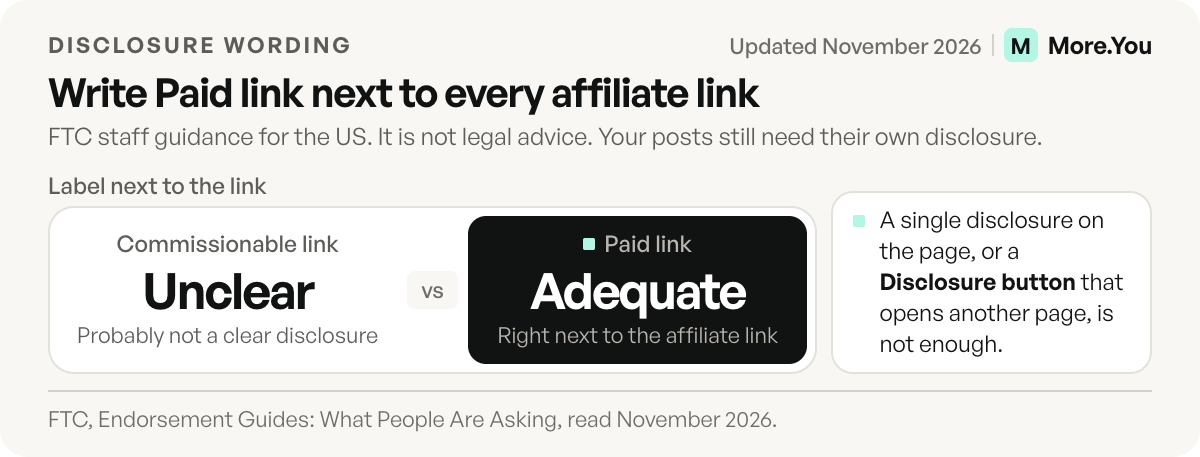
The rules come from two FTC staff documents. Disclosures 101 for Social Media Influencers (ftc.gov, November 2019) says disclosures are likely to be missed if they appear only on an ABOUT ME or profile page, and that tags, likes and pins can count as endorsements. The FTC’s Endorsement Guides FAQ (ftc.gov, November 2026) adds three points that apply directly to a bio page:
- A single disclosure on your home page won’t be sufficient, because visitors may only look at one section.
- A hyperlinked “DISCLOSURE” or “LEGAL” button is easily avoidable, so it is not clear and conspicuous.
- “Commissionable link” is probably not a clear disclosure. “Paid link” next to the link should be.
In practice, label each block directly: “Paid link: the serum I use every morning” or “Ad: Brand X spring collection, 15% off with my code”. The disclosure in your post or video still has to be there too. The bio page label covers the page, and the post covers the post. This is FTC staff guidance for the US, not legal advice. If you work with brands in other countries, check the local rules as well. More on structuring the commission side in affiliate links in your bio.
How do you prove results to a brand from your link in bio?
Track clicks per link and per post, then send the brand the number for their link during their campaign window. A line like “the Tuesday Reel drove most of the clicks to your product page, mostly from Instagram on mobile” answers the question every sponsor asks. A screenshot of story taps does not tell them which post did the work.
Your bio page is where traffic from every platform meets, so measure there. Three numbers cover most sponsor reports:
- Clicks on the brand’s block during the agreed window.
- Click-through rate on that block: clicks divided by page views. This shows the offer pulled people in, beyond page visits.
- Which post drove the clicks. If you posted a Reel, a TikTok and a story for one brand, the brand wants to know which one worked.
Here is an illustrative report. The numbers are made up to show the format, not measured results.
Campaign: Brand X spring serum, 72-hour window
Clicks on the brand block: 412
Click-through rate: 9% of page views
Top post: Tuesday Reel, about two thirds of the clicks
Top source: Instagram, mostly on mobile
The third number is the one most creators can’t produce. Post attribution for creators explains how clicks get tied back to the specific post that sent them. Once you have it, you can also price the next deal on real numbers instead of follower count.
Do you still need a bio page if Instagram allows 5 links?
Instagram allows up to five links on a profile (Instagram Help, checked November 2026). That works for a creator with one shop and one newsletter.
It stops working for influencers fast. Five links can’t hold a campaign link, a media kit, an inquiry path, six affiliate links and your best content. They carry no disclosure labels and no about text. TikTok shows a website link only on accounts with at least 1,000 followers or a Verified Business Account (TikTok Support, checked November 2026), so some creators there have no website field at all.
The common setup is to use a bio page as the first of Instagram’s five links, and the same page as the only link on TikTok, YouTube and Threads. One page, updated once, behind every profile.
Why AI assistants read influencer pages now
A brand manager can ask ChatGPT, Perplexity or Claude to “find fitness creators in Spain with a YouTube channel”. The assistant answers from pages it can read. A page made of untitled buttons gives them almost nothing to work with. A page with an about text, labeled blocks and structured data gives them your niche, platforms and contact path in a form they can repeat correctly.
The fix is mostly writing. A clear about text, descriptive block labels (“Brand inquiries” instead of “Click here”) and an FAQ do most of the work. Making your link in bio AI-readable walks through the full checklist.
Build an influencer page with More.You
More.You covers this list with blocks: links, social icons, products, events, FAQ, an about text and a collection block to group affiliate links under one disclosed heading. Analytics show clicks and CTR per block, broken down by source, device and country, on every plan. On Pro, Auto-Pin puts a scheduled post’s link at the top of the page when it goes live and removes it after 24 hours, 3 days or 7 days, and attribution ties clicks to the post that drove them. That’s the sponsor report, ready to send. Every page also ships an llms.txt, an agent manifest and structured data built from its blocks. Create your More.You page and send brands numbers instead of screenshots.
FAQ
What should an influencer put in their link in bio?
Put the live campaign link first, then a two-sentence about text with your combined reach, social icons, a brand inquiry path with your media kit, disclosed affiliate links, two or three of your best posts, and an FAQ. Order them by what a visitor needs first, and keep time-sensitive links at the top.
Do I need to disclose affiliate links on my bio page?
Yes, if you’re paid through those links. FTC staff guidance says to place the disclosure next to the link in clear words, such as “Paid link”. A single disclosure elsewhere on the page or a separate disclosure page is not enough. Your posts still need their own disclosure as well.
How do I show a brand how many clicks their link got?
Use a bio page with per-link analytics and post attribution. Report clicks on the brand’s block during the campaign window, the click-through rate on that block, and which of your posts drove the clicks. Those three numbers answer most sponsor questions.
Is Instagram’s 5-link feature enough for influencers?
It covers creators with a few fixed links. Influencers usually need more: a rotating campaign link, a media kit, an inquiry path, disclosed affiliate links and click data for sponsors. Many use a bio page as the first of Instagram’s five links and as the only link on other platforms.
Sources
- Disclosures 101 for Social Media Influencers, ftc.gov, November 2019, accessed November 2026
- FTC’s Endorsement Guides: What People Are Asking, ftc.gov, accessed November 2026
- help.instagram.com, Add links to your Instagram profile, November 2026
- TikTok Support, which accounts can add a website link to a TikTok profile, checked November 2026
- More.You feature pages: more.you/features/bio-page-blocks, more.you/features/auto-pin, more.you/features/analytics-attribution and more.you/features/ai-native-pages (November 2026)
Platform rules and prices checked November 2026.



