
When your TikTok link in bio is not working, the fault sits at one of three points: TikTok won’t show the Links field, the link won’t save or gets removed, or the link opens and the page breaks. Find your point first. Most cases come down to account eligibility, a URL typed into the bio text, a link to another social app, a flagged domain, or a page that fails in TikTok’s in-app browser.
You usually find out from a comment: “where’s the link?” or “link doesn’t open”. By then your video has had its best hours, and the people who wanted the product, the playlist or the booking page left with nothing.
This guide sorts the problem by symptom, then gives 8 fixes in the order to try them. It’s for creators and small businesses who send TikTok viewers to a shop, a newsletter or a link in bio page.
Key Takeaways
- No Links field means you’re not eligible yet. TikTok gives the field to accounts with 1,000 followers or a Verified Business Account.
- Bio text never becomes a link. Only the Links field in Edit profile is tappable.
- Use a web URL, not an app link. TikTok no longer supports links that open or log people into other social apps.
- Test outside TikTok. Its in-app browser breaks app links, logins and some checkouts that work fine in Safari or Chrome.
- A link that disappears may have been removed. TikTok removes links that lead to content it doesn’t allow.
Why is my TikTok link in bio not working?
Your TikTok link in bio fails at one of three checkpoints. At the first, the Links field is missing from Edit profile, so there’s nowhere to put the link. At the second, the field is there but the link won’t save, vanishes later, or shows as plain text. At the third, the link is tappable but the page loads blank, logs people out, or lands somewhere you didn’t intend.
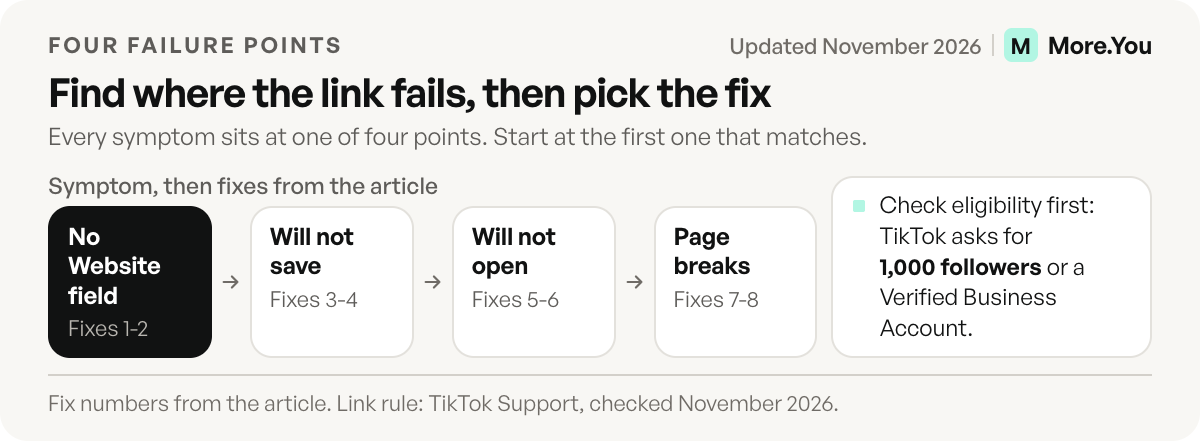
Match what you see to a row, then go to that fix.
| What you see | Where it fails | Likely cause | Fix |
|---|---|---|---|
| No Links field in Edit profile | Field | Under 1,000 followers, business account not verified | 1 |
| URL shows as grey, untappable text | Saving | Typed into the bio text, not the Links field | 2 |
| Instagram or YouTube link won’t save | Saving | App link to another social platform | 3 |
| One domain fails, others save | Saving | Shortener or flagged domain | 4 |
| Link was there, now it’s gone | Saving | TikTok removed the link | 4 |
| Link shows, tap does nothing | Tapping | Outdated or cached app | 5 |
| You see the link, some viewers don’t | Tapping | Viewer’s account or region | 6 |
| Page loads blank, logs out, or opens a store | Loading | In-app browser breaks the destination | 7 |
| Page loads the wrong thing | Loading | Expired URL or redirect chain | 8 |
Fixes when the Links field is missing
1. Check that your account qualifies
TikTok doesn’t give every account a clickable website link. Its support page asks for at least 1,000 followers or a Verified Business Account (TikTok Support, checked November 2026). Social Media Examiner lists “a link in your bio without needing 1,000 followers first” as a feature of the verified business account (socialmediaexaminer.com, March 2026).
Switching to a business account and skipping verification may not be enough. Open Edit profile after you switch. If the field still isn’t there, finish business verification or keep growing toward 1,000 followers. Our TikTok link in bio setup guide walks through the account options.
2. Put the URL in the Links field, not the bio text
Go to your profile, tap Edit profile, and find Links (Website in some older app versions). Paste the full address there, starting with https://. A URL typed into the bio text stays plain text, and nobody can tap it.
Copy the URL from your browser’s address bar rather than typing it, so a stray space or missing letter can’t slip in. Then tap Save and reopen your profile to confirm the link appears.
Fixes when the link won’t save or disappears
3. Use a web URL, not a link to another social app
TikTok’s support page says it “no longer supports links that open or log you into other social media apps” (TikTok Support, checked November 2026). One report says the dedicated Instagram and YouTube fields are gone from Edit profile (influencers-time.com, November 2026).
If a link to your Instagram profile or YouTube channel won’t save, that rule is the likely cause. Send people to a web page instead, and put your social profiles on that page as links.
4. Check whether the domain or the destination is flagged
TikTok’s Community Guidelines say links can lead to harmful content that isn’t allowed on the platform. “If a link breaks our rules, we’ll remove it.” TikTok can also temporarily stop you from posting links, and ban the account for severe violations (TikTok Community Guidelines: Accounts and features, accessed November 2026).
So a link that disappears after you saved it may not be a bug. Check what the page links to, including pages one tap deeper. Then run the domain through Google’s Safe Browsing site status check. A domain marked dangerous there will struggle on every platform.
Generic URL shorteners are the other usual suspect. Many unrelated links share one shortener domain, so one bad link can affect them all. Link to your own domain or a dedicated bio page instead.
Fixes when the link shows but won’t open
5. Update the app and re-add the link
Update TikTok from the App Store or Google Play, then force-close it and reopen. On Android, you can also clear the app’s cache in your phone’s Settings, under Apps, TikTok, Storage. Inside TikTok, you can also go to Profile, the three-line icon, Settings and privacy, then choose Clear cookies and cache under Activity or Security, depending on your app version (TikTok Ads Help Center, November 2026). If the link still does nothing, delete it from the Links field, save, then add it again so TikTok stores it fresh.
6. Test from another account and another phone
The link you see on your own profile isn’t proof that viewers see it. What a viewer sees can differ by account, app version and region.
Ask a friend to open your profile on their phone, ideally one iPhone and one Android. If they don’t see the link, the issue is on the viewer’s side. Put your page’s short address in the video or the caption too, so those viewers can type it into a browser.
Fixes when the link opens but the page breaks
7. Test the destination outside TikTok
Paste the URL into a normal browser tab. If it fails there, the problem is your page, not TikTok. If it works there but fails inside TikTok, the in-app browser is the cause.
TikTok opens links in its own in-app browser. In that browser, app links don’t fire, so a tap meant to open your app lands on a web page, or on an app store page instead (airbridge.io, November 2026). Pages that need a saved login, PDFs and some checkouts fail for the same reason.
The in-app browser keeps its own cookies. TikTok lets you clear them: open any link, tap the three-dot or share icon at the bottom of the screen, then choose “Clear cookies and cache” (TikTok Ads Help Center, accessed November 2026). That same menu is how a viewer opens the page in their phone’s own browser. Point your bio link at a plain, fast web page, and put the app, file or checkout one tap further in.
8. Remove redirect chains and expired links
A link that worked last month can point at a sold-out product or a finished sale today. Every extra hop, from a shortener to a tracker to the final page, is one more step that can fail in the in-app browser. Use one stable URL that goes straight to a page you control. Change what the page shows, not the link.
What to tell viewers while the link is broken
A broken link costs you most on the day a video does well, so give viewers a second way in before you finish debugging.
- Say the short address of your page in the video, and show it as text on screen.
- Write the same address in plain text in the caption, so a viewer can copy it into a browser.
- Answer the comment “where’s the link?” with the address, so the next viewer sees it.
- When the link works again, say so in a new video or a reply, and remove the plain address.
A plain address is not clickable, so this is a stopgap. It keeps your best hours from going to waste while you fix the cause. If you do not yet have a page with a short address, TikTok bio ideas shows what the line before the link can promise.
How do you stop the link from breaking again?
Many bio links break during an edit. Run a two-minute test every time you touch the link:
- Tap the link from your own profile in the app.
- Tap it from a second account on another phone.
- Open the page and press its main button.
- Paste the URL into a desktop browser.
Then remove the reason to edit at all. TikTok gives you one website link, so a single bio page URL that never changes does the most work. A custom domain for your link in bio keeps that URL yours if you ever switch tools. If you also post on Instagram, the Instagram link in bio fixes cover the same three checkpoints there.
Last, watch the numbers. A sudden drop to zero clicks from TikTok is often the first sign of a broken link, days before a viewer comments.
One link that stays current
A More.You page gives TikTok one stable URL, and you change what the page shows instead of the link. On Pro, Auto-Pin puts a scheduled post’s link at the top when the post goes live. Analytics show clicks per block by source and device, so a drop in TikTok traffic shows in the numbers. Pages are server-rendered web pages, with no app link or login between the tap and the content. The failures from fix 7 that come from app links and logins do not apply to a plain web page. Create your More.You page and keep the link in your TikTok bio working.
FAQ
Why can’t I add a link to my TikTok bio?
Your account doesn’t qualify yet. TikTok gives the Links field to accounts with 1,000 followers or a Verified Business Account. Switching to a business account without verification may not add it.
Why is my TikTok bio link not clickable?
The URL is in the bio text instead of the Links field. Bio text never becomes a link. Move the URL to Edit profile, then Links (Website in some older app versions), include https://, and save.
Why did my TikTok bio link disappear?
TikTok removes links that lead to content its Community Guidelines don’t allow, and can temporarily stop an account from posting links. Check the destination page and anything it links to, then add a clean URL.
Can I put my Instagram link in my TikTok bio?
Try the web address of your Instagram profile. TikTok doesn’t support links that open or log people into other social apps, so if the link won’t save, that rule is the likely cause. A bio page that lists all your profiles is the simpler route.
Why does my link work in Safari but not on TikTok?
TikTok opens links in its in-app browser, where app links, saved logins and some checkouts fail. Point the bio link at a plain web page, and put the app or checkout one tap further in.
Sources
- TikTok Support: website link eligibility and links to other social apps, checked November 2026
- Social Media Examiner: How to use TikTok’s Verified Business Account features, March 2026
- influencers-time.com: TikTok bio link changes and the brand funnel, November 2026
- TikTok Community Guidelines: Accounts and features, accessed November 2026
- Google Transparency Report: Safe Browsing site status, accessed November 2026
- airbridge.io: Deep link opened in a social app browser, what breaks, November 2026
- TikTok Ads Help Center: Clear cookies and cache in TikTok’s in-app browser, accessed November 2026
- More.You feature pages: more.you/features/auto-pin and more.you/features/analytics-attribution (November 2026)