
Linkme is a link in bio app made by Me Global App, Inc., a company based in Miami. It gives you one page at link.me/yourname for your links, socials, videos and shop. Its dashboard also posts one video to seven social networks and sends automatic DMs to people who comment. Linkme has a free plan and two paid plans, Plus and Pro.
If you are asking what Linkme is, you probably met it as a link first: link.me/someone in an Instagram or TikTok bio. Tap it and a page opens in your browser with that person’s links, videos and products. If you are choosing a link in bio for yourself, the question changes: what does Linkme do beyond the page, what does it cost, and how do you set one up?
This guide answers all three, using Linkme’s FAQ, pricing page, about page and app store listings as they read in November 2026. More.You publishes this blog and builds a rival link in bio product, which is why every Linkme fact below carries its source. New to the format? Start with what a link in bio is.
Key Takeaways
- Linkme is a link in bio page plus social tools. Your page lives at link.me/yourname, and the same account posts to 7 networks and runs DM automations.
- It started as a networking app. In 2023 it was described as a next-generation business card, with short posts called shouts on each profile.
- There is a free plan. Plus costs $9.99 a month and Pro $29.99 a month, or $7 and $16.67 a month billed yearly.
- Setup takes four steps. Pick a username, add links and sections, set the look, then paste the URL into your bios.
- Anyone can open a Linkme page. Visitors need no account and no app: the page loads in a browser.
What is Linkme?
Linkme is a link in bio platform that also manages social media. Each user gets a public page at link.me/yourname with links, social accounts, a photo and video gallery, contact details, forms, events and a shop. Linkme’s FAQ calls it “the social operating system for creators and brands”: the page, plus tools that publish posts, answer comments and DMs, collect emails and sell products.
Linkme is made by Me Global App, Inc., which its about page places in Miami, Florida. It runs on the web and in apps for iPhone and Android. Brands use it as well as creators: Linkme’s FAQ names FIFA, Mall of America and the New York Islanders as organizations with pages on it (link.me/faq, checked November 2026).
From networking app to social operating system
Linkme began as a networking tool. In September 2023, Refresh Miami’s profile of the company described it as a next-generation business card: a QR code that opens a profile of links, photos and contact details. The same profile could host shouts, short posts in the style of a tweet. The article named Net Kohen, Val Share and Dre Medici as the founders.
The product has grown since then. One of Linkme’s Android apps still carries the name “Linkme | Link, Network, Shout!”, next to a second app called “Linkme - Link in Bio Creator” (Google Play, checked November 2026). Today Linkme’s about page describes five jobs that run from one page and one dashboard: publish, reply, capture, sell and measure.
| 2023 (Refresh Miami) | November 2026 (Linkme’s own pages) | |
|---|---|---|
| How it is described | A next-generation business card | The social operating system for creators |
| Main use | Share contact details and profiles by link or QR code | A link in bio page plus posting, DMs, leads and selling |
| Posting | Shouts hosted on your Linkme profile | Post to All: one video to 7 social networks |
What is Linkme used for?
Linkme is used for six jobs, and each one starts on a different plan. The table maps them from Linkme’s FAQ and pricing page (checked November 2026).
| Job | What Linkme does | Starts on |
|---|---|---|
| Link in bio page | A page at link.me/yourname with unlimited links, socials, a gallery, contact details and events, plus a QR code | Free |
| Post to All | One video and caption to YouTube, Instagram, TikTok, Facebook, X, Threads and LinkedIn, now or scheduled | Free: 10 posts for the life of the account. Plus and Pro: unlimited |
| DM automations | A public reply and a DM with your link to people who comment on Instagram or Facebook Page posts | Free: up to 3 keyword automations. Pro: unlimited |
| Selling | Tips, print-on-demand merch, digital downloads, paid content and courses, with Stripe checkout | Tips and merch on Free. Downloads and courses from Plus |
| Leads and email | Forms save visitors who choose to share an email, and a Leads list sends email campaigns | Forms on Plus. Leads and campaigns on Pro |
| Analytics | Profile views, link clicks, traffic sources and a country and city map | Basic on Free. Real-time on Pro |
Pro also adds Link, which Linkme calls your AI social media manager. Its pricing page says Link drafts posts and makes images, videos and voiceovers, and nothing goes live until you approve it.
Linkme’s FAQ names three groups of users. Creators, musicians and athletes use it as one link that also sells and posts. Businesses use it when a team publishes to several social accounts. Agencies run client profiles from one dashboard, on a plan that costs $100 a month for 5 client profiles (link.me/faq, checked November 2026).
How does Linkme work? 4 setup steps
Linkme works like most link in bio tools: you build one page, then share its URL everywhere. Its FAQ describes the setup in this order.
- Sign up and pick a username. Your page goes live at link.me/yourname as soon as you choose it.
- Add links and sections. In Edit Profile, add featured links with labels and thumbnails, your social accounts, a bio, a photo and video gallery, contact details and events. Drag the sections to reorder them.
- Set the look. Choose the background color, text color and font. You can put a video behind or in place of your profile photo, and show each link as small, medium, big or a button.
- Share the URL. Paste link.me/yourname into your social bios, messages and email signature. For print, open Your QR Code in the dashboard and download the image.
Automations need one more connection. Linkme runs them on an Instagram Business account or a Facebook Page, so connect one from the Automations page before you build the first one.
Getting more from a Linkme page
The habits that make any bio page work apply on Linkme too. Keep the link count low, put the current offer at the top, and name each button by what the visitor gets. Our link in bio best practices cover 12 of them, with the common mistakes next to each fix.
Two Linkme settings help with that. The link scheduler on Plus sets start and end dates for a link, so a launch or sale link appears and leaves on its own. Analytics show a click count for every link, so you can see which button to move up and which to cut.
How much does Linkme cost?
Linkme has a free plan and two paid plans for creators, priced in USD. Its pricing page opens on yearly billing, so read the monthly figure before you compare.
| Plan | Billed monthly | Billed yearly | What it adds |
|---|---|---|---|
| Free | $0 | $0 | A page with unlimited links, tips, merch, basic analytics, 10 Post to All posts and up to 3 keyword automations |
| Plus | $9.99 a month | $83.99 a year ($7 a month) | Verification badge, advanced analytics, forms, the link scheduler, digital products, courses and unlimited posts |
| Pro | $29.99 a month | $199.99 a year ($16.67 a month) | Link AI manager, 10 accounts per platform, Leads and email campaigns, real-time analytics and your own logo |
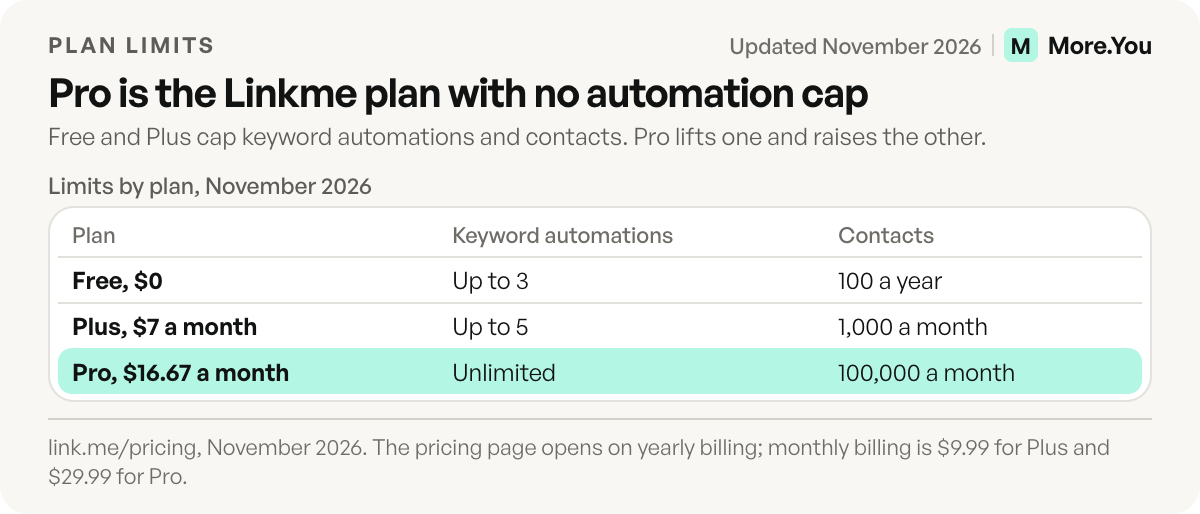
Source: link.me/pricing and link.me/faq, checked November 2026. The pricing page opens on yearly billing and shows the per-month equivalents, $7 and $16.67.
Usage limits also rise with the plan, and they decide which plan fits a team.
| Limit | Free | Plus | Pro |
|---|---|---|---|
| Post to All posts | 10 for the life of the account | Unlimited | Unlimited |
| Accounts per platform | 1 | 1 | 10 |
| Keyword automations | Up to 3 | Up to 5 | Unlimited |
| Any-comment automations | Up to 4 | Up to 10 | Unlimited |
| Contacts | 100 a year | 1,000 a month | 100,000 a month |
Source: link.me/pricing, November 2026. Paid plans renew automatically, and you cancel in Settings.
On sales, Linkme charges its own platform fee, which is lower on each higher plan, and Stripe charges for card processing. A “Powered by Linkme” badge shows on Free pages, and on Pro your logo replaces it. Trials depend on the plan: the homepage advertises 7 free days on monthly billing, and the pricing FAQ says the checkout button states whether one applies. For a plan-by-plan comparison with the best-known tool in the category, read Linkme vs Linktree.
Is Linkme safe to use?
Linkme is a product of Me Global App, Inc., a company based in Miami, and its apps are listed on the App Store and Google Play. The iPhone app, Linkme: Social OS, sits in the App Store’s Social Networking category with a 13+ age rating and a score of 4.8 out of 5 from 5.3K ratings (apps.apple.com, checked November 2026).
We opened link.me/linkme, Linkme’s own page, in a browser with no Linkme account on November 11, 2026. It loaded with its links, App Store and Google Play buttons, and a cookie notice with a Reject all option. The footer carries Privacy Policy, Terms and Report links.
Two account details matter before you sign up. Automations need an Instagram Business account or a Facebook Page connected, so Linkme can read your posts and send DMs. If you leave, deleting the account in Settings deactivates it for 30 days and then deletes it permanently (link.me/faq, checked November 2026).
How Linkme compares with other link in bio tools
Linkme sits between a link in bio page and a social media manager, with your page, cross-posting, comment replies and a shop under a single login. Linktree is the general-purpose standard for the page itself, and our guide to what Linktree is and how it works explains its four plans. Linkme is a different company from Linktree, and from the similarly named linkme.bio and linkme.center.
If you want posting and automations in the same tool as your page, Linkme covers both. If you mainly need the page, compare several options in our best link in bio tools roundup before you commit.
Where More.You fits
More.You is an AI-native link in bio platform. Each published page comes with a plain-text llms.txt summary, an agent manifest and JSON-LD markup generated from its blocks, all written for AI assistants, next to the page people see. On the Free plan you get one page and every block type, from links and products to events, bookings and FAQ.
Linkme wraps cross-posting and DM tools around the page, and More.You spends its effort on the page itself. With AI Control, which every plan includes, you link ChatGPT, Claude or Gemini to your More.You page and change blocks or check your numbers by typing a request. To switch, give the importer your link.me URL and it suggests your header, photo, social accounts and links, writing none of them until you approve each one.
Add a FAQ block and a products block, and the same page answers your visitors and the AI assistants that read it. Create your More.You page on the Free plan, then compare it with your Linkme page before you change the link in your bio.
FAQ
Is Linkme free?
Yes. The Free plan costs nothing and includes unlimited links, tips and merch sales, basic analytics, 10 Post to All posts and up to 3 keyword automations. Paid plans start with Plus at $9.99 a month, or $7 a month on yearly billing.
Who owns Linkme?
Linkme is made by Me Global App, Inc., a company based in Miami, Florida. A 2023 Refresh Miami profile named Net Kohen, Val Share and Dre Medici as its founders.
Do you need an account to open a Linkme link?
No. A Linkme page is a public web page at a link.me address, and it opens in any browser. You need an account only to build a page of your own.
Does Linkme have an app?
Yes. Linkme has an iPhone app called Linkme: Social OS on the App Store and Android apps on Google Play. You can also build and edit your page on the web.
Is Linkme the same as Linktree?
No. Linkme and Linktree are separate companies. Linkme pages use link.me addresses and Linktree pages use linktr.ee addresses, and both offer a free plan.
Sources
- Linkme FAQ: what Linkme is, setup, profile sections, plans, automations, selling and account deletion (link.me/faq, November 2026)
- Linkme pricing page: monthly and yearly prices, plan features, posting and automation limits (link.me/pricing, November 2026)
- Linkme about page: company, location and the five jobs (link.me/about, November 2026)
- Linkme homepage: positioning and trial note (link.me, November 2026)
- Linkme’s own profile page, opened without an account on November 11, 2026 (link.me/linkme)
- Linkme: Social OS on the App Store: category, age rating and score (apps.apple.com, November 2026)
- Linkme apps on Google Play (play.google.com, November 2026)
- Refresh Miami: “What’s your Linkme?” Meet the Miami-based networking tool, September 7, 2023
- More.You AI Control, import and AI-native pages (more.you/features/ai-control, more.you/features/import and more.you/features/ai-native-pages, November 2026)
Platform rules and prices checked November 2026.