
Linktree is a link in bio tool. It gives you one page at linktr.ee/yourusername that lists all your links: your shop, videos, socials and booking page. You put that one URL in your Instagram, TikTok or YouTube bio, and visitors pick where to go. Linktree was founded in Melbourne in 2016 and has a free plan plus three paid plans.
Social apps give you few clickable links in a profile. Instagram allows up to five bio links (Instagram Help), and TikTok shows a website link only on accounts with at least 1,000 followers or a Verified Business Account (TikTok Support). If you have a shop, a podcast, a newsletter and a new video every week, that is not enough room. Linktree became the common fix for that gap. Linktree says more than 70 million people use it (linktr.ee/s/about, checked November 2026), and many people now say “a linktree” for any page like it.
This guide explains what Linktree is, how it works in five steps, what each plan costs, what an owner can see about visitors, and how it compares with other link in bio tools. Every Linktree fact below comes from Linktree’s own pages, checked in November 2026. More.You publishes this blog and competes with Linktree, so every number below names its source.
Key Takeaways
- Linktree is a link in bio page. One URL, linktr.ee/yourusername, holds all your links, so one profile link can lead anywhere.
- Setup takes five steps. Sign up, pick a username, choose a plan, add links and a theme, then paste the URL into your bios.
- There is a free plan. Free costs $0 with unlimited basic links. Paid plans cost $9, $17 or $35 a month, or $7, $14 or $30 a month billed annually (US prices).
- Selling paid products starts on Pro. Free and Starter can share free products and bookings only.
- “Linktree” is also a general word. People call any link in bio page “a linktree”, whichever tool runs it.
What is Linktree?
Linktree is a link in bio tool made by an Australian company of the same name. Alex Zaccaria, Anthony Zaccaria and Nick Humphreys founded it in Melbourne in 2016. The product is one mobile page with your name, photo and short bio at the top, and a button for each link below. You share one URL, and visitors tap the button they want.
Linktree describes itself as “one link to share everything you do” (linktr.ee/s/about, checked November 2026). Each button opens a destination: a YouTube video, a Shopify store, a Calendly booking page, a Spotify album. You manage the page from a web dashboard or from the Linktree app for iPhone and Android.
Linktree the company and “a linktree” the format
The word now means two things. Linktree, with a capital L, is the company and its product. “A linktree”, in lowercase, is what many people call any link in bio page, the way people say “google it” for any web search. When someone asks for “your linktree”, they mean your link in bio page, whichever tool built it. The format itself, and why every social app needs it, is covered in what a link in bio is and how it works.
Is Linktree the same as OnlyFans?
No. OnlyFans is a subscription site where creators sell content to paying fans. Linktree is a page of links, and each link points to another site, which can be a subscription page. Linktree’s pricing page lists a Link Lock feature that puts an age check (date of birth) or a sensitive content warning in front of a single link (linktr.ee/s/pricing, November 2026). Visitors see the check or the warning before that link opens.
How does Linktree work? 5 setup steps
Linktree works by giving you one hosted page that you edit, behind one URL that does not change. You set it up once and place the URL in your profiles. After that, you change the buttons on the page, never the link in your bio. Linktree’s help center lists the setup in this order (linktr.ee/help, checked November 2026):
- Sign up. Create an account at linktr.ee/register or in the Linktree app, using your email.
- Choose a username. It becomes your page address, linktr.ee/yourusername. Use the same handle you use on social apps, so people recognize it.
- Pick a plan. Free covers a basic page. Paid plans add design options, selling and longer analytics.
- Add your links and a theme. Add one button per destination, give each a short label, and choose a theme.
- Paste the URL into your bios. On Instagram, open Edit profile, tap Links, then Add external link, and paste the full URL. Linktree’s pricing page also names TikTok, YouTube and LinkedIn, plus your email signature and printed QR codes.
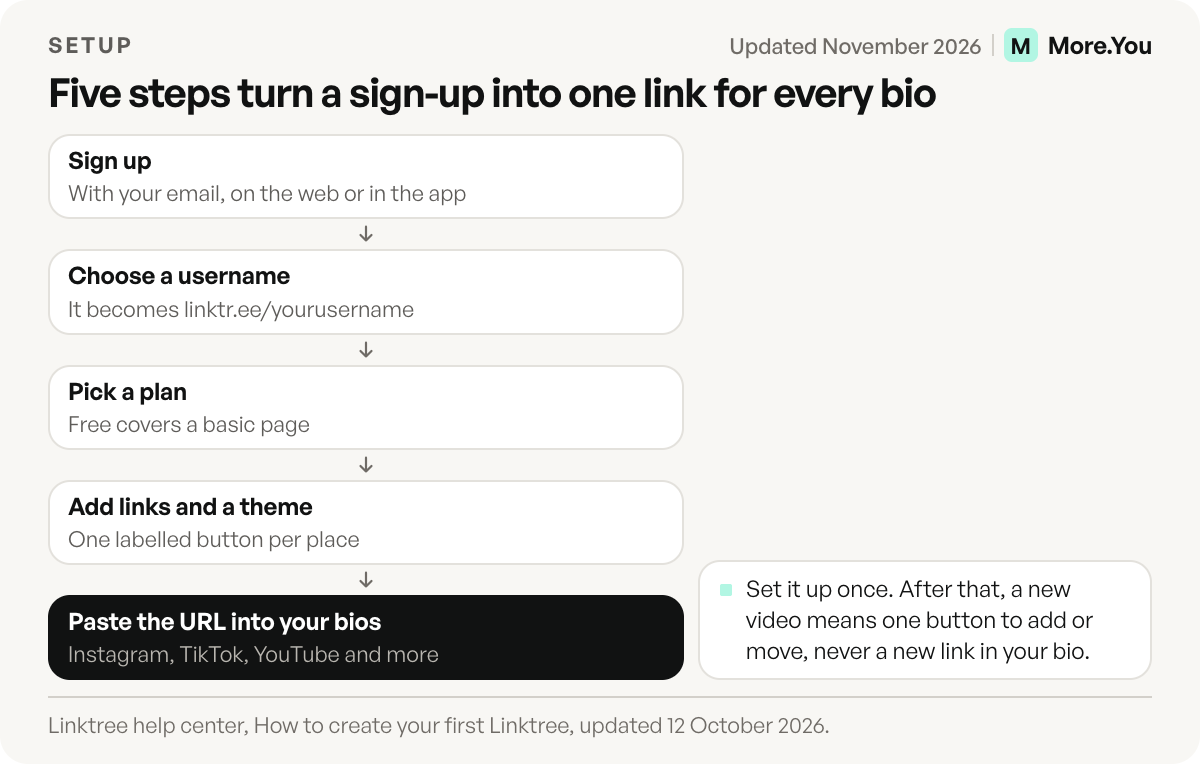
The weekly work happens on the page. When you post a new video, you add or move one button, and every profile that carries the URL now leads to the new video. For the Instagram steps in detail, see how to add a link to your Instagram bio.
What is Linktree used for?
Linktree is used to send followers from one profile link to many places. What goes on the page depends on who owns it:
| Who uses it | What usually goes on the page |
|---|---|
| Creators | Newest video, other channels, merch, a contact link for brands |
| Musicians | New release on streaming apps, tour dates, merch |
| Podcasters | Latest episode, links to each podcast app |
| Small businesses | Menu or price list, booking page, map, online store |
| Sellers | Digital products, courses, affiliate links |
Linktree’s menus go beyond plain links. They list digital products, courses, bookings, affiliate products, short links, QR codes, digital business cards, Instagram auto-replies and an audience manager. Named integrations include Shopify, Spotify, Mailchimp and Calendly (linktr.ee, checked November 2026). Linktree says its selling features are available in selected countries.
How much does Linktree cost?
Linktree costs $0 on its Free plan. The three paid plans are Starter, Pro and Premium. The prices below are Linktree’s US prices; other countries see local currency (linktr.ee/s/pricing, checked November 2026). The pricing page shows annual billing by default, so the lower number is the monthly price when you pay for a full year.
| Plan | Billed monthly | Billed annually | What the plan adds |
|---|---|---|---|
| Free | $0 | $0 | Unlimited basic links, social icons, QR code, email and phone sign-ups, 28 days of analytics |
| Starter | $9 a month | $7 a month ($84 a year) | Personalized design, unlimited featured links, link scheduling, 90 days of analytics |
| Pro | $17 a month | $14 a month ($168 a year) | No Linktree branding, custom designs, paid products with 0% Linktree fees, SEO settings, 365 days of analytics |
| Premium | $35 a month | $30 a month ($360 a year) | Link rules and routing, AI integrations, social media scheduling, data export, all-time analytics |
Paying yearly saves $24 on Starter, $36 on Pro and $60 on Premium over twelve monthly payments (our arithmetic from the prices above). Pro and Premium offer a 7-day free trial. In the euro area the same page shows euro prices: Starter costs €6.75 a month, or €5.25 a month billed annually, Pro €15 or €12, and Premium €32 or €27.50 (linktr.ee/s/pricing, euro view, November 2026).
Two money rules matter if you plan to sell. On Free and Starter, you can share free products and free bookings only. Pro and Premium let you set any price with 0% Linktree fees, and Stripe’s processing fee of 2.9% + $0.30 per purchase applies on every plan (Linktree help center, checked November 2026). For the full fee table, read what Linktree’s free plan covers.
Can someone see if you viewed their Linktree?
A Linktree owner sees totals, not a list of who visited. Linktree’s pricing page says Insights on every plan include total views, total clicks, unique clicks, click-through rate and the average time to click (linktr.ee/s/pricing, November 2026). Pro and Premium split those totals by city or country, by device type and by referral source, such as Instagram. A visitor’s name, email or phone number appears only when that visitor types it into a sign-up or contact form on the page.
| What the owner sees | Plans |
|---|---|
| Total views, clicks, unique clicks and click-through rate | Every plan |
| One link’s results for any period in the last 365 days | Starter, Pro and Premium |
| Page totals by city or country, device type and referral source | Pro and Premium |
| Names, emails, phone numbers and answers from people who fill in a form | Every plan |
| How far back the history goes | 28 days on Free, 90 on Starter, 365 on Pro, all time on Premium |
Going by these descriptions, a visit on its own only adds to a count. If you fill in a form on someone’s Linktree, the owner sees what you typed.
How Linktree compares to other link in bio tools
Linktree made the link in bio format popular, and it covers the core job well: unlimited links on the free plan, an app for both phones and many link types. Other tools choose a different scope. Some put a storefront with checkout at the center, some are one-page website builders with more layout freedom, and some focus on who reads the page besides people.
If you are choosing a tool, compare four things: the price of the plan you need, the fee on each sale, the analytics history, and how easy it is to move your links later. Our round-up of Linktree alternatives compares those details across tools. If you already run a Linktree and want to move, migrating from Linktree walks through exporting your links without breaking your bio.
Where More.You fits
More.You is an AI-native link in bio platform. Every page, on every plan including Free, ships its own llms.txt file, an agent manifest and structured data built from its blocks. People see buttons, and AI assistants such as ChatGPT can read who you are, what you sell and how to book you.
If you already have a Linktree, More.You’s import tool reads your page URL and proposes your header, socials and links. Nothing is saved until you confirm each item. The More.You vs Linktree comparison shows the two side by side.
Start with the free page and see the format for yourself. Create your More.You page, add a link block for each place your followers should go, and the page publishes with its llms.txt and structured data on the Free plan.
FAQ
Is Linktree free?
Yes. Linktree’s Free plan costs $0 and includes unlimited basic links, social icons and a QR code. The paid plans cost $9, $17 or $35 a month, or $7, $14 or $30 a month billed annually, in US prices as of November 2026.
Can someone see if you viewed their Linktree?
Linktree’s pricing page describes views and clicks as totals, which Pro and Premium split by location, device and referral source. A visitor’s name, email or phone number appears only when that visitor types it into a form on the page.
Does Linktree have an app?
Yes. Linktree has an app for iPhone and Android, listed on the App Store and Google Play. You can build and edit your page from the app or from the web dashboard.
Can you use Linktree on TikTok?
Yes, if your TikTok account can show a website link. TikTok allows a profile link on accounts with at least 1,000 followers or a Verified Business Account. You paste the linktr.ee URL in Edit profile, next to Links.
What is the difference between Linktree and a website?
A Linktree is one page of buttons that sends visitors to other places. A website holds the content itself, across many pages. Many creators use both: the website for depth, and the link in bio page for the one link a social profile allows.
Sources
- Linktree, About page (linktr.ee/s/about, November 2026)
- Linktree, Pricing, with its feature table (linktr.ee/s/pricing, US prices and the euro view, November 2026)
- Linktree help center: how to create your first Linktree, an overview of paid plan features, transaction and processing fees, adding your Linktree URL to your Instagram bio, and sharing your Linktree (linktr.ee/help, November 2026)
- Linktree app listings (App Store and Google Play, November 2026)
- Instagram Help Center, Add a website to your Instagram profile
- TikTok Support, Add a link to your TikTok profile
- More.You import and AI-native pages (more.you/features/import, more.you/features/ai-native-pages, November 2026)
Platform rules and prices checked November 2026.