A link in bio for ecommerce is a one-page storefront that sits behind your Instagram or TikTok bio. It puts the current drop or sale at the top, lists your best products with a button to each product page, collects emails for the next launch, and shows which products and posts get the clicks. Shoppers go from post to product page in one or two taps.
Your feed sells the product, but the sale happens somewhere else. Meta began moving Facebook and Instagram Shops off in-app checkout and onto merchants’ own websites in June 2025 (ppc.land, November 2026). Instagram allows up to five links on a profile (Instagram Help, checked November 2026), and one page is easier to keep current than five links. So the one link people do tap has to carry the whole catalog.
This guide covers what an ecommerce bio page needs, block by block: the spotlight for drops, trust signals, product links, email sign-ups, the numbers worth reading, and how to run more than one campaign. It is written for online stores, DTC brands and makers who sell from social.
Key Takeaways
- One spotlight at a time. The top slot holds the current drop, sale or limited run. Everything else sits below it.
- Every product block points to a product page. Send shoppers to the exact item, never to a homepage they have to search.
- Email is the channel you own. Use the page to build waitlists before launches, since social reach can change overnight.
- Click data per block shows what sells. CTR per product, traffic source and post attribution tell you which content drives orders.
- Shopping agents read the page too. Product blocks on More.You ship Product structured data that AI systems can parse.
What should a link in bio for ecommerce include?
An ecommerce bio page needs a spotlight for the current offer, 3 to 6 product blocks that link straight to product pages, a link to your email sign-up form, your social icons, and a short FAQ for shipping and returns. Brand it with your logo and colors, put it on your own domain if your plan allows it, and track clicks per block. Cut anything that does not lead to a purchase or a signup.
If you are new to the format, start with what a link in bio is and how it works. Here is the ecommerce version, block by block:
| Block | Its job | Example |
|---|---|---|
| Spotlight (pinned link or hero header) | Push the one thing selling right now | ”Summer sale: 30% off linen, ends Sunday” |
| Product blocks | Send shoppers to a specific product page | Best seller, new arrival, restocked item |
| Collection | Group items so a long page stays readable | ”New in”, “Gifts under 50”, “Restocked” |
| Email sign-up link | Build a list for launches and waitlists | ”Get the drop 24 hours early” |
| FAQ | Answer the questions that stop a checkout | Shipping times, returns, sizing |
| Social icons | Let shoppers follow you on other platforms | TikTok, YouTube, Pinterest |
| Events | Promote a pop-up, a sample sale or a live shopping stream | ”Pop-up in Lisbon, 14 to 16 March” |
| About text | One line of brand story or proof | ”Made in small batches in Porto” |
The order matters as much as the blocks. The shoppable bio page layout guide covers what goes above the fold and how many blocks to show.
Put the drop or sale at the top
The top of the page is the only slot every visitor sees. Use it for one thing: the new drop, the seasonal sale, or the limited edition that ends this week. When the campaign ends, swap it out the same day so the page never sells last month’s offer.
On More.You you have three ways to do this. A pinned link holds the top position by hand. A hero or banner header layout gives the offer an image and a headline. On Pro, Auto-Pin does it without you: when a scheduled social post goes live, its link pins to the top of the page, then comes down after 24 hours, 3 days or 7 days.
For a store that posts product content daily, auto-pin removes the most common failure on a bio page. The post says “link in bio” and the bio still points at an older product.
Build a bio page customers trust
A shopper who taps your bio link is deciding in seconds whether the page belongs to the brand they saw. Three things settle it.
- It looks like your brand. Add your logo as the avatar, set your brand colors, pick fonts and button styles that match your store. Start from a template if you want a head start.
- It sits on your domain. On Pro, a More.You page can be served on your own domain or subdomain, such as shop.yourbrand.com, so the URL matches your store.
- It previews correctly when shared. Pages are server-rendered with OpenGraph and Twitter meta, so the link shows the right title and image in DMs and group chats.
Per-page SEO settings let you set the meta title, meta description and an about text, or turn indexing off for a campaign page. Design edits go through a draft layer with undo and redo, so the live page never shows a half-finished redesign during a sale.
Link to the store, not into it. The bio page sends shoppers to the product page on the store you already run, on Shopify, WooCommerce or any other platform, and your store takes the payment. Open each product link on your phone before a campaign, and check that the item is in stock and the price matches the post.
Product photos send the same trust signal. If you only have phone pictures, DesignerBox, built by the same team as More.You, turns a phone photo of a product into AI product photos on a plain background, in a styled scene or on a model.
Take shoppers from post to product in one tap
Every extra step between the post and the product page loses buyers. Point each product block at the product page, never the homepage. If a Reel shows the blue linen shirt, the shopper should land on the blue linen shirt.
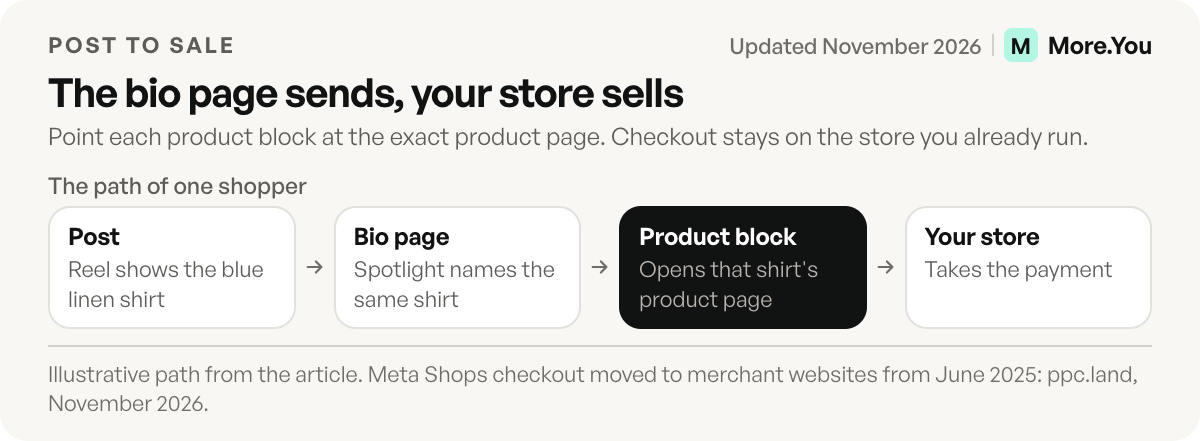
Some practical rules:
- Match the post. Name products on the page the way you name them in captions, so shoppers recognize them on sight.
- Feature 3 to 6 products. Group the rest into collections such as “New in” or “Restocked” so the page stays short on a phone.
- Reorder for the campaign. Blocks reorder by drag, so the Black Friday page and the January restock page can use the same blocks in a different order.
- Answer objections on the page. An FAQ block for shipping times and returns answers the question a shopper would otherwise DM you about.
Turn visitors into subscribers, then repeat buyers
Social platforms change their rules and their reach. Your email list stays yours. A sign-up link near the top of the bio page, pointing to your email tool’s form, turns a casual visitor into someone you can reach on launch day.
Three uses work well for stores:
- Waitlists for limited drops. “Join the list, get the link 24 hours before everyone else.”
- Pre-launch interest. Collect emails for a product you are still producing, so launch day starts with buyers.
- A first-order offer. Promise a welcome code in exchange for the email, then send it from your email tool.
The guide to growing an email list from your link in bio covers placement and the offers that get signups.
Which numbers show what sells?
Track clicks per block, click-through rate, traffic source, device and country, and tie each click back to the post that drove it. Those numbers show which products pull attention, which platforms send buyers, and which content to repeat. Page views alone tell you nothing about sales intent.
More.You analytics report page views, clicks and CTR per block, broken down by source, device and country. On Pro, post-level attribution connects the clicks to the content: “this Tuesday Reel drove the shop clicks.” That is the difference between guessing and knowing which post to remake. For the method behind it, read how post attribution works for creators and brands.
| Question | Number to check | What to do with it |
|---|---|---|
| Which product gets attention? | CTR per product block | Move the winner up, cut the block nobody taps |
| Which platform sends buyers? | Clicks by source | Post more where clicks come from |
| Which content sells? | Post attribution | Remake the format of the post that drove clicks |
| Where are shoppers? | Clicks by country | Check shipping options and currency on your store |
| What device do they use? | Clicks by device | Test your product pages on that device first |
Example: tagging one campaign
This example is illustrative. A store runs a sale post on Tuesday and wants to know if it sold. It adds UTM tags to the sale link, so the order report in its store analytics names the source.
https://yourstore.com/sale?utm_source=instagram&utm_medium=bio&utm_campaign=linen-saleMore.You adds UTM tags to outbound clicks automatically, and you can override them per link. In your store analytics, filter by the campaign name. Compare orders with the block clicks on the bio page, and you see where shoppers drop out: before the product page, or at checkout. UTM parameters are explained on Google Analytics Help.
Mistakes that lose a sale
- A link to the homepage. The shopper must search for the item they saw. Link the product page.
- A sold-out product with a live button. Mark it or remove it the same day.
- Three spotlights. Only one thing can be first. Choose the offer that ends soonest.
- Prices that differ from the post. A shopper who sees a different price leaves.
Running several product lines or markets
A brand with two product lines, or one store selling in two countries, has a choice. Keep one page and split it with collections, or give each campaign its own page with its own offer and language.
Collections work when the audience is the same and the products differ. Each collection is an expandable group under its own heading. Separate pages work when the audience differs: a wholesale page and a retail page, or one page per market. Each page then gets its own spotlight and its own analytics. On More.You, Premium holds up to 5 pages on one account.
Shopping agents read your page too
People are no longer the only visitors. AI assistants and shopping agents read product pages to answer “where can I buy this” and “what does this brand sell.” A bio page that is a list of untitled buttons gives them nothing to work with.
Every published More.You page ships structured data built from its blocks. Product blocks produce Product markup. The page also ships an llms.txt summary and an agent manifest. You decide per page whether AI crawlers may read it, and you can see how often they do. The deeper case is in how AI shopping agents change selling for creators and brands.
Start with the page your shoppers already tap
Your bio link is the one URL every post points to. Build it like a storefront: one spotlight, a handful of product blocks, an email sign-up, and click data that shows what sells. Create your More.You page and give shoppers, and the agents that shop for them, a page they can act on.
FAQ
Can I sell products directly through a link in bio page?
Most stores use the bio page to send shoppers to checkout on their own site. A product block shows the item and its button goes to the product page in your store. Meta has also moved Instagram and Facebook Shops to website checkout, so your store’s checkout is where the sale happens.
Should I use a link in bio tool or my own store page?
Use both. Your store sells, and the bio page sends social traffic to the right product page. The bio page changes with each post, which a store homepage cannot do.
How many products should an ecommerce link in bio show?
Show 3 to 6 products in the main list and group the rest into collections. A phone screen shows only a few blocks at once, and too many equal choices slow shoppers down. Rotate the featured products with each campaign.
Can a link in bio page rank on Google?
It can be indexed. Use a custom domain if you have one, set the meta title and description, and write a clear about text. For full catalog search rankings, your store’s product pages do the heavy work, and the bio page supports them.
Do I need design or coding skills to build an ecommerce bio page?
No. You pick a template or theme, add your logo and colors, and add blocks. Blocks reorder by drag, and design changes stay in a draft until you publish them.
Sources
- ppc.land, Meta moves Facebook and Instagram Shops to website checkout, accessed November 2026
- help.instagram.com, Add links to your Instagram profile, November 2026
- Google Analytics Help, Campaign URLs and UTM parameters, November 2026
- More.You feature pages: more.you/features/bio-page-blocks, more.you/features/auto-pin, more.you/features/custom-domains, more.you/features/analytics-attribution and more.you/features/ai-native-pages (November 2026)
- More.You plans: more.you/pricing (November 2026)
Platform rules and prices checked November 2026.



