
Instagram action buttons are profile buttons that let visitors book an appointment, reserve a table or order food from a business profile. Instagram’s help pages list three types: Book now, Reserve and Order food. Each one connects to a partner service where you already have an account, and your profile can show only one action button at a time.
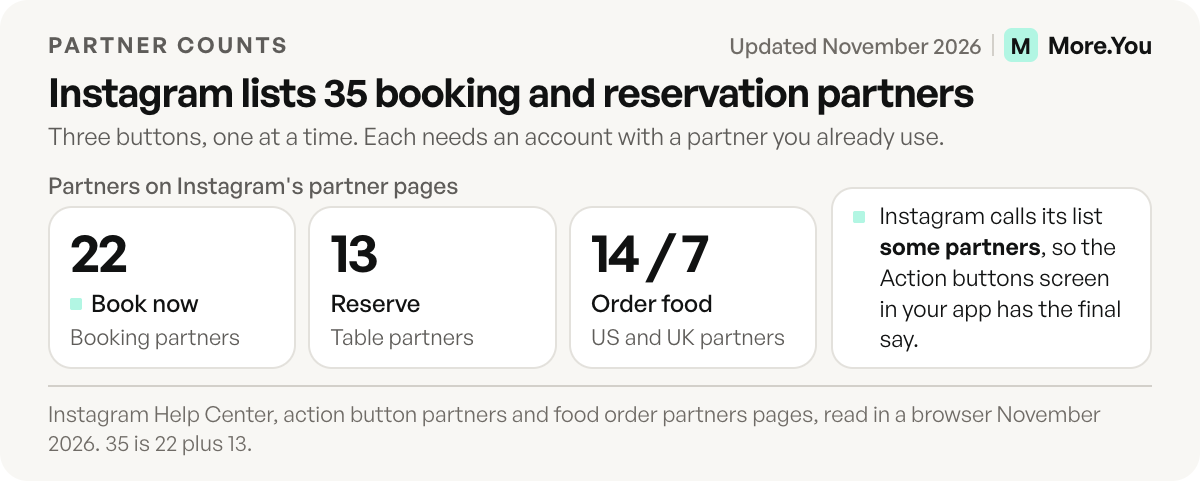
The catch is the partner list. Instagram names 22 booking partners and 13 reservation partners, and food ordering depends on your country: 14 partners in the US and 7 in the UK (checked November 2026). If your scheduler, your ticket seller or your second offer sits outside that list, the button can’t carry it.
Below you’ll find every profile button with what it needs, the full partner list, setup steps for action and contact buttons, four checks for a missing button, and where to put the jobs the list leaves out.
Key Takeaways
- Three action buttons, one at a time: Book now, Reserve and Order food, plus a lead form option. Only one shows on your profile.
- Every action button needs a partner account: Instagram connects the button to a service such as Square, OpenTable or DoorDash that you already use.
- The Contact button is a separate setting: business and creator accounts can show a phone number, an email address and directions.
- Account type is worded two ways: the partner page says the feature is “only available for business and creator accounts”, while the setup steps say business account.
- The gaps go on your bio page: tickets, unlisted schedulers and a second action fit as blocks on one page linked from your bio.
What are Instagram action buttons?
Instagram action buttons are buttons on a business profile that send visitors to a partner service to book, reserve or order. Instagram lists three types: Book now for appointments, Reserve for restaurant tables and Order food for delivery or takeout. You pick one partner you already have an account with, and only one action button can show on your profile at a time.
Instagram’s help page on action buttons says any business can use them but the number of providers is limited, and you need an existing account with a partner before you can select it (checked November 2026). The setup page adds one more option: instead of a partner, you can attach a lead form that gathers contact info. It also warns that the feature “is being gradually introduced and may not be available to you yet.”
Instagram once had a Get Tickets button. Eventbrite launched it for business accounts in May 2018, as Pollstar reported at the time. Instagram’s current help pages list no ticket button.
Every Instagram profile button and what it needs
Instagram’s profile buttons come from two settings. Action buttons connect a partner or a lead form. The Contact button shows your own details. This table lists all seven options with who can add each one and what it needs.
| Button | Visitor taps to | Account type | What you need |
|---|---|---|---|
| Book now | Book an appointment | Business (partner page: business or creator) | An account with one of 22 booking partners, such as Square, Fresha or Vagaro |
| Reserve | Reserve a restaurant table | Business (partner page: business or creator) | An account with one of 13 reservation partners, such as OpenTable, Resy or SevenRooms |
| Order food | Order delivery or takeout | Business (partner page: business or creator) | An account with a food order partner in your country: 14 in the US, 7 in the UK |
| Lead form | Send you their contact details | Business | No partner: you build the form in the Action buttons screen |
| Contact: phone | Call you | Business or creator | A phone number in your business contact info |
| Contact: email | Email you | Business or creator | An email address in your business contact info |
| Contact: directions | Get directions to you | Business or creator | An address in your business contact info |
Sources: Instagram’s help pages on action buttons, action button partners, food order partners and professional accounts, all checked November 2026. The partner page labels the food button Order now, while the main help page calls it Order food.
Which partners power Book now, Reserve and Order food?
Instagram’s action button partners page lists the providers below and calls them “some partners”, so the Action buttons screen in your app has the final say for your account (checked November 2026). You must already have an account with a partner before you can add it.
- Book now (22 partners): Acuity Scheduling, Appointments by Square, Appointy, Avec, BeautyDate, Booksy, Fresha, GenBook, GetSquire, Gettimely, GlossGenius, Gopanache, MyTime, Salon Iris, Schedulicity, Schedulista, Setmore, Shore, StyleSeat, SumUp, Treatwell, Vagaro.
- Reserve (13 partners): Bookatable, Chope, Gurunavi, Jasper’s Ristorante, OpenTable, Quandoo, Reserve, Restorando, Resy, SevenRooms, TheFork, Tock, Yelp.
- Order food, United States (14 partners): Allset, Caviar, ChowNow, delivery.com, DoorDash, Grubhub, LoyLap, Postmates, Ritual, Seamless, Slice, SpeedETab, Toast, Uber Eats.
- Order food, United Kingdom (7 partners): Chatfood, Deliveroo, Flipdish, JustEat, LoyLap, Ritual, Uber Eats.
Canada has six food partners on that page: Caviar, ChowNow, DoorDash, Ritual, SkipTheDishes and Uber Eats. Every other country has its own food list on Instagram’s food order partners page. If your country is not listed there, the page says food order partners may not be available where you are.
How to add a Book now button on Instagram
Adding a Book now button takes five steps on Instagram’s setup page (checked November 2026). Sign up with the booking partner first, because Instagram only offers services you already use. Reserve and Order food follow the same steps with a different partner.
- Go to your business profile on Instagram.
- Tap Edit profile.
- Below Public business information, tap Action buttons.
- Select the button you want, then connect it to your partner, or add a lead form instead.
- Tap Done after you pick the partner or finish the form.
Square’s guide shows the partner side: pick Appointments for Square, sign in, choose your business and refresh your profile to see Book Now (squareup.com/help, checked November 2026). It names the menus Contact Options and Add an Action Button, so the labels in your app may differ from Instagram’s steps.
To remove the button, Instagram’s removal steps run through the same screen: Edit profile, then Action buttons, then Current button. Select the button and tap Remove action button.
If clients book through your link in bio instead, our guide to bookings through your link in bio shows the block order that works for service providers.
How to add a contact button on Instagram
The Contact button is the profile button that shows your phone number, email address and directions to your business. Business and creator accounts can both add it, and it appears near the top of the profile. Anyone who taps Contact can see the details you add, so list only a phone and inbox you answer.
Instagram’s page on professional accounts describes the button, and its business information page gives the steps (both checked November 2026):
- Go to your professional account and tap Edit profile.
- Under Public business information, open your business contact info and add your phone number, email address and address.
- Open Profile display in the same section and choose to display your contact info.
- Tap Done on iPhone, or the check mark on Android.
To show your business on the Instagram Map, the business information page has you edit the address on your connected Facebook Page. Instagram says the location appears on the map within 48 hours. Other ways to show your address, from the bio text to a maps link, are in our guide on how to add a location to your Instagram bio. If customers reach you on WhatsApp, follow our steps to add WhatsApp to your Instagram bio.
Action button not showing? 4 checks
Four settings decide whether an Instagram action button appears on your profile. Check them in this order.
- Account type. The setup and removal steps are written for business profiles, while the partner page also names creator accounts. If the Action buttons row is missing on a creator account, switching to business is the route the steps describe. Our guide to the Instagram creator account covers switching between the two types, and you can switch back later.
- Partner account. A partner appears as an option only when you already have an account with it.
- Country. Food order partners differ by country, and Instagram says its partner lists will expand over time.
- Rollout. Instagram says the feature is being introduced gradually and may not be available to you yet.
Also check Current button in the Action buttons screen. If a button is already live, it holds the only slot.
When the partner list does not cover your business
The one-button limit and the partner list leave real jobs without a home. A band that sells through a ticketing site has no ticket button. A coach whose scheduler is not on the list has no Book now. A salon that takes bookings and sells a product range needs two actions, and a cafe wants reservations, hours and delivery at once.
Those jobs go behind your bio link instead. Put one page there that holds every action, and let the action button handle the single most common one. The table below shows which block covers each job.
More.You is an AI-native link in bio platform. A More.You page carries a bookings block that sends visitors to your booking calendar in one tap, an events block for your dates and an opening-hours block with a live open-now state, and all three come with the Free plan.
| The job | Where it goes on the bio page |
|---|---|
| Book through a scheduler that is not on Instagram’s list | A bookings block that sends visitors to your booking calendar |
| Sell tickets for a show or a workshop | An events block for the dates, plus a link block to the ticket page on your ticketing site |
| Tell people when you’re open | An opening-hours block with a live open-now state |
| Answer “do you take walk-ins?” before the DM | An FAQ block |
| Take bookings and sell products at once | A bookings block and a products block on the same page |
The blocks also write structured data that AI assistants can read: Event data from the events block, FAQPage data from the FAQ block, and LocalBusiness data from an opening-hours block with valid hours. When you’re done, add the page’s link to your Instagram bio so the profile shows both the action button and the page.
Give every booking a place to land
Let the action button take your most common booking, then put the rest on one page. Add a bookings block, an events block for your dates and your opening hours, and visitors reach each one from the link in your bio. The page also answers the questions the button cannot: when you are open, which dates are free and whether you take walk-ins. Create your More.You page on the Free plan, which includes every block type.
FAQ
Can a creator account add Instagram action buttons?
Instagram’s partner page says action buttons are available for business and creator accounts. Its setup and removal steps are written for business profiles. If the Action buttons row does not appear on your creator account, switching to a business account is the route those steps describe, and you can change the account type again later.
How many action buttons can you have on Instagram?
One. Instagram’s help pages state that only one action button can be displayed on your profile at a time. The Contact button with your phone number, email address and directions is a separate setting. For a second action, such as tickets or a product, use the page behind your bio link.
Do I need an account with a booking partner?
Yes. Instagram says you need an existing account with a partner before you can select it, so sign up with the booking, reservation or food ordering service first. The only option without a partner is the lead form, which gathers contact details from visitors.
Is there a ticket button on Instagram?
Not on Instagram’s current help pages, which list Book now, Reserve and Order food. Eventbrite announced a Get Tickets profile button in May 2018, and it does not appear on the current partner list. Performers can put show dates and ticket links on the page behind their bio link instead.
Why is my Instagram action button not showing?
Check four things: that you use a business account, that you have an account with the partner, that the partner serves your country, and that the feature has reached your account. Instagram says action buttons are being introduced gradually and may not be available to everyone yet.
Sources
- Instagram Help Center, About action buttons for Instagram Business profiles, November 2026
- Instagram Help Center, Add an action button to your Instagram business account, November 2026
- Instagram Help Center, About action button partners on Instagram, November 2026
- Instagram Help Center, About food order partners and countries on Instagram, November 2026
- Instagram Help Center, Remove action buttons from your business profile, November 2026
- Instagram Help Center, About professional accounts on Instagram, November 2026
- Instagram Help Center, Edit your business information on Instagram, November 2026
- Pollstar, ‘Get Tickets’: Eventbrite and Instagram partner to allow in-app ticket purchases, 9 May 2018
- Square Support, Receive appointment bookings through Instagram and Facebook (squareup.com/help, November 2026)
- More.You features: bio page blocks (more.you/features/bio-page-blocks), November 2026
Platform rules and prices checked November 2026.