An athlete bio is a short, factual summary of you as an athlete: your sport, your position or event, your team or school, and one or two results that show your level. Most athletes need three versions of it: an Instagram bio under 150 characters, a third-person paragraph for team rosters and recruiting, and a bio page that holds the links.
Three kinds of people check your profile, each for a different reason. A fan wants the next game, a college coach wants your class year, stats and film, and a sponsor wants to know who follows you. An Instagram bio holds 150 characters at most (Instagram Help, checked November 2026), and NCSA says most athletic resumes should fit on one page.
This guide gives you 10 copy-paste templates: six Instagram bios by sport and level, two roster bios and two recruiting summaries. It also shows how to put the Athlete label on your Instagram profile and what the page behind your bio link should hold. For what to post each season, see social media for athletes.
Key Takeaways
- Lead with sport and position: “Outside hitter, Class of 2027” tells a coach more than any motto.
- One proof point beats a list: a personal best, a stat or one honor shows your level in a few words.
- Keep three versions: under 150 characters for Instagram, one third-person paragraph for rosters, one structured summary for recruiting.
- The Athlete label is free: switch to a professional account, choose Athlete as the category and turn the label on.
- Point every version at one page: schedule, film, stats, sponsor codes and contact live behind your bio link.
What to put in an athlete bio
An athlete bio answers five questions in a fixed order: what you play, where, how good you are, who you are off the field, and what the reader can do next. Each answer takes a phrase, so the short version fits on Instagram and the long one fits in a roster paragraph.
| Element | What the reader wants to know | Sample wording |
|---|---|---|
| Sport and position | What do you play? | Outside hitter, volleyball |
| Team and level | Where do you play? | [University], NCAA Division II |
| Proof | How good are you? | 412 kills in 2025, All-Conference First Team |
| Person | Who are you off the court? | Kinesiology major from [Hometown] |
| Next step | What can I do now? | Schedule, film and camps below |
Colleges collect the same facts for their rosters. The student-athlete bio form at the University of the District of Columbia asks for your sport, class, height and weight, position or event, hometown, high school, major and past accomplishments, plus goals and fun facts. Fill in those answers once and every version gets easier.
Athlete bio length for Instagram, rosters and recruiting
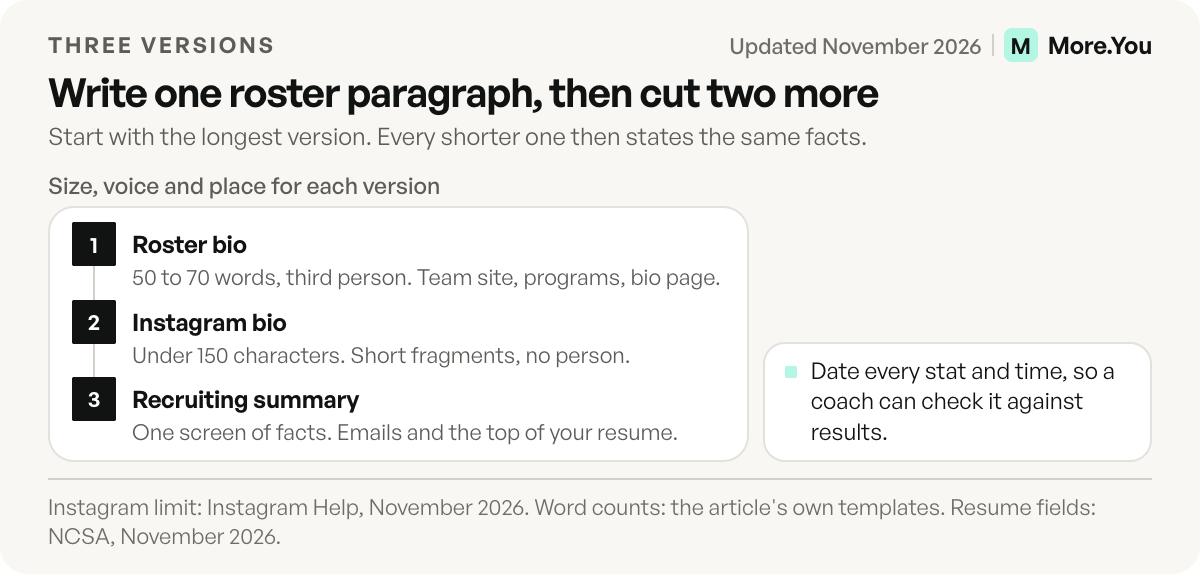
You need the same facts in three shapes. Start with the roster paragraph, since it holds the most detail. Then cut it for Instagram and turn it into short lines for coaches, so every version states the same stats.
| Format | Size | Written as | Used on |
|---|---|---|---|
| Instagram bio | Under 150 characters | Short fragments | Your Instagram profile |
| Roster bio | One paragraph, 50 to 70 words in the templates below | Third person | Team website, game programs, media guides, your bio page about text |
| Recruiting summary | One screen, structured lines | Facts only | Emails to coaches, recruiting profiles, the top of your athletic resume |
The recruiting version is the strictest. NCSA’s guide to athletic resumes lists your graduation year, height and weight, position, stats and measurables, GPA, team history, honors, contact details and a link to your highlight video.
6 athlete Instagram bio templates by sport and level
We wrote these six bios for this guide. Swap the brackets for your own details. To test the limit, we put a long sample in each bracket, such as “Westlake High School” or “All-Conference First Team”, and counted every character, line breaks included. The longest version is 149 characters, inside Instagram’s cap.
High school recruit
Coaches search by class year and position, so both go on line one.
[Sport] | [Position] | Class of [Year]
[High School], [City], [State]
[GPA] GPA | [Key stat]
Highlight film and profile below
College athlete
Name the program and one honor, then send fans to the schedule.
[Position] at [University] [Sport]
[Major] major from [Hometown]
[Honor] [Year]
Schedule, camps and codes below
Pro or national team athlete
At this level the team name does the work, so add partners and a contact route for brands.
[Position] for [Team]
[Country] national team | [Title]
Partners: [Brand], [Brand]
Merch, schedule and contact below
Runner, swimmer or other timed sport
Timed sports have a number everyone understands: your personal best.
[Event] runner | PB [Time]
Training for [Championship]
Coached by [Coach] at [Club]
Race calendar and gear codes below
Fighter or combat sport
Your record and weight class are the first things a promoter or fan checks.
Pro [Discipline] fighter | [Record]
[Weight class] | [Gym], [City]
Next fight: [Date]
Tickets and bookings below
Athlete who coaches
If lessons or camps pay your bills, lead with your playing level and end on the booking.
Former [Level] [Sport] player
Private lessons and camps in [City]
[Credential]
Book a session below
For more profile lines outside sport, see the Instagram bio ideas by niche.
How to put Athlete in your Instagram bio
The word Athlete under your name is Instagram’s category label, and only professional accounts can show it (BGR, August 2026). Switching costs nothing. You set it up in four steps:
- Switch to a professional account. Open Settings, go to Account type and tools, and switch to a professional account (Instagram Help, checked November 2026). Pick Creator if you are an individual athlete. The Instagram creator account guide covers every tap.
- Choose Athlete as your category. Instagram asks for a category during the switch. Type “Athlete” and select it.
- Turn the label on. Go to Edit profile and open the profile display settings, where you can show or hide the category label (Instagram Help, checked November 2026). Menu names change between app versions, so look for Category or Profile display.
- Check your profile. The label appears under your profile picture as its own line, separate from the bio text you write.
One trade-off matters for recruits. A professional account is public, and BGR notes it cannot be set to private. If you are under 18, talk to a parent or coach before you switch, and keep your school schedule and home location out of posts and the bio.
Roster bio templates for college and club teams
A roster bio is the paragraph on your team’s website, in the game program and in the media guide. It is written in third person, because sports information staff and reporters copy it straight into programs and stories. Each template below ran 54 to 67 words when we filled it with sample details.
College roster bio
[Name] is a [class] [position] from [Hometown], [State]. Before [University], [Name] played at [High School], where [Name] [high school achievement]. In [Season], [Name] [stat line] and was named [honor]. [Name] is a [major] major and plans to [career goal]. Off the court, [Name] [one fun fact].Club or pro team bio
[Name] joined [Team] in [Year] from [Previous club]. The [age]-year-old [position] has made [number] appearances for the club and [key stat]. [Name] has [number] caps for [Country] and won [title] in [year]. Outside the game, [Name] runs [camp, charity or project] in [City].Keep the newest season first and update it the week the season ends.
Recruiting bio templates for college coaches
A recruiting summary is the part of your bio a coach reads first, at the top of an email or profile. It lists facts in a fixed order, from class year to contact. The two templates follow the fields NCSA lists for athletic resumes.
Team sport recruiting summary
[Name] | Class of [Year] | [Position]
[Height], [Weight] | [High School], [City], [State] | Club: [Club team]
GPA [X.X] | Intended major: [Major]
[Season] stats: [Stat], [Stat], [Stat]
Honors: [Honor], [Honor]
Highlight video: [Link]
Contact: [Your email] | Parent: [Name, email] | Coach: [Name, email]
Timed sport recruiting summary
[Name] | Class of [Year] | [Event or events]
[High School], [City], [State] | Club: [Club]
PRs: [Event] [Time] ([Meet], [Month Year]), [Event] [Time] ([Meet], [Month Year])
GPA [X.X] | Intended major: [Major]
Honors: [State qualifier, conference title]
Race video and results: [Link]
Contact: [Your email] | Parent: [Name, email] | Coach: [Name, email]
List a coach who has agreed to take calls. Date every time and stat, so a coach can check it against meet results.
Build the athlete bio page behind your link
More.You is an AI-native link in bio platform. Every page publishes an llms.txt file and JSON-LD generated from the blocks on it. An events block adds Event markup, which puts the date and venue of your next game in a form that search engines and AI tools can parse.
Your Instagram bio says “below”, and the page behind the link has to deliver it. Paste your roster bio into the about text. More.You shows it on the page and uses it as the summary AI agents read. Then add a block for each promise the bio makes. All of these blocks come with the Free plan.
| Line in your bio | Block to add | Contents |
|---|---|---|
| ”Schedule below” | Events block | Each game, meet or fight as its own entry, with date and venue |
| ”Highlight film and profile below” | Links block | Your highlight reel and recruiting profile, each labeled |
| ”Codes below” | Links block | One labeled link per sponsor code |
| ”Merch below” | Products block | Jerseys, signed items, training plans |
| ”Book a session below” | Bookings block | Lessons, camps and brand calls |
| Questions you get every week | FAQ block | Camp ages, fan mail address, how brands contact you |
You can begin from one of the bio page templates, grouped by occupation, and swap in your own blocks. Sponsors usually ask for numbers next, and a media kit for creators shows what to put in one. New to bio pages? The guide on how a link in bio works covers the basics.
Put your bio and your schedule on one page
Your bio sends fans, coaches and sponsors to one link, and that page decides what they do next. Create your More.You page on the Free plan, put your roster paragraph in the about text, and add your next game as an events block at the top.
FAQ
How do I put Athlete on my Instagram bio?
Switch to a professional account in Settings under Account type and tools, choose Athlete as your category, and turn on the category label in your profile display settings. The label appears under your profile picture, separate from your bio text. Switching to a professional account is free.
What should an athlete bio include?
Include your sport and position or event, your team or school, one result that shows your level, one personal detail such as your major or hometown, and a next step for the reader. Recruits add their class year, GPA and a highlight video link.
How long should an athlete bio be?
Instagram allows up to 150 characters in a bio. A roster bio is one paragraph, and the templates in this guide run 50 to 70 words. A recruiting summary fits on one screen, and a full athletic resume should fit on one page.
Should I write my athlete bio in first or third person?
Roster bios, media guides and game programs use third person, because staff and reporters copy the text without changes. Instagram bios use short fragments with no person at all. An email to a coach can open in first person, followed by the recruiting summary.
What is the difference between an athlete bio and an athletic resume?
An athlete bio is a short summary for fans, media and sponsors. An athletic resume is a one-page document for college coaches with full stats, academics, team history and references. The recruiting summary in this guide is the top section of that resume.
Sources
- Instagram Help Center, Add a bio to your Instagram profile, checked November 2026
- Instagram Help Center, Set up a professional Instagram account, checked November 2026
- Instagram Help Center, Edit your business information on Instagram, checked November 2026
- BGR, What switching to a professional Instagram account actually does, August 2026
- NCSA, How to build an athletic resume, checked November 2026
- University of the District of Columbia Athletics, Student-Athlete Bio Form, checked November 2026
- More.You feature pages: more.you/features/templates, more.you/features/bio-page-blocks and more.you/features/ai-native-pages (November 2026)
Platform rules and prices checked November 2026.