
To create a WhatsApp link, write wa.me/ followed by your full phone number in international format: country code first, then the number, with no plus sign, leading zeros, brackets or dashes. A US number becomes wa.me/12125550123. Add ?text= and an encoded message to pre-fill the chat. Anyone who taps the link opens a chat with you on their phone or on WhatsApp Web.
Your customers already use WhatsApp. The friction is the step before the chat: copying your number, saving a contact, then finding you in the app. A wa.me link removes all three. One tap and the chat is open, with the first line already typed if you want it.
This guide gives you five link formats to copy, an encoding table for pre-filled messages, the WhatsApp Business short link and QR code, and where the link fits on Instagram, TikTok, Facebook and your bio page. Every rule below comes from WhatsApp’s and each app’s own help pages.
Key Takeaways
- The format is fixed: wa.me/ plus your full international number, digits only.
- Pre-filled text needs encoding: a space becomes %20, a comma %2C, a question mark %3F.
- WhatsApp Business builds the link for you: the app creates a short link and a QR code, with an optional default message of up to 140 characters.
- Anyone with the link can message you, so post a business number, not a personal one.
- Give the link a label and a place: a “Message us on WhatsApp” block on your bio page tells people why to tap.
How do you create a WhatsApp link?
A WhatsApp link is a click-to-chat address that opens a chat with one phone number. WhatsApp’s click to chat help page sets two conditions: the number is written in full international format, and it has an active WhatsApp account. The link works on phones and on WhatsApp Web (checked November 2026).
- Start with the country code. A US number, (212) 555-0123, becomes 12125550123.
- Drop the trunk zero. A UK mobile, 07700 900123, becomes 447700900123: the 0 after the country code goes.
- Remove everything that is not a digit. No plus sign, spaces, brackets or dashes.
- Put the digits after wa.me/ and test it. Open the link on your phone before you post it. The chat should open on your number.
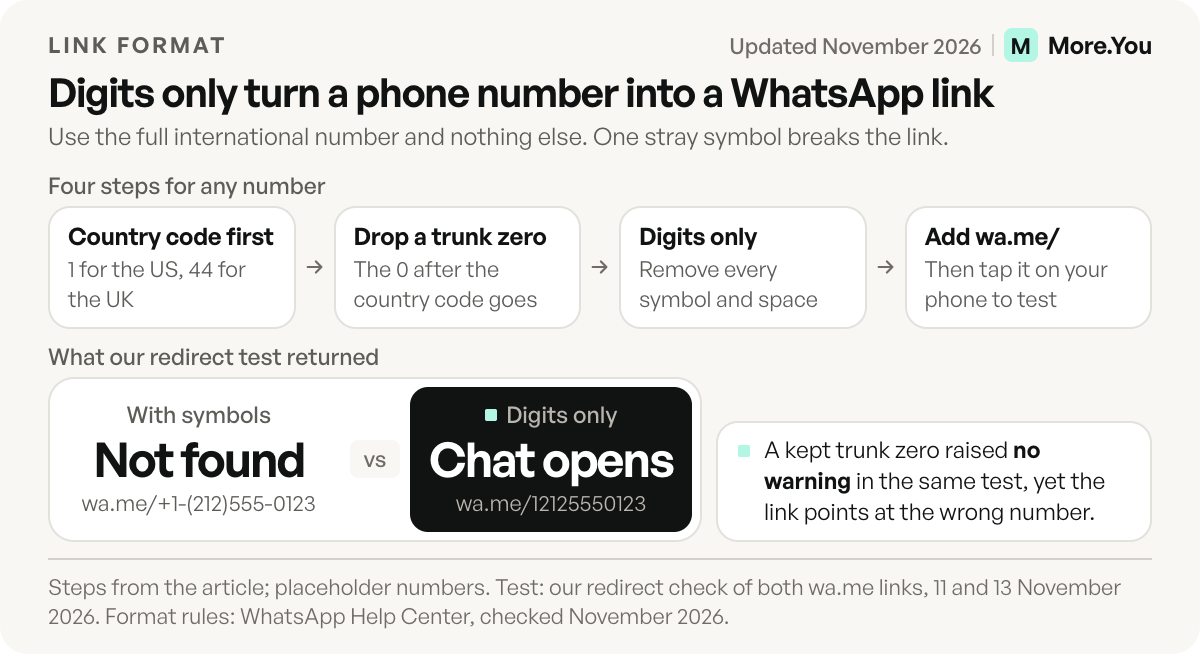
Both sample numbers above are placeholders, so use your own. In our test on 11 November 2026, the clean link redirected to WhatsApp’s send page with the number filled in. The same number written as +1-(212)555-0123 redirected to WhatsApp’s resolve page with a “not found” flag, and no chat opened. A repeat on 13 November 2026 gave the same result. When a link fails, check the formatting first.
5 WhatsApp link formats to copy
Each format below uses the placeholder number 12125550123. Swap in your digits and keep the rest.
1. Chat link
https://wa.me/12125550123This opens an empty chat with your number. Use it anywhere someone might want to ask you a question.
2. Chat link with a pre-filled message
https://wa.me/12125550123?text=Hi%2C%20is%20the%20blue%20vase%20still%20available%3FThis opens the chat with “Hi, is the blue vase still available?” already in the text box. The customer taps send. A pre-filled line tells you which post or product they came from.
3. Share link with no number
https://wa.me/?text=Friday%20slots%20are%20open%20this%20weekWith no number, WhatsApp shows the person a list of their contacts to send the message to. Use it when you want fans to forward an offer to a friend.
4. WhatsApp Business short link
https://wa.me/message/ABCDEFGHIJKLThe WhatsApp Business app creates this link for you. The code after /message/ is unique to your account, so copy it from the app instead of typing it.
5. Username link
https://wa.me/yourusernameWhatsApp’s page on contacting someone by username says a username creates a direct link in this form, wa.me/YourUsername. Usernames are rolling out gradually and might not be available to you yet (checked November 2026). A username key, if you add one, makes new contacts type it before their first message.
How to pre-fill a WhatsApp message
A pre-filled WhatsApp message is text that appears in the chat box when the link opens. WhatsApp’s format is ?text= after the number, followed by the message in URL-encoded form. Encoding swaps characters that a web address cannot carry for short codes.
| Character | Write it as |
|---|---|
| Space | %20 |
| Comma | %2C |
| Question mark | %3F |
| Exclamation mark | %21 |
| Colon | %3A |
| Ampersand (&) | %26 |
| Hash (#) | %23 |
| Line break | %0A |
The last three matter most. A browser reads an unencoded & as the start of a new part of the address and an unencoded # as a jump link, so the message stops short. “Hi! I saw your post & want to book a cut” becomes Hi%21%20I%20saw%20your%20post%20%26%20want%20to%20book%20a%20cut.
Write the message in the customer’s words, not yours: “Hi, I’d like to book a cut this Friday.” The customer is the one who sends it, so it should sound like them.
How to get a short link and QR code in WhatsApp Business
WhatsApp Business creates a short link for your account automatically when you set the account up, according to its short link help page. You find it in the app:
- Android: Tools > More options > Short link.
- iPhone: Tools tab > Short link.
Turn on the default message and type it with the pencil icon. Default messages have a 140-character limit, and customers can edit the message before they send it, per WhatsApp’s default message page (checked November 2026).
On the same screen, tap View QR code. WhatsApp’s QR code page says the code does not expire unless you reset it or delete your WhatsApp Business account. Print it on a counter card, a market stall sign or a packing slip. If you want the code to show every way to reach you, a QR code for your link in bio points at the whole page instead.
One detail helps desktop visitors. When someone opens a Business short link in a web browser, they see a page with your business details and a “Continue to chat” button.
How to get your WhatsApp link on iPhone or Android
Your WhatsApp link on a personal account is the wa.me address you write from your number, as in the steps above. WhatsApp’s help pages give personal accounts one more way to share a chat, the QR code in Settings:
- Android: More options > Settings, then tap the QR code next to your name.
- iPhone: Settings or your profile picture, then tap the QR code next to your name.
Tap the share icon to send the code to a contact or an app. WhatsApp’s QR code sharing page asks you to share it only with people you trust, because anyone who gets it can add you as a contact. For a code you print in public, use the Business code from the section above.
In the WhatsApp Business app, the link already exists under Tools > Short link. On a personal account, a username adds a third option once it reaches you: wa.me/YourUsername opens a chat without showing your number to people who do not have it saved.
Online link generators build the same wa.me address from the number you type. Some put it behind a short link on their own domain, which works only while that service does.
Where to put your WhatsApp link
Your WhatsApp link works anywhere a web link works, but each app has its own rules for where links go. Here are four common places for it.
| Place | How to add it | Rule to know |
|---|---|---|
| Instagram bio | Edit profile > Links > Add external link | Up to 5 links per profile (Instagram Help, checked November 2026) |
| Instagram profile button | Link a business or creator account to the WhatsApp Business app: Tools > Facebook & Instagram > Instagram | Adds a Click to WhatsApp button to your profile (WhatsApp Help) |
| TikTok bio | Profile > Edit profile > Links > Add | 1,000+ followers or a Verified Business Account (TikTok Support, checked November 2026) |
| Facebook Page | Switch to the Page, then Settings & privacy > Settings > Linked accounts > WhatsApp | Adds a WhatsApp button to the Page (Facebook Help) |
For the Instagram button and bio link step by step, see how to add WhatsApp to your Instagram bio. Instagram counts a wa.me link as one of your five, so it competes with your shop, your booking page and your latest post. Our guide to multiple links in your Instagram bio covers how to spend those slots.
TikTok’s help page also says it no longer supports links that open or log you into other social media apps, while links to those platforms’ websites still work. It does not say whether that covers WhatsApp, so tap the link from your profile after you save it. If it does not open the chat, put your bio page in the TikTok slot and the WhatsApp link on the page.
Put the WhatsApp link on your bio page
More.You is an AI-native link in bio platform. Each page ships its own llms.txt and agent manifest, which give AI assistants a readable version of the page your visitors see.
A link in bio page fixes the two weak points of a bare WhatsApp link: no label and no context. On a bio page, the link becomes a block that says what tapping it does, sitting next to the thing people want to ask about.
- Label the action, not the number. “Message us on WhatsApp” or “Ask about sizes on WhatsApp” tells people what happens when they tap.
- Place it next to what it supports. A shop puts it under an opening-hours block, which shows a live open-now state. A stylist puts it beside the bookings block.
- Pin it when it matters. Any link can be pinned to the top of the page, for example during a sale week.
- Print one code for everything. The page’s own QR code sends people to your hours, bookings and WhatsApp in one scan.
Basic analytics on the Free plan show views, clicks and click-through rate per block, with 30 days of history, so you can see how many visitors tapped WhatsApp. On Pro, attribution ties each click to the post that sent it. For a local business, link in bio for small business covers which blocks to stack around it.
Mistakes that break a WhatsApp link
Most broken WhatsApp links fail for one of five reasons.
- Symbols in the number. A plus sign, spaces, brackets or dashes break the link, as the test above showed.
- A kept trunk zero. 4407700900123 is not the same number as 447700900123. In our 13 November test this link went to the send page with no warning, so a test tap on your phone is the way to catch it.
- No WhatsApp account on the number. Click to chat needs an active account, so a landline with no WhatsApp opens nothing.
- Unencoded symbols in the message. An & or # cuts the pre-filled text short.
- A personal number in public. WhatsApp’s short link page puts it plainly: “Anyone who has access to the link will be able to message you.” Use a business number for links you post.
A WhatsApp link turns “how do I reach you?” into one tap. Add it as a link block next to your hours or bookings, and basic analytics show how many visitors tapped it. Create your More.You page and put the chat button where customers already look.
FAQ
What is a WhatsApp QR code?
A WhatsApp QR code is a square code that opens a chat with you when someone scans it. On a personal account it sits next to your name in Settings, and WhatsApp asks you to share it only with people you trust. In WhatsApp Business it sits under Tools > Short link, and it does not expire unless you reset it or delete the account.
Can I create a WhatsApp link without showing my phone number?
A click-to-chat link contains your number, so anyone who sees the link can read it. WhatsApp is rolling out usernames, which give you a wa.me link with a username in place of the digits. For business accounts, Meta’s developer documentation says a business username does not hide the business phone number (checked November 2026).
Why doesn’t my WhatsApp link open a chat?
Check the number first. It must be in full international format with digits only: no plus sign, no spaces, no dashes and no trunk zero after the country code. The number also needs an active WhatsApp account.
Can I add a WhatsApp link to my TikTok bio?
TikTok lets you add a website link once you have 1,000 followers or a Verified Business Account. Its help page also says it no longer supports links that open other social media apps, so test the wa.me link after you save it. If it does not open a chat, link your bio page and put WhatsApp there.
How long can a pre-filled WhatsApp message be?
A WhatsApp Business default message has a 140-character limit. For a hand-made wa.me link, keep the message to one short sentence the customer would send anyway.
Sources
- How to use click to chat (WhatsApp Help Center, November 2026)
- WhatsApp Business short links (WhatsApp Help Center, November 2026)
- WhatsApp Business default messages (WhatsApp Help Center, November 2026)
- WhatsApp Business QR codes (WhatsApp Help Center, November 2026)
- Linking WhatsApp Business to Instagram (WhatsApp Help Center, November 2026)
- About usernames and how to contact someone by username (WhatsApp Help Center, November 2026)
- How to share your WhatsApp QR code (WhatsApp Help Center, November 2026)
- Business usernames and business-scoped user IDs (Meta for Developers, November 2026)
- Add links to your Instagram profile (Instagram Help Center, November 2026)
- Adding a website link to your profile (TikTok Support, November 2026)
- Connect WhatsApp to your Facebook Page (Facebook Help Center, November 2026)
- More.You feature pages: more.you/features/bio-page-blocks, more.you/features/qr-sharing and more.you/features/analytics-attribution (November 2026)
Platform rules and prices checked November 2026.