
The best link in bio for Instagram depends on which Instagram job you need done. Instagram’s own five native links are enough for three evergreen destinations. Later suits teams that schedule there, Beacons and Stan Store suit sellers who want DM automation, Linktree is the familiar default, Milkshake is built on your phone, and a page with auto-pin and post attribution keeps your newest post on top and shows which post drove each click.
You post four Reels a week. Your bio link still points at last month’s launch, and when a follower comments “link?” you answer by hand. Price and themes matter less on Instagram than four jobs that only Instagram creates.
This guide sets the baseline first (what Instagram gives you for free), then scores seven options on those four jobs, with prices checked in November 2026. More.You publishes this blog and competes with these tools, so every number below names its source. It is for creators, small businesses and sellers who get most of their traffic from Instagram.
Key Takeaways
- Start from the free baseline. Instagram allows five links in your bio, but visitors see the first one plus a count.
- Judge tools on four Instagram jobs: newest post on top, replies in DMs, selling without a second tool, and knowing which post drove the click.
- Seller fees cost more than plans. Beacons takes 9% on its Free and Creator plans; Stan Store and Linktree Pro take 0% (November 2026).
- DM automation now ships inside link tools. Linktree, Beacons and Stan Store all bundle an Instagram auto-reply feature.
- Your bio link has a second reader. AI assistants read creator pages to answer “what does this person sell”, and a list of bare buttons tells them little.
What is the best link in bio for Instagram?
The best link in bio for Instagram is the one that matches your main Instagram job. If you have three or fewer destinations, Instagram’s native links are enough. If you sell, pick a tool with a low seller fee. If you post daily, pick one that puts your newest post on top. If you need proof, pick one with post-level click data.
A link in bio is one page that holds everything your profile can’t. If the term is new, what a link in bio is covers the basics in five minutes.
The baseline: what Instagram gives you for free
Instagram added support for up to five links in a bio in April 2023, for every account (techcrunch.com, November 2026). Instagram’s help center lists the feature for Android and iPhone, not for computers (help.instagram.com, November 2026). A paid Meta One plan raises the cap to 20 links, each with an image and a title, on a link page with its own URL (meta.com, November 2026).
The catch is the display. Your profile shows the first link and a count, and visitors tap to see the rest. Link one gets most of the attention.
So any tool you add has to do a job five native links can’t. Native links versus a bio page runs that decision in detail.
The four Instagram jobs to judge a tool on
These four jobs come from how Instagram works.
| Job | Why Instagram creates it | What to look for |
|---|---|---|
| Newest post on top | You post often, and the bio link goes stale between edits | A feed mirror or an automatic pin of the latest post |
| Replies in DMs | ”Comment LINK” posts send people to your DMs, not your bio | Built-in Instagram auto-replies, and their monthly cap |
| Selling without a second tool | Followers buy on a phone, from a tap, in seconds | Product or checkout blocks, and the seller fee |
| Knowing which post drove the click | Instagram reports profile taps, not which Reel sold the preset | Click data tied to a specific post |
A fifth job is newer. ChatGPT, Perplexity and shopping agents read creator pages to answer questions about the person. A page with structured data gives them something accurate to repeat.
The 7 options compared
| Option | Free plan | Paid from (monthly billing) | Instagram-specific feature | Fee on your sales |
|---|---|---|---|---|
| Instagram native links | Yes, built in | Not applicable | Five links, first one shown | Not applicable |
| Linktree | Yes | $9 ($7 billed annually) | Instagram auto-reply DMs, 1,000 a month on Free | 0% from Pro ($17) |
| Later Link in Bio | Listed in Later’s help center, with branding | $25 ($18.75 billed annually) | Clickable feed, up to 5 links per post on paid plans | No checkout listed |
| Beacons | Yes | $10 | Instagram DM automation | 9% on Free and Creator, 0% from $30 |
| Stan Store | 14-day trial | $29 | AutoDM | 0% on both plans |
| Milkshake | Yes | $2.99 (Lite) | Built and edited on your phone | 12% on Free and Lite, 9% on Pro, 7% on Pro+ |
| More.You | Yes, free forever | $7 ($5 billed annually) | Auto-pin of the newest post and post-level attribution, both on Pro | Not applicable |
Competitor prices are US prices from each vendor’s pricing page in November 2026. Processing fees from Stripe or PayPal apply on top of every seller fee.
1. Instagram native links
Five links, no tool, no cost, and no extra page to maintain. For a creator with a newsletter, a shop and a YouTube channel, that is enough.
The limits are scope. Native links can’t sell, capture an email, take a booking or report which post drove a click. Best for profiles with three or fewer destinations and nothing to measure.
2. Linktree
Linktree made the format familiar, so few visitors need it explained. Its free plan covers unlimited links, and every plan includes Instagram auto-reply DMs: 1,000 a month on Free, 1,500 on Starter, 2,500 on Pro and unlimited on Premium (linktr.ee help center, November 2026).
Plans run Free, Starter at $9, Pro at $17 and Premium at $35 a month, or $7, $14 and $30 billed annually (linktr.ee, November 2026). Pro is the plan that adds selling with 0% Linktree fees and removes Linktree branding. Best for creators who want a widely recognized page and a comment-to-DM flow from the same account.
3. Later Link in Bio
Later’s page mirrors your Instagram grid. Paid plans add up to five links to each feed post, Reels included, and the page can feature your latest linked post (later.com/pricing, November 2026). That solves the stale-link job directly: a follower taps the post they saw and lands where it pointed.
Later’s help center lists a Free plan that includes the page with Later branding, while the pricing page shows only paid plans with a 14-day trial. The Starter plan removes the branding at $25 a month, or $18.75 a month billed yearly (later.com/pricing, November 2026). For each plan’s limits, from click history to page count, see how Later’s Link in Bio works. Best for teams that already schedule Instagram in Later and want the bio page in the same place.
4. Beacons
Beacons bundles a link page with a store, email marketing, a media kit and Instagram DM automation. Its keyword-triggered DMs from Reels, posts and Stories are unlimited on every plan, Free included (beacons.ai/i/pricing, November 2026).
Free and Creator ($10 a month) take a 9% Beacons fee on sales; Creator Plus at $30 a month takes 0% (beacons.ai, November 2026). Best for creators who sell, pitch brands and want those tools on one login. Our comment-to-DM automation guide covers how those keyword flows work.
5. Stan Store
Stan Store is built around selling: digital products, courses, coaching, bookings and AutoDM on its Creator plan (stan.store, November 2026).
Creator costs $29 a month or $300 a year, and Creator Pro $99 a month or $948 a year (help.stan.store, November 2026). Both take 0% Stan fees, and new accounts get a 14-day free trial instead of a free plan. Best for creators whose Instagram exists to sell their own products.
6. Milkshake
Milkshake builds a small site from swipeable cards, entirely in a phone app: links, top picks, YouTube videos and a Sell card for digital files (milkshake.app, November 2026).
Paid plans start with Lite at $2.99 a month, and Pro costs $6.99 a month or $59.99 a year. Selling works on every plan. The fee is 12% on Free and Lite, 9% on Pro and 7% on Pro+, plus Stripe’s processing fee (milkshake.app/pricing, November 2026). Our Milkshake vs Linktree comparison sets those fees against Linktree’s flat plans. Best for creators who never open a laptop and want a page that looks like a set of Stories.
7. More.You
More.You is an AI-native link in bio platform. One page carries your links, products, events, bookings and FAQ. On Pro, auto-pin moves a scheduled post’s link to the top of the page when it goes live, for a window you set. Analytics show views and clicks per block, by source and device, and on Pro, which post drove them.
Every published page also ships a plain-text llms.txt, an agent manifest and structured data built from your blocks. AI assistants can read who you are and what you sell. The Free plan covers one page with every block type; Pro adds auto-pin, attribution and a custom domain at $5 a month billed annually, or $7 monthly (more.you, November 2026). Best for creators who post often and want proof of which content converts.
Which link in bio app for Instagram fits your account?
Match the tool to your main job, then check the fee on sales.
- Three or fewer destinations, nothing to sell: Instagram native links.
- You want the best-known page and DM replies on comments: Linktree.
- Your team already schedules in Later: Later Link in Bio.
- You sell and pitch brands from one account: Beacons.
- Instagram exists to sell your own products: Stan Store.
- You build everything on your phone: Milkshake.
- You post daily and want to know which post drove each click: More.You.
Whichever you pick, put the page in link slot one, since that is the link visitors see. If you post on more than Instagram, the wider roundup of the best link in bio tools compares options for TikTok and YouTube too.
How to tell if your bio link is working
Give any tool 30 days, then check three numbers: profile visits, link taps and clicks per destination. If taps are high and destination clicks are low, the page has too many choices. If one post drove most clicks, make more like it.
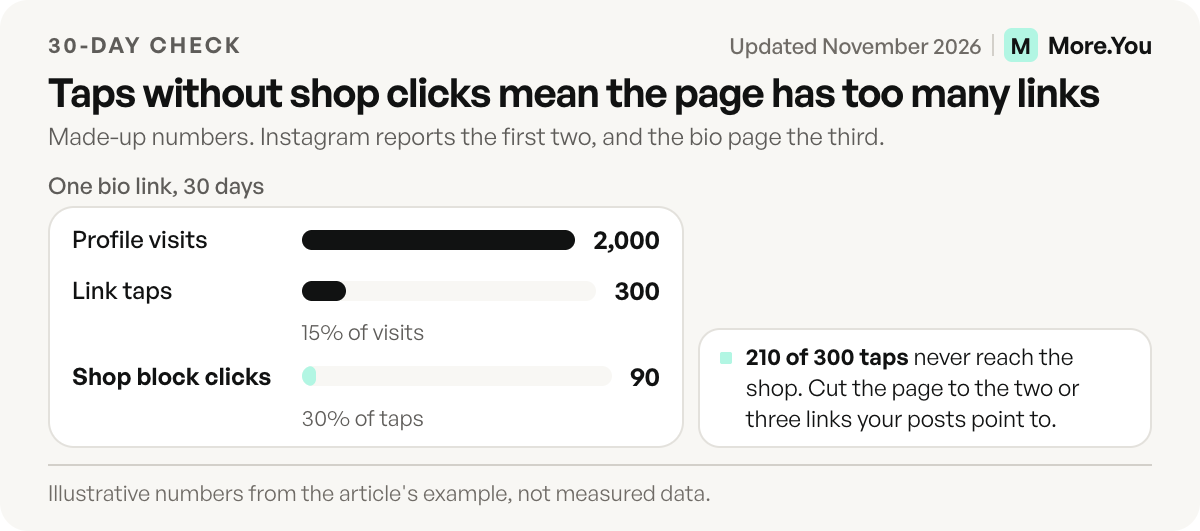
Example, with made-up numbers: 2,000 profile visits, 300 link taps and 90 clicks on the shop block. Visits to taps is 15%, so people do open the link. Taps to shop clicks is 30%, so 210 people opened the page and never reached the shop. Cut the page to the two or three links your posts point to, then compare the next 30 days.
Instagram reports the first two. The third needs a page that records clicks per block, and the most useful version ties each click to a post. Post attribution for creators explains how that link from post to click works.
Make Instagram traffic count
Your bio link has two readers now: the follower who tapped it, and the AI assistant asked about you later. Create your More.You page to give both something to act on.
Moving takes two steps. Paste your current link in bio address into import and confirm each proposed item, since nothing is saved until you do. Then add the block your posts point to most, such as a product, booking or music pre-save block, all on the Free plan. On Pro, auto-pin keeps your newest post on top, and attribution shows which post drove the clicks.
FAQ
What is the best free link in bio for Instagram?
Instagram’s native links are the best free option if you have three or fewer destinations and nothing to sell. Among tools, Linktree, Beacons, Milkshake and More.You all offer free plans. Compare what each free plan limits, such as the 9% seller fee on Beacons Free, before you commit.
Do I still need a link in bio tool if Instagram allows 5 links?
Only if you need a job native links can’t do. Five links can’t sell a product, capture an email, take a booking or show which post drove a click. If none of those matter to you, the native links are enough.
Which link in bio tool works with Instagram DMs?
Linktree, Beacons and Stan Store bundle Instagram auto-replies. Linktree caps them at 1,000 a month on its free plan and removes the cap on Premium. Stan Store includes AutoDM on its Creator plan, as of November 2026.
Can a link in bio show my latest Instagram post automatically?
Yes. Later Link in Bio mirrors your grid and can feature your latest linked post. On More.You Pro, auto-pin moves a scheduled post’s link to the top of your page when it goes live, for a set window.
Is Linktree or Later’s Link in Bio better?
Neither wins on every job. Linktree is a list you arrange, with Instagram auto-replies on every plan, from 1,000 a month on Free. Later’s Link in Bio mirrors your Instagram grid and fits teams that already schedule posts in Later. Pick the one that does your main Instagram job.
Sources
- Instagram support for up to five links in bio, techcrunch.com, April 2023, accessed November 2026
- Add a website to your Instagram profile, help.instagram.com, November 2026
- How to add a link page to your Instagram bio with Meta One, Meta Help Center, November 2026
- Linktree plans, prices and seller fees (linktr.ee/s/pricing, November 2026; US prices)
- Linktree Instagram auto-reply limits by plan (linktr.ee help center, November 2026)
- Later Link in Bio features and pricing (later.com/pricing, November 2026)
- Later help center: Getting Started With Later Social and Choose a Later Social Plan (help.later.com, November 2026)
- Beacons plans, seller fees and Instagram DM automations (beacons.ai/i/pricing, November 2026)
- Stan Store plans, fees and AutoDM (stan.store and help.stan.store, November 2026)
- Milkshake features and selling fees (milkshake.app/pricing, November 2026)
- More.You plans and features: more.you/pricing, more.you/features/auto-pin, more.you/features/analytics-attribution, more.you/features/ai-native-pages and more.you/features/import (November 2026)
Platform rules and prices checked November 2026.