
Yes, Linktree is free. The Free plan costs $0, never expires and gives you unlimited links, a QR code, basic themes and 28 days of analytics. What it leaves out: hiding the Linktree logo, selling paid products or bookings, and SEO settings. Those start on Pro. Starter, Pro and Premium are paid monthly or annually, and Pro and Premium offer a 7-day free trial (linktr.ee/s/pricing, November 2026).
You set up a Linktree in five minutes, add your links, and it works. Then you try to sell a $9 preset pack, or hide the logo, or check what happened last quarter, and the page asks you to upgrade. That moment is what this guide is for.
Below is what each Linktree tier includes today, read from Linktree’s own pricing page and help center in November 2026. You’ll also see Free and Pro side by side, the fee rules, and a simple test for whether free is enough for you.
Key Takeaways
- Linktree Free is free forever. $0, no card, unlimited links, QR code, base themes and 28 days of analytics.
- Paid selling starts on Pro. On Free and Starter you can share free digital products and free bookings only. Pro and Premium let you set a price, with 0% Linktree fees.
- The 12% fee is narrower than you think. On Linktree’s current table, the 12% Free-plan fee applies to inbox tips and paid messages, not to product sales.
- Stripe charges on every plan. Direct sales carry Stripe’s 2.9% + $0.30 per purchase whatever tier you are on.
- Free is enough if your page only routes traffic. Upgrade when you need to sell, remove the logo, or keep analytics longer than 28 days.
Is Linktree free to use?
Linktree is free to use with no time limit. The Free plan is listed at $0 in Linktree’s own structured data, and it includes unlimited links, social icons, link thumbnails, a QR code, the base theme set, one featured link and 28 days of analytics. You can run a working bio page on it indefinitely without entering a card.
The free tier is generous on the thing most people need: getting followers from one profile link to many destinations. If you are new to the format, what a link in bio is and how it works covers the basics first.
Linktree free vs Pro: what each plan includes
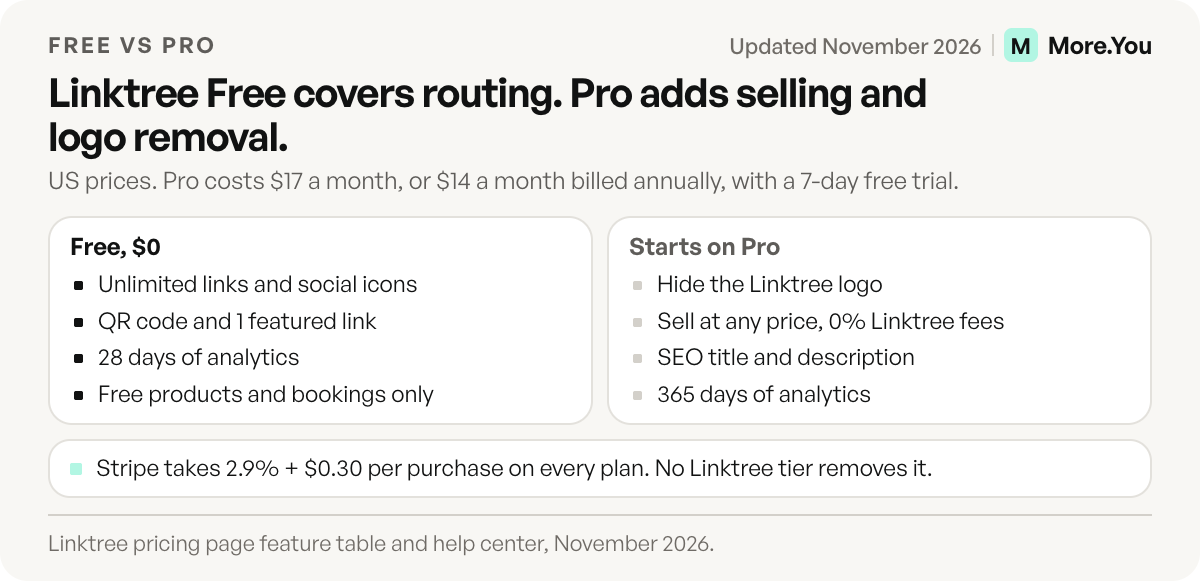
The Linktree free plan covers routing, and Pro adds selling, branding control and a year of analytics. Pro costs $17 billed monthly, or $14 a month billed annually, and comes with a 7-day free trial. The table shows where the line sits, per Linktree’s pricing data (linktr.ee/s/pricing, checked November 2026):
| Feature | Linktree Free | Linktree Pro |
|---|---|---|
| Price (US) | $0 | $17 a month, or $14 a month billed annually |
| Links | Unlimited | Unlimited |
| Featured links | 1 | Unlimited |
| QR code | Yes, with Linktree logo | Yes, custom colours and no logo |
| Themes | Base themes | Base and advanced themes |
| Analytics history | Last 28 days | Last 365 days |
| Link scheduling | No (Starter and up) | Yes |
| Hide Linktree logo | No | Yes |
| Sell paid digital products or bookings | No, free products and free bookings only | Set any price, 0% Linktree fees |
| SEO title and meta description | No | Yes |
| Email tool integrations (Mailchimp, Kit, Klaviyo) | No | Yes |
| Support response time | 48 hours | 12 hours |
Free covers routing: a person taps your bio link and lands on the right destination. Anything about earning, branding or measuring over time sits in a paid tier, and Pro is the first tier that covers all three.
How much does Linktree cost?
Linktree has four tiers: Free, Starter, Pro and Premium. Prices appear in your local currency and change by region. The table shows US pricing (linktr.ee/s/pricing, checked November 2026):
| Plan | Billed monthly | Billed annually (per month) | Annual saving |
|---|---|---|---|
| Free | $0 | $0 | n/a |
| Starter | $9 | $7 | 22% |
| Pro | $17 | $14 ($168 a year) | 18% |
| Premium | $35 | $30 ($360 a year) | 14% |
In the euro area, the same page shows Starter at €6.75 a month or €5.25 billed annually, Pro at €15 or €12, and Premium at €32 or €27.50 (linktr.ee/s/pricing, euro view, November 2026). Prices differ by country, so open the pricing page from your own region before you budget.
What each paid tier adds
- Starter adds link scheduling, animated links, redirects, unlimited featured links, link-level analytics, a custom QR code and 90 days of analytics history.
- Pro adds paid digital products and bookings with 0% Linktree fees, hiding the Linktree logo, custom designs, SEO settings, email and analytics integrations and 365 days of analytics.
- Premium adds link rules and routing, all-time analytics, CSV data export, unlimited Instagram auto-replies and a 4-hour support response time.
Does Linktree take a cut of sales on the free plan?
On the Free plan you cannot sell paid digital products or paid bookings at all. Linktree’s help center says selling digital products is available on Pro and Premium, in eligible countries. On those two plans the pricing table lists “set any price, 0% Linktree fees”, with a note that transaction and processing fees may still apply.
The 12% figure applies in one place. Linktree’s current table lists a 12% fee on Free for inbox tips and paid messages, and 0% on Starter, Pro and Premium.
The fee you pay on every plan
Linktree’s help center states that direct sales carry Stripe’s processing fee of 2.9% + $0.30 per purchase on every plan, and partner payouts carry $0.25 per payout. These go to Stripe, not Linktree, so no tier removes them. A $20 product on Pro nets you about $19.12 before tax.
If selling is your main goal, compare how tools handle checkout before you commit. Our guide to selling digital products from your link in bio walks through the options.
Can you remove the Linktree logo for free?
No. Linktree’s help center says hiding the logo from your page footer and from your QR code is available on Pro and Premium. On Free and Starter, the Linktree footer stays on your page and the Linktree logo stays in your QR code.
For most personal pages this does not matter. For a brand, a shop or a client page, the footer is often the first reason people upgrade.
Is Linktree free enough for you?
Use this test. Free is enough when all three are true:
- Your page only routes traffic. Links to your shop, videos, podcast or booking tool hosted somewhere else.
- You check analytics weekly, not yearly. 28 days covers “which link got clicks this month”. It does not cover year-on-year comparisons.
- The Linktree footer does not bother you. It appears on the page and in the QR code.
Upgrade when you want to sell from the page itself, when you need SEO settings so the page shows a proper title in search results, or when you report results to brands and need longer history. If you’re tracking clicks more seriously, see how to track link in bio clicks for what the numbers mean.
If the free tier no longer fits, these Linktree alternatives compare Beacons, Stan Store, Carrd and others on the same points. For the same breakdown of Beacons’ tiers, see is Beacons free, and for the fee math between the two, Beacons vs Linktree.
How More.You’s free plan compares
More.You is an AI-native link in bio platform. Each page ships its own llms.txt, an agent manifest and structured data built from its blocks, so AI agents can read it as well as people. More.You publishes this blog and competes with Linktree, so every number below names its source.
Linktree popularized the format, and its Free plan is a solid way to route followers. The More.You free plan is free forever with no card required. It includes one page with every block type, the full theme gallery, templates, QR codes, basic analytics and that AI-readable layer. Details are on the More.You pricing page.
| Linktree Free | More.You Free | |
|---|---|---|
| Links | Unlimited | All block types (links, social icons, products, events, bookings, FAQ) |
| QR code | Yes | Yes |
| Themes and templates | Base themes | Full theme gallery and templates |
| AI-readable output (llms.txt, JSON-LD) | Not listed on pricing page | Included on every page |
| Analytics | Last 28 days | Basic analytics (views and clicks, last 30 days) |
Two features sit on More.You’s Pro plan: auto-pin, which puts your newest post at the top of the page automatically, and post-level attribution, which shows which post drove which click.
You don’t have to rebuild anything to compare, and if you do switch, moving off Linktree step by step shows what to export before you cancel. Paste your current Linktree URL into More.You’s importer and it proposes your header, socials and links, then waits for you to confirm each one. Create your More.You page and compare both side by side before you pay for either.
FAQ
Is Linktree free forever?
Yes. The Free plan has no time limit and needs no card. You keep unlimited links, a QR code and 28 days of analytics for as long as you use it.
Does Linktree take 12% on the free plan?
Only on inbox tips and paid messages, per Linktree’s current pricing table. Paid digital products and paid bookings are not available on Free. They start on Pro, which lists 0% Linktree fees. Stripe’s 2.9% + $0.30 applies on every plan.
Can I sell on Linktree for free?
You can share free digital products and free bookings on the Free plan. Setting a price requires Pro or Premium, and only in countries where Linktree’s earn features are available.
Is Linktree Pro worth it?
Linktree Pro is worth it when you sell from the page, need to hide the Linktree logo, or report results over a full year. It adds paid products and bookings with 0% Linktree fees, SEO settings and 365 days of analytics. If your page only routes followers to links hosted elsewhere, the Free plan covers that job.
How much is Linktree Pro?
In the US, Pro costs $17 billed monthly or $14 a month billed annually, which is $168 a year. Pro and Premium both come with a 7-day free trial. Prices vary by country, so check the pricing page in your region (linktr.ee/s/pricing, checked November 2026).
Sources
- Linktree pricing page, plan prices (US and euro view), trial, feature table and fee notes (linktr.ee/s/pricing, November 2026)
- Linktree help center, overview of paid plan features (linktr.ee/help, November 2026)
- Linktree help center, transaction and processing fees (linktr.ee/help, November 2026)
- Linktree help center, hiding the Linktree logo (linktr.ee/help, November 2026)
- Linktree help center, selling digital products (linktr.ee/help, November 2026)
- More.You plans, import, blocks and AI-readable pages: more.you/pricing, more.you/features/import, more.you/features/bio-page-blocks and more.you/features/ai-native-pages (November 2026)
Platform rules and prices checked November 2026.