
Milkshake vs Linktree comes down to format and where you edit. Milkshake builds a small site of swipeable Cards in a phone app, with every design free and its branding removed for $2.99 a month. Linktree is one scrolling page of links that you edit in a browser or its apps, and its Pro plan sells paid products with 0% Linktree fees (milkshake.app and linktr.ee, November 2026).
Both turn the one link in your Instagram bio into something closer to a website. They charge sellers in opposite ways: Milkshake takes a percentage of every sale, while Linktree Pro charges a flat plan.
Every number below comes from each company’s own pages, checked in November 2026.
Key Takeaways
- Different formats. Milkshake is a set of swipeable Cards built in an app. Linktree is one scrolling page you edit in a browser or its apps.
- Milkshake costs less in US dollars. Lite is $2.99 a month, Pro $59.99 a year and Pro+ $99.99 a year. Linktree’s paid plans run $7, $14 and $30 a month billed annually.
- Sellers pay in opposite ways. Milkshake keeps 12%, 9% or 7% of each sale. Linktree Pro takes 0%, so it costs less than Milkshake Pro once you sell about $100 a month.
- Domains and editors split them. Milkshake Pro+ connects your own domain, which Linktree doesn’t support. Linktree adds admins on Pro, which Milkshake doesn’t offer.
Milkshake vs Linktree at a glance
Milkshake calls itself a free mobile website builder for creators, influencers and small businesses (milkshake.app, November 2026). Linktree is a link in bio page with selling and Instagram tools on top.
| Milkshake | Linktree (US prices) | |
|---|---|---|
| Format | Swipeable Cards, one full screen per topic | One scrolling page of links and blocks |
| Where you edit | App for iPhone, iPad, Android and Apple silicon Macs | Web browser, iOS and Android apps |
| Cheapest paid plan | Lite, $2.99/mo | Starter, $9/mo or $7/mo yearly |
| Remove branding | Lite, $2.99/mo | Pro, $17/mo or $14/mo yearly |
| Fee on your sales | 12% Free and Lite, 9% Pro, 7% Pro+ | 0% Linktree fee on Pro and Premium |
| Custom domain | Pro+, $99.99/yr | Not supported |
| Extra editors | Not offered | Admins on Pro and Premium |
| Best for | Phone-first creators and small shops that want a mini site | Sellers and teams who want a web editor and 0% platform fees |
Sources: milkshake.app/pricing, milkshake.app/vs/linktree, linktr.ee/s/pricing and linktr.ee/help, November 2026.
How do you build and edit Milkshake and Linktree?
Milkshake is an app for iPhone, iPad and Android that also runs on Macs with Apple silicon, and it has no browser editor. Linktree works in a web browser and in iOS and Android apps. Milkshake gives each topic a full-screen Card that visitors swipe like Instagram Stories, while Linktree stacks links and blocks on one scrolling page (milkshake.app and linktr.ee/s/pricing, November 2026).
Milkshake’s Card types cover a Splash page, About, Links, Top Picks, YouTube, Contact and Sell. Each Card takes a Look, a design template you recolor, and every Look is free on every plan. Linktree builds its page from links, collections and link apps; base themes are free, and custom designs and wallpaper images start on Pro (linktr.ee/s/pricing, November 2026). If the format is new to you, start with what a link in bio is.
Linktree adds admins with full access on Pro and Premium (linktr.ee/help, November 2026). Milkshake’s own comparison lists letting someone else edit as not offered (milkshake.app/vs/linktree, November 2026).
How much do Milkshake and Linktree cost?
Both have free plans. Milkshake’s paid plans are Lite at $2.99 a month, Pro at $6.99 a month or $59.99 a year, and Pro+ at $29.99 a quarter or $99.99 a year. From the US, Linktree lists Starter at $9, Pro at $17 and Premium at $35 a month, or $7, $14 and $30 a month billed annually (milkshake.app/pricing and linktr.ee/s/pricing, November 2026).
| Plan level | Milkshake | Linktree (US) |
|---|---|---|
| Free | $0 | $0 |
| Entry | Lite: $2.99/mo, monthly only | Starter: $9/mo, or $7/mo billed annually |
| Middle | Pro: $6.99/mo, or $59.99/yr | Pro: $17/mo, or $14/mo billed annually |
| Top | Pro+: $29.99 a quarter, or $99.99/yr | Premium: $35/mo, or $30/mo billed annually |
Milkshake bills through the App Store or Google Play, shows US dollars and says prices vary by country and platform. You cancel it in your phone’s subscription settings (Apple’s guide, Google Play’s guide). Linktree shows local prices: from Europe it listed €6.75, €15 and €32 a month. We break down every tier in is Linktree free.
Which one takes a cut when you sell?
Milkshake lets you sell on every plan, Free included, and keeps 12% of each sale on Free and Lite, 9% on Pro and 7% on Pro+. Linktree sells paid digital products, courses and bookings on Pro and Premium only, with 0% Linktree fees. Stripe’s processing fee applies on top with both tools (milkshake.app/sell and linktr.ee/s/pricing, November 2026).
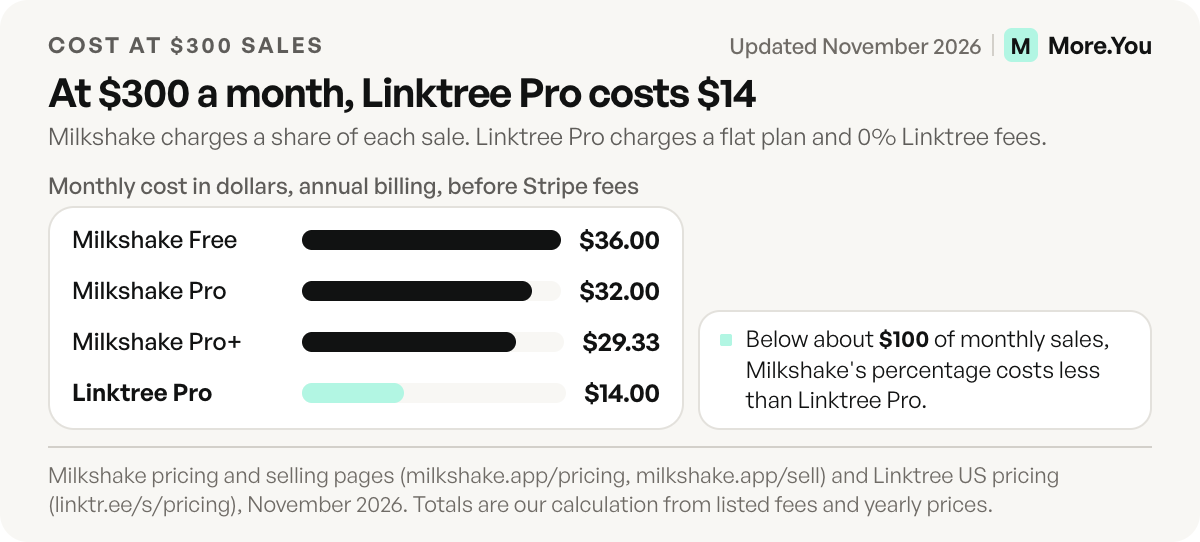
Monthly cost at four sales levels on annual billing, by our calculation, before Stripe’s fee:
| Monthly sales | Milkshake Free (12%) | Milkshake Pro (9% + $5) | Milkshake Pro+ (7% + $8.33) | Linktree Pro (0% + $14) |
|---|---|---|---|---|
| $50 | $6.00 | $9.50 | $11.83 | $14.00 |
| $100 | $12.00 | $14.00 | $15.33 | $14.00 |
| $300 | $36.00 | $32.00 | $29.33 | $14.00 |
| $1,000 | $120.00 | $95.00 | $78.33 | $14.00 |
Below about $100 a month in sales, Milkshake’s percentage costs less. Above it, Linktree Pro costs less, and the gap grows with every sale.
While Milkshake’s Sell Card is in beta, each item can cost $1 to $100 (milkshake.app/sell, November 2026). It sells digital items only: a file up to 100 MB, a link or a private note. Buyers pay by card, Apple Pay or Google Pay, and the money goes to your own Stripe account. Pro can also list $0 items, which suits lead magnets. On Linktree, Stripe takes 2.9% + $0.30 per purchase, and Free carries a 12% fee on tips and paid files sent through your Linktree inbox (linktr.ee/s/pricing, November 2026).
Custom domain, branding and analytics
Milkshake connects your own domain on Pro+, and Linktree’s help center says it doesn’t support custom domains. Milkshake drops its branding on Lite for $2.99 a month, Linktree from Pro. Free analytics keep 30 days on Milkshake and 28 on Linktree (milkshake.app/pricing and linktr.ee/help, November 2026).
Custom domain
Pro+ puts your Milkshake site on your own address for $99.99 a year plus the domain. Every Linktree keeps its linktr.ee address, though Starter and above can redirect the page to your website. See how to set up a custom domain for your link in bio.
Branding
Free Milkshake sites end on a card that reads “Build a site like this one, right from your phone” (msha.ke, November 2026). Lite removes it. Linktree Free shows its logo in the footer and the QR code until Pro (linktr.ee/help, November 2026).
Analytics
Milkshake counts Card views and link clicks. Pro keeps 365 days and adds CSV export, UTM campaign links and the Meta pixel, and Google Analytics needs Pro+. Linktree keeps 28 days on Free, 90 on Starter, 365 on Pro and all time on Premium, with referrer and location data from Pro and export on Premium (milkshake.app/pricing and linktr.ee/s/pricing, November 2026).
Where Milkshake wins
Milkshake wins when the page should feel like a small site built on your phone.
- A site, not a list. Each part of your business gets a full-screen Card, and every Look and photo background is free.
- Cheap branding removal. Lite costs $2.99 a month.
- Your own domain on Pro+, which Linktree doesn’t support.
- Selling with nothing upfront. The Sell Card works on the free plan.
- A Linktree importer. Paste a public Linktree URL and get draft Milkshake sites in seconds.
If you’re weighing a mini site against a full website, see link in bio vs a website.
Where Linktree wins
Linktree wins when you sell often, work from a computer or share the page.
- 0% platform fees. Pro and Premium sell products, courses and bookings with 0% Linktree fees, cheaper than Milkshake Pro’s cut above about $100 a month.
- Editing anywhere, with help. Browser or apps, plus admins on Pro.
- More on Free. A contact form and email and phone sign-ups. Milkshake’s contact form and mailing list need Pro.
- Instagram auto-replies on every plan, with 1,000 DMs a month on Free (linktr.ee/help, November 2026). Milkshake’s comparison lists this as not offered.
- Scheduling and a trial. Links go live and expire on a schedule from Starter, and Pro and Premium start with 7 days free.
A third option: More.You
More.You publishes this blog and competes with these tools, so every number below names its source. More.You is one scrollable page built from blocks: links, products, events, bookings, opening hours and an FAQ each get a labeled block.
Your bio link is read by people and by AI agents, so every page ships an llms.txt file, an agent manifest and structured data generated from its blocks. On Pro, Auto-Pin puts a scheduled post’s link on top for 24 hours, 3 days or 7 days, and attribution ties each click to the post that sent it.
A More.You product block links to wherever the product is sold. Sellers who want checkout on the page itself can pick Milkshake or Linktree Pro. Free is free forever with no card, and Pro is listed at $5 a month billed yearly or $7 monthly (more.you/pricing, November 2026). Our More.You vs Milkshake page covers the rest.
How to switch without losing clicks
- Export your analytics first. Milkshake exports on Pro, Linktree on Premium. Save the file before you cancel anything.
- Rebuild from your URL. Milkshake’s switch tool reads a public Linktree link. More.You import reads any provider’s URL and proposes your header, avatar, socials and links, writing nothing until you confirm each item.
- Test every link on a phone and a computer. Open each Milkshake Card in order and tap every button once.
- Update every bio and QR code, then cancel. On Instagram, open Edit profile, then Links, and replace the old address. A paid Milkshake plan ends in your App Store or Google Play subscriptions.
Which should you pick?
Pick Milkshake if you build on your phone, want a small multi-page site and sell little. Pick Linktree if you sell more than about $100 a month, work from a computer or share editing.
Use these checks to decide:
- You post from your phone all day. Milkshake edits in the app. Linktree also has iOS and Android apps, so this alone does not decide it.
- You sell one or two digital files. Milkshake’s Sell Card works on Free, with a 12% fee and Stripe’s fee.
- You sell every week. Run the cost table above with your own number. At $300 a month, Milkshake Pro costs $32.00 and Linktree Pro costs $14.00.
- A teammate edits your page. Linktree admins on Pro cover this. Milkshake lists it as not offered.
- You want your own web address. Milkshake Pro+ connects one. Linktree does not. For more options, compare link in bio tools for Instagram.
If you want one page that people and AI agents can both read, create your More.You page for free and import your current links from your old page’s URL.
FAQ
Is Milkshake better than Linktree?
It depends on the job. Milkshake suits a small multi-page site built on your phone, with every design free and branding off for $2.99 a month. Linktree suits sellers, computer users and teams, because Pro charges 0% Linktree fees and adds admins.
Is the Milkshake app free?
Yes. The free plan includes unlimited Cards, every Look, hosting at msha.ke/yourname, a QR code and 30 days of Insights. You can sell on Free, and Milkshake keeps 12% of each sale plus Stripe’s fee. Lite removes the Milkshake card at the end of your site for $2.99 a month.
Can you use Milkshake on a computer?
To edit, only on a Mac with Apple silicon. Milkshake’s FAQ says the app runs on those Macs, phones and iPads, and there is no browser editor. Visitors can open your site on any device, and on a computer the Cards stack in a scroll.
Does Linktree support custom domains?
No. Linktree’s help center says it doesn’t support custom domains, so every page stays on linktr.ee/yourusername. Starter and above can redirect the page to your own website instead. Milkshake connects your own domain on Pro+, at $99.99 a year plus the domain registration.
Sources
- Milkshake pricing, selling fees and Sell Card limits (milkshake.app/pricing and milkshake.app/sell, November 2026)
- Milkshake vs Linktree comparison and FAQ, published by Milkshake (milkshake.app/vs/linktree, November 2026)
- Milkshake Card types, Looks, platforms and switch tool (milkshake.app, November 2026)
- Milkshake free-plan card on live user pages (msha.ke, November 2026)
- Linktree pricing page, US and Europe prices and plan features (linktr.ee/s/pricing, November 2026)
- Linktree help center: custom domains, admins, paid plan features, transaction fees (linktr.ee/help, November 2026)
- Cancel a subscription from Apple (Apple Support)
- Cancel, pause, or change a subscription on Google Play (Google Play Help)
- More.You features and plans (more.you/features/bio-page-blocks, more.you/features/ai-native-pages, more.you/features/auto-pin and more.you/pricing, November 2026)
Platform rules and prices checked November 2026.