
Later Link in Bio, also called Linkin.bio, is the link in bio page built into the Later scheduler. It copies your Instagram and TikTok grid onto linkin.bio/yourname, and each linked post opens its page. Later’s help center lists it on every plan, Free included, with a Later banner. The pricing page shows only paid plans with a 14-day trial, and Starter removes the banner for $25 a month.
You post a Reel about a new product and write “link in bio” in the caption. The bio link still points at last week’s launch. Later’s answer is to make the bio page look like your feed, so a follower taps the same post they watched and lands on the product.
This explainer covers how the page works, how to set it up, what each plan adds, how it compares with Linktree and three ways to keep your newest post linked. Plan details come from Later’s own site and help center, read in November 2026.
Key Takeaways
- Later’s help center lists Link in Bio on every plan, Free too. The pricing page shows only paid plans with a 14-day trial. Starter removes the Later banner at $25 a month, or $18.75 a month billed yearly.
- The page mirrors your grid. You attach links to Instagram and TikTok posts, and each linked post becomes a tile followers can tap.
- Free keeps 3 months of click data. Starter and Growth keep 1 year, and Scale 2 years.
- Checkout sits outside its scope. Product links lead to your own store, and paid plans add Mavely affiliate links.
- There are three ways to keep a new post linked. Later mirrors the feed, Linktree is a list you edit or schedule, and More.You’s Auto-Pin, on Pro, pins a scheduled post’s link to the top. More.You publishes this blog.
What is Later Link in Bio?
Later’s Link in Bio is a mini web page behind the link in your Instagram or TikTok bio. The page lives at linkin.bio/yourname, which is why people search for Linkin.bio, and Later’s settings still use that name. It shows your linked posts as a clickable grid, and you build and manage it inside Later.
You pick the username that forms the URL, and you can change it once every 30 days (help.later.com, November 2026). If the format is new to you, what a link in bio does covers the basics.
How does Later’s Linkin.bio page work?
Later’s page works by attaching links to your posts. When you schedule an Instagram post in Later’s web or mobile app, you add the link it should open. For posts already published, Instagram and TikTok alike, you add links from the Link in Bio page on the web. Each linked post becomes a tile, and a follower taps the tile to reach your product, article or video.
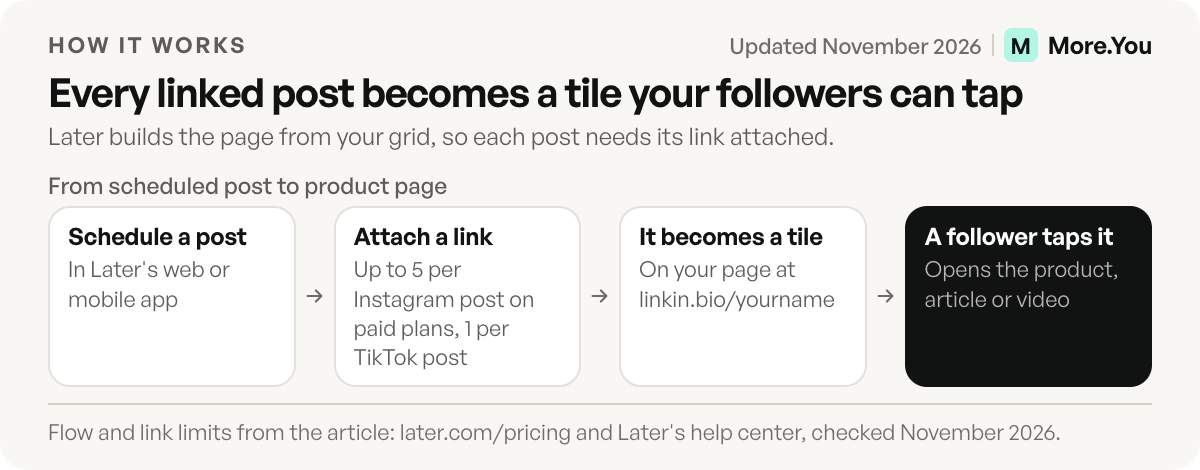
Above the grid, a featured slot shows your latest linked Instagram post, TikTok post or YouTube video (later.com/pricing, November 2026). Around it you can add unlimited buttons, social links, a Featured Banner, a Multi-Item Banner that lists products with prices, and an email form that sends sign-ups to Mailchimp or a CSV file (help.later.com, November 2026). Later’s paid plans list up to five links per Instagram post, Reels included, and one per TikTok post (later.com/pricing, November 2026).
Every plan tracks page views, post clicks, button clicks and click-through rate. With a connected business, creator or TikTok account, the Link in Bio page also shows how many clicks each linked post received (help.later.com, November 2026).
Set up the page in five steps
- On a computer, open app.later.com and click Link in Bio in the left menu.
- Choose a username. It becomes your page address.
- Click Create Your Page, then add buttons, social links and a theme.
- In the Later app on your phone, open your Link in Bio page, tap the share icon and tap Copy Link.
- In Instagram, tap Edit profile, then Links, then Add external link. Paste the address in the URL field and tap Done.
The steps follow Later’s own help article (help.later.com, November 2026).
Is Later Link in Bio free? Plans and pricing
Yes. Later’s help center lists Link in Bio on every plan, including Free (help.later.com, November 2026). The free page carries a Later-branded banner, keeps 3 months of click data and uses Later’s default UTM tags. Starter, at $25 a month or $18.75 a month billed yearly, removes the banner, keeps a year of click data and adds custom SEO titles and UTM values (later.com/pricing, November 2026). The pricing page shows only the paid plans, each with a 14-day free trial. The Free plan appears in the help center’s plan guide.
| Free | Starter | Growth | Scale | |
|---|---|---|---|---|
| Billed monthly | $0 | $25/mo | $50/mo | $110/mo |
| Billed yearly | $0 | $18.75/mo | $37.50/mo | $82.50/mo |
| Link in Bio pages | 1 | 1 | 2 | 6 |
| Later banner on the page | Yes | No | No | No |
| Link in Bio click history | 3 months | 1 year | 1 year | 2 years |
| Custom SEO title and UTM values | No | Yes | Yes | Yes |
| Posts you can schedule | 12 per profile a month | 30 per profile a month | 180 per profile a month | Unlimited |
Prices in USD from later.com/pricing, where yearly billing is listed as 25% off. Feature rows from Later’s plan availability guide on help.later.com, November 2026.
The price buys a scheduler as well as the page, with one profile on each network Later supports, including Instagram, TikTok, Threads and YouTube. If you only need a link in bio page, link-only tools start lower, as the comparison below shows.
What Later’s page does well
Later’s Link in Bio sits where you already plan. You attach the link while you schedule the post, so the page needs no second tool. The page also looks like your feed, which helps a follower who saw a post find the matching tile.
For brands, the blocks lean toward selling. The email form collects sign-ups on every plan, and paid plans connect Mavely to create affiliate links (later.com/pricing, November 2026). Google Analytics tracking covers traffic and e-commerce sales from the page. Later also imports an existing Linktree page, with your profile, social links and design (later.com/link-in-bio, November 2026).
What sits outside its scope
Checkout is not part of Later’s Link in Bio. Product tiles and banners link to your own store, and the sale happens there.
The page is built around the grid, which helps only for posts you attach links to, so linking stays a task for every post. Each social set gets one page, so a second brand page needs Growth or Scale.
Click data lives in Later’s web app. Open Analytics in the side menu and pick your Link in Bio page from the list at the top (help.later.com, November 2026). Free shows the last 3 months, so write down any numbers you want to keep.
How does Later Link in Bio compare with Linktree?
Linktree is a list of links you arrange yourself, while Later turns your post grid into the list. Linktree Free keeps 28 days of analytics and Later Free keeps 3 months. Later’s paid plans cost more because a scheduler comes with them.
| Later | Linktree | |
|---|---|---|
| Page format | Grid of linked posts, plus buttons and banners | List of links you arrange |
| Free plan | Later banner, 3 months of click data | Linktree logo, unlimited links, 28 days of analytics |
| First paid tier | Starter, $25/mo or $18.75/mo yearly, scheduler included | Starter, $9/mo or $7/mo yearly (US pricing) |
| Branding removed on | Starter | Pro, $17/mo or $14/mo yearly (US pricing) |
| Selling | No checkout; links to your store | Paid products and bookings from Pro, 0% Linktree fees |
| Keeping the newest post linked | Attach a link when you schedule | Edit the page, or schedule a link from Starter |
Sources: later.com/pricing, help.later.com and linktr.ee, November 2026. Linktree prices vary by country.
For each Linktree tier in detail, see is Linktree free.
Three ways to keep your newest post linked
A new post needs a working link in your bio the moment it goes live. Link in bio tools handle that in three ways. Later mirrors your feed, so each linked post becomes a tile. A static list, such as Linktree, waits for you to edit it or to release a scheduled link. More.You’s Auto-Pin, on Pro, moves a scheduled post’s link to the top of the page for a window you set. More.You publishes this blog and competes with these tools, so every number below names its source.
| Approach | Example | What you do for each post | What a visitor sees first | Trade-off |
|---|---|---|---|---|
| Mirror the feed | Later | Attach a link when you schedule, or on the web afterwards | The latest linked post, featured above the grid | Every post needs its link added |
| Edit a static list | Linktree | Edit the page, or set a scheduled link in advance on Starter and up | The order you last saved | The page goes stale when you skip an edit |
| Auto-pin | More.You | Nothing when the post goes live; the link pins itself | The newest post’s link, for 24 hours, 3 days or 7 days | On Pro; works with scheduled posts |
Each approach fits a different posting habit. If your team already schedules in Later, the grid adds no extra step. If your links change once a month, a list you edit is enough. If you post daily and want one page order with the newest post on top, auto-pin handles it without touching the page. How auto-pin works explains the pin window.
Later Link in Bio alternatives
These tools do the same job in other ways:
- Linktree: the most familiar list format. Free includes unlimited links and 28 days of analytics (linktr.ee, November 2026).
- Milkshake: a website of cards built on your phone. You can sell digital files on Free for a 12% fee (milkshake.app/pricing, November 2026).
- Beacons: a page with a store, media kit and email tools. Free sells unlimited digital products at a 9% seller fee (beacons.ai/i/pricing, November 2026).
- Lnk.Bio: unlimited links on Free, and a one-time $24.99 removes the branding (lnk.bio, November 2026).
- More.You: an AI-readable page on every plan, with llms.txt and structured data from your blocks, plus Auto-Pin and post-level attribution on Pro (more.you/pricing, November 2026).
For every free tier side by side, see 12 free link in bio plans compared.
How to switch from Later’s page to another tool
- Save what you need. Note your buttons and post links, and export your email sign-ups from Mailchimp or as a CSV.
- Import the page. On More.You, paste your linkin.bio address, and the link in bio import proposes your header, avatar, socials and links. Nothing is written until you confirm each item.
- Re-add the post links you still need. Post links belong to Later’s grid, so add the ones that matter as link blocks and pin the most important one.
- Update your bios. Change the link on Instagram and TikTok, and keep the Later page live for a week.
A page for both readers
Later’s page fits teams that already plan their posts in Later. Your bio link also has a second reader now, the AI assistant asked about you.
More.You is an AI-native link in bio platform. Each page carries an about text that visitors read as prose and AI agents read as the page summary. It also ships an llms.txt file and structured data built from your blocks, so an assistant that reads the page finds your products, events and podcast episodes as data.
Create your More.You page on the free plan, import your current links, and give people and AI agents a page they can act on.
FAQ
Is Later Link in Bio free?
Later’s help center says yes. It lists Link in Bio on every plan, including Free, with a Later-branded banner and 3 months of click data. The pricing page shows only the paid plans, each with a 14-day trial. Starter removes the banner at $25 a month, or $18.75 a month billed yearly, as of November 2026.
What is linkin.bio?
Linkin.bio is the address of Later’s link in bio pages. Each page lives at linkin.bio followed by the username you choose in Later. Later’s help center calls the product Link in Bio, and the older Linkin.bio name still appears in its page settings.
How many links can you add to a post in Later?
Later’s paid plans list up to five links per Instagram feed post, Reels included, and one link per TikTok post. You add Instagram links while scheduling in Later’s web or mobile app. Links for published Instagram and TikTok posts are added from the Link in Bio page on the web.
How do I set up Later Link in Bio?
On a computer, open app.later.com, click Link in Bio in the left menu, choose a username and click Create Your Page. Then copy the page link in the Later app and paste it into Instagram under Edit profile, Links and Add external link.
Can you remove the Later banner for free?
No. Later’s plan guide lists the bannerless page on Starter and up, so the Later-branded banner stays on a free page. Starter costs $25 a month, or $18.75 a month billed yearly, and also adds custom SEO titles and custom UTM values.
Sources
- Later plans, prices and Link in Bio features (later.com/pricing, November 2026)
- Later Link in Bio product page and FAQ (later.com/link-in-bio, November 2026)
- Later help center: Getting Started With Later Social, Choose a Later Social Plan, What is Link in Bio?, Link in Bio Features By Plan, Plan Availability for Later Social, Create a Link in Bio Page, Link in Bio Analytics and Later Glossary (help.later.com, November 2026)
- Linktree plan prices, analytics history and selling fees (linktr.ee, November 2026)
- Milkshake plans and selling fees (milkshake.app/pricing, November 2026)
- Beacons plans and seller fees (beacons.ai/i/pricing, November 2026)
- Lnk.Bio plans (lnk.bio/llms.txt, November 2026)
- More.You plans (more.you/pricing, November 2026)
- More.You Auto-Pin (more.you/features/auto-pin, November 2026)
- More.You AI-readable layer (more.you/features/ai-native-pages, November 2026)
- More.You import (more.you/features/import, November 2026)
Platform rules and prices checked November 2026.