
A Claude skill is a small text file, named SKILL.md, that gives Claude your rules for one repeatable task. Here are five free Claude skills examples for your link in bio page. One plans the blocks, one writes the button labels, one writes the about text, one writes the FAQ and one checks the page each week.
If you paste the same long prompt into Claude every time (your niche, your tone, “no emoji”), a skill stores those rules once. Type “FAQ for my page” and Claude follows them.
Below are the full text of all five skills, what each returns, the four install steps, and how to connect Claude to your page. New to bio pages? Start with what a link in bio is.
Key Takeaways
- Each skill is a short file you can read. SKILL.md opens with a name and a description. Claude loads the rest only when your request matches the description.
- Five skills cover the page. Plan the blocks, name the buttons, write the about text, write the FAQ, and check the page each week.
- Every skill uses only your facts. Each one asks for missing links, prices and dates instead of making them up.
- Skills write, connectors act. A skill holds your rules. A connector to your link in bio tool lets Claude apply the changes after you say yes.
- Install takes four steps. Turn on code execution, zip the folder, upload it in Claude, then turn the skill on.
What these Claude skills examples do
These Claude skills examples split the bio page into five jobs, one skill each, and every answer comes back in a fixed format.
| Skill | What you type | What you get back |
|---|---|---|
| bio-page-plan | ”Plan my bio page. I teach yoga online.” | 5 to 7 blocks in order, plus the links still missing |
| link-button-labels | ”Rename these links” and your current labels | 3 labels per link, with character counts |
| bio-page-about | ”Write my about text” and a few facts | About text, meta title and meta description, with counts |
| bio-page-faq | ”FAQ from these DMs” and the questions | 5 to 8 questions and answers, plus missing facts |
| bio-page-check | ”Check my bio page” and your page URL | Problems and fixes, then the top 3 |
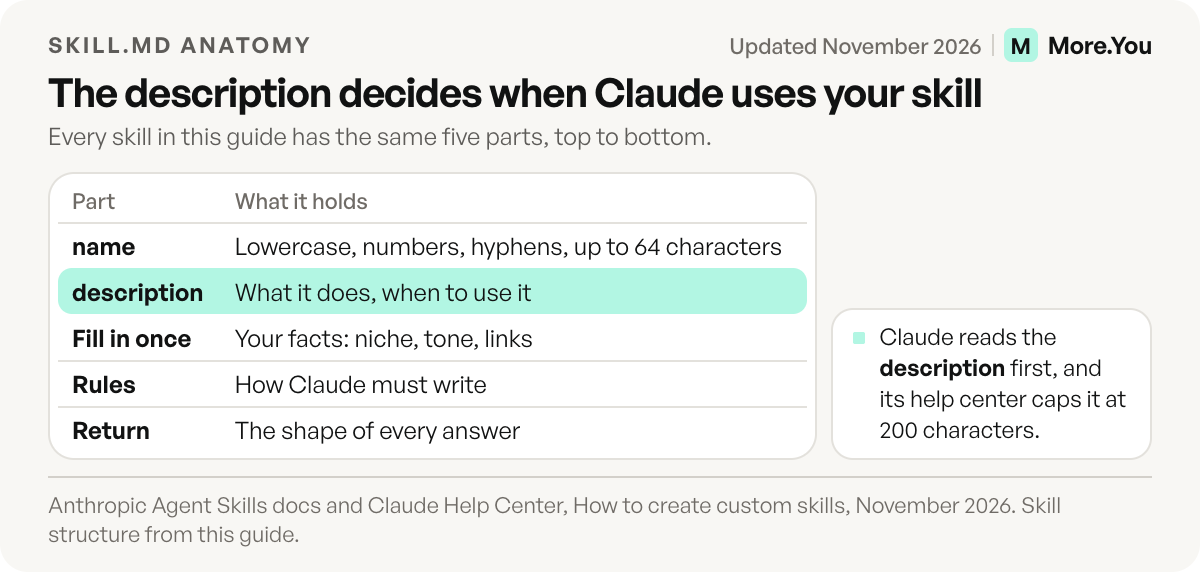
The top lines between the dashes hold the name and the description. Anthropic’s skills docs allow only lowercase letters, numbers and hyphens in the name, up to 64 characters, and the folder name must match it. Claude’s help center caps the description at 200 characters, because Claude reads it to decide when to use the skill (checked November 2026). The longest description below is 138 characters.
Below the dashes, “Fill in once” holds your facts, “Rules” says how Claude must write, and “Return” fixes the shape of every answer.
Skill 1: plan your bio page blocks
The planning skill turns one line about you into a block list, with your main action on top and the rest grouped, two habits from our link in bio best practices.
---
name: bio-page-plan
description: Plan a link in bio page. Use when someone asks what to put on their bio page, which blocks to add, or what order to use.
---

# Bio page plan

## Fill in once
- Who I am: [one line, e.g. potter who sells mugs and teaches classes]
- The one thing visitors should do first: [e.g. book a Saturday class]

## Rules
1. Put the one main action at the top.
2. Use 5 to 7 blocks. Merge or cut the rest.
3. Give each item a block type: link, product, event, booking, music pre-save, podcast episode, opening hours, FAQ or social icons.
4. Put older links under one heading instead of listing each one.
5. Never invent a link, price or date. Ask me for any you need.

## Return
A table with: order, block type, title, and one line on why it sits there.
Then a list of the links you still need from me.
Skill 2: write link button labels
The label skill rewrites every button so it says what the visitor gets. “Calendar” becomes “Book a 15-minute call”. It shows a character count next to each option.
---
name: link-button-labels
description: Write button labels and block titles for a link in bio page. Use when someone asks to name, rename or shorten the links on their bio page.
---

# Link button labels

## Fill in once
- My tone: [e.g. friendly and direct]
- Words to avoid: [e.g. click here, link, stuff]

## Rules
1. Start with a verb: Shop, Book, Listen, Watch, Get, Join.
2. Say what the visitor gets: "Book a 15-minute call", not "Calendar".
3. Aim for 30 characters or fewer.
4. No emoji unless I ask for them.
5. Keep product names, prices and dates exactly as I wrote them.

## Return
For each link: the old label, 3 new options with their character count, and your pick.
Skill 3: write the about text
The about skill writes two to four sentences of plain facts: who you are, what people can buy or book here, and where you are if it matters. A visitor gets the point at a glance, and an AI assistant can answer “who is this and what do they sell” from the same lines, the reader llms.txt files are written for.
---
name: bio-page-about
description: Write the about text, meta title and meta description for a bio page. Use when someone asks for an about section or page summary.
---

# Bio page about text

## Fill in once
- My name and what I do: [ ]
- What people can buy, book or follow on the page: [ ]
- Who it is for: [ ]
- Where I am, if it matters: [ ]

## Rules
1. Write 2 to 4 short sentences of plain facts.
2. Sentence one says my name and what I do.
3. Name what people can do on the page: buy, book, listen or join.
4. No hype words (amazing, best, world-class) and no emoji.
5. Use only facts I gave you. If one is missing, ask.
6. Meta title: 60 characters or fewer. Meta description: 155 characters or fewer.

## Return
The about text, the meta title and the meta description, each with its character count.
Example output for a made-up pottery studio in Lisbon:
| Field | Output | Characters |
|---|---|---|
| About text | Mira Studio makes stoneware mugs and bowls by hand in Lisbon. You can buy pieces on this page, with shipping to Portugal and Spain. Beginners can book a two-hour wheel class on Saturdays. | 187 |
| Meta title | Mira Studio: Handmade Mugs and Wheel Classes in Lisbon | 54 |
| Meta description | Stoneware mugs and bowls made by hand in Lisbon. Shop pieces with shipping to Portugal and Spain, or book a beginner wheel class on Saturdays. | 142 |
Skill 4: write the FAQ block
The FAQ skill turns questions from your DMs and comments into short answers for the page. Paste five to ten real questions. An FAQ in this shape can also ship as FAQ structured data, as our guide to structured data for creator pages explains.
---
name: bio-page-faq
description: Write FAQ questions and answers for a link in bio page. Use when someone pastes questions from DMs or comments, or asks for an FAQ block.
---

# Bio page FAQ

## Fill in once
- Facts to use: [prices, shipping, booking times, locations]

## Rules
1. Write 5 to 8 questions in the words visitors use.
2. Answer each one in 1 to 3 sentences. Put the answer first.
3. Use only facts I gave you. If a question needs a fact I did not give, list it and ask.
4. No links inside answers. Name the block instead: "Use the booking button above."
5. Merge questions that ask the same thing.

## Return
The FAQ as question and answer pairs, then a list of the facts you still need.
Skill 5: check your bio page every week
Run the check skill every Monday. It compares the page with what you promote this week and flags past events, sold-out products, old codes and blocks nobody clicks. Click-through rate per block is the number our guide to link in bio metrics tells you to watch.
---
name: bio-page-check
description: Review a link in bio page and list fixes. Use when someone asks to check, clean up or update their bio page, or pastes the links on it.
---

# Bio page check

## Fill in once
- My page URL: [ ]

## Rules
1. Ask what I promote this week before you start.
2. Read the page. If you cannot open it, ask me to paste the blocks.
3. Check that the top block matches what I promote this week.
4. Flag past events, sold-out products, old discount codes and duplicate links.
5. If I share clicks per block, flag blocks with no clicks in 30 days.
6. Do not change the page until I say yes to each fix.

## Return
A table: block, problem, fix. Then the 3 fixes that matter most.
For the posts that send people to the page, CreatorFlow, built by the same team as More.You, publishes 8 free Claude skills for Instagram posts, including Reel scripts, captions and carousels (checked November 2026).
How to install a Claude skill
Claude’s help center lists skills on the Free, Pro, Max, Ultra, Team and Enterprise plans, and skills need code execution turned on (checked November 2026). Then follow these four steps for each skill:
- Turn on code execution. In Settings, go to Capabilities. Switch on the option named “Code execution and file creation” (“Create and edit files” in newer versions).
- Make the folder. Create a folder with the exact skill name, for example bio-page-faq. Inside it, save the skill text as a file called SKILL.md.
- Zip the folder. The ZIP must hold the folder itself, not the loose file.
- Upload it. Open Customize, then Skills. Click the + button and choose “Create skill”. Pick “Upload a skill”, select your ZIP and switch the skill on.
If Claude answers without the skill, start your message with its name (“Use bio-page-faq”) or rewrite the description in the words you type. In Claude Code, the skills docs name a personal skills folder, so you skip the ZIP and save the file here:
~/.claude/skills/bio-page-faq/SKILL.mdRead every file before you upload it, ours included, as the help center advises for any skill. These five hold only text, no code, and open only your own page.
Connect Claude to your bio page
More.You is an AI-native link in bio platform. Every plan includes AI Control, a connector that lets Claude read your page, add or edit blocks by chat, and look up your page analytics.
Claude calls this a custom connector, and the Free Claude plan allows one (Claude help center, checked November 2026). To add the More.You AI Control connector:
- In Claude, open Customize, then Connectors. Click ”+ Add” and choose “Add custom connector”.
- Name it More.You and paste this server URL:
https://mcp.more.you/api- Sign in to your More.You account when Claude asks. The sign-in uses OAuth, so you never type your More.You password into the chat.
- In a new chat, press the + button, open Connectors and switch More.You on.
Then combine both in one message: “Run bio-page-check on my More.You page.” Claude reads the blocks, returns the fix table and waits for your yes. Free analytics show views and clicks per block for the last 30 days, enough for rule 5 of the check skill.
On More.You, the about text is the summary AI agents read, and the FAQ block ships as structured data, on the Free plan. Create your More.You page, connect Claude once, and run bio-page-check every Monday.
FAQ
What is a Claude skill?
It is a folder with one SKILL.md file inside. The file starts with a name and a description, then lists the instructions. Claude reads the description first and loads the full file only when your request matches it.
Can I use Claude skills on the free plan?
Yes. Claude’s help center lists skills on the Free, Pro, Max, Ultra, Team and Enterprise plans (checked November 2026). You need code execution turned on under Settings and Capabilities before the Skills section works.
Can a Claude skill change my link in bio page?
A skill only writes and checks text. To change the page itself, Claude needs a connector to your link in bio tool. More.You’s AI Control is one such connector: Claude can read your page and add or edit blocks after you ask.
Do these skills work outside Claude?
The files follow the open Agent Skills format, so tools that adopt that format can load them. In a chat app without skill support, paste the file at the start of the chat and type your request below it.
How do I make a skill fit my brand?
Fill in your niche, your tone and the words to avoid in the “Fill in once” section. Add one rule at a time and test it with three different requests. If Claude skips the skill, make its description more specific.
Sources
- Claude Help Center: Use skills in Claude (November 2026)
- Claude Help Center: How to create custom skills (November 2026)
- Claude Help Center: Get started with custom connectors using remote MCP (November 2026)
- Anthropic docs: Agent Skills overview (November 2026)
- Agent Skills: Specification (November 2026)
- Claude Code docs: Extend Claude with skills (November 2026)
- More.You feature pages: more.you/features/ai-control, more.you/features/ai-native-pages and more.you/features/analytics-attribution (November 2026)
- CreatorFlow free Claude skills: creatorflow.so/skills (November 2026)
Platform rules and prices checked November 2026.