An Instagram creator account is a free professional account type built for public figures, content producers, artists and influencers. It adds a professional dashboard with insights, a Contact button, a category label, ads and access to monetization tools such as Subscriptions and Gifts. You switch from a personal account in nine steps, keep every follower and post, and can switch back anytime.
One catch: a creator account can’t be private. If your personal account is private today, switching makes it public and accepts every pending follow request at once. Instagram’s own help page states the rule.
This guide covers what the account type changes, a side-by-side table of personal, creator and business features, the current switching steps checked against Instagram’s help center in November 2026, and how to set up the profile so the people who land on it have somewhere useful to go.
Key Takeaways
- A creator account is one of two professional types. Instagram recommends it for people and the business type for retailers, brands and service providers.
- It’s free, with no follower minimum. Monetization tools have their own thresholds: 500 followers for Gifts, 1,000 for Creator Marketplace, 10,000 for Subscriptions.
- Professional accounts can’t be private. Switching a private account makes it public.
- Creator and business share most features. The main differences are music access and the Shop catalog. Instagram’s partner page says action buttons are open to both types.
- The switch only matters if visitors can act. Insights tell you who arrives. Your bio link decides what they do next.
What is an Instagram creator account?
An Instagram creator account is a professional account set to the Creator type. Instagram describes Creator accounts as “best for public figures, content producers, artists and influencers,” and Business accounts as best for “retailers, local businesses, brands, organizations and service providers” (help.instagram.com, November 2026). Both types sit on the same professional toolkit.
Either type gets the professional dashboard with insights, a Contact button, a category label, ads and an inbox with Primary, General and Requests folders. Your posts and reels may also appear in search engine results outside Instagram. Instagram’s page says the category label matches the category of your linked Facebook Page, and anyone who taps Contact can see the details you add.
The category you pick (“Artist”, “Blogger”, “Musician”) does not decide whether you end up with a creator or business account. That choice is a separate step. To show or hide the category label and contact info later, tap Edit profile and open Profile display under Public business information.
Personal vs creator vs business: what each account gets
Most of the “creator vs business” debate shrinks once you put the three types in one table. Personal accounts lose the professional toolkit. The two professional types differ in three rows.
| Feature | Personal | Creator | Business |
|---|---|---|---|
| Can be set to private | Yes | No | No |
| Dashboard and insights | Only if the account is public | Yes | Yes |
| Contact button (email, phone, directions) | No | Yes | Yes |
| Category label under the photo | No | Yes | Yes |
| Licensed music library | Yes | Yes | Some business accounts get Meta’s Sound Collection instead |
| Action buttons (Book now, Reserve, Order food) | No | Yes, through a partner provider (partner page: “business and creator accounts”) | Yes, through a partner provider |
| Instagram Shop with a product catalog | No | Instagram’s shopping page lists a separate route for creators with a merchandise provider | Yes, for sellers of physical goods |
| Subscriptions, Gifts, Creator Marketplace | No | Yes, with follower thresholds | Yes, with follower thresholds |
| Ads, Meta Business Suite, Ads Manager | No | Yes | Yes |
| Third-party apps through Meta’s API (schedulers, analytics, inbox tools) | No | Yes | Yes |
| Up to 5 links in bio | Yes | Yes | Yes |
Sources: the Instagram Help Center pages and Meta developer documentation listed under Sources below, checked November 2026.
Two rows deserve a closer look. Music first: Instagram’s licensed library “is intended for personal, non-commercial use,” so “certain business accounts and certain types of posts do not have access to the library” (help.instagram.com, November 2026). Those accounts fall back to Sound Collection, which holds over 14,000 royalty-free songs and sounds.
Then the API row. Meta’s Instagram Platform “allows your app to access data for Instagram professional accounts, including business and creator accounts” (developers.facebook.com, November 2026). A personal account is the type that can’t connect. Instagram’s own in-app scheduling also launched for professional accounts first, back in November 2022 (techcrunch.com, November 2022).
How to switch to a creator account on Instagram
The switch takes about a minute in the app. These are the steps from Instagram’s setup page (help.instagram.com, November 2026):
- Tap Profile or your profile picture in the bottom right.
- Tap More (the three lines) to open Settings and activity.
- Below For professionals, tap Account type and tools.
- Select Switch to professional account.
- Pick the category that describes what you do.
- Tap Switch to professional account.
- Choose Creator.
- Tap Next.
- Complete the optional profile steps, or tap X to skip them.
After that, Instagram offers two optional steps: add contact details (or tap Don’t use my contact info) and connect a Facebook Page (or tap Skip). A Page makes sharing to Facebook and some ads and shopping tools easier. You don’t need one to run a creator account.
On a computer, the path is More, then Settings, then Account type and tools, then Switch to professional account, then Creator.
Already on a business account? Go to Account type and tools, tap Account type, then Switch account type, pick Creator and tap Switch. You can move between the two as often as you like.
Creator vs business account on Instagram: which should you pick?
Pick by what you sell. Neither type’s help page lists a reach or ranking benefit, so the table above leaves three deciding questions.
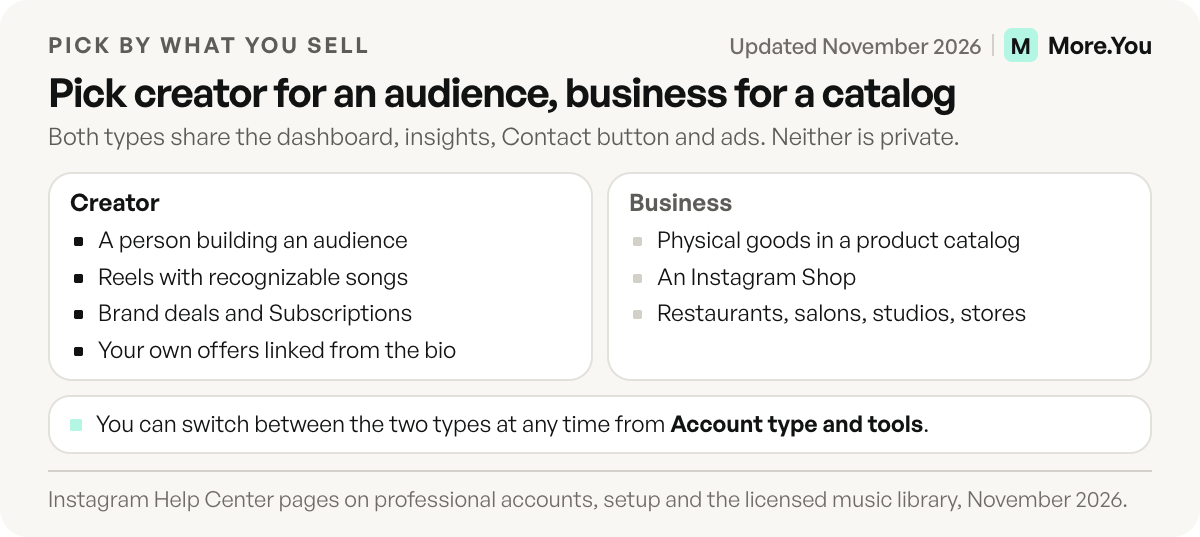
Pick Creator if you are a person building an audience, you post Reels with recognizable songs, and you earn through brand deals, Subscriptions, Gifts or your own offers linked from your bio. That covers most influencers, coaches, musicians, podcasters and educators.
Pick Business if you sell physical goods from a product catalog and want an Instagram Shop. Restaurants, salons, studios and stores sit here.
Either works if your goal is insights, a Contact button, third-party tools or a Book now, Reserve or Order food button. Instagram’s partner page says action buttons are available for business and creator accounts, while its setup steps are written for business accounts (checked November 2026). If the Action buttons row is missing on a creator account, switch the type and look again. Partners and steps are in our guide to Instagram action buttons.
A practical test for creators who also sell: if your products live on your own site or bio page rather than in a Meta catalog, the Business type gives you little that Creator doesn’t, and the music trade-off is real.
What changes when you switch, and what doesn’t
Your followers, posts, username and Highlights stay as they are. Three rules apply.
Privacy. “Professional accounts can’t be set to private,” and pending follow requests are accepted automatically when the account goes public (help.instagram.com, November 2026). Clear your requests first if you’d rather not accept them all.
Facebook sharing. If you link a Facebook Page, you can only share Instagram posts to Facebook through that Page.
Switching back. Returning to personal “removes the business and creator features from your profile” and drops access to Meta Business Suite and Ads Manager. A public personal account keeps its dashboard and insights (help.instagram.com, November 2026). Any connected Facebook Page is disconnected.
Set up the creator profile so the bio link is ready for traffic
Switching gives you insights. Insights show you how many people reached your profile. They don’t give those people anything to do. That’s the job of the next ten minutes.
Fill the visible fields first. Show the category label if it explains you faster than your name does; athletes who pick “Athlete” can copy a matching line from these athlete bio examples. Turn on the Contact button only with an inbox you check. Our Instagram profile optimization checklist walks through the name field, bio and highlights in the order visitors read them.
Decide what your one link is. Instagram lets every account add up to five bio links, but visitors see the first one and a count. The rest sit behind a tap. The trade-offs are laid out in our guide to multiple links in your Instagram bio. For most creators the first link should be a bio page that carries everything: latest post, products, bookings, events, FAQ.
Put the link in the right place. The steps for the native field, and the mistakes that make a link unclickable, are in how to add a link to your Instagram bio.
Plan for the monetization tools you’ll qualify for. If Subscriptions is on your roadmap at 10,000 followers, read how Instagram creator subscriptions work before you build tiers. What you sell inside Instagram and what you sell from your own page should not compete for the same fan.
Measure the link, not only the profile. Instagram insights stop at the profile visit and the link tap. They don’t tell you what happened on the page or which post sent the buyer. That gap is where post attribution earns its place.
Make the profile visit count
A creator account tells you who showed up. Your bio page decides whether they buy, book or subscribe, and it is the page AI assistants can read when someone asks about you. A More.You page carries your links, products, events, bookings and FAQ as blocks, with an llms.txt file and structured data on every plan. Basic views and clicks per block are free, and on Pro, Auto-Pin keeps your newest post on top while attribution ties each click to the post that drove it. Create your More.You page and give your new professional profile a link worth tapping.
FAQ
Is an Instagram creator account free?
Yes. Switching to a creator account costs nothing and has no follower minimum. The professional dashboard, insights, Contact button and category label are all included. Some monetization tools inside the account have their own requirements: Gifts need 500 followers, Creator Marketplace needs 1,000 and Subscriptions need 10,000, plus age and country rules.
Can a creator account on Instagram be private?
No. Instagram’s help center states that professional accounts, creator and business, can’t be set to private. If your personal account is private when you switch, it becomes public and all pending follow requests are accepted. To make the account private again, you first switch back to a personal account.
What is the difference between a personal and a creator account?
A personal account can be private but has no Contact button, category label, ads or monetization tools, and third-party apps can’t connect to it through Meta’s API. A creator account adds all of those and must stay public. A public personal account still gets a basic dashboard and insights.
Will I lose followers if I switch to a creator account?
No. Your followers, posts, Reels, Highlights and username stay exactly as they are. Only the tools on your profile change. You can switch between creator and business, or back to personal, at any time from Account type and tools.
Do I need a Facebook Page for a creator account?
No. Connecting a Facebook Page is an optional step during setup, and you can tap Skip. A Page helps with sharing posts to Facebook and some ads and shopping tools. Some third-party apps that log in through Facebook also ask for one.
Sources
- Instagram Help Center, About professional accounts on Instagram, November 2026
- Instagram Help Center, Set up a professional Instagram account, November 2026
- Instagram Help Center, How to switch an Instagram professional account to personal, November 2026
- Instagram Help Center, Access to the licensed music library, November 2026
- Instagram Help Center, About action buttons for Instagram Business profiles, November 2026
- Instagram Help Center, About action button partners on Instagram, November 2026
- Instagram Help Center, Shopping on Instagram, November 2026
- Instagram Help Center, Eligibility requirements for Instagram Subscriptions, November 2026
- Instagram Help Center, How to earn money on Instagram Gifts, November 2026
- Instagram Help Center, Eligibility requirements for Meta Creator Marketplace, November 2026
- Meta for Developers, Instagram Platform overview, November 2026
- TechCrunch, Instagram scheduling tool for professional accounts, November 2022
- Instagram Help Center, Add a website to your Instagram profile, November 2026
- More.You features: blocks (more.you/features/bio-page-blocks), AI-native pages (more.you/features/ai-native-pages), analytics and attribution (more.you/features/analytics-attribution), Auto-Pin (more.you/features/auto-pin), plans (more.you/pricing), November 2026
Platform rules and prices checked November 2026.