
Instagram highlight covers are the round images under your bio that label each highlight. Instagram publishes no cover size, so design on the 1080 x 1920 pixel Story canvas, put one icon or one word at the center, and save it to your phone. Then open the highlight, tap Edit highlight, then Edit cover, and pick the image from your camera roll. The cover does not have to be a Story.
A new visitor reads your profile from the top: photo, name, bio, link, then the row of circles. Five covers in five styles look like leftovers. Five covers in one color, with one icon each, read like a menu, and the visitor taps the one they came for.
This guide covers the size and the safe area, how to make a matching set in any design app, how to change the cover on a highlight you already have, icons against words against photos, and 30 highlight ideas by creator type with a cover icon for each.
Key Takeaways
- There is no official cover size. Design on 1080 x 1920 pixels, the size Meta recommends for Stories, and keep the icon in the center.
- The profile shows a small circle. One bold icon or one short word survives that crop. Small text and busy photos do not.
- Covers come from your camera roll. Tap Edit cover, then the photo icon. Nothing is posted to your Story.
- Pick one style for the whole row. Same background color, same icon set, same line weight.
- Give link highlights the clearest covers. Links, Shop, FAQ and Book are the circles that send people somewhere.
Instagram highlight cover size and safe area
Highlight covers have no official size from Instagram. Design them on a 1080 x 1920 pixel canvas, the full-screen Story size, and place the icon or word at the center. The profile shows each cover as a small circle cut from the center, so anything near the edges disappears and anything thin turns to a smudge.
Meta’s design requirements for Instagram Stories ads recommend a 9:16 ratio at 1080 x 1920 pixels (checked November 2026). Instagram’s own guide to using Stories describes highlights as “round covers under your profile bio” and suggests a clear name and a custom cover for each one.
| Spec | What to use | Why |
|---|---|---|
| Canvas | 1080 x 1920 px, 9:16 | The Story size Meta recommends, and the preset most design apps already have |
| Square canvas | 1080 x 1080 px | Works if your app has no Story preset; the circle still comes from the center |
| Icon area | About half the canvas width, centered | Our working rule: it leaves a margin inside the circle crop |
| Background | One solid color or a soft texture | Busy photos turn to noise at circle size |
| File | PNG or JPG saved to your phone | The cover picker reads your camera roll |
| Highlight name | One short word | Long names get cut off under the circle |
How to make Instagram highlight covers in 5 steps
A set of covers takes about as long as one Story graphic, because every cover is the same file with a different icon. Build one master cover, duplicate it for each highlight, swap the icon or word, and export them all at once. Any app that exports a 1080 x 1920 image works, including a slides app set to 9:16.
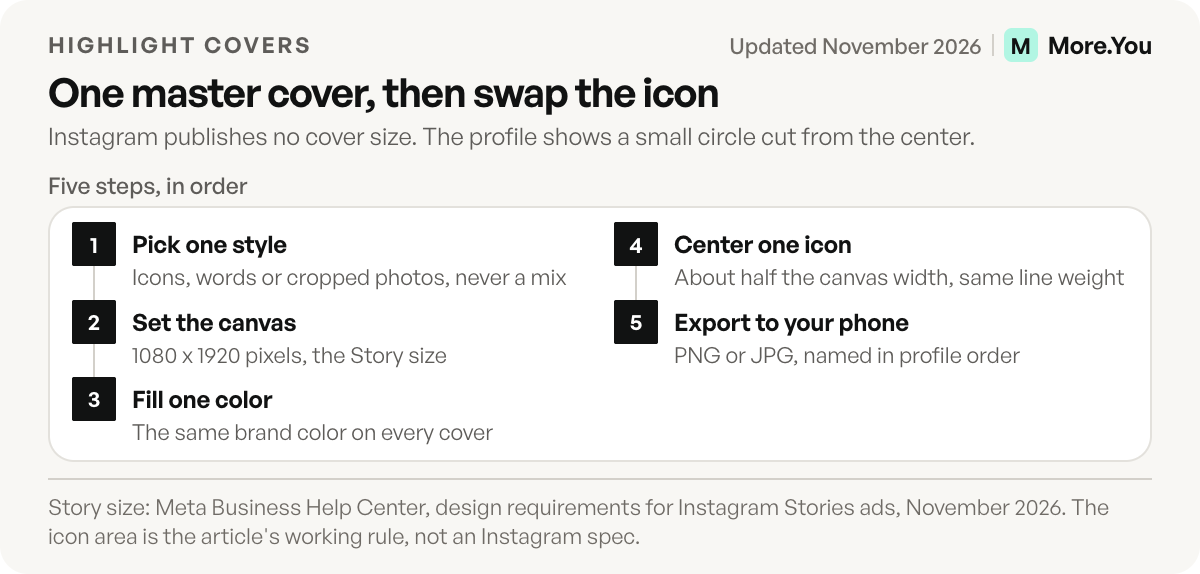
- Pick one style for the set. Icons, words or cropped photos. Mixing styles makes the row look unfinished.
- Set up a 1080 x 1920 canvas. Use your design app’s Story preset, or a custom size.
- Fill the background with one brand color. Use the same color on every cover, so the row reads as one set.
- Add one icon or one word in the center. Keep every icon the same size and the same line weight.
- Export each cover as a PNG or JPG to your camera roll. Name the files in the order they will sit on your profile.
Before you upload, zoom your design out until the icon is about the size of a fingernail. That is roughly how big it shows on a phone profile. If you cannot tell the icons apart at that size, make them bolder or switch to words.
An emoji on a solid background is the fastest icon set: it matches across covers and reads at small sizes.
How to change a highlight cover on Instagram
To change a highlight cover, open the highlight on your profile, tap More, then Edit highlight and Edit cover. Choose one of the frames Instagram offers from that highlight, or open your camera roll with the photo icon and select the cover you designed, then tap Done. The cover image does not need to be one of the stories inside the highlight.
- Open your profile and tap the highlight whose cover you want to replace.
- Tap the More button at the bottom right and choose Edit highlight. A long press on the highlight opens the same option.
- Tap Edit cover.
- Tap the photo icon and select the cover image you saved.
- Tap Done, then check the new cover on your profile.
Instagram’s help pages on adding stories to highlights and editing a highlight list the Edit highlight and Edit cover steps (checked November 2026). The photo icon for camera roll images is described in Hootsuite’s guide to highlight covers (blog.hootsuite.com, January 2023). A new highlight asks for a cover in the same Edit cover screen, so you can upload your designed cover from the start.
Instagram highlight icons, words or photos?
Instagram highlight icons work best for most creators, because a single symbol reads at the size the profile shows. Words work when no icon is obvious, such as Rates or Menu. Cropped photos suit personal brands and photographers, as long as the crop is tight on one subject. Pick one of the three for the whole row.
| Cover style | Works best for | Watch out for |
|---|---|---|
| Icons | Any niche with 4 or more highlights | Icons from different sets with different line weights |
| Words | Topics with no clear symbol: FAQ, Rates, Menu, Hours | More than one word, or thin fonts |
| Photos | Photographers, models, personal brands | Busy backgrounds and faces that sit off-center |
Whatever you pick, keep the highlight name short too. The name sits under the circle in small type, so “Shop” works where “Shop my favorite things” gets cut off. Your profile photo is a circle too, so give the covers a background color your photo does not use. Everything else between your name and your grid is in our seven-step guide to optimizing your profile.
30 Instagram highlights ideas by creator type
These 30 Instagram highlights ideas are grouped by creator type, each with a cover icon and what goes inside. Start with the six every creator can use, then add three or four from your niche. Put the ones a new visitor needs first at the left of the row.
Highlights every creator can use
| Highlight | Cover icon | What goes inside |
|---|---|---|
| Start here | Waving hand | Who you are and what you post, in 3 to 5 stories |
| Links | Chain link | Stories with link stickers to your bio page |
| FAQ | Question mark | Answers to the questions you get in DMs |
| Shop | Shopping bag | Products, prices and where to buy |
| Reviews | Star | Messages and results you have permission to share |
| Work with me | Envelope | Rates, past collaborations and how to reach you |
Fashion and beauty
| Highlight | Cover icon | What goes inside |
|---|---|---|
| Outfits | Hanger | Full looks, with each item tagged or linked |
| Routine | Mirror | Your morning and evening routine, step by step |
| Hauls | Box | Try-ons of new buys, with what you kept |
| Codes | Price tag | Discount codes and affiliate links, labeled as ads |
Food and recipes
| Highlight | Cover icon | What goes inside |
|---|---|---|
| Recipes | Whisk | Short recipe Stories with a link to the full version |
| Meal prep | Container | A week of prep in one sequence |
| Eat out | Fork and knife | Restaurant visits in your city |
| Kitchen | Frying pan | The tools you use, with links |
Fitness and wellness
| Highlight | Cover icon | What goes inside |
|---|---|---|
| Workouts | Dumbbell | Short routines people can follow at home |
| Form | Check mark | Clips that show how to do a move |
| Plans | Calendar | Your free and paid programs, with link stickers |
| Gear | Sneaker | Shoes, mats and bands you use |
Coaches and educators
| Highlight | Cover icon | What goes inside |
|---|---|---|
| Free guide | Down arrow | Your free download, with a link sticker |
| Lessons | Light bulb | One tip per story |
| Wins | Trophy | Client results you have permission to share |
| Book a call | Phone | How a call works and where to book it |
Musicians and podcasters
| Highlight | Cover icon | What goes inside |
|---|---|---|
| New music | Music note | The latest release, with a pre-save or listen link |
| Tour | Ticket | Dates, cities and ticket links |
| Episodes | Microphone | Clips from new episodes, with a listen link |
| Studio | Headphones | Behind the scenes of a recording |
Small businesses and local services
| Highlight | Cover icon | What goes inside |
|---|---|---|
| Prices | Receipt | Your menu or price list |
| Hours | Clock | Opening hours and holiday changes |
| Book | Calendar with a tick | How booking works, with a link sticker |
| New in | Sparkles | New products or services this month |
If you are still writing the line above the row, the Instagram bio ideas give 40 bios by niche that point to these highlights.
Covers for highlights that hold links
Covers for Links, Shop, FAQ and Book do more work than the rest, because those highlights hold Stories with link stickers. Instagram’s Stories guide says anyone watching a Story can tap its link sticker, and its help center says a highlighted story remains visible after the original 24 hours are over. Make these covers the easiest to read in the row.
More.You is an AI-native link in bio platform. An FAQ block on a More.You page publishes its questions and answers as FAQPage structured data, which ChatGPT and other assistants can read straight from the page. Match each link highlight to the block it sends people to:
| Highlight | Story inside | Block on your bio page |
|---|---|---|
| Links | A link sticker to your page | Links, with the newest one pinned to the top |
| Shop | A product with a link sticker | Product blocks |
| FAQ | One question and answer per story | An FAQ block |
| Book | How a session works | A booking block |
| Tour | Dates and cities | Event blocks |
| New music | A clip of the release | A music pre-save block |
Our guide to putting a link sticker on a Story walks through the sticker. If you post video on more than one app, a link in bio page for content creators puts today’s video, your series and your guide behind the one address your Links highlight points to. Check these highlights once a month, because a sticker that opens a sold-out product is a dead end that stays up for months.
One page behind every link highlight
Build the page your Links, Shop and FAQ covers point to, then design the covers to match its colors. Every block type is on the free plan, so an FAQ block can answer the same questions as your FAQ highlight and any link can be pinned to the top. Create your More.You page and give each link highlight a block to land on.
FAQ
What size should Instagram highlight covers be?
Instagram publishes no official cover size. Design on a 1080 x 1920 pixel canvas, the size Meta recommends for Stories, and center the icon or word, because the profile shows each cover as a small circle cut from the middle of the image.
Can you change a highlight cover without posting a Story?
Yes. Open the highlight, tap More, then Edit highlight and Edit cover, and tap the photo icon to open your camera roll. The cover image does not need to be one of the stories inside the highlight.
Why does my Instagram highlight cover look blurry?
A small export or thin details are the usual cause. Export at 1080 pixels wide or more, use one bold icon or one short word, and avoid photos with small text, which turns to noise at the size the profile shows.
What should a Links highlight cover look like?
Use a chain-link icon or the single word Links, and give it the strongest contrast in the row. Put it first or second from the left, so a visitor sees it next to your bio link without swiping.
Do highlight covers have to match?
No rule requires it. A row in one color with one icon style reads like a menu, so visitors find the highlight they want faster, while five unrelated styles make the profile look unfinished.
Sources
- How to use Instagram Stories, Instagram, November 2026
- Add a story to your Story Highlights, Instagram Help Center, November 2026
- Edit or delete a highlight on Instagram, Instagram Help Center, November 2026
- Design requirements for Instagram Stories ads, Meta Business Help Center, November 2026
- Changing a highlight cover with the photo icon (blog.hootsuite.com, January 2023)
- More.You blocks and FAQ structured data (more.you/features/bio-page-blocks and more.you/features/ai-native-pages, November 2026)
- More.You for content creators (more.you/for/content-creators, November 2026)
Platform rules and prices checked November 2026.