
The best affiliate marketing tools for creators cover five jobs: a program that pays you, a page that holds your links, a link tool for long or regional URLs, tracking that shows which post sold, and an app that makes the content. No single tool does all five. A working stack costs $0 to start: Amazon Associates, impact.com, a free bio page, Google’s URL builder and Canva’s free plan.
Affiliate tools serve two different buyers. Many, such as Rewardful, are software for brands that run an affiliate program. If you are the creator who posts the link and earns the commission, you need a different set, and most of it is free.
This guide sorts 10 tools by the job each one does for a social-first creator, with prices checked in November 2026. It ends with a $0 starter stack and the order to add paid tools once the commissions justify them.
Key Takeaways
- Pick tools by job, not by brand: programs pay you, a bio page holds the links, link tools fix long URLs, tracking shows which post sold, and content apps make the posts.
- The programs cost nothing to join: Amazon Associates, impact.com and LTK charge creators no fee, and ShopMy takes an 18% revenue share instead of a fee.
- Amazon’s cookie lasts 24 hours: a shopper who adds the item to the cart within that window still counts if they order within 89 days.
- Tag every link with UTM parameters: source, medium and campaign tell you which post and platform drove the sale.
- Disclose next to the link: the FTC says a disclosure that appears only on a profile page is likely to be missed.
What makes a good affiliate marketing tool for creators?
A good affiliate marketing tool for creators does one job well and costs less than the commissions it helps you earn. Judge each one on four points: what it costs at your current volume, whether it works on a phone (most of your traffic arrives from an app), whether it shows you clicks per link, and whether you can leave without breaking links already in old posts.
The table maps each job to the question it answers. Keep it next to you when a new tool asks for your card.
| Job | Question it answers | Picks in this guide |
|---|---|---|
| Programs and networks | Who pays me, and how much? | Amazon Associates, LTK, ShopMy, impact.com |
| Bio page | Where do my followers land? | More.You |
| Link tools | Does the link work in every country and app? | Geniuslink, Bitly |
| Tracking | Which post made the sale? | Google’s Campaign URL Builder |
| Content | What do I post to earn the click? | Canva, CapCut |
Affiliate programs and networks: who pays you
Affiliate programs set your commission, your cookie window and your payout rules, so pick them before any other tool. Start with the store your audience already buys from.
1. Amazon Associates
Amazon Associates is free to join and pays fixed rates by category. Amazon’s fee table lists 10% for luxury beauty, 4.5% for books and kitchen, 4% for fashion and most other categories, 3% for home, toys and beauty, and 1% for grocery and health (Amazon Associates fee schedule, checked November 2026). A session ends 24 hours after the click, or when the shopper orders. Items added to the cart in that window still count if ordered within 89 days (Amazon Associates program policies). You have 180 days from applying to refer three qualifying sales before Amazon reviews your account. Creators on YouTube, Instagram, TikTok, Facebook or Pinterest can also apply for a storefront through the Amazon Influencer Program.
2. LTK
LTK is a shopping app and affiliate network built for fashion, beauty and home creators. Joining is complimentary, and its application page asks for “an engaged social media following with over 5,000 followers on at least one platform” (company.shopltk.com, checked November 2026). The trade is a stricter bar for an audience that opens the app to shop. The steps are in how to become an LTK creator.
3. ShopMy
ShopMy turns product links from many brands into commission links under one dashboard. Its creator page lists commissions of 10% to 30% on sales you drive, paid every Friday by PayPal or Stripe (shopmy.us, checked November 2026). ShopMy charges no subscription. It keeps 18% of each commission, and the rate it displays is already what you earn after that share. Payouts need at least $11, and commissions stay pending for 30 to 120 days (guide.shopmy.us, checked November 2026).
4. impact.com
impact.com is a network where you apply to individual brand programs from one account. Its partner page says it “is free for creators. No platform fees. No subscription required.” (impact.com, checked November 2026). Use it for brands that do not sell on Amazon or through a storefront app, such as software, travel and subscription boxes.
Two platforms also pay inside their own apps. TikTok Shop’s US affiliate program asks for at least 1,000 followers and an age of 18 (seller-us.tiktok.com, checked November 2026). YouTube Shopping’s affiliate program needs a channel in the YouTube Partner Program in one of 18 countries, including the US and the UK (YouTube Help, checked November 2026). Commissions there stay inside the app, so your bio page still holds everything else. Affiliate storefronts compared sets ShopMy, LTK and Amazon side by side.
Where do your affiliate links live?
Your affiliate links live on a bio page, because Instagram allows up to five links on a profile (Instagram Help Center, checked November 2026) and most creators run more programs than that. A link in bio page puts every program, storefront and product on one page that you change without editing your profile.
5. More.You
More.You is an AI-native link in bio platform. Each page ships its own llms.txt, an agent manifest and structured data built from its blocks, so a product block also becomes Product data that AI assistants can read. More.You publishes this blog and competes with the other bio page tools named here, so every price in this section names its source.
For affiliate work, the useful parts are the product and link blocks, a pin to keep the current drop on top, and analytics that show views, clicks and CTR per block. Every outbound click carries UTM tags. On Pro ($5 a month billed annually or $7 billed monthly, more.you/pricing, checked November 2026), attribution ties each click to the post that sent it.
Other bio page tools take a commerce-first approach. Linktree Shops lets creators in the US add affiliate products from a curated marketplace (linktr.ee/features/shops, checked November 2026). Beacons starts free with a 9% transaction fee and charges $10 a month or $100 a year for its Creator plan (help.beacons.ai, checked November 2026). Stan Store’s Creator plan costs $29 a month or $300 a year. Creator Pro costs $99 a month or $948 a year and adds upsells, order bumps, payment plans and email flows. Stan says it charges no transaction fees, so you pay only the payment processor’s fee (stan.store, checked November 2026).
Link tools: shorten, localize and clean up URLs
Link tools solve two problems a bio page does not: a 300-character Amazon URL in a YouTube description, and a UK viewer landing on the US store where your tag earns nothing.
6. Geniuslink
Geniuslink sends each shopper to the right product in their local Amazon store and can open links in the shopper’s app. Pricing starts at $6 a month for 1,000 clicks, then $3.50 per extra 1,000 clicks, with a 14-day free trial that asks for a card (geniuslink.com, checked November 2026). It earns its fee once a real share of your clicks comes from outside your home country.
7. Bitly
Bitly shortens links and makes QR codes. The free plan covers 5 links and 2 QR codes a month. Core costs $10 a month, billed annually only as $120 a year (bitly.com, checked November 2026). Use it for spoken or printed links, such as a podcast read or a QR code at an event. On a bio page, the block label does that job for free.
Tracking: which post made the sale?
Affiliate dashboards report sales by link, not by the Reel or video that sent the shopper. UTM parameters close that gap: tags added to the end of a URL that tell analytics where the click came from.
8. Google’s Campaign URL Builder
Google’s Campaign URL Builder is a free form that adds the tags for you. Google Analytics reads source, medium and campaign as the core three, plus optional ones such as content and term (Google Analytics Help). A tagged link for one Reel looks like this:
https://example.com/serum?utm_source=instagram&utm_medium=reel&utm_campaign=winter-skincare&utm_content=reel-nov-12Keep one naming rule for every link (lowercase, hyphens, no spaces), or your reports split one source into three rows. The full method is in UTM parameters for creators. On a bio page that adds UTM tags itself, you tag only the link in your profile and let the page tag each outbound click. More.You’s analytics show clicks per block, by source, device and country, and Pro adds attribution to the post.
Content tools: make the post that earns the click
The post earns the click, so the last two picks are the apps you make it with.
9. Canva
Canva makes thumbnails, carousels, story frames and product collages. The free plan covers most creator work. Canva Pro is the paid plan, and its price depends on your country, so read it on canva.com/pricing (checked November 2026).
10. CapCut
CapCut edits short-form video on phone, desktop and web. It is free to try online with no credit card (capcut.com, checked November 2026). Use it for the try-on, the unboxing and the before-and-after that make a product link worth tapping.
The $0 affiliate starter stack
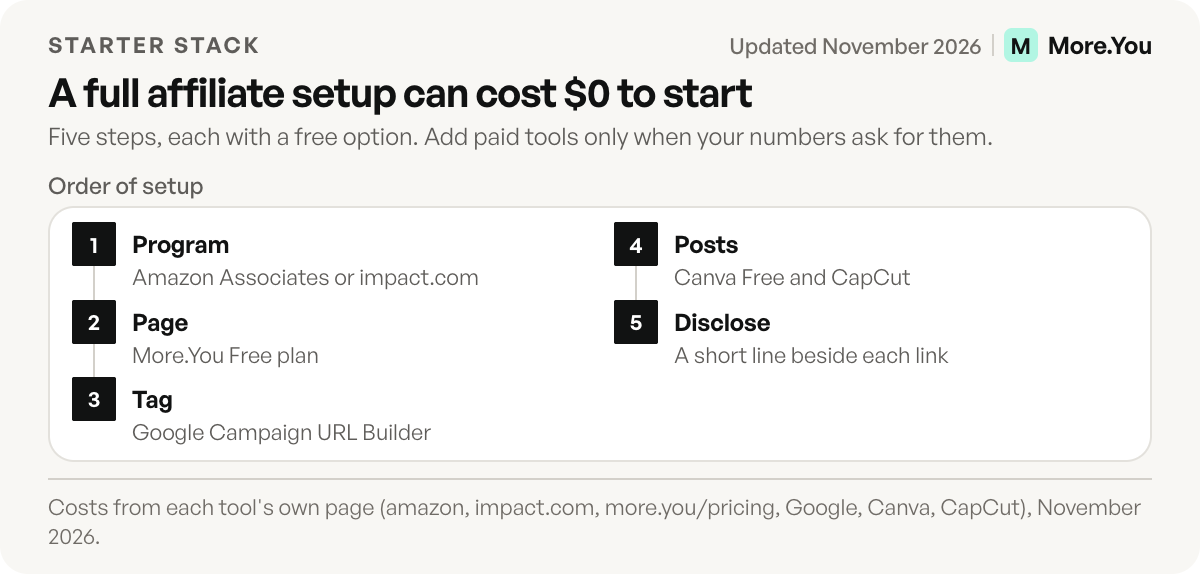
You can run a full affiliate setup without paying for any tool. Here is the order to set it up, with the cost of each step.
| Step | Tool | Cost to start |
|---|---|---|
| 1. Join a program | Amazon Associates, impact.com | $0 |
| 2. Build the page | More.You Free plan | $0 |
| 3. Tag the profile link | Google’s Campaign URL Builder | $0 |
| 4. Make the posts | Canva Free, CapCut | $0 |
| 5. Disclose | A short line beside each link | $0 |
| Total | $0 |
Add paid tools in this order, and only when the numbers ask for them. Add Geniuslink when your analytics show a real share of clicks from outside your home market. Add Canva Pro when its paid assets save you more time than they cost in your country. Apply to LTK or ShopMy when your audience asks where to buy your outfit or your shelf.
Disclosure is the step most stacks skip. The FTC’s guide for influencers says disclosures “are likely to be missed if they appear only on an ABOUT ME or profile page” (FTC Disclosures 101). Put the disclosure in the post and beside the link itself. Affiliate links in bio shows the wording and the placement.
Start with the page your followers land on. Add one block per program, label each with the product it sells, and pin the one your newest post talks about. Create your More.You page on the Free plan, and you see clicks per block from the first day.
FAQ
What is the best tool for affiliate marketing for beginners?
For a beginner, the best tool for affiliate marketing is a free program plus a free bio page. Amazon Associates costs nothing to join and covers most products your audience already buys. A bio page holds that link next to every other program you join later.
Are affiliate marketing tools free?
Most tools a creator needs have a free tier. Amazon Associates, impact.com and LTK charge creators no fee, Google’s Campaign URL Builder is free, and Canva and CapCut both offer free plans. Paid tools such as Geniuslink start at $6 a month.
How do I track affiliate sales by post?
Add UTM parameters to each link, with the platform as the source and the post as the campaign or content. Your affiliate dashboard reports the sale, and your analytics report which post sent the click. A bio page with post attribution links the two without tagging each link by hand.
Do I need a website for affiliate marketing?
No. Amazon Associates accepts social accounts, and LTK, ShopMy and impact.com all work with creators who publish on social apps. A bio page gives your links one home address without building or hosting a website.
Where should I disclose affiliate links?
Disclose in the post and next to the link itself. The FTC says a disclosure that appears only on a profile page is likely to be missed, so a single line in your bio is not enough on its own.
Sources
- Amazon Associates fee schedule (November 2026)
- Amazon Associates program policies (November 2026)
- Amazon Influencer Program eligibility (amazon.com/shop/info/influencers, November 2026)
- LTK creator application expectations (company.shopltk.com, November 2026)
- ShopMy creator commissions and payouts (shopmy.us and guide.shopmy.us, November 2026)
- impact.com for creators (impact.com/partners/influencer-partners, November 2026)
- TikTok Shop US affiliate requirements (seller-us.tiktok.com, November 2026)
- YouTube Shopping affiliate program eligibility (November 2026)
- Instagram Help Center: links on your profile (November 2026)
- Linktree Shops (linktr.ee/features/shops, November 2026)
- Beacons plans (help.beacons.ai, November 2026)
- Stan Store plans (help.stan.store, November 2026)
- Geniuslink pricing (geniuslink.com/pricing, November 2026)
- Bitly pricing (bitly.com/pages/pricing, November 2026)
- Google Analytics Help: URL builders and campaign parameters (November 2026)
- Google Campaign URL Builder (November 2026)
- Canva Pro pricing (canva.com, November 2026)
- CapCut (capcut.com, November 2026)
- FTC Disclosures 101 for Social Media Influencers (November 2026)
- More.You features and plans (more.you/features/bio-page-blocks, more.you/features/analytics-attribution, more.you/pricing, November 2026)
Platform rules and prices checked November 2026.