
A digital catalog is an online version of a product catalog: one link where buyers see your items, photos and prices, then tap through to buy or ask a question. Sellers build one in four main formats: a PDF or flipbook, a WhatsApp Business catalog, a Meta catalog for Facebook and Instagram shops, or a link page with product blocks. The right format depends on where your buyers find you.
You sell candles, prints or jewelry, and the same three messages arrive every day: “price?”, “what colors?”, “how do I order?”. Each answer is a photo, a number and a link typed by hand. A catalog answers all three before anyone asks.
This guide defines the term, compares the four formats with the rules each platform sets, and walks through six steps to build one. It is written for small sellers whose buyers arrive from Instagram, TikTok or WhatsApp.
Key Takeaways
- A catalog is one link to everything you sell: photos, prices, a short description and a way to buy or ask.
- Pick the format by where buyers find you: a PDF for trade buyers, WhatsApp for sellers who close in chat, a Meta catalog for Facebook and Instagram shops, a link page for social traffic.
- Meta shops send buyers to your own website: product links must sit on your business’s domain, and checkout moved to your website during 2025.
- WhatsApp reviews every item: an item appears only after approval, and a collection cannot be shared as its own link.
- A link page works as a free catalog: one product block per item, each linked to the place where the buyer pays.
What is a digital catalog?
A digital catalog is a list of your products that people open on a screen instead of paper. Each item has a name, at least one photo, usually a price and a short description, and a link or button that leads to the next step: buy, book or message the seller. In UK English the word is spelled catalogue.
A catalog differs from an online store in one way. A store also takes the payment and manages the order. A catalog shows what you sell and sends the buyer to wherever the sale happens, which can be your store, an Etsy listing, a payment link or a chat. Many small sellers need only the catalog, because they already take orders somewhere else.
Digital catalog formats compared
The four formats differ in where the buyer opens them, how the buyer pays, and what you must set up first.
| Format | Where buyers open it | How they buy | What you need first | Best for |
|---|---|---|---|---|
| PDF or flipbook | Email, a download, a website | Order form, email or links in the file | A design tool; a flipbook service for a page-turn view | Trade buyers, price lists, print runs |
| WhatsApp Business catalog | Your WhatsApp business profile and shared links | They message you in the chat | The WhatsApp Business app; WhatsApp approves each item | Sellers who close sales in chat |
| Meta catalog for Facebook and Instagram shops | Your shop on Facebook and Instagram, and catalog ads | Checkout on your own website | Commerce Manager, a business portfolio, product pages on your domain | Brands with an online store |
| Link page with product blocks | Your bio link, a QR code, anywhere you paste the URL | They tap through to your store, payment link or chat | A link in bio page | Creators and small sellers with social traffic |
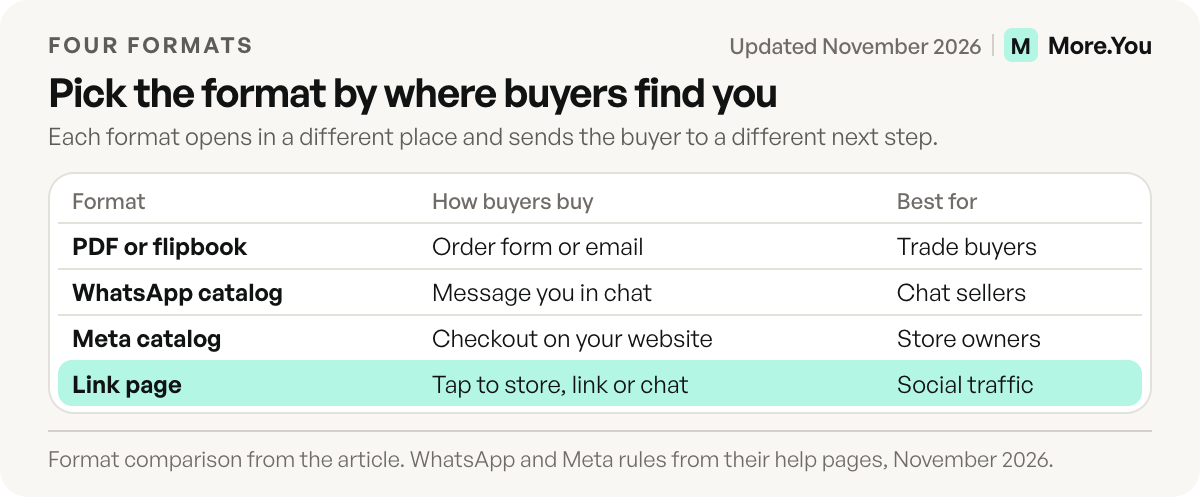
The WhatsApp and Meta rows come from each platform’s own help pages, checked November 2026.
PDF and flipbook catalogs
A PDF catalog is the classic format: you design pages in a layout tool, export a file and send it. A flipbook service turns that PDF into a web page with a link, where pages turn like a printed booklet. Flipsnack’s free plan, for example, allows 5 flipbooks of up to 15 pages each, with Flipsnack branding on links and embeds (flipsnack.com/pricing, checked November 2026).
PDFs suit long product lists, wholesale price sheets and anything you also print. They have two costs for social sellers. A page laid out for A4 or Letter paper shrinks on a phone screen, so buyers zoom and scroll sideways. And every price change means a new export and a new file to send.
WhatsApp Business catalog
The WhatsApp Business app lets you build a catalog that shows on your business profile, according to WhatsApp’s catalog help page. Each item needs a unique title, at least one image and the country of origin. You can add a price (in some countries only), a sale price, a description, a website link and a product code (checked November 2026).
Three rules shape how you use it:
- WhatsApp reviews every item. An item becomes visible only after approval, and a rejected item shows a red mark you can appeal (WhatsApp Help Center).
- Collections group items but cannot be shared alone. WhatsApp reviews each new collection, which should take no more than 24 hours. To show one collection, you share the full catalog link or each item in it (sharing catalog links).
- The catalog link is fixed. You cannot customize the auto-generated link. It opens straight in WhatsApp; outside the app, the buyer chooses how to open it.
To share it, open Tools, then Catalog, pick an item and tap the three dots. Forward sends the link in a WhatsApp chat; Share sends it to email, other apps or your Status. If you also want a direct chat link with a ready message, our guide to creating a WhatsApp link covers the formats.
Meta catalog for Facebook and Instagram shops
A Meta catalog holds the items you promote across Facebook and Instagram, in shops and in ads. You create it in Commerce Manager, and you need full control of the business portfolio it belongs to, per Meta’s guide to creating a catalog. You add items with a form, with a spreadsheet or XML data feed (uploaded once or on an hourly, daily or weekly schedule), or by connecting a partner platform such as your store builder.
A catalog has to pass Meta’s shop eligibility rules before it powers a shop on Facebook or Instagram (checked November 2026):
- Physical goods only. Shops are for physical goods, so a catalog of hotels, flights, vehicles or home listings cannot run one.
- One to 10 million items. An empty catalog cannot run a shop.
- Product links on your own domain. Each link must open that item’s page on your business’s website, not a Facebook Page.
Checkout also moved. During 2025, Meta moved shops on Facebook and Instagram to website checkout, so buyers browse in the app and pay on your site, according to Meta’s note on shop and checkout changes. The Meta catalog fits a seller who already runs an online store. Without product pages on your own domain, a shop has nowhere to send the buyer.
A link page as your catalog
More.You is an AI-native link in bio platform. Each product block on a More.You page also becomes Product structured data, so search engines and AI assistants can read what you sell from the page itself. The page sits behind the link you already have in your bio, so buyers open it from the profile they are looking at.
Build the catalog from blocks. Add one product block per item and link it to the place where the buyer pays: your store, an Etsy listing, a payment link or the WhatsApp item link from the section above. Group related items with a collection block, which shows as an expandable section under one heading; our guide to organizing a page with collections covers the setup. Pin the link to your newest arrival at the top, and add an FAQ block for sizes, shipping and returns. If you sell from a shop or a market stall, an opening hours block shows whether you are open right now.
Every block type is on the Free plan, along with themes, templates and basic analytics. You can start from a template for your occupation and swap in your own items. Our guide to a shoppable bio page layout covers which item goes where.
How to create a digital catalog in 6 steps
These steps work for any format in the table. Do steps 1 and 2 once, and you can reuse the list in every format.
- List your items in a spreadsheet. One row per item: name, price, a one-line description, the photo file and the link where the buyer pays or asks. Meta’s data feed accepts a spreadsheet, so this list can also become your Meta catalog later.
- Shoot every photo the same way. Use the same background, the same light and the same framing, so the catalog reads as one set. WhatsApp requires at least one image per item.
- Pick the format by where buyers find you. Chat buyers get the WhatsApp catalog. Social buyers get a link page. Store owners add a Meta catalog. Trade buyers who want a file get a PDF.
- Group the items the way buyers shop. Sort by type, by price or by occasion, and name each group in plain words (“Rings”, “Gifts under $30”). A buyer who opens the catalog to find one thing should see its group first.
- Add one way to ask. A WhatsApp chat link, a booking block for services or an FAQ block stops the “how do I order?” messages before they start.
- Share the catalog link everywhere buyers look. Put it in your bio, your WhatsApp Status and your email signature, and send it in reply to every “price?” comment or DM. Print it as a QR code on packaging, receipts and the counter; our guide to a QR code for your link in bio covers size and placement.
After a week, check which items get the clicks. Basic analytics on the More.You Free plan show views and clicks for the last 30 days. Move the items with the most clicks up, and replace the ones nobody opens. For the rest of a seller page, see our guide to a link in bio for small business.
Start with the ten items you sell most. Add a product block for each, group them in a collection, and put the page link in your bio and on a printed QR code. Create your More.You page on the Free plan, which includes every block type.
FAQ
Is a digital catalog free to make?
Yes, you can make one without paying. Flipsnack’s free plan covers 5 flipbooks of up to 15 pages each, and a link page on the More.You Free plan includes product blocks and collections. Paid flipbook plans raise the page limit per flipbook.
What is the difference between a digital catalog and an online store?
A catalog shows your products and sends buyers to the place where they pay. An online store also takes the payment and manages orders, shipping and returns. Many small sellers use a catalog in their bio and keep an existing store or chat for the sale.
How do I share my WhatsApp catalog link?
In the WhatsApp Business app, open Tools, then Catalog, pick an item and tap the three dots. Choose Forward to send it in a chat or Share to send it to other apps or your Status. You can share one item or your whole catalog, but not a single collection.
Can I sell on Instagram without a website?
An Instagram shop needs product links that open on your own website domain, according to Meta’s eligibility rules. Without a website, put a catalog page behind your bio link and send buyers to the store, payment link or chat where you already take orders.
Is a digital catalogue the same thing?
Yes. Catalogue is the UK spelling and catalog is the US spelling. Both mean an online list of products with photos, prices and a way to buy.
Sources
- WhatsApp Help Center: About catalog, How to create and maintain a catalog, How to create and manage a collection in your catalog and Sharing catalog links (November 2026)
- Meta Business Help Center: How to create a catalog in Commerce Manager, Catalog eligibility requirements for Shops and About changes to Shops and checkout (November 2026)
- Flipsnack plans and free plan limits (flipsnack.com/pricing, November 2026)
- More.You feature pages: more.you/features/bio-page-blocks, more.you/features/ai-native-pages and more.you/features/templates (November 2026)
- More.You pricing (more.you/pricing, November 2026)
Platform rules and prices checked November 2026.