
Multiple link in bio pages means running several separate bio pages, each with its own URL, design and links, from one account and one login. You need them when you serve more than one audience: two brands, several clients, a business with locations, or a side project with its own following. If it is one audience with many topics, one page grouped into sections is the better choice.
The pressure usually builds slowly. You start a podcast next to your design business, or a client asks you to run their Instagram, and suddenly one bio page is trying to serve people who want completely different things. The page gets longer, the top slot becomes a fight, and the analytics stop telling you which audience did what.
This guide covers when to split into separate pages and when not to, how to organize several pages so they stay current, how the main tools handle more than one page, and who benefits most. It builds on the basics in what a link in bio is.
Key Takeaways
- One page per audience, not per topic. Split when visitors want different things. Group when they want more of the same thing.
- Each social profile gets its own page. A profile has one bio link, so the page it points to should match that profile’s audience.
- One login beats five accounts. Switching pages inside one account is faster and safer than separate logins.
- Each page keeps its own settings. URL, design, SEO, analytics and, on More.You, its own AI-readable layer and crawler policy.
- Plan limits vary. More.You Free includes one page and Premium up to five on one account. Linktree bills each paid Linktree as its own plan (US pricing, November 2026).
What are multiple link in bio pages?
Multiple link in bio pages are separate bio pages managed from one account. Each page has its own address, header, blocks, design and statistics, so you can point different social profiles at different pages. One login lets you create pages, switch between them and update each one without signing out. The pages do not share design or analytics, so a change on one never changes another.
The setup is different from having many links on one page. If that is your question, the guide to multiple links in your Instagram bio covers Instagram’s native five links and when a single page is enough.
One page or several? A 4-question test
Most people split too early or too late. Answer these four questions for the content you are trying to fit.
- Is it a different audience? A podcast for marketers and a pottery shop for locals share almost no visitors. Split.
- Does it have its own social profile? If the project has its own Instagram or TikTok, it already has its own bio link to fill. Split.
- Does it need its own brand? Different name, logo, colors or domain. Split.
- Would the top slot be a fight? If two things both deserve the first block every week, they belong on different pages.
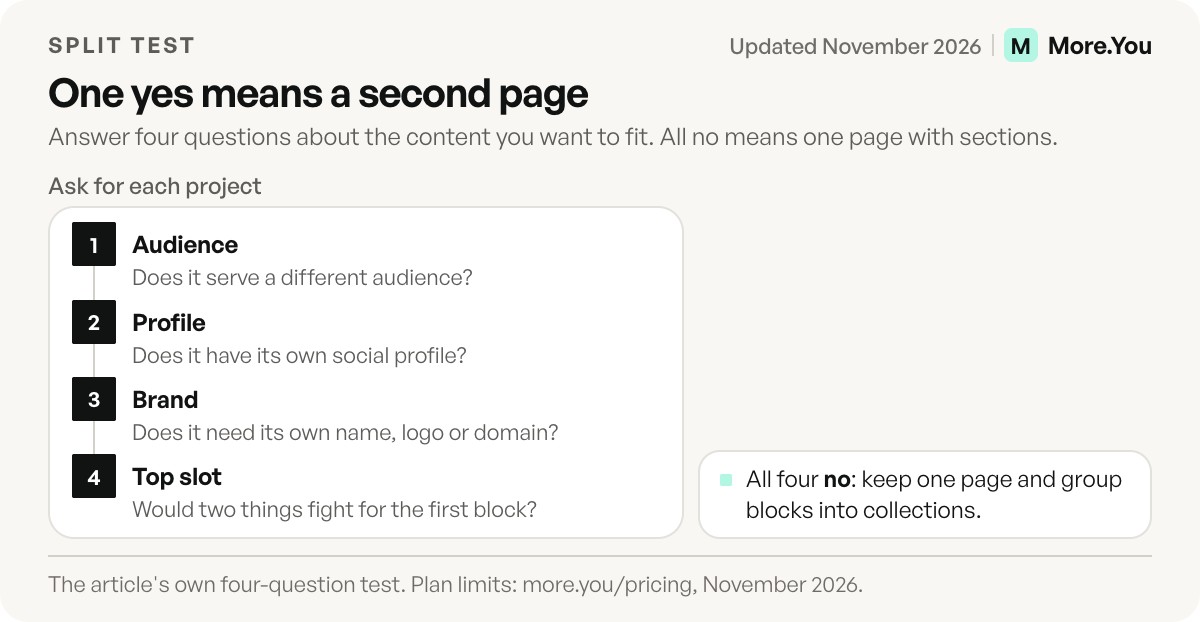
If you answered no to all four, keep one page and organize it. A page that runs long because you do many related things gets clearer with collections that group blocks into sections, not with a second page.
| Situation | One page with collections | Separate pages |
|---|---|---|
| Creator with a shop, a podcast and a newsletter for the same followers | Yes | No |
| Creator with a second account for a different niche | No | Yes |
| Agency or social media manager running client accounts | No | One per client |
| Business with several locations | Only with one shared profile | One per location profile |
| Brand with sub-brands or product lines that have their own profiles | No | One per sub-brand |
| Short campaign or launch | Pinned block on the main page | Only if it gets its own profile or ads |
Worked example: one profile, one page
For illustration: a designer runs a studio, a podcast and a pottery side shop. Each has its own Instagram profile and its own audience.
| Profile | Audience | Page job | Top block |
|---|---|---|---|
| Studio | Clients who hire | Book a call | Booking block |
| Podcast | Listeners | Play the newest episode | Newest episode |
| Pottery shop | Local buyers | Find products and hours | Product block |
Three profiles need three pages. The studio page never shows pottery products, and the podcast page never shows a client price. The same designer’s blog and newsletter, which serve all three audiences, stay as links on the page where those readers already arrive.
Who uses multiple link in bio pages
Agencies and social media managers. Every client account needs its own bio page, with the client’s brand and no other client’s links. Managing them from one login saves the password juggling. Pair this with branding removal and the client’s own domain, covered in the guide to a white label link in bio.
Brands with locations or sub-brands. A restaurant group with three Instagram accounts, one per venue, needs three pages: different hours, menus and booking links. A shared page forces every visitor to find their location first. The link in bio for small business guide covers what each location page should carry.
Creators with more than one project. A main account plus a side project, a band plus a solo account, or a personal brand plus a product brand. Each audience gets a page built for it.
Teams sharing links. When several people promote the same campaign, each person’s profile can point to a page with their own header and the shared campaign blocks.
How the main tools handle more than one page
Linktree, one of the best-known link in bio tools, supports several Linktrees under one email and login. You create a new one from the account menu and switch between them there, and each Linktree stays separate so you can update it on its own (linktr.ee help center, November 2026). Each paid plan covers one Linktree, so upgrading two Linktrees means paying for two plans, and active plans cannot be merged (linktr.ee help center, November 2026). For many profiles under one dashboard, Linktree points to custom-priced Agency and Enterprise plans (linktr.ee, November 2026).
On More.You, the Free plan includes one page. Premium includes up to five pages on one account, at a published price of $15 a month billed yearly or $19 billed monthly (more.you/pricing, November 2026). Premium also includes everything in Pro, such as Auto-Pin and post attribution.
When you compare tools, check four things: how many pages a plan includes, whether paid features cover every page or one page each, whether each page can have its own custom domain, and whether analytics stay separate per page.
Mistakes when you run several pages
| Mistake | What happens | Fix |
|---|---|---|
| One page copied three times | Pages drift apart and two go stale | Give each page its own job and top block |
| Two profiles point at one page | Analytics blur two audiences | Point each profile at its own page |
| Split by topic, not audience | Visitors from one profile cannot find the second page | Use collections to group blocks on one page |
| Same name on every page | You cannot tell which page you are editing | Name each page after its profile |
A short naming rule helps. Use one pattern for every page, for example:
yourname-studio
yourname-podcast
yourname-shop
Each name then matches the profile it serves, and you know which page to open before you edit.
What each page keeps separately
The point of separate pages is that nothing leaks between them. On More.You each page has its own:
- Address. Its own URL.
- Header and blocks. Its own name, bio, links, products, events and FAQ.
- Design. Its own theme, wallpaper, buttons and fonts.
- SEO settings. Its own meta title, meta description, about text and optional noindex.
- AI-readable layer. Its own llms.txt, agent manifest and structured data, plus its own AI-crawler policy. You can allow AI crawlers on one page and disallow them on another, because the choice is per page.
- Views and clicks. Each page collects its own traffic, so one audience’s numbers do not blur another’s.
A custom domain (a Pro feature) serves a page on a domain you own. The steps are in the guide to a custom domain for your link in bio page.
Keep five pages current without five times the work
The risk with several pages is that only the busiest one stays current. Three habits prevent it.
Give each page one owner and one review day. Even if the owner is you, put each page on a fixed day: client A on Monday, the shop on Tuesday. A page nobody owns goes stale first.
Let the newest post update the top slot. More.You’s Auto-Pin (a Pro feature, included in Premium) puts a scheduled post’s link at the top of the page when the post goes live. The pin comes off after 24 hours, 3 days or 7 days, whichever you set.
Compare pages by clicks per view, not views. A small page with a high tap rate may deserve more posts than a large page with a low one. Read how in the guide to link in bio traffic sources.
If you run more than one audience and want each page readable by people and by AI agents, start with one. Create your More.You page on the Free plan, build it for your main audience, and run the four questions before you add a second.
FAQ
Can I have multiple link in bio pages on one account?
Yes, on most tools. More.You includes one page on Free and up to five on Premium. Linktree allows several Linktrees under one login, with each paid Linktree on its own plan.
Should I make a separate link in bio page for each social account?
Make one when the account serves a different audience or brand. If two accounts share the same followers and goals, one page with the same links can serve both.
Is it better to use multiple pages or one page with sections?
Use one page with sections when the same audience wants several things from you. Use separate pages when different audiences want different things, or when each project has its own profile and brand.
Do multiple link in bio pages have separate analytics?
On most tools each page collects its own views and clicks. Check whether the tool also offers a combined view if you need to compare pages side by side.
How do agencies manage link in bio pages for clients?
Agencies usually run one page per client from a single login, remove the tool’s branding and connect each page to a subdomain of the client’s domain, so every page reads as the client’s own.
Sources
- Create multiple Linktrees, and Upgrade multiple Linktree profiles (linktr.ee help center, November 2026)
- Linktree plans and Agency + Enterprise (linktr.ee, November 2026)
- More.You plans (more.you/pricing, November 2026)
- More.You feature pages: more.you/features/ai-native-pages, more.you/features/auto-pin and more.you/features/qr-sharing (November 2026)
Platform rules and prices checked November 2026.



