A link in bio for musicians is one page that sends fans to your music on the platform they already use, Spotify, Apple Music, YouTube, SoundCloud, Tidal or Bandcamp, and also holds your newest release, tour dates with ticket links, merch, and a fan email signup. It replaces the bio you rewrite every release with one page you update in a single edit.
Every release cycle runs the same loop. You announce a pre-save, then the release, then the tour, then the merch. Each step needs a different link, and your bio has one main slot. Instagram allows up to five profile links (Instagram Help, checked November 2026), but one page is easier to keep current than five links. Fans who can’t find the right link in two taps go back to scrolling.
This guide covers the 6 parts of a musician’s bio page, how to run it from pre-save to release day, how to send each fan to the right streaming service, and which numbers to check before the next release or tour.
Key Takeaways
- Every platform, one page. List Spotify, Apple Music, YouTube, SoundCloud, Tidal and Bandcamp so each fan opens the service they already pay for.
- The new release owns the top slot. Pre-save before the drop, the streaming link after it, changed in one edit.
- Tour dates need venue, city and a ticket link. One event block per show, removed when the show is over.
- Merch sits next to the music. Fans who came to listen can buy without hunting for a second link.
- Email is the fan channel you own. Collect addresses for early releases and presale codes.
What should a musician put in their link in bio?
A musician’s bio page should hold six things: the newest release or pre-save at the top, links to every streaming platform, your latest video, tour dates with ticket links, merch, and an email signup for fans. Add your social profiles in one row. Keep the top slot for whatever you are promoting this week.
If you are setting up your first page, read what a link in bio is. Here is the music version:
| Part | What fans do there | More.You block |
|---|---|---|
| New release | Pre-save or stream the latest single or album | Music pre-save, pinned link, hero header |
| Streaming links | Open your music on their service | Links with platform names |
| Latest video | Watch the new video or live clip | Pinned link to YouTube |
| Tour dates | Find the next show and buy a ticket | Event blocks |
| Merch | Buy shirts, vinyl, limited runs | Product blocks |
| Fan list | Get early releases and presale codes | Link to your email sign-up form |
Put Spotify, Apple Music and YouTube in one link
Your fans are split across services. Give each one a clear, labeled link: “Listen on Spotify”, “Apple Music”, “Watch on YouTube”, “SoundCloud”, “Tidal”, “Buy on Bandcamp”. A fan scans for the name they know and taps.
Put the new single’s Spotify link and its YouTube video right under the pre-save, so a first-time visitor from a Reel hears the song in one tap and decides to follow. Group older releases into a collection called “Discography” so the page stays short. To have tracks and live streams play on the page itself, our solo.to vs Linktree comparison covers Spotify, SoundCloud and Twitch embeds.
Run the page from pre-save to release day
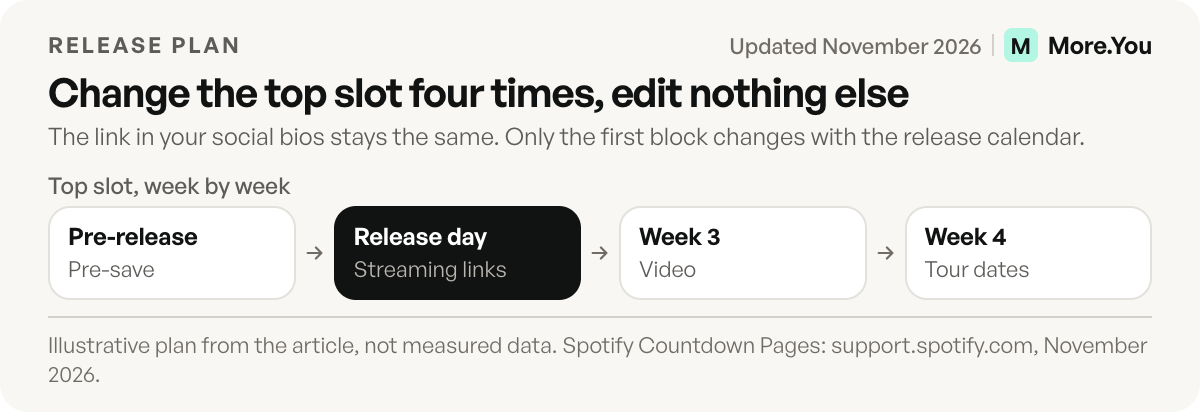
The top of the page follows the release calendar:
- Announcement to release day: a pre-save block. Fans save the release before it is out.
- Release day: swap the pre-save for the streaming links to the new release.
- First weeks after release: keep the release on top, add the video when it drops.
- Tour announcement: move the tour dates up, keep the release second.
Spotify has its own pre-save tool, Countdown Pages. Spotify says that on average, nearly 60% of people who pre-save an album stream it in the first week. Countdown Pages need at least 3,000 monthly active listeners and only cover new albums and EPs, not singles (support.spotify.com, November 2026). Link your Countdown Page from the bio page when you have one, and use a pre-save block for releases it does not cover.
Auto-Pin helps on release day. On Pro, when a scheduled social post goes live, its link pins to the top of the page and comes down after 24 hours, 3 days or 7 days. Your announcement post and your bio page point at the same thing at the same moment. The setup is in how auto-pin works.
How do you send each fan to the right streaming service?
You have two options. List every service on your page and let fans choose, or use a smart link that detects the fan’s device or country and opens the matching service. The first is simple and transparent. The second removes one tap but needs a separate smart link tool.
Music smart link services such as Feature.fm and Linkfire build a landing page per release with links to each store. Feature.fm supports pre-saves on Spotify, Apple Music and Deezer, and turns a pre-save link into a release link on release day (help.feature.fm, November 2026). If you use one, put that smart link in a block at the top of your bio page and keep your permanent links below it. The bio page holds everything else a fan needs: tour dates, merch, the email list. The free tools and where each link belongs are compared in music smart links.
Sell merch, vinyl and limited drops
Fans who came to listen are the best buyers for merch. Put the store on the same page as the music so they don’t need a second link.
- Product blocks for the items that sell: the tour shirt, the vinyl pre-order, the signed limited run. Each block points to the item in your store.
- One spotlight for a drop. A limited vinyl run gets the top slot for its launch week, then moves down.
- Bundles and presales go in their own block with the end date in the title, such as “Vinyl pre-order, ships in March.”
If you also run a podcast, the same page can hold episodes next to the music. Podcast monetization through your bio covers that setup, and the creator bio page, section by section covers courses, paid calls and brand work.
Turn followers into a crowd at the show
People who already stream you are the most likely to buy a ticket. They need three facts: the date, the place and the ticket link.
Add one event block per show with the date, venue, city and a link straight to that date’s ticket page. Name the venue, not only the city, so fans can find the room. When a show sells out, mark it in one edit. When the tour ends, remove the dates or move them into a “Past shows” collection.
Event blocks also produce Event structured data. Search engines and AI assistants can read the date, venue and ticket link when a fan asks “when is this band playing near me.” The details are in the guide to structured data for creator pages.
Build your superfan email list
Streaming platforms and social apps decide who sees your posts. An email list goes straight to the fans who asked for it.
Offer something fans want: early access to the next single, presale codes before tickets go public, a demo or a behind-the-scenes video. “Get tour presale codes first” gives fans a clearer reason to sign up than “Join my newsletter.” Link to your email tool’s sign-up form high on the page during a tour announcement, when fans want the codes most.
Keep the promise small and keep it. If the sign-up says “presale codes”, send the codes before tickets go on public sale. Send a short message at each release and each tour announcement, and nothing in between. A fan who gets one useful email a month stays on the list.
See what your fans click
Before the next release or tour, check what this one did. More.You analytics show page views, clicks and CTR per block, with breakdowns by source, device and country, on every plan.
| Question | Number to check | What it tells you |
|---|---|---|
| Which service do fans use? | Clicks per streaming link | Where to focus playlist pitching and ads |
| Where are fans? | Clicks by country | Which cities to add to the next tour |
| Which post sold tickets? | Post attribution | Which content format to repeat |
| Does merch sell from the page? | CTR per product block | Which items to restock or drop |
| Where does traffic come from? | Clicks by source | Which platform to post on more |
On Pro, post attribution ties clicks back to the post that sent them. If the rehearsal clip sent more ticket clicks than the polished trailer, you know what to post next tour.
Example: a four-week release plan
This plan is illustrative. Dates are placeholders, so adjust them to your own release. The point is that the top slot changes four times and the rest of the page stays put.
| Week | Top slot | Second slot | Post that sends fans to the page |
|---|---|---|---|
| 1 (before release) | Pre-save for the single | Last release | Clip of the chorus, “pre-save in my bio” |
| 2 (release day) | Streaming links for the single | Music video | Release announcement |
| 3 | Music video | Tour dates | Live or rehearsal clip |
| 4 | Tour dates and tickets | Merch | Show announcement |
Each change is one edit. The link in your social bios never changes, so old posts keep sending fans to the current page.
Mistakes that cost fans a tap
- Ten equal links. A fan who sees ten buttons picks none. Put one promoted item on top and group the rest.
- A link that says “Music”. Name the service and the action: “Listen on Spotify”, “Pre-save the single”.
- Old tour dates. A past show with a live ticket link looks like a stale page. Remove it or move it to “Past shows”.
- A pre-save that stays after release day. Swap it for the streaming link the same day.
- No second path for fans on other services. If your page lists only Spotify, a fan on Apple Music leaves. Add every service you release on.
One page for every release
Your bio link carries the whole release cycle: pre-save, release, video, tour, merch. Build it once and change the top slot with each campaign. Read the numbers after each release, and use them to plan the next one. Create your More.You page and give fans, and the AI assistants they ask about your music, one page that stays current.
FAQ
How do I add Spotify and YouTube to my link in bio page?
Add a labeled link for each service: “Listen on Spotify”, “Watch on YouTube”, then Apple Music, SoundCloud, Tidal and Bandcamp. Put the new release at the top so every fan opens it on their own service in one tap.
How do I put a pre-save link in my bio?
Add a music pre-save block or a link to your pre-save page at the top of your bio page before the release. On release day, replace it with links to the released song or album. Your social bios keep the same URL the whole time.
How do I promote tour dates from my link in bio?
Add one event block per show with the date, venue, city and ticket link. Move the tour section to the top when you announce it. Update or remove a date in one edit when it sells out or passes.
What is the best link in bio for a musician?
The best setup is one page with the new release on top, a link to each streaming service, tour dates with ticket links, merch and an email sign-up. Choose the tool that lets you change the top slot in one edit.
Can I sell merch from a music link in bio?
Yes. Add product blocks that link to each item in your merch store, such as shirts, vinyl pre-orders or limited runs. Fans who came for the music can buy from the same page.
Sources
- support.spotify.com, Getting started with Countdown Pages on Spotify, accessed November 2026
- help.feature.fm, Creating a pre-save smart link, November 2026
- help.instagram.com, Add links to your Instagram profile, November 2026
- More.You feature pages: more.you/features/bio-page-blocks, more.you/features/auto-pin, more.you/features/analytics-attribution and more.you/features/ai-native-pages (November 2026)
Platform rules and prices checked November 2026.



