A music smart link is one URL that opens a landing page listing a single song, album or playlist on every streaming service, so each fan taps the app they already pay for. You make one per release. Several free options exist, and Apple Music for Artists has its own link tool. A smart link covers one release. Your bio link covers the whole artist.
Your fans are spread across services. Music subscriptions reached 921.6 million worldwide at the end of 2025 (midiaresearch.com, June 2026). Spotify is the largest service with about 31% of them (musicbusinessworldwide.com, 2026). A Spotify-only link asks roughly two in three subscribers to switch apps before they can listen.
This guide explains what a smart link does, which tools make one for free, and how to split the job between the release link and your bio page. It is for independent artists, managers and anyone running a release without a label marketing team.
Key Takeaways
- One release, one smart link. It lists the track on every service and sends each fan to their own app.
- Free is enough for most artists. Song.link, Apple’s Promote link, Feature.fm and Hypeddit all have a free option.
- The smart link goes in posts, ads and emails. Each one points at a single release.
- The bio link goes to your artist page. It holds the newest release plus tour dates, merch and every profile.
- Measure both. Clicks per service tell you where your listeners are. Clicks per post tell you which content sent them.
What is a music smart link?
A music smart link is a short URL for one release. When a fan opens it, they see the cover art and a button for each service that carries the track: Spotify, Apple Music, YouTube Music, Amazon Music, Deezer, Tidal and others. Most tools detect the release automatically, so you paste one store link and the tool finds the rest. Before release day, the same link can collect pre-saves.
The idea is fan choice. A fan who listens on Apple Music never lands on a Spotify page they can’t use. They tap their own app and the song plays.
Smart links go by several names: fan links, song links, universal music links, release links. The mechanics are the same.
Music smart link vs link in bio page
Artists often ask which one to put in their bio. The answer is both, in different places. A smart link is about one release, and you make a new one for each single. A bio page is about you, and it stays at one URL for years.
| Music smart link | Link in bio page | |
|---|---|---|
| Scope | One song, album or playlist | Your whole career: releases, shows, merch, socials |
| Lifespan | One campaign | Permanent, updated in place |
| Where it goes | Post captions, Stories, ads, email, press | The one link slot in every social profile |
| What fans do | Pick a service and stream | Find the new release, a ticket, a shirt or a profile |
| What you learn | Which services your fans use | Which part of your career drives clicks |
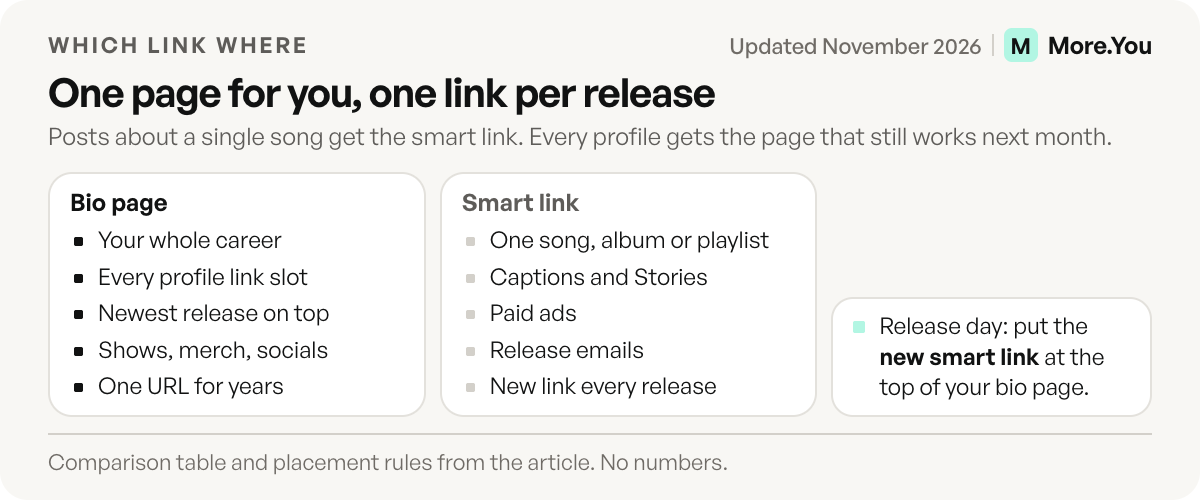
If you put a smart link in your Instagram bio, it goes stale the day the next single drops. Instagram allows up to 5 links in a profile (meta.com help, November 2026), but the app shows the first one, and that first link should be your page. The basics of the bio page are in what a link in bio is.
Free and paid smart link tools compared
Most artists never need to pay for the link itself. Paid plans add pre-save on more services, longer analytics history and ad pixels. This is what each tool offers as of November 2026:
| Tool | Free option | What it does best | Paid from |
|---|---|---|---|
| Song.link (Odesli) | Yes, all features free | Automatic pages with no login, plus custom pages you can edit with your own URL | No paid plan |
| Apple Music Promote link | Part of Apple Music for Artists, no price listed | A single link to multiple streaming services, plus badges and QR codes | No paid plan listed |
| Feature.fm | Yes: unlimited release links, 1 pre-save service, 7 days of data | Pre-saves: 3 services on Basic Artist, all services on Artist and up | $8 a month as listed (Basic Artist) |
| Hypeddit | Yes: unlimited smart links and download gates | Download gates that trade a free track for a follow | $108 a year (Basic, billed yearly) |
| Linkfire | Trial only, then a limited free account | Label and team workflows | $27 a month, or $21 a month billed yearly |
| Linktree Music Link | Yes, on every plan including Free | 73+ streaming platforms inside a Linktree page | Platform click breakdown starts on Starter |
Sources: odesli.co/pricing, feature.fm/pricing, hypeddit.com/pricing, linkfire.com/pricing and linktr.ee/blog, all November 2026. Hypeddit’s page shows the yearly price as a total ($108 for Basic). Linkfire’s $21 is the monthly rate when you pay for a year. Apple’s link is on the Apple Music for Artists Promote page, which names Linkfire as the link tool.
Two notes before you pick. Linktree bought Songlink/Odesli in August 2021 and built its Music Link on it (prnewswire.com, August 2021), so these two are related, not independent. And tools change owners and domains. Keep your permanent link on a page you control, so one tool’s change touches only the release links.
How to make a smart link for a new release
The same six steps work for every release:
- Start with a pre-save if you can. Spotify reports that nearly 60% of people who pre-save an album stream it in the first week (support.spotify.com, November 2026). Spotify’s own Countdown Pages need at least 3,000 monthly active listeners and cover albums and EPs only, not singles. Apple Music has pre-adds, which independent artists set up through their distributor (artists.apple.com, November 2026). A smart link tool fills the gap for singles. The next section explains the three terms.
- Paste one store URL once the release is live, usually the Spotify or Apple Music link. The tool finds the release on the other services.
- Check every button. Open the link on your phone and tap each service. A release can take a day to appear everywhere.
- Order the services by your audience. Put the service most of your listeners use first. Your clicks per service tell you which one that is after the first release.
- Set a short custom URL with the artist and song name. It reads better in a caption and on a poster.
- Tag the link per channel. Add UTM tags to the copy you use in ads and email, so you can tell traffic apart later. The method is in UTM parameters for creators.
Pre-save, pre-add and Countdown Page: what is the difference?
These three terms are easy to mix up. Each one asks fans to act before release day, on different services.
- Pre-save is the name for Spotify. A fan taps a button and the release is saved to their library the moment it is out.
- Pre-add is the name for Apple Music. Fans add the upcoming release with one tap and Apple notifies them when it is available. Independent artists set it up through their distributor.
- Countdown Page is Spotify’s own page for an upcoming album or EP. It needs at least 3,000 monthly active listeners, and singles are not eligible.
For a single, you use a smart link tool. One link collects pre-saves, then it turns into a normal streaming page on release day. Ask your distributor about pre-add timing: Apple’s page gives no deadline.
Where to put each link
The rule is simple. Anything tied to one release gets the smart link. Anything that has to keep working after the next release gets your page.
| Placement | Link to use | Why |
|---|---|---|
| Instagram, TikTok, YouTube and X bio | Bio page | It must still work next month |
| Post captions, Reels, Stories | Smart link | The post is about one release |
| Paid ads | Smart link with UTM tags | One goal, one measurable click |
| YouTube video description | Smart link for that song, bio page below it | The video is about one release, the channel is about you |
| Release email | Smart link | Fans came for the new song |
| Press kit and playlist pitches | Smart link and bio page | Editors need the track and the artist |
If you sell on Bandcamp, add that link too. Bandcamp announced in March 2025 that Feature.fm pages can include a Bandcamp link. Tools differ in the stores they list, so check your own link.
On release day, put the smart link (or a pre-save block before the drop) at the top of your bio page. A fan who taps your profile after a Reel sees the new song first, with tour dates and merch below it. The full musician setup, from streaming links to tour blocks, is in link in bio for musicians.
Fans also ask for the song in the comments. CreatorFlow, built by the same team as More.You, can send the streaming link by Instagram DM to everyone who comments a word like LISTEN on your Reel.
Smart link not working? Four fixes
Four causes explain most broken smart links.
- A button is missing. The release is not live on that service yet. Wait a day, then open the link again.
- The button opens the wrong release. A remix or a song with the same title was matched. Paste the exact store URL for that service.
- The link opens a web page, not the app. The fan is inside a built-in browser in Instagram or TikTok. Ask them to open the link in their phone’s browser.
- The link points to an old single. You pasted last month’s URL. Name each link by its song.
How do you know if a smart link is working?
Look at two numbers: clicks per service and clicks per source. Clicks per service tell you where your listeners are, which guides playlist pitching and ad targeting. Clicks per source tell you which post, ad or email sent them. If a smart link gets many views and few service clicks, open it on a phone and check that the release appears on every big service.
Your bio page adds the third view: what fans do besides streaming. More.You publishes this blog and competes with these tools, so every number below names its source. A More.You page shows views, clicks and CTR for each block, by source, device and country, on every plan. On Pro, attribution ties each click to the post that drove it, so you can see whether the studio clip or the lyric video sent more fans to the new single. The full method is in how to track link in bio clicks.
Your artist page, with the release on top
A smart link gets one song heard. A bio page keeps the fan after the song ends: the next show, the shirt, the email list, every profile. A More.You page holds music pre-save, event and product blocks on one page. You move the newest release to the top when it drops, and the rest of the page stays the same. It also ships structured data so AI assistants can answer “when is this artist playing” from your own page. Create your More.You page for free and put this week’s smart link at the top.
FAQ
Where can I make a free music smart link?
Song.link (Odesli) makes free pages automatically for any release on the major services. Apple Music for Artists offers a free cross-platform link on its Promote page. Feature.fm and Hypeddit both have free plans with unlimited release links. Linktree’s Music Link also works on its Free plan.
Should my Instagram bio link be a smart link?
No. A smart link points at one release and goes stale when the next one drops. Put your bio page in the profile and place this week’s smart link at the top of that page. Use the smart link itself in captions, Stories, ads and emails.
Can a smart link collect pre-saves?
Yes, most smart link tools turn the link into a pre-save page before release day and switch it to streaming buttons after. Free plans often limit pre-saves to one service. Feature.fm’s free plan, for example, includes one pre-save service.
Are smart link analytics free?
Basic click counts usually are. Longer history and the breakdown by service are often on paid plans. Feature.fm’s free plan keeps 7 days of data, and Linktree’s platform breakdown starts on its Starter plan.
Do I still need a smart link if my bio page lists every service?
For your bio, no. A labeled button per service on your page does the same job for the newest release. For posts, ads and emails, a smart link is still better, because each one points at one release and measures that campaign alone.
Sources
- midiaresearch.com, Music subscriber market shares Q4 2025, June 2026
- musicbusinessworldwide.com, subscriber shares by service, 2026
- support.spotify.com, Countdown Pages, accessed November 2026
- blog.bandcamp.com, Feature.fm and Bandcamp, March 2025
- artists.apple.com/promote, Apple Music for Artists Promote tools, accessed November 2026
- artists.apple.com, Apple Music pre-adds, accessed November 2026
- meta.com help, links in an Instagram profile, accessed November 2026
- odesli.co/pricing, November 2026
- feature.fm/pricing, November 2026
- hypeddit.com/pricing, November 2026
- linkfire.com/pricing, November 2026
- linktr.ee/blog, Music Link guide, updated November 2026 (Linktree’s page states “Last updated Nov 2, 2026”)
- prnewswire.com, Linktree acquisition of Songlink/Odesli, August 2021
- More.You feature pages: more.you/features/bio-page-blocks, more.you/features/analytics-attribution and more.you/features/ai-native-pages (November 2026)
Platform rules and prices checked November 2026.