
solo.to vs Linktree comes down to what you pay for. solo.to has the cheaper paid ladder. Its $1 plan, billed yearly, adds a tip jar, and its $10 plan, billed yearly, removes the footer and connects your own domain. Linktree has the bigger free plan, phone apps and paid selling at 0% Linktree fees on Pro, but it doesn’t support custom domains.
Example: you release a single in two weeks and stream on Twitch twice a week. You want fans to play the track, pre-save it, find the next stream and tip you, without paying for features you’ll never touch.
Below, both tools are compared on their own pricing and help pages, checked in November 2026. If you’re new to the format, start with what a link in bio is and how it works.
Key Takeaways
- solo.to costs less to make your own. Its Professional plan, $10 a month billed yearly, hides the solo.to footer and adds a custom domain. Linktree hides its logo from Pro and doesn’t support custom domains.
- Linktree’s free plan does more. You get unlimited links and 28 days of click analytics. solo.to’s free plan stops at 25 links and shows page views only.
- Both take a cut of tips. solo.to keeps 2% to 4% of each tip by plan, plus Stripe’s fee. Linktree keeps 12% of inbox tips on Free and 0% on paid plans.
- solo.to puts more music on the page. It embeds 14 music services from Entrepreneur, $5 a month billed yearly. Linktree answers with a native pre-save and a Music Link app.
- Only Linktree sells. Paid digital products and bookings run on Linktree Pro and Premium at 0% Linktree fees. solo.to has no built-in store.
solo.to vs Linktree at a glance
| Feature | solo.to | Linktree |
|---|---|---|
| Free plan | Beginner: up to 25 links, 30 days of page views | Free: unlimited links, 28 days of analytics |
| Paid plans, billed yearly | $1, $5 and $10 a month | $7, $14 and $30 a month (US) |
| Paid plans, billed monthly | $6 and $15 a month (the $1 plan is yearly only) | $9, $17 and $35 a month (US) |
| Branding removed on | Professional | Pro |
| Custom domain | Professional | Not supported |
| Tips | Tip jar from Personal, 4%, 3% or 2% fee plus Stripe | Inbox tips, 12% fee on Free, 0% on paid plans |
| Paid products and bookings | No built-in store | Pro and Premium, 0% Linktree fees |
| Music and streams | 44 embeds from Entrepreneur, pre-saves through Linkfire | Music Link app, native pre-save, video embeds including Twitch |
| Click analytics | From Entrepreneur, 12 months (24 on Professional) | Every plan, from 28 days on Free to all time on Premium |
| Ad tracking | Meta and TikTok pixels on Professional | Meta Pixel and Google Analytics on Pro and Premium |
| Mobile app | None, you edit in the browser | iOS and Android |
Sources: solo.to/pricing, solo.to/extensions, help.solo.to, linktr.ee/s/pricing and linktr.ee/help, November 2026. Linktree prices vary by country; US prices are shown.
How much does solo.to cost compared with Linktree?
solo.to’s four plans are Beginner (free), Personal at $1 a month, Entrepreneur at $5 and Professional at $10, all billed yearly. Monthly billing costs $6 and $15 for the top two. Linktree’s US plans cost $9, $17 and $35 a month, or $7, $14 and $30 billed yearly. solo.to charges less at every step.
Personal is sold yearly only, so solo.to’s entry price is $12 a year. A brand-free page on your own domain costs $120 a year on Professional. Linktree Pro costs $168 a year in the US and hides the logo, but your page stays on a linktr.ee address (our calculation from both pricing pages).
Linktree’s prices vary by country. Viewed from Europe, Starter shows €6.75, Pro €15 and Premium €32 a month (linktr.ee/s/pricing, November 2026). In the US, Starter costs $9 and Pro $17 a month, or $7 and $14 a month billed yearly (linktr.ee/s/pricing, November 2026). Our breakdown of whether Linktree is free covers what each tier adds.
What do the free plans include?
Linktree’s free plan is the bigger one. It gives you unlimited links, video embeds and 28 days of click analytics. solo.to’s free Beginner plan caps you at 25 links or sections, shows daily page views for the past 30 days and keeps link clicks for paid plans. Both free pages show the tool’s branding.
solo.to’s free plan still covers the basics well, with more than 2,000 link icons, a social button bar and contact buttons for email, calls, texts and Discord (solo.to/pricing, November 2026). Linktree Free adds one featured link and a Music Pre-save link with one automated service (linktr.ee/s/pricing, November 2026). Link scheduling starts on Starter on Linktree, and on Entrepreneur on solo.to.
Can fans tip you or buy from you?
On solo.to, fans can tip you, but they can’t buy products from the page. The tip jar runs through Stripe from Personal, $1 a month billed yearly, and solo.to adds a platform fee of 4%, 3% or 2% depending on your plan. Linktree takes inbox tips at a 12% fee on Free and 0% on paid plans, and sells products and bookings on Pro and Premium.
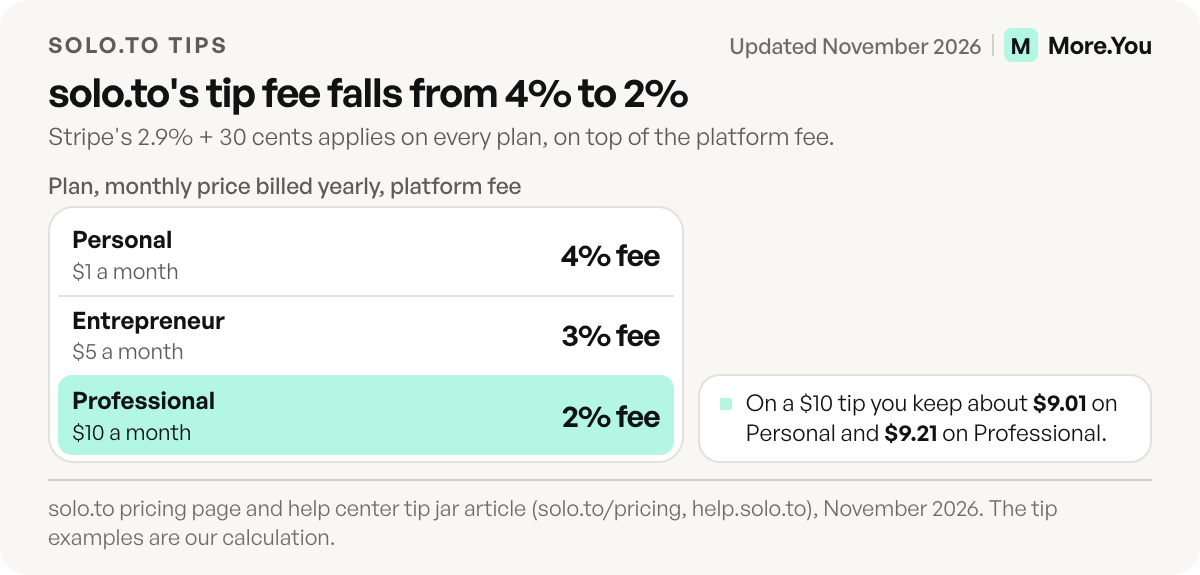
solo.to’s tip jar shows up to three preset amounts plus a custom amount between $1 and $999. Every tip carries Stripe’s 2.9% + 30¢ on top of the platform fee: 4% on Personal, 3% on Entrepreneur and 2% on Professional (help.solo.to, November 2026). On a $10 tip, you keep about $9.01 on Personal and $9.21 on Professional (our calculation).
Linktree’s tips arrive through its inbox (linktr.ee/s/pricing, November 2026). Paid digital products and bookings start on Pro, at 0% Linktree fees, with processing fees on top. solo.to has no store, but it embeds Eventbrite events with checkout, Calendly scheduling and ShopMy collections (solo.to/extensions, November 2026). Before you pick, compare the tip jar options creators link to most.
Which is better for musicians and streamers?
solo.to puts more of your music and streams on the page itself. From its Entrepreneur plan, $5 a month billed yearly, it embeds 14 music services, including Spotify, Apple Music, SoundCloud and Bandcamp, plus Twitch, Kick and YouTube streams and Bandsintown or Songkick tour dates. Linktree’s edge is its native pre-save, which adds a release to fans’ libraries on release day.
solo.to pitches itself to musicians, streamers and businesses (solo.to/affiliate-program, November 2026). Its Twitch embed plays live streams with chat and clips, pre-saves run through a Linkfire embed, and team accounts with up to 255 pages serve record labels (solo.to/teams, November 2026).
Linktree’s Music Pre-save link adds a release to a fan’s Spotify, Apple Music or TIDAL library on release day, then turns into a regular Music link. Free shows one automated service, and Pro or Premium shows more (linktr.ee/help, November 2026). Video embeds, including Twitch, work on every plan. For the full release-day setup, see our link in bio guide for musicians.
Which handles branding, analytics and custom domains better?
solo.to does, and for less money. Its Professional plan, $10 a month billed yearly, hides the footer, connects a custom domain and keeps 24 months of click history. Linktree hides its logo from Pro, at $14 a month billed yearly in the US, and doesn’t support custom domains on any plan. Linktree does count clicks on every plan, including Free.
On solo.to, click tracking starts on Entrepreneur with 12 months of history, and the two cheaper plans show page views only (help.solo.to, November 2026). Linktree keeps 28 days of analytics on Free, 90 on Starter, 365 on Pro and all time on Premium (linktr.ee/s/pricing, November 2026).
For ad tracking, solo.to adds Meta and TikTok pixels on Professional, while Linktree connects a Meta Pixel and Google Analytics on Pro and Premium (linktr.ee/help, November 2026).
Where solo.to wins
- Lower prices at every step. A tip jar costs $12 a year, and a brand-free page on your own domain costs $120 a year.
- Your own domain. Professional connects a root domain or a subdomain, and your solo.to link keeps working.
- More on the page. 44 embeds cover music, video, podcasts, tour dates and forms, plus tools like Calendly and Matterport 3D tours.
- More pages and links per plan. Personal allows 50 links, Entrepreneur 100 links and embeds on 2 pages, and Professional 5 pages.
- Email capture and a second editor. Professional adds email sign-ups through Mailchimp, Make or Zapier, and invites one collaborator per page (solo.to/pricing, November 2026).
Both tools also offer a wallet pass for in-person sharing (solo.to/pricing and linktr.ee/features, November 2026). To compare more options, see free digital business card apps.
Where Linktree wins
- A bigger free plan. Unlimited links and click analytics on Free, against solo.to’s 25 links and page views.
- Selling on the page. Paid digital products and bookings run on Pro and Premium at 0% Linktree fees. A store is outside solo.to’s scope.
- A native pre-save. Release-day pre-saves to Spotify, Apple Music or TIDAL work without a third-party embed.
- Phone apps. Linktree has iOS and Android apps on every plan. solo.to has no app, so you edit in the browser (help.solo.to, November 2026).
- A familiar page. Linktree says more than 70 million people use it (linktr.ee, November 2026).
A third option: More.You
More.You publishes this blog and competes with these tools, so every number below names its source. More.You is a link in bio page built for two audiences: the fans who tap it and the AI assistants that read it to answer who you are and when you play next. Every page publishes an llms.txt file, an agent manifest and structured data from its blocks, such as Event data from your tour dates.
For musicians, its blocks include music pre-saves, podcast episodes, events and bookings. When a scheduled post goes live, Auto-Pin, on Pro, moves its link to the top of your page for 24 hours, 3 days or 7 days. Attribution, also on Pro, shows which post sent each click. Tips and payments stay with the tool you already use, linked from the page. Free is free forever, and Pro is listed at $5 a month billed yearly or $7 monthly (more.you/pricing, November 2026).
How to switch between solo.to and Linktree
- Note what won’t move. Write down your tip jar settings, pixel IDs and the URLs behind every embed.
- Rebuild the page. Re-add links by hand, or import them. On More.You, you paste your current page URL and confirm each proposed item before anything is written.
- Plan for the domain. A solo.to page on your own domain can’t move to Linktree, which serves pages on linktr.ee only.
- Update every bio. On Instagram, open Edit profile, then Links, and replace the old address. Do the same on every other profile the same day.
- Keep the old page live for a week. Older posts still carry its link. Check clicks on both pages, then delete the old one.
Which one should you pick?
Pick solo.to if you want music, streams and tour dates playing on the page, your own domain and the lowest price for a brand-free page. Pick Linktree if you want a bigger free plan, a phone app, a native pre-save or paid products and bookings on the page.
Add a music pre-save block for your next single and an events block for your tour dates, and More.You publishes those dates as Event data that AI assistants can read. Create your More.You page for free and import your current links. On Pro, Auto-Pin pins each release post’s link as the post goes live.
FAQ
Is solo.to free?
Yes. solo.to’s Beginner plan costs $0 and is free forever. It includes up to 25 links or sections, link icons, social and contact buttons, page themes and daily page views for the past 30 days. The tip jar starts on Personal, at $1 a month billed yearly, and click tracking and embeds start on Entrepreneur, at $5.
How much does solo.to cost?
solo.to has four plans. Beginner is free. Personal costs $1 a month and is billed yearly only. Entrepreneur costs $5 a month billed yearly or $6 monthly, and Professional costs $10 a month billed yearly or $15 monthly. Professional removes the solo.to footer and adds a custom domain.
Does solo.to take a cut of tips?
Yes. solo.to adds a platform fee of 4% on Personal, 3% on Entrepreneur and 2% on Professional, on top of Stripe’s 2.9% + 30¢ per tip. Tips go to your own Stripe account. The tip jar starts on Personal, so the free plan can’t take tips.
Can you use a custom domain on solo.to or Linktree?
On solo.to, yes, from the Professional plan at $10 a month billed yearly, with a root domain or a subdomain. Linktree doesn’t support custom domains on any plan. Its help center points to a Redirect instead, which sends every visitor to one link you choose and is available from Starter.
Is solo.to a good Linktree alternative for musicians?
For many musicians, yes. solo.to embeds 14 music services, tour dates and Twitch streams from $5 a month billed yearly, which is less than any paid Linktree plan. Linktree fits better if you want native pre-saves, a phone app or paid merch and bookings sold on the page.
Sources
- solo.to plans and prices (solo.to/pricing, November 2026)
- solo.to embeds and integrations (solo.to/extensions, November 2026)
- solo.to help center: tip jar fees, embeds, Linkfire embed, click and page view analytics, custom domains, removing branding, Meta Pixel, contact buttons, mobile app (help.solo.to, November 2026)
- solo.to affiliate program and audience (solo.to/affiliate-program, November 2026)
- solo.to team accounts (solo.to/teams, November 2026)
- Linktree pricing, plan prices and feature table (linktr.ee/s/pricing, November 2026)
- Linktree help center: custom domains, hiding the Linktree logo, Meta Pixel, Google Analytics, Music Pre-save, link scheduling, Insights (linktr.ee/help, November 2026)
- Linktree features, wallet pass and contact sharing (linktr.ee/features, November 2026)
- The /llms.txt file proposal (llmstxt.org, November 2026)
- More.You blocks (more.you/features/bio-page-blocks, November 2026)
- More.You Auto-Pin (more.you/features/auto-pin, November 2026)
- More.You AI-native pages (more.you/features/ai-native-pages, November 2026)
- More.You import (more.you/features/import, November 2026)
- More.You pricing (more.you/pricing, November 2026)
Platform rules and prices checked November 2026.