
Yes, you can use Linktree for OnlyFans. Linktree permits a link to adult content when it is legal where you live, it is marked as sensitive, the page does not advertise full service sex work and no adult images or videos sit on the page (linktr.ee/s/community-standards, checked November 2026). Linktree may label the link as sensitive on its own. The stricter rules come earlier, in the app that sends the click.
Your link sits at the end of a chain: your profile on Instagram, TikTok or X, then your link page, then OnlyFans. Each step has its own rulebook. A link that passes Linktree’s rules can still be age-restricted or removed by the app that shows it.
This guide covers what Linktree allows, what Instagram, TikTok, X and YouTube say about adult links, three link tools compared on their 18+ rules, and a page setup that keeps explicit content off the page. Each rule comes from the company’s own policy page. For the basics of the format, read our guide to what a link in bio is.
Key Takeaways
- Linktree allows OnlyFans links with conditions. The link must be legal where you live and marked as sensitive, the page must not advertise full service sex work, and adult media stays off the page.
- Linktree can label your link for you. For some domains it applies a sensitive content label automatically. An appeal form is the way to dispute one.
- The app’s rules come first. Meta limits links to adult subscription websites to adults, TikTok removes links to content it does not allow, and YouTube does not allow links to pornography.
- X allows labeled adult content. It must stay out of your profile photo and header.
- Keep the link page safe for work. No explicit photos, words or thumbnails, and one clear link to your subscription page.
Linktree for OnlyFans: what Linktree allows
Linktree for OnlyFans works within four conditions. The adult link must be legal where you live and marked as sensitive, the page must not advertise full service sex work, and adult media stays off the page. Linktree’s standards also let you advertise adult media that you create and sell on other platforms, which is what an OnlyFans link does.
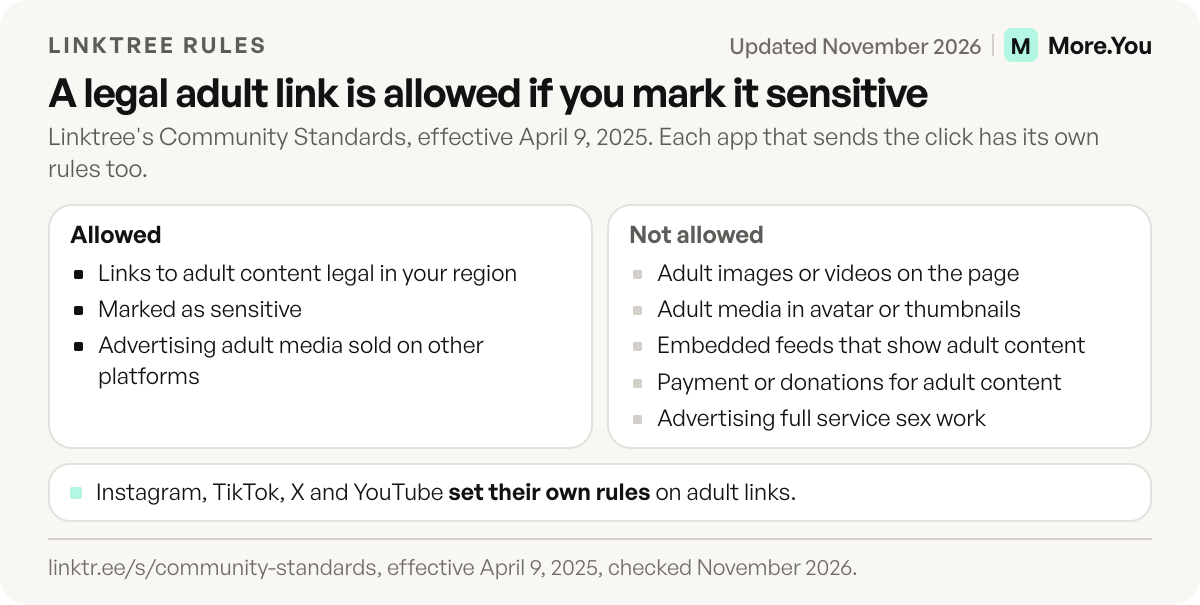
These are the lines in Linktree’s Community Standards that apply to an OnlyFans page (effective April 9, 2025):
- Allowed: links to adult content that is legal in your region and marked as sensitive.
- Allowed: advertising adult media you create and sell on other platforms.
- Not allowed: adult images or videos, including nudity, in your avatar, link thumbnails, background or PDFs.
- Not allowed: embedded social feeds that would show adult content on your page.
- Not allowed: collecting payment or donations for adult content through Linktree.
- Not allowed: using Link Apps, Linktree commerce features or payment-locked links to distribute adult content.
- Not allowed: sharing adult content made with generative AI to impersonate another person.
The sensitive content label
Linktree’s help center lists four labels: 18+, 21+, 25+ and Sensitive Content. With an age label, visitors confirm their age before they can continue. You turn on the Sensitive content warning for the whole page under Settings, then Visibility and access. For a single link, open it under Edit, go to the Power-ups tab, select Lock link and choose Sensitive content. Turning on any of these labels may limit your access to Earn features, its help center says (linktr.ee/help, updated October 26, 2026).
You do not always choose the label. For certain domains, Linktree applies one automatically or suggests that you add one. If you cannot remove a label and think it is a mistake, the help center points you to its Appeal a Decision form (linktr.ee/help, updated October 22, 2026).
What Instagram, TikTok, X and YouTube allow
Each app has its own rule on adult links, and that rule applies to your profile whichever link tool you use. Meta limits content with usernames, links or logos of adult subscription websites to viewers aged 18 and older and does not allow links to pornographic websites. TikTok removes links to content it does not allow. X allows adult content that carries a content warning, outside highly visible areas such as your profile photo and header. YouTube does not allow links to pornography.
| App | What its rules say | What it means for your profile |
|---|---|---|
| Instagram, Facebook and Threads | Usernames, links or logos of adult subscription websites are limited to viewers 18 and older. Usernames or links to pornographic websites are not allowed. | Keep explicit words out of your bio and keep the page you link safe for work. |
| TikTok | Nudity, sexual activity and sexual services are not allowed. TikTok removes links to content it does not allow and can stop you posting links. | Treat a link to adult content as a link TikTok can remove, and severe cases can cost the account. |
| X | Labeled adult content is allowed. It cannot appear in your profile photo, header, live video, List banners or Community cover photos. | Mark adult posts with a content warning and keep your profile images clean. |
| YouTube | Links to pornography are not allowed in videos, channels, comments or any other YouTube feature. | Leave adult links off your channel, descriptions and pinned comments. |
Sources, all checked November 2026: Meta’s Adult Sexual Solicitation policy, TikTok’s Community Guidelines on accounts and features, X’s adult content policy and YouTube’s external links policy.
Meta’s rules do not name OnlyFans or any link in bio tool (checked November 2026). They name the content: adult subscription websites and pornographic websites. The same policy bars sexually explicit language about genitals, arousal or sexual encounters, so the words in your bio count as much as the link. Meta’s Community Standards apply to Facebook, Instagram, Messenger and Threads.
TikTok’s guidelines took effect on September 24, 2026. If your TikTok link has stopped showing, our guide to fixing a TikTok link in bio that is not working covers the other causes.
How to set up a Linktree for OnlyFans that stays safe for work
A safe-for-work link page keeps explicit content off the page itself and still sends fans to your subscription page. Five steps get you there:
- Use a profile photo you would post on Instagram. Linktree does not allow adult media in the avatar, background or thumbnails, and X keeps adult content out of profile photos and headers.
- Write the page title and bio in plain words. Name what you make without explicit terms, the same way you would in your Instagram bio.
- Put the subscription link first, once. One clear button with a plain label is easier to find than three buttons to the same place.
- Turn on the label yourself. An 18+ label on the page or on that one link shows visitors an age check before they continue. Linktree’s standards ask for adult links to be marked as sensitive.
- Add your safe-for-work links below it. Your other socials, a free page or a merch shop give visitors from Instagram and TikTok something to tap that fits those apps’ rules.
Before you change every bio, open your profile in the app you post on most, tap the link and check what a new visitor sees first.
What mistakes get an adult link page into trouble?
Four mistakes come up often, and each one is a rule in a policy above.
- Adult media in the avatar or a thumbnail. Linktree does not allow it, and X keeps it out of profile photos.
- Taking payment through the page. Linktree does not allow payment or donations for adult content through Linktree, so send fans to your subscription page for that.
- An embedded social feed. A feed can show adult posts on your page, which Linktree does not allow.
- No label. Linktree asks for adult links to be marked as sensitive.
No setup removes the risk that a platform reviews or restricts your link, because each app decides for itself.
Linktree alternatives for OnlyFans creators
A Linktree alternative for OnlyFans is worth a look when the 18+ link is the main job of your page. GetMySocial says it is built for 18+ creators. AllMyLinks is free and moves links from known adult platforms into a separate 18+ section. Read each tool’s rules before you move.
| Linktree | GetMySocial | AllMyLinks | |
|---|---|---|---|
| Adult links | Allowed if legal, marked as sensitive, and not full service sex work | Allowed on every plan; built for 18+ creators | Allowed; links from known adult platforms go to an 18+ section |
| Age check | 18+, 21+ and 25+ confirmation screens | Not stated on the pages we read | Separate 18+ section on the profile |
| Who sets the label | You, or Linktree for certain domains | Not stated on the pages we read | AllMyLinks for known adult platforms; you can mark any link NSFW |
| Free plan | Yes | Yes, 2 links | Yes, “100% free” |
| Paid plans | Starter, Pro and Premium | Creator: $7 a month, or $5 a month billed annually | None listed |
Sources: linktr.ee/s/community-standards and linktr.ee/help, getmysocial.com, allmylinks.com and support.allmylinks.com, all checked November 2026.
GetMySocial
GetMySocial is built for creators and agencies whose main link goes to a subscription platform, and its home page offers smart routing by country, device or language. Its Free plan has 2 links. Creator has 7 links and costs $7 a month, or $5 a month on yearly billing, as its pricing showed in November 2026 (getmysocial.com). Our GetMySocial vs Linktree comparison covers its fees, deep links and agency plans.
AllMyLinks
AllMyLinks calls itself 100% free and says it never shows ads on your profile (allmylinks.com, checked November 2026). Links to platforms known for adult content move automatically to an 18+ section at the bottom of your profile. You can mark any other link as NSFW to place it there too, and a link from a known adult platform cannot leave that section (support.allmylinks.com, updated November 8, 2026). Its terms describe an “inclusive platform” that permits links to adult content, and they ask you to turn on a sensitive content switch in profile settings (allmylinks.com/terms, November 2026). Our AllMyLinks vs Linktree comparison covers the rest of its features.
If your page is mostly safe-for-work links with one subscription link among them, a general-purpose tool may fit better. Our list of Linktree alternatives compares 15 options on price and features.
Where a More.You page fits
More.You is an AI-native link in bio platform. Every page publishes an llms.txt file, an agent manifest and JSON-LD generated from its blocks, and each page has its own setting for whether AI crawlers are welcome. More.You publishes this blog and competes with the tools in this guide, so each rule above cites the company that wrote it.
For an OnlyFans creator, a More.You page works as the safe-for-work hub from the steps above: a header and profile photo, your socials, a link block for your subscription page and an FAQ block that answers the questions fans send you most. One page with every block type is free. If you prefer that AI crawlers stay away, set the page’s crawler policy to disallow on AI-native pages, and the page sends noai signals that ask them not to use it.
To move from Linktree, paste your Linktree URL into the More.You importer. It reads the page and lists the links, socials and avatar it found, and nothing is saved until you approve them. Then create your More.You page for free, add an FAQ block for the questions fans ask most, and test the new link from one bio before you change the rest.
FAQ
Does Linktree allow OnlyFans links?
Yes. Linktree’s Community Standards allow links to adult content that is legal in your region, as long as the page does not advertise full service sex work. Adult images and videos cannot appear on the page itself, and Linktree may add a sensitive content label to the link.
Can you put an OnlyFans link in your Instagram bio?
Meta’s Community Standards limit content with usernames, links or logos of adult subscription websites to viewers aged 18 and older, and links to pornographic websites are not allowed. These standards cover Instagram, Facebook, Messenger and Threads. Keep explicit words out of your bio and keep the page you link safe for work.
Does TikTok allow OnlyFans links?
TikTok does not allow nudity, sexual activity or sexual services, and it removes links that lead to content it does not allow. It can also stop you from posting links for a while, or ban the account for severe violations.
Why did Linktree add a sensitive content label to my link?
Linktree applies a sensitive content label automatically, or suggests one, for certain domains whose content may not suit all audiences. If you think the label is a mistake, Linktree’s help center says to submit its Appeal a Decision form.
What is the best Linktree alternative for OnlyFans?
Pick by the job your page does. GetMySocial says it is built for 18+ creators. AllMyLinks is free and moves links from known adult platforms into an 18+ section. Read each tool’s content rules before you move your link.
Sources
- Linktree Community Standards, adult content rules, effective April 9, 2025 (linktr.ee/s/community-standards, November 2026)
- Linktree help center, sensitive content labels updated October 26, 2026, and link labels updated October 22, 2026 (linktr.ee/help, November 2026)
- Meta Transparency Center, Adult Sexual Solicitation and Sexually Explicit Language and the Community Standards overview, November 2026
- TikTok Community Guidelines, Accounts and Features and Sensitive and Mature Themes, effective September 24, 2026
- X Help Center, Adult content policy, November 2026
- YouTube Help, External links policy, November 2026
- GetMySocial home page and plans (getmysocial.com, November 2026)
- AllMyLinks homepage, terms and help center (allmylinks.com, allmylinks.com/terms and support.allmylinks.com, November 2026)
- More.You AI-native pages and import (more.you/features/ai-native-pages and more.you/features/import, November 2026)
Platform rules and prices checked November 2026.