
Beacons vs Linktree comes down to how you earn. Beacons lets you sell on its $0 plan but keeps 9% of each sale. Linktree’s Free plan can’t sell paid products, and its $17 Pro plan sells at 0% Linktree fees. Below about $189 in monthly sales, Beacons Free costs less. Above it, Linktree Pro does (beacons.ai and linktr.ee, US pricing, November 2026).
You picked a tool in five minutes two years ago, and now you sell a preset pack, pitch brands and send a newsletter. The question now is which tool takes less of your money for the work you do every week.
This guide compares both tools on the numbers that change your monthly bill: plan prices, seller fees, branding, email and analytics. Every figure was read from Beacons’ and Linktree’s own pricing pages and help centers in November 2026.
Key Takeaways
- Linktree is the routing tool. Its Free plan has unlimited links, a QR code and 28 days of analytics, but paid selling starts on Pro at $17 a month.
- Beacons is the bundle. Its Free plan includes a store, a media kit, 50 email sends a month and 30 daily AI credits, with a 9% seller fee.
- The cost flips at about $189 a month in sales. That is where Beacons’ 9% equals Linktree Pro’s $17 monthly price.
- Branding goes on different plans. Linktree hides its logo from Pro ($17). Beacons removes its logo from Creator Plus ($30).
- Stripe fees apply on both. Expect 2.9% + $0.30 per card sale whichever tool you choose.
Beacons vs Linktree at a glance
Linktree is a link in bio page first, with selling and integrations added on paid tiers. Beacons is a creator business kit first: page, store, media kit and email in one account from the Free plan up. If you are new to the format, what a link in bio is and how it works covers the basics.
| Beacons | Linktree | |
|---|---|---|
| Free plan | $0, labeled “free forever” | $0, no time limit |
| Paid plans (US, monthly billing) | Creator $10, Creator Plus $30, Creator Max $100 | Starter $9, Pro $17, Premium $35 |
| Sell paid products on the free plan | Yes, 9% seller fee | No, paid selling starts on Pro |
| Seller fee on paid plans | 9% on Creator, 0% on Creator Plus and Max | 0% Linktree fee on Pro and Premium |
| Remove the tool’s logo | Creator Plus ($30) | Pro ($17) |
| Custom domain | Creator ($10), domain free for the first year | Pages stay on linktr.ee on every plan |
| 50 sends a month free, 500 on Creator, unlimited on Creator Plus | Integrations with Mailchimp, Kit and Klaviyo from Pro | |
| Analytics history | Real-time analytics on Free | 28 days Free, 90 Starter, 365 Pro, all-time Premium |
| Free trial of paid plans | None listed | 7 days on Pro and Premium |
Sources: beacons.ai/i/pricing, help.beacons.ai, linktr.ee/s/pricing and linktr.ee/help, November 2026. Linktree shows prices in local currency; the figures here are US prices.
Which is cheaper, Beacons or Linktree?
Beacons is cheaper if you sell less than about $189 a month, and Linktree is cheaper above that. Beacons Free charges no monthly price but keeps 9% of each sale. Linktree Pro charges a flat $17 a month and takes 0% in Linktree fees. $17 divided by 9% is $188.89, so about $189 is the break-even point on monthly billing. On Linktree’s annual billing ($14 a month, or $168 a year), it drops to about $156, because Beacons’ fee reaches $14 at $155.56 in sales.
| Monthly sales | Beacons Free (9%) | Linktree Pro ($17/mo) | Beacons Creator Plus ($30/mo) |
|---|---|---|---|
| $100 | $9.00 | $17.00 | $30.00 |
| $189 | $17.01 | $17.00 | $30.00 |
| $300 | $27.00 | $17.00 | $30.00 |
| $500 | $45.00 | $17.00 | $30.00 |
| $1,000 | $90.00 | $17.00 | $30.00 |
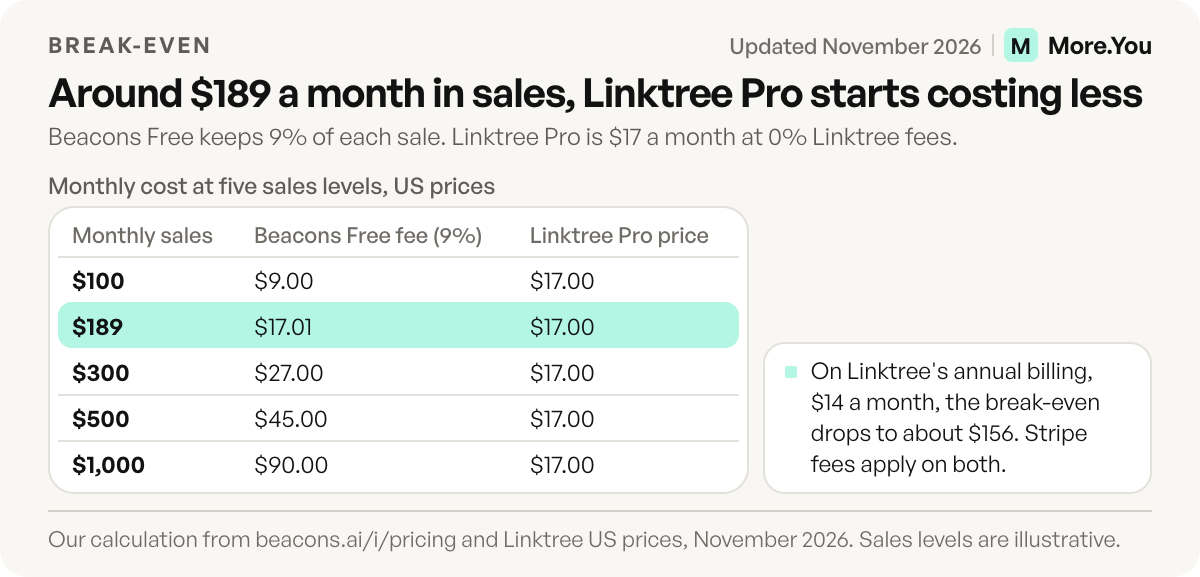
Our calculation from prices on beacons.ai and US Linktree prices, November 2026. Stripe processing (2.9% + $0.30 per sale) applies to every column and is left out.
The table also shows what happens when you outgrow the 9% on Beacons. Creator Plus drops the fee to 0% at $30 a month, which is $13 more than Linktree Pro for the same 0%. You pay that difference for Beacons’ unlimited email sends, memberships and courses. If you would pay for an email tool anyway, the bundle can still come out ahead.
Annual billing lowers both prices. Beacons charges $100 a year for Creator, $300 for Creator Plus and $1,000 for Creator Max, which works out to $8.33, $25 and $83.30 a month (beacons.ai/i/pricing, November 2026). Linktree’s US annual prices are $84 for Starter, $168 for Pro and $360 for Premium. On yearly billing, Creator Plus costs $11 a month more than Linktree Pro, and both charge 0% in platform fees.
Two checks before you trust the math. Linktree’s help center says selling digital products works in eligible countries only, so confirm yours first. Linktree also shows prices in local currency, so open its pricing page from your own region before you budget (linktr.ee/s/pricing, November 2026). For a full plan-by-plan breakdown, see is Linktree free and is Beacons free.
Beacons vs Linktree fees by the way you get paid
Beacons and Linktree charge different fees on different kinds of income, so compare the row that matches how you earn. The plan prices in the headers are US monthly prices.
| How you get paid | Beacons Free | Beacons Creator Plus ($30) | Linktree Free | Linktree Pro ($17) |
|---|---|---|---|---|
| Digital products | 9% fee | 0% fee | Free products only | Any price, 0% Linktree fee |
| Courses | 9% fee, 1 course without video hosting | 0% fee, unlimited, with video hosting | Free courses only | Any price, 0% Linktree fee |
| Affiliate links | 9% of commissions | Keep 100% of commissions | From Pro | Keep 100% of commissions |
Sources: beacons.ai/i/pricing and linktr.ee/s/pricing feature tables, November 2026.
Two fees cause most of the confusion. Linktree’s Free plan has a 12% fee, but only on Inbox Tips and Pay to Unlock, the paid replies inside its messaging inbox. Starter and up pay 0% on those, and Linktree’s bookings follow the product rule: free only on Free and Starter, any price on Pro. On Beacons, the 9% on Free and Creator also covers commissions from Beacons’ own affiliate marketplace. Card processing comes on top on both tools: Stripe takes 2.9% + $0.30 per sale, and Beacons also offers PayPal at 3.49% plus a fixed fee (help.beacons.ai, November 2026).
Which is better for selling digital products?
Beacons is better for selling at low volume, and Linktree Pro is better once sales are steady. Beacons lets you list unlimited digital products on Free, and Creator Plus adds unlimited courses with video hosting and memberships. Linktree sells paid digital products and paid bookings on Pro and Premium, with 0% Linktree fees. Both route card payments through Stripe.
On a $29 product sold through Stripe, you keep about $25.25 on Beacons Free and about $27.86 on Linktree Pro or Beacons Creator Plus. The $2.61 gap is the 9% seller fee (help.beacons.ai, November 2026).
On Linktree’s current plan table, Free and Starter can offer free products only, and the 12% fee on Free applies to inbox tips and paid messages (linktr.ee/s/pricing, November 2026). Our guide to selling digital products from your link in bio covers pricing and checkout on any tool.
Which is better for brand deals and email?
Beacons covers brand deals and email on its Free plan. You get a media kit that updates daily, 50 email sends a month and Instagram auto-replies, all at $0 (beacons.ai, November 2026). If you pitch brands, the media kit alone can decide it. See how to build a media kit for what brands look for in one.
Linktree takes the integration route. From Pro, it connects to email tools you may already use, such as Mailchimp, Kit and Klaviyo. Instagram auto-reply DMs are on every plan, with 1,000 a month on Free and 2,500 on Pro (linktr.ee/help, November 2026). You keep your list in the email tool, and Linktree sends signups there.
So the choice is one account against best-of-breed tools. Beacons’ 50 free sends a month cover a small list. Beacons counts every email sent as one send, so a newsletter to 51 people already needs Creator, and unlimited sends need Creator Plus.
Which is better for analytics and branding?
Linktree gives you a clearer analytics path and hides its logo sooner. Free keeps 28 days of history, Starter 90 days, Pro 365 days, and Premium all-time with CSV export. Hiding the Linktree logo from your page and QR code starts on Pro, per Linktree’s help center (linktr.ee/help, November 2026).
Beacons offers real-time analytics on Free and removes the Beacons logo from Creator Plus, at $30 a month (help.beacons.ai, November 2026). If a clean, unbranded page for a client or a shop is the main reason you upgrade, Linktree gets you there for $13 a month less.
Which should you choose?
Use this short test:
- Your page only routes followers to other sites. Linktree Free is enough.
- You sell under about $189 a month and pitch brands. Beacons Free gives you a store, media kit and email at $0.
- You sell more than about $189 a month. Linktree Pro costs less in fees, unless you need Beacons’ built-in email and memberships.
- You want no tool logo at the lowest price. Linktree Pro at $17, against Beacons Creator Plus at $30.
Both tools answer the question “where do my followers go next”. A bio page also has a newer reader: AI assistants such as ChatGPT and Perplexity, which read creator pages to answer “what does this person sell” and “how do I book them”.
A page people and AI agents can both read
More.You is an AI-native link in bio platform, built for both readers. More.You publishes this blog and competes with these tools, so every number in this guide names its source. Every page ships an llms.txt file, an agent manifest and structured data generated from its blocks. Your products, events, bookings and FAQ are published as labeled data that AI assistants can read, while people see the same page.
The Free plan is free forever and includes one page with every block type, the theme gallery, QR codes and basic analytics. Auto-pin, which keeps your newest post at the top, and attribution, which shows which post drove each click, are on Pro. To move, paste your Beacons or Linktree URL into the importer. More.You proposes your header, socials and links and writes nothing until you confirm each item. Create your More.You page and compare it with your current page side by side.
FAQ
Is Beacons better than Linktree?
Beacons is better if you want a store, a media kit and email on a free plan. Linktree is better if your page mostly routes followers, or if you sell more than about $189 a month and want 0% fees for $17 a month. Pick on fees and the work your page does, not on looks.
Does Beacons or Linktree take a cut of sales?
Beacons keeps 9% of sales on Free and Creator, and 0% on Creator Plus and Creator Max. Linktree takes 0% Linktree fees on paid products on Pro and Premium, and Free can’t sell paid products. Stripe’s 2.9% + $0.30 per sale applies on both (beacons.ai, linktr.ee, November 2026).
Which is cheaper for beginners, Beacons or Linktree?
Both have a $0 plan. If you only share links, both cost nothing. If you sell a few products a month, Beacons Free is cheaper because you pay 9% per sale and no subscription. Linktree needs Pro at $17 a month before you can set a price.
Can I switch from Linktree to Beacons, or back?
Yes. Your links are plain URLs you can copy across in minutes. Products and subscriber lists have to be moved separately. Your bio link changes, so update it on every social profile the same day.
Do Beacons and Linktree offer free trials?
Linktree offers a 7-day free trial on Pro and Premium. Beacons lists no time-limited trial for paid plans. Its Free plan works as the trial, and you upgrade in place (beacons.ai, linktr.ee, November 2026).
Sources
- Beacons pricing page, plans, prices, seller fees and feature table (beacons.ai/i/pricing, November 2026)
- Beacons help center, pricing plans, Beacons products transaction fees and logo removal (help.beacons.ai, November 2026)
- Linktree pricing page, feature table and fee notes (linktr.ee/s/pricing, US prices, November 2026)
- Linktree help center, paid plan features, transaction and processing fees, and custom domains (linktr.ee/help, November 2026)
- More.You plans, AI-readable pages and import: more.you/pricing, more.you/features/ai-native-pages and more.you/features/import (November 2026)
Platform rules and prices checked November 2026.