
AllMyLinks vs Linktree is a choice between two free link in bio pages with different priorities. AllMyLinks is free with no ads, moves adult links into an automatic 18+ section, and has not supported selling since 2 October 2026. Linktree is free with unlimited links, offers 18+ labels on every plan, and sells products from Pro at $17 a month (checked November 2026).
You picked a bio link tool to send followers to the right place. Then a link gets flagged, or you want to sell a $10 pack, or you need to see which country your clicks come from. Those moments decide which of these two pages fits you.
This guide compares AllMyLinks and Linktree on price, 18+ links, selling, analytics, custom domains and apps. Every figure comes from each company’s own pages, help center or terms, read again on November 13, 2026. If the format is new to you, start with what a link in bio is.
Key Takeaways
- Both are free to start. AllMyLinks calls itself “100% free” with no ads on your profile. Linktree Free costs $0 with unlimited links and 28 days of analytics.
- Both handle 18+ links, in different ways. AllMyLinks puts links from known NSFW platforms into a fixed 18+ section. Linktree lets you add an 18+, 21+, 25+ or sensitive content label to the whole page or to one link.
- Only Linktree sells today. AllMyLinks ended paid links and funding campaigns on 2 October 2026. Linktree Pro sets any price at 0% Linktree fees.
- Only AllMyLinks connects a custom domain. Linktree’s help center says it doesn’t support custom domains on any plan.
- Linktree publishes its prices. AllMyLinks lists no paid plan or price on its site.
AllMyLinks vs Linktree at a glance
AllMyLinks is a free profile page that collects your social accounts and websites in one link, with its own 18+ handling and country blocking. Linktree is the general-purpose standard, with four plans and a checkout from Pro.
| AllMyLinks | Linktree | |
|---|---|---|
| Free plan | Yes, “100% free”, no ads on your profile | Yes, $0 with unlimited links |
| Paid plans | None listed on its site | Starter $9, Pro $17, Premium $35 a month (US, billed monthly) |
| 18+ links | Automatic 18+ section for links from known NSFW platforms | 18+, 21+, 25+ or sensitive content label, per page or per link |
| Selling | Ended on 2 October 2026 | Paid products and bookings from Pro, 0% Linktree fees |
| Analytics | Visits, link clicks and countries | 28 days on Free, up to all time on Premium |
| Tracking codes | Facebook Pixel and Google Analytics | Google Analytics, Meta Pixel and UTM parameters from Pro |
| Custom domain | Supported, plan not stated | Not supported |
| Verified badge | By request, for celebrities and popular profiles | From Starter |
| Apps | iOS and Android | iOS and Android |
Sources: allmylinks.com, allmylinks.com/terms, the AllMyLinks help center, linktr.ee/s/pricing and the Linktree help center, November 2026. Linktree prices are US prices and vary by country.
Is AllMyLinks free?
AllMyLinks is free. Its homepage says you can create a profile “in seconds, 100% free” and that “there are NEVER any ads on your profile”. The site lists no paid plan and no price. Its terms say some enhanced features “may be On-Demand or Subscription based”, and its Android app lists in-app purchases, so check inside the app before you rely on a feature.
Linktree is free too, with a published ladder above it: Starter at $9, Pro at $17 and Premium at $35 a month, or $7, $14 and $30 a month billed annually. Pro and Premium come with a 7-day free trial (linktr.ee/s/pricing, checked November 2026). Our breakdown of Linktree’s free plan and paid tiers covers each tier.
How do AllMyLinks and Linktree handle 18+ links?
AllMyLinks handles 18+ links automatically. Its help center says sensitive links are “automatically placed in a separate ‘18+’ section at the bottom of your profile”, and a link from a known NSFW platform cannot be moved out of it. AllMyLinks says it does this to protect visitors who may not expect adult content or may not be of legal age.
Linktree uses labels you choose. Its help center lists four: 18+, 21+ and 25+, where visitors confirm their age before they continue, and Sensitive Content, where they acknowledge a warning. You can set a label for the whole Linktree in Settings, or lock one link from its Power-ups tab. The same page notes that “turning on any of these labels may limit your access to Earn features” (linktr.ee/help, updated October 26, 2026).
Linktree’s Community Standards set the rules in the table below (linktr.ee/s/community-standards, checked November 2026). For the rules on the apps that send the click, see our OnlyFans link page guide.
18+ rules side by side
| Rule | AllMyLinks | Linktree |
|---|---|---|
| Links to adult content | Allowed once you turn on “My profile contains sensitive content” | Allowed if legal in your region, marked sensitive and not advertising full service sex work |
| How visitors see them | Links from known NSFW platforms move to an 18+ section at the bottom | An age gate (18+, 21+ or 25+) or a sensitive warning, for the page or one link |
| Adult images on the page | No explicit profile image or background photo | No adult media or nudity, including the avatar, thumbnails and background |
| Payments for adult content | Selling ended for all content on 2 October 2026 | Not allowed through Linktree |
AllMyLinks also bans links to escort services, gambling and online casinos. Linktree warns that it may apply the sensitive label to a new link automatically, so check each link after you add it.
Can you sell on AllMyLinks or Linktree?
You can sell through Linktree, from Pro. AllMyLinks’ help center says that “as of October 2, 2026, AllMyLinks no longer supports selling”, so paid links and funding campaigns are no longer available. If your page sends people to a shop hosted elsewhere, both tools still link to it.
On Linktree, Free and Starter can offer free digital products, courses and bookings only. Pro and Premium set any price at 0% Linktree fees, and direct sales pay Stripe’s 2.9% + $0.30 per purchase on every plan (linktr.ee/help, November 2026). Free also carries a 12% fee on inbox tips and Pay to Unlock files (linktr.ee/s/pricing, November 2026).
If you sold on AllMyLinks before October 2026
On AllMyLinks, your paid links are now hidden from visitors, not deleted, and they show a lock icon in your account. To show one again as a normal link, edit it, leave the price empty or set it to 0, and save. Funding campaigns are hidden too, and you cannot start a new one.
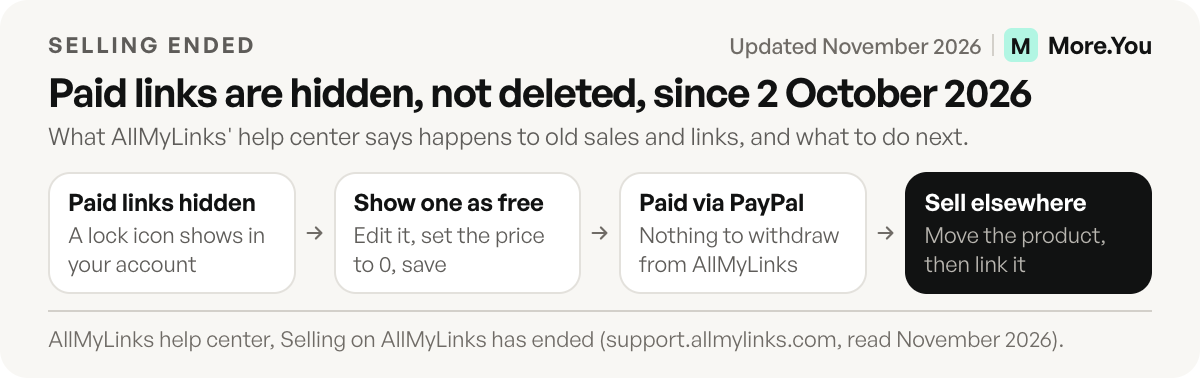
Payments always went straight from buyers to your PayPal account, so there is nothing to withdraw, and refunds for past sales stay between you and the buyer in PayPal. Buyers keep access to links they bought before October 2, 2026.
To keep selling, move the product to a tool that sells, such as Linktree Pro, and link it from your profile.
Which has better analytics and tracking?
Linktree publishes clearer limits. Analytics history runs 28 days on Free, 90 on Starter, 365 on Pro and all time on Premium. Starter lets you pick a custom date range of up to 365 days for each link, and Pro adds Google Analytics, a Meta Pixel and UTM parameters on every link. AllMyLinks’ help center lists visits, link clicks and countries of origin, plus fields for a Facebook Pixel and a Google Analytics tracking code, with no history window stated.
AllMyLinks’ help article asks for a “UA-” Google Analytics code, and Google says standard Universal Analytics properties stopped processing hits on July 1, 2023. Test the field with your Google Analytics 4 ID first. AllMyLinks also lets you show or hide the visitor count on your profile.
UTM tags on each link let your analytics tool see which post sent the visit.
Where AllMyLinks wins
AllMyLinks gives you more control over who sees the page. Country blocking stops visitors from chosen countries from opening your profile at all. The automatic 18+ section means you don’t have to label each adult link by hand.
It also connects a custom domain or sub-domain, such as links.yourname.com, which Linktree doesn’t offer on any plan. The profile stays free of ads, as the homepage promises, and its QR code can be restyled, from the background and colors to the eyes and body. For a paid tool built around 18+ creators, see our GetMySocial vs Linktree comparison, and for one with social posting built in, Linkme vs Linktree.
Where Linktree wins
Linktree fits better if you sell your own products, courses or bookings from the page. Pro includes the checkout at 0% Linktree fees, and the 7-day trial lets you test it first.
It also publishes every plan, price and analytics window, so you know what you get before you sign up. Its age labels can sit on one link instead of a whole section, and Starter shows how many people scan your QR code. On Pro, you write your own meta title and description for search and sharing. What Linktree is and how it works covers the basics.
A third option: More.You
More.You is an AI-native link in bio platform. More.You publishes this blog and competes with these tools, so every number below names its source. People tap your links, and AI assistants can read the same page through its llms.txt file, agent manifest and structured data to answer “who is this and what do they do”.
The Free plan gives you one page with every block type: links, social icons, products, events, bookings and FAQ, plus basic analytics with 30 days of views and clicks. On paid plans, audience rules show or hide a block by the visitor’s country or the app they arrived from. A custom domain and branding removal are on Pro. Our More.You vs Linktree comparison sets the two side by side.
How to switch between them
Links move by hand in minutes. Work through these steps on the same day.
- Check your custom domain. A domain such as links.yourname.com points at AllMyLinks through a CNAME record. Linktree has no custom domains, so point the record at a tool that does, or share the linktr.ee address.
- Copy your tracking codes. Add your pixel and Google Analytics ID to the new tool before you share the link.
- List your blocked countries. Check how the new tool handles them before you move.
- Change each bio link. On Instagram, go to Edit profile, then Links.
- Leaving Linktree? On Starter and up, a redirect sends every visitor to one link, so old Linktree links keep working.
On More.You, paste your AllMyLinks or Linktree URL into the importer. It proposes your header, avatar, socials and links, and writes nothing until you confirm each item. Create your More.You page on the Free plan and compare it with your current page side by side.
FAQ
Is AllMyLinks really free?
Yes. AllMyLinks says profiles are 100% free and carry no ads. Its site lists no paid plan or price, although its terms allow on-demand or subscription features and its Android app lists in-app purchases.
Can you still sell on AllMyLinks?
No. AllMyLinks’ help center says it stopped supporting selling on 2 October 2026, and paid links and funding campaigns are no longer available. You can still link to a shop hosted on another site.
Does Linktree allow adult links?
Yes, with conditions. Linktree’s Community Standards allow links to adult content that is legal in your region and marked as sensitive. They do not allow payments or donations for adult content through Linktree, and a sensitive label may limit Earn features.
Can you use a custom domain on AllMyLinks or Linktree?
AllMyLinks’ help center explains how to connect a custom domain or sub-domain to your profile. Linktree’s help center says it doesn’t support custom domains, so every page keeps its linktr.ee address.
Is Linktree or AllMyLinks better?
AllMyLinks suits creators who want a free page with an automatic 18+ section, country blocking and a custom domain. Linktree suits creators who sell, because Pro sets any price at 0% Linktree fees, and it publishes its analytics limits by plan. If you sold paid links on AllMyLinks, you need a tool that sells.
Sources
- AllMyLinks homepage, free plan and no-ads statement (allmylinks.com, November 2026)
- AllMyLinks terms of service, subscriptions and adult links, last updated November 5, 2026 (allmylinks.com/terms, November 2026)
- AllMyLinks help center: selling ended, sensitive links, allowed content, analytics, tracking codes, custom domains, country blocking, QR code and verification (support.allmylinks.com, November 2026)
- AllMyLinks apps on the App Store and Google Play (apps.apple.com and play.google.com, November 2026)
- Linktree pricing page, plan prices, trial and feature table (linktr.ee/s/pricing, November 2026)
- Linktree help center: sensitive content labels, paid plan features, fees and custom domains (linktr.ee/help, November 2026)
- Linktree Community Standards (linktr.ee/s/community-standards, November 2026)
- Google Analytics Help: Google Analytics 4 has replaced Universal Analytics
- Instagram Help: Add a website to your Instagram profile
- More.You import, AI-native pages and Linktree comparison (more.you/features/import, more.you/features/ai-native-pages and more.you/alternatives/linktree, November 2026)
Platform rules and prices checked November 2026.