Join this week and get Pro free for 6 monthsLiked the free tool? Get your own page with Pro freeMoving to More.You? Get Pro free for 6 monthsPick a template and get Pro free for 6 monthsTry every Pro feature free for 6 monthsPut it into practice with Pro free for 6 months
Get Pro freeSign upTemplatesSee all templatesPricing



Product
Page blocksLinks, products, bookings, events and opening hoursThemes and fonts15 colour themes, 31 fonts, buttons and backgroundsClick analyticsPage views, clicks on each link, countries and devicesLinktree importPaste your Linktree address and pick the links to bringResources
TemplateShop the look
Link in bio template for LTK creators
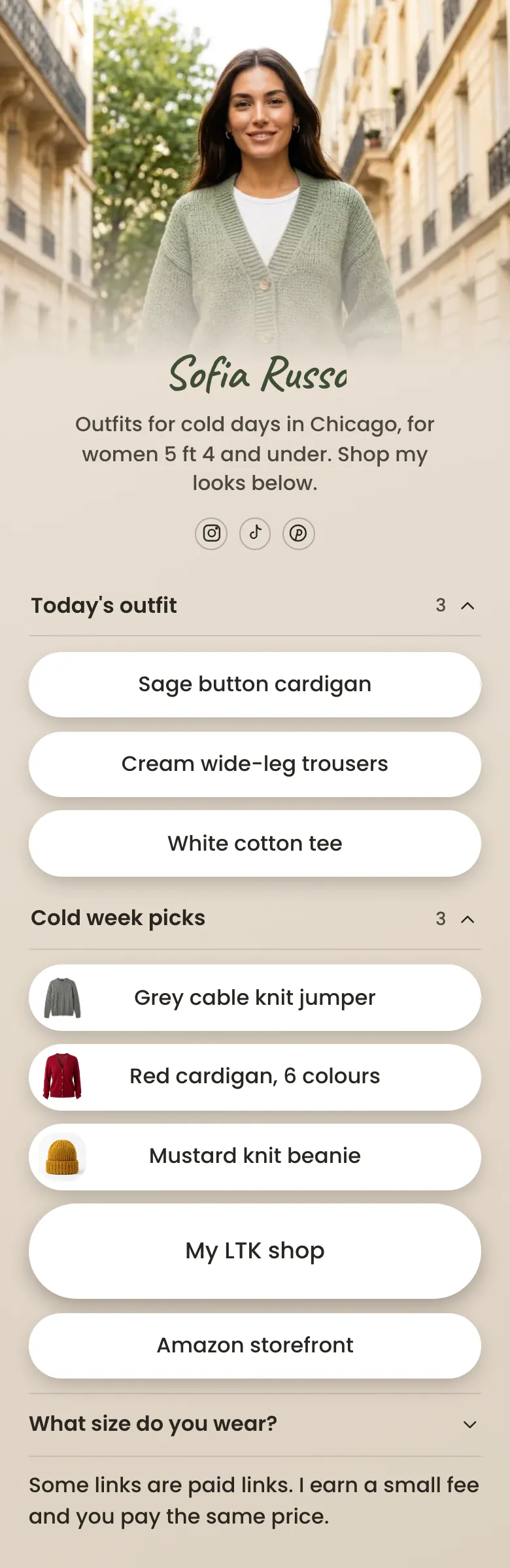
The outfit from today's post comes first, as three buttons, one for each piece: the cardigan, the trousers and the tee. Picks for a cold week, the full LTK shop and a size answer sit under them.
Link in bio blocks for LTK creators
LTK creators should put these in their link in bio, in order: today's outfit with one link for each piece, a short list of current picks, a button to the full LTK shop, their height and size, and a line that says some links are paid. A follower usually wants one piece from one post, so single pieces go before the whole shop.
What is on this page
- Name and bioSofia RussoOutfits for cold days in Chicago, for women 5 ft 4 and under. Shop my looks below.
- Social iconsInstagram, TikTok, Pinterest
- CollectionToday's outfit3 links
'Today's outfit' holds the three pieces from one post under one title. A follower opens it and taps the piece they liked.
- LinkSage button cardigan
Each button is named by colour and item, like 'Sage button cardigan', the way followers describe clothes in comments.
- LinkCream wide-leg trousers
- LinkWhite cotton tee
- CollectionCold week picks3 links
- LinkGrey cable knit jumper
- LinkRed cardigan, 6 colours
- LinkMustard knit beanie
- Featured linkMy LTK shop
'My LTK shop' is the largest button on the page and opens your full shop on LTK.
- LinkAmazon storefront
- FAQWhat size do you wear?
'What size do you wear?' is answered once here. For a petite creator, height and size tell the reader if a piece will fit.
- TextSome links are paid links. I earn a small fee and you pay the same price.
The closing line tells visitors that some links are paid and that the price stays the same for them.
Who it is for
Style creators who post daily outfits on Instagram, TikTok or Pinterest and link most pieces through LTK, with an Amazon storefront as a second shop. It suits a creator with a clear subject, like petite outfits for cold weather. If you send a weekly email and link pieces from many shops, start from the template for fashion influencers.
How to make it yours
Start from Shop the look
Choose Shop the look in the template gallery. Two lists, a large button for your LTK shop, a size question and a paid links line are in place.
Link your own pieces
Replace Sofia's name, photo and bio with yours. Paste the LTK link for each piece of today's outfit and name each button by colour and item. Type your height and usual size in the FAQ.
Put the address in your profiles
Publish, and put more.you/yourname in your Instagram, TikTok and Pinterest profiles. Tell followers in the caption that every piece is linked in your bio.
- Replace the three links in 'Today's outfit' each time you post a new look. Move the old pieces into the picks list if followers still ask for them.
- Write the colour choices in the button name when a piece comes in several, as the sample does with 'Red cardigan, 6 colours'.
- Put your height in the bio line and your sizes in the FAQ. A follower of a different height can then judge how a piece will fit them.
Questions
What should an LTK creator put in their link in bio?
Lead with the outfit from your newest post, split into one link for each piece. Add a second list for the pieces you wear all week, then one button for your whole LTK shop. Finish with your sizes and a sentence that tells visitors some links earn you money.
Should my bio link go to my LTK shop or to a page of links?
Use a page of links when followers ask for single pieces. Today's outfit is then the first thing on the page, with one link for each piece. 'My LTK shop' stays one tap away for followers who want to browse every look you have shared.
Do I need to say that my LTK links are paid links?
Yes, tell visitors plainly that you earn from the links. The sample ends with the words 'Some links are paid links' and tells the visitor the price stays the same. Keep a line like that on your page. Repeat it in your posts, since a follower may tap a link without reading to the end.
Can I change the beige colours and the handwritten font?
All of it can change. The beige background, the white buttons and the text colour each take a colour you choose. The handwritten name is one of 31 fonts, and your name can have its own font. None of this costs money, because a page is free to create and publish.
Start your page with this template
Type the name you want after more.you/ and create your account. Then change the words and photos to yours.
 more.you/yourname
Before you go
Put everything you share behind one link
More.You is a free link in bio page. No card needed.
- Start from a template made for your work
- Add links, products, bookings and events
- See how many people tap each link