Join this week and get Pro free for 6 monthsLiked the free tool? Get your own page with Pro freeMoving to More.You? Get Pro free for 6 monthsPick a template and get Pro free for 6 monthsTry every Pro feature free for 6 monthsPut it into practice with Pro free for 6 months
Get Pro freeSign upTemplatesSee all templatesPricing



Product
Page blocksLinks, products, bookings, events and opening hoursThemes and fonts15 colour themes, 31 fonts, buttons and backgroundsClick analyticsPage views, clicks on each link, countries and devicesLinktree importPaste your Linktree address and pick the links to bringResources
TemplateSkin routine
Link in bio template for Miravia creators
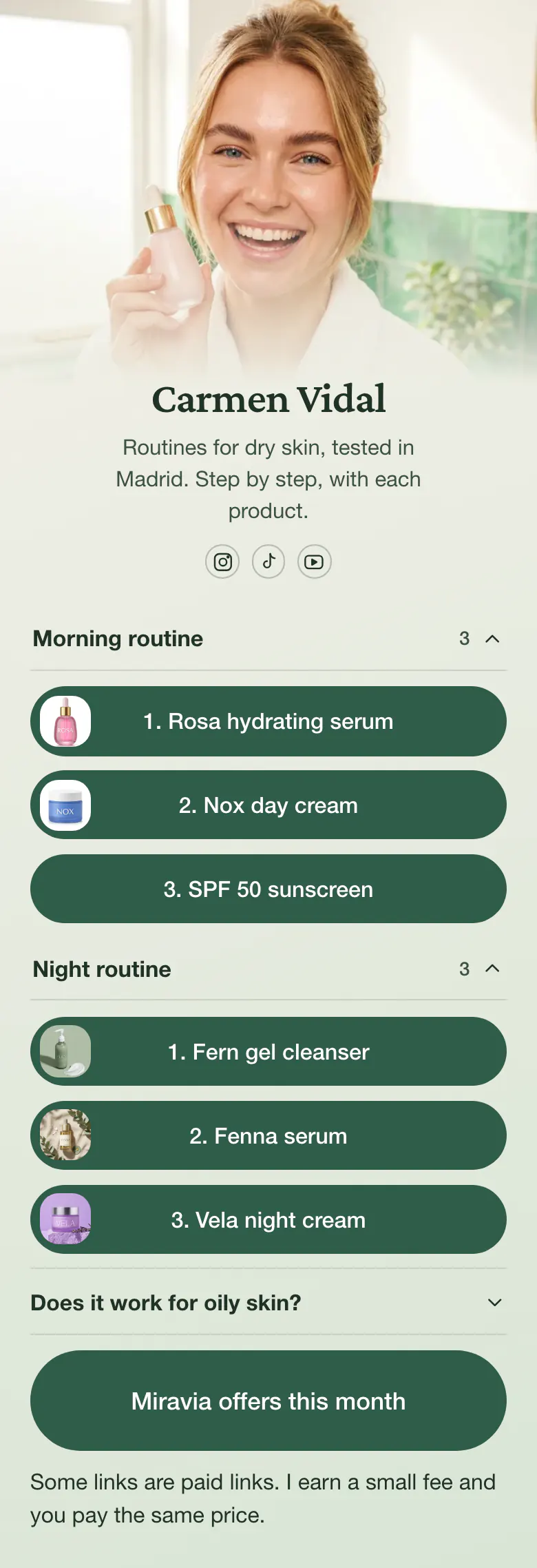
Followers ask which product you apply first, so this page answers with numbers. The morning routine opens the page with three steps, the night routine follows, and each step opens that product on Miravia.
A Miravia bio link built on routines
The link in bio of a Miravia creator should show each routine as a numbered list of product links, then a note on the skin type it suits, a link to the current Miravia offers and one line about paid links. Followers copy a routine step by step, so the order of the links matters as much as the products.
What is on this page
- Name and bioCarmen VidalRoutines for dry skin, tested in Madrid. Step by step, with each product.
- Social iconsInstagram, TikTok, YouTube
- CollectionMorning routine3 links
One collection is one routine. “Morning routine” and “Night routine” each open to show three steps.
- Link1. Rosa hydrating serum
Each link is one step with its number, from “1. Rosa hydrating serum” to “3. SPF 50 sunscreen”. A tap opens that product on Miravia.
- Link2. Nox day cream
- Link3. SPF 50 sunscreen
- CollectionNight routine3 links
- Link1. Fern gel cleanser
- Link2. Fenna serum
- Link3. Vela night cream
- FAQDoes it work for oily skin?
“Does it work for oily skin?” gets one honest answer, so followers with another skin type know before they buy.
- Featured linkMiravia offers this month
“Miravia offers this month” is a large button under the routines, for followers who wait for a sale before they buy.
- TextSome links are paid links. I earn a small fee and you pay the same price.
The page closes with one honest line. Some links are paid links, and the buyer's price is unchanged.
Who it is for
Carmen's page was made for skin care creators in Spain who show full routines in Reels, TikTok videos or on YouTube and earn from Miravia links. A focused account suits it best, for example one about dry skin. Creators who post make-up looks more often than routines will find the template for beauty creators a closer match.
How to make it yours
Begin with two routines
Two routines of three steps each are ready, one for the morning and one for the night. A skin type question, an offers link and a sentence about paid links follow.
List your products in order
Rename each collection, then paste your Miravia link for every step in the order you apply the products. Add a product picture to each link and your skin type to the line under your name.
Name the step in each video
With the page published, place its link in your Instagram, TikTok and YouTube bios. In each video, say which routine the product belongs to and which step it is.
- State your skin type under your name. Carmen's line says dry skin, and followers check it before they copy a routine.
- Rename the offers link when the month changes, and remove it while no sale is on. A button that opens nothing new teaches followers to skip it.
- Keep each routine to the steps you use every day. Put masks and weekly treatments in a separate collection with its own name.
Questions
What should a Miravia creator put in their link in bio?
Build the page around your routines. Give each routine its own group, number the steps and link every product to Miravia. Then say who the routine suits, add a link to this month's offers and write one sentence about paid links. A follower can repeat your morning from the first step to the last.
How do I share a skin care routine in order from one link?
Use one collection for each routine and put the step number in each link name. On this page the morning routine runs from the hydrating serum at step 1 to the SPF 50 sunscreen at step 3, and the night routine has its own three steps.
Where do I say that my Miravia links are affiliate links?
Put it in writing where the links are, in one sentence a follower understands. Carmen's page ends with one line of text. It tells followers that some of her links are paid links and that the price is the same for them. Add the same sentence to the caption of each video that sends people to your bio.
Can the green buttons change, and is there room for more routines?
Both are possible. Choose your own background, button and text colours, and replace Carmen's photo with yours. A page holds up to 50 blocks, which is room for several routines. Creating and publishing the page on More.You is free.
Start your page with this template
Type the name you want after more.you/ and create your account. Then change the words and photos to yours.
 more.you/yourname
Before you go
Put everything you share behind one link
More.You is a free link in bio page. No card needed.
- Start from a template made for your work
- Add links, products, bookings and events
- See how many people tap each link