Join this week and get Pro free for 6 monthsLiked the free tool? Get your own page with Pro freeMoving to More.You? Get Pro free for 6 monthsPick a template and get Pro free for 6 monthsTry every Pro feature free for 6 monthsPut it into practice with Pro free for 6 months
Get Pro freeSign upTemplatesSee all templatesPricing



Product
Page blocksLinks, products, bookings, events and opening hoursThemes and fonts15 colour themes, 31 fonts, buttons and backgroundsClick analyticsPage views, clicks on each link, countries and devicesLinktree importPaste your Linktree address and pick the links to bringResources
TemplateFriday run
Link in bio template for Target creators
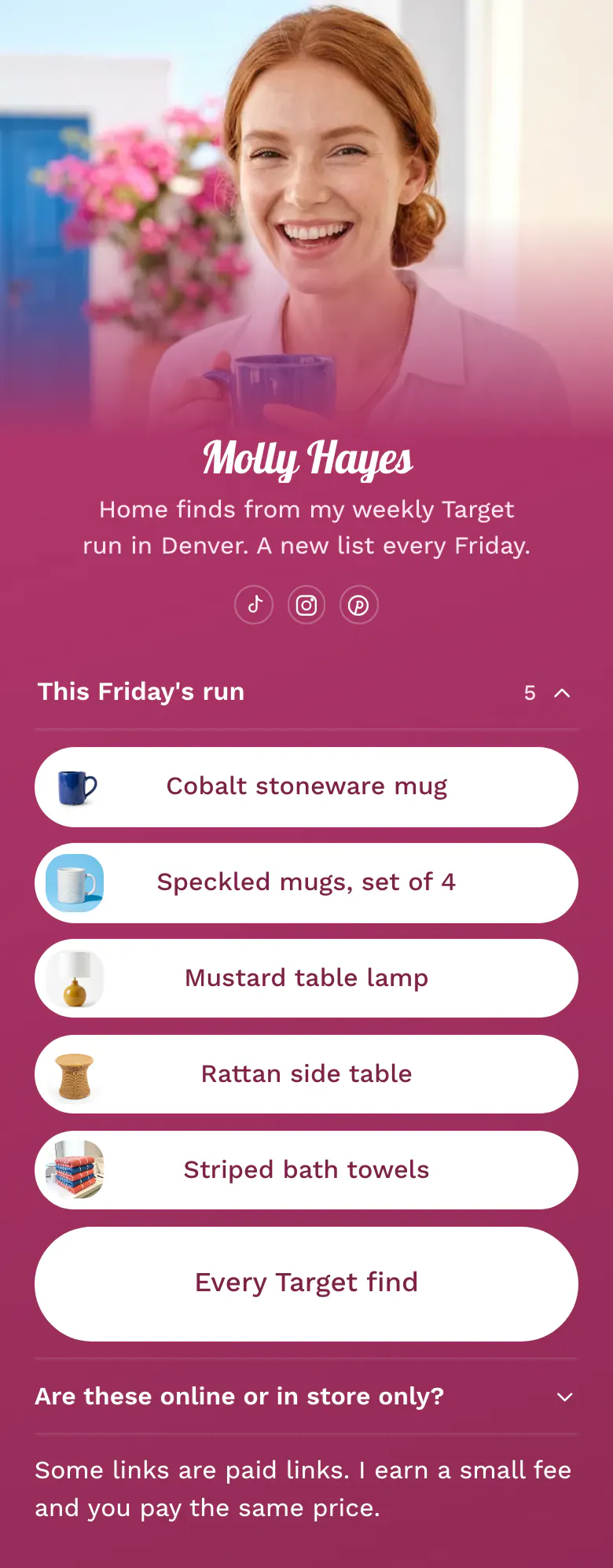
The page starts with one list, 'This Friday's run', with five finds in the order Molly filmed them. A button for every Target find and the question 'Are these online or in store only?' sit under it.
A Target creator's link in bio, in order
Target creators should put these in their link in bio, in order: this week's finds as one list with pictures, a button to the full Target storefront, a note on which finds are in store only, and a line about paid links. Followers watch a Target run and want the third or the fifth item, so the list keeps the order of the video.
What is on this page
- Name and bioMolly HayesHome finds from my weekly Target run in Denver. A new list every Friday.
- Social iconsTikTok, Instagram, Pinterest
- CollectionThis Friday's run5 links
'This Friday's run' holds the five finds of the week under one title, in the order they appear in the video.
- LinkCobalt stoneware mug
Each find is a button with a small picture and a name by colour and item, like 'Cobalt stoneware mug'.
- LinkSpeckled mugs, set of 4
- LinkMustard table lamp
- LinkRattan side table
- LinkStriped bath towels
- Featured linkEvery Target find
'Every Target find' is the tall button under the list. It opens your full storefront, with finds from earlier weeks.
- FAQAre these online or in store only?
'Are these online or in store only?' tells a follower where to get each item, before they ask under the video.
- TextSome links are paid links. I earn a small fee and you pay the same price.
The line at the bottom says in plain words that some links are paid and the price does not change.
Who it is for
Creators in Target's creator programme who film a weekly shop run, a haul or home finds for TikTok, Instagram or Pinterest. It fits a creator with a fixed posting day and a new list each week. If you build whole rooms and report what each one cost, start from the template for Walmart creators.
How to make it yours
Pick Friday run
Choose Friday run in the template gallery. One list for the week's finds, a tall storefront button, a stock question and a paid links line are ready.
Add this week's finds
Replace Molly's name, photo and bio. Rename the list after your own posting day, paste a Target link for each find and add a small picture to each.
Publish on posting day
Publish, then paste more.you/yourname into your TikTok, Instagram and Pinterest profiles. Each week, replace the links in the list when the new video is posted.
- Keep the links in filmed order. A follower who wants the third item from the video counts the buttons and finds it.
- Write 'in store only' in the FAQ answer for finds with no online page. Followers then know to visit a shop before the item is gone.
- Put the day in the list title, like 'This Friday's run'. A dated title shows visitors the list is from this week.
Questions
What should a Target creator put in their link in bio?
List the finds from your newest video first, each with a picture and a clear name. Under the list, add one button to your full Target storefront. Say which items are in store only, and finish with a sentence that tells visitors you earn from some links.
How do I share my Target finds from TikTok and Instagram?
Collect the week's finds in one list on your bio page and put the page address in each profile. The sample list, 'This Friday's run', has five links in filmed order. In the video, tell viewers the finds are linked in your bio in the same order.
What do I do with last week's Target finds?
Replace them with the new list and let the storefront button hold the older finds. 'Every Target find' on the sample opens the full storefront for that reason. Each link shows how many times visitors tapped it, so keep an older find that still gets taps as a single link under the list.
Is the Target creator template free, and can I change the pink design?
Yes, and yes. A page is free to create and publish on More.You. The raspberry pink background, the white buttons and the script font of the name can all change. Your own photo can be the cover at the top of the page.
Start your page with this template
Type the name you want after more.you/ and create your account. Then change the words and photos to yours.
 more.you/yourname
Before you go
Put everything you share behind one link
More.You is a free link in bio page. No card needed.
- Start from a template made for your work
- Add links, products, bookings and events
- See how many people tap each link