Join this week and get Pro free for 6 monthsLiked the free tool? Get your own page with Pro freeMoving to More.You? Get Pro free for 6 monthsPick a template and get Pro free for 6 monthsTry every Pro feature free for 6 monthsPut it into practice with Pro free for 6 months
Get Pro freeSign upTemplatesSee all templatesPricing



Product
Page blocksLinks, products, bookings, events and opening hoursThemes and fonts15 colour themes, 31 fonts, buttons and backgroundsClick analyticsPage views, clicks on each link, countries and devicesLinktree importPaste your Linktree address and pick the links to bringResources
TemplateRoom redo
Link in bio template for Walmart creators
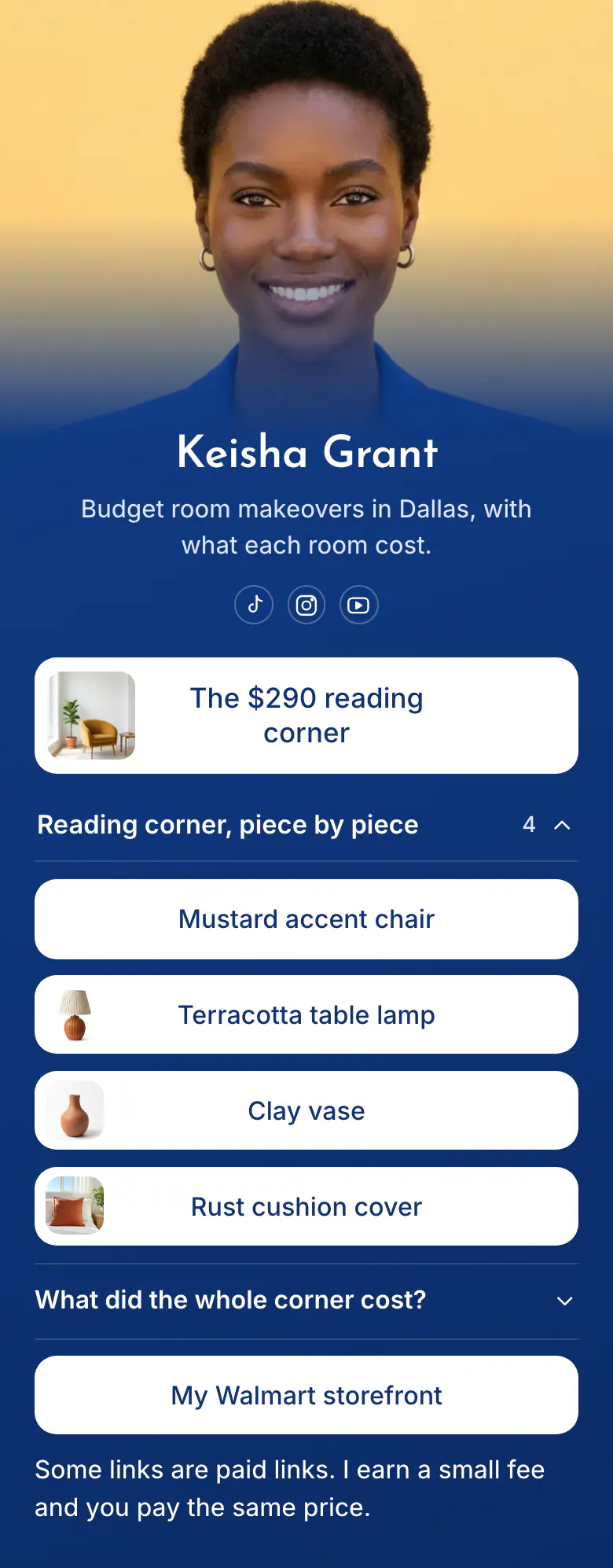
A picture card of the finished room is the first button, named 'The $290 reading corner'. Under it, each piece of that corner has a link of its own, from the mustard chair to the cushion cover. The FAQ gives the total.
Bio link order for Walmart creators
Walmart creators should put these in their link in bio, in order: the newest makeover or haul as a picture card, each product from it as a separate link, the total cost, a link to the full Walmart storefront, and a line about paid links. Followers want the exact chair from the video, so every piece gets a link of its own.
What is on this page
- Name and bioKeisha GrantBudget room makeovers in Dallas, with what each room cost.
- Social iconsTikTok, Instagram, YouTube
- Featured linkThe $290 reading corner
The room photo and the total sit on one card, so a follower knows which video the page belongs to.
- CollectionReading corner, piece by piece4 links
'Reading corner, piece by piece' groups the four products from one room under a title that opens and closes.
- LinkMustard accent chair
Each piece is a button named by colour and item. 'My Walmart storefront' under the FAQ opens everything else.
- LinkTerracotta table lamp
- LinkClay vase
- LinkRust cushion cover
- FAQWhat did the whole corner cost?
'What did the whole corner cost?' is the question under every makeover video. The answer states the total once.
- LinkMy Walmart storefront
- TextSome links are paid links. I earn a small fee and you pay the same price.
The page ends by telling visitors that some links are paid and that they pay the same price.
Who it is for
Creators in the Walmart Creator programme who film budget room makeovers, home hauls or decor finds for TikTok, Instagram or YouTube. It fits a creator who builds one project at a time and tells followers the total. If you post a new list of finds from one shop run every week, start from the template for Target creators.
How to make it yours
Choose Room redo
Open the template gallery and choose Room redo. A picture card for your newest room, a list for its pieces, a cost question and a storefront button are in place.
Add your newest room
Replace Keisha's name, photo and bio. Add a photo of your finished room, put the total in the card's name, and paste one Walmart link for each piece.
Publish and tell viewers
Publish, then paste more.you/yourname into your TikTok, Instagram and YouTube profiles. Say in the video that every piece of the room is linked in your bio.
- Put the room total in the name of the first button, as the sample does with '$290'. The total is the first thing followers ask about.
- List the pieces in the order they appear in the video. A follower who remembers the lamp after the chair finds it without reading every name.
- For a new room, make a new collection and move it above the old one. Keep older rooms lower on the page while followers still ask about them.
Questions
What should a Walmart creator put in their link in bio?
Show your newest room or haul first, with a photo. Under it, link each product by name so nobody has to search, and state what the whole room cost. Add one button to your Walmart storefront for everything else, and a sentence that says you earn from some links.
How do I link every product from a room makeover video?
Group them in one collection named after the room. The sample has 'Reading corner, piece by piece' with four links: the chair, the lamp, the vase and the cushion cover. The collection opens and closes, so a room with many pieces still takes little space on a phone.
Should I show what a room cost on my bio page?
Yes, if budget is your subject. Keisha's page states the total in the first button, 'The $290 reading corner', and answers 'What did the whole corner cost?' in the FAQ. Shop prices change, so check the total again while the room stays on your page.
Does a Walmart creator page cost anything on More.You?
No, creating and publishing a page is free, and the Free plan has every block type. The dark blue background, the white buttons and the font can change to your own choices. A page holds up to 50 blocks, enough for several rooms.
Start your page with this template
Type the name you want after more.you/ and create your account. Then change the words and photos to yours.
 more.you/yourname
Before you go
Put everything you share behind one link
More.You is a free link in bio page. No card needed.
- Start from a template made for your work
- Add links, products, bookings and events
- See how many people tap each link