
In this Beacons review, the short answer is yes for most creators who sell and pitch brands. One free account runs a link in bio page, a store, a media kit, email marketing and Instagram auto-DMs, plus an AI assistant called Beam. The cost is a 9% seller fee on the Free and $10 Creator plans, and Beacons branding until the $30 Creator Plus plan (beacons.ai, November 2026).
This is a documentation review, not a hands-on test. We read Beacons’ pricing page, product pages, What’s New log and help center in November 2026. Only features Beacons lists as available count toward the verdict.
Key Takeaways
- Beacons puts a lot on its $0 plan. Free includes the page, a store, a daily-updating media kit, 50 email sends a month and keyword auto-DMs (beacons.ai/i/pricing, November 2026).
- Selling costs 9% until Creator Plus. Free and Creator keep 9% of each sale; Creator Plus ($30 a month) and Creator Max ($100) keep 0%. Stripe or PayPal fees apply on every plan.
- Beam handles analytics charts, content ideas and brand-email drafts. Each action spends AI credits, and Free gets 30 a day.
- The logo stays until $30 a month. Logo removal is a Creator Plus feature.
- Best fit: creators who pitch brands and sell a first product. Weaker fit: steady sellers on the lower plans, and anyone who only needs links.
Beacons review at a glance
Beacons is a creator business kit with a link in bio page at the front. Most of its tools work on the Free plan, and the table shows where paid plans start.
| Feature | What Beacons lists | Plan |
|---|---|---|
| Link in bio page | Unlimited links and sub-pages, AI page designer | Free |
| Store | Unlimited digital products, Stripe and PayPal checkout | Free, 9% fee until Creator Plus |
| Media kit | Updates daily from linked social accounts | Free |
| Email marketing | 50 sends and 5 automation sequences a month | Free; 500 sends on Creator, unlimited on Creator Plus |
| Instagram auto-DMs | Smart Reply keyword triggers on posts, Reels, Stories and DMs | Free, unlimited DMs |
| Brand deals | Affiliate links from 12,000 brand partners, AI outreach emails | Free, 9% on commissions until Creator Plus |
| Beam AI | 30 AI credits a day, about 10 chats | Free; 300 credits on Creator, unlimited on Creator Plus |
| Custom domain | Included, free for the first year | Creator, $10 a month |
| No Beacons logo | Included | Creator Plus, $30 a month |
Sources: beacons.ai/i/pricing, beacons.ai/i/whats-new and help.beacons.ai, November 2026.
How much does Beacons cost?
Beacons has four plans. Free costs $0 and is labeled free forever. Creator costs $10 a month, Creator Plus $30 and Creator Max $100, or $100, $300 and $1,000 a year on annual billing. The seller fee is 9% on Free and Creator and 0% on the two higher plans (beacons.ai/i/pricing, November 2026).
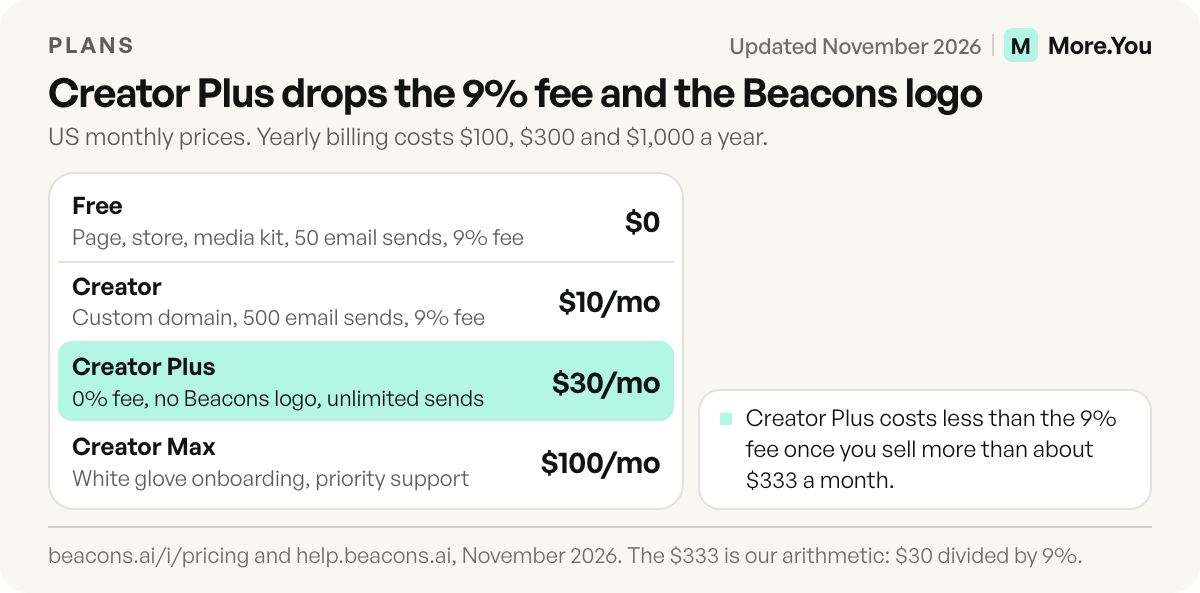
On yearly billing, the paid plans work out to $8.33, $25 and $83.30 a month. Beacons’ help center names one exception to the 9% on Creator: invoices carry 0%. Our Beacons pricing breakdown works out when Creator Plus pays for itself.
How good is the Beacons link in bio page?
The page covers the core job well. You get unlimited links and sub-pages, blocks for video, music, images, embeds and sign-ups, and a personal QR code. Beam can design a page from a text prompt, once a day on Free and up to 15 times a day on Creator. A custom domain needs Creator, and removing the logo needs Creator Plus (help.beacons.ai, November 2026).
Beacons also lists music embeds from Spotify, SoundCloud and Apple Music, tour dates from Bandsintown and Seated, and a one-page website on Free. If you’re new to the format, how a link in bio works covers the basics.
How much does Beacons take from your sales?
Beacons keeps 9% of every sale on Free and Creator, and nothing on Creator Plus and Creator Max. Payment processing comes on top: Beacons’ help center lists Stripe at 2.9% + $0.30 per transaction, and PayPal at 3.49% plus a fixed fee that depends on the currency (help.beacons.ai, November 2026).
Each product gets its own page, priced in any of 20+ currencies, with Apple Pay and Google Pay checkout, discount codes and a one-click product importer. Order bumps work on every plan. Free and Creator get one course without video hosting. Creator Plus adds memberships, unlimited courses with video hosting, and buy now, pay later through Klarna or Affirm.
What does the Beacons media kit include?
The media kit is one of the strongest parts of the Free plan. It pulls follower and engagement data from your linked social accounts and refreshes daily on every plan. Beacons also lists rate cards, past projects, a contact form, invoices, media kit analytics that show who viewed the kit and when, an optional email gate and sharing by link, email or PDF. Its Pricing Calculator turns your audience and engagement numbers into a suggested rate for each deliverable, such as a Reel, a Story or a post (beacons.ai/i/whats-new, November 2026).
Beacons’ What’s New log says linking Instagram no longer needs a Facebook Business page. Our guide to what brands look for in a media kit covers the sections that get read.
Is Beacons email marketing enough?
For a small list, yes. Free includes 50 email sends and 5 automation sequences a month. Creator raises sends to 500, and Creator Plus makes sends unlimited with 20 sequences a month. Beacons counts every email sent as one send, so the list size decides the plan.
| Weekly newsletter to | Sends in a 4-issue month | Smallest plan that covers it |
|---|---|---|
| 12 subscribers | 48 | Free (50 sends) |
| 100 subscribers | 400 | Creator (500 sends) |
| 200 subscribers | 800 | Creator Plus (unlimited) |
Illustrative list sizes; send limits from beacons.ai/i/pricing, November 2026.
The tool also covers welcome emails, geotargeted campaigns, list imports and exports, and signup forms you can embed on other sites. The Audience Manager keeps every contact in one list, with no contact limit on any plan. From Creator, your emails can go out from an address on your own domain.
How does Beacons Smart Reply work?
Smart Reply is Beacons’ comment-to-DM tool. You pick a trigger: a keyword comment on a post or Reel you choose, a Story reply or a DM. Smart Reply then sends your link in bio page, any URL, a product card, a YouTube video or a text-only reply. Beacons lists unlimited DMs on every plan and tracks sends, clicks and click-through rate per keyword (beacons.ai/i/app-pages/smart-reply, November 2026).
Advanced flows open a two-way chat, then send follow-ups and collect emails. They carry Beacons branding on Free and Creator (beacons.ai/i/pricing, November 2026). Beam can draft the reply text.
What brand-deal tools does Beacons offer?
Beacons covers both the pitch and the paperwork. You can add affiliate links from what Beacons calls 12,000 brand partners, write outreach emails with AI on every plan, and keep rates, invoices and past projects in the media kit. Affiliate commissions carry the 9% fee until Creator Plus.
Since January 2026, Beacons has an AI Brand-Deal Inbox. With Gmail connected, it reads incoming deal emails, organizes them, flags the good ones and drafts replies with suggested rates built in (beacons.ai/i/whats-new, November 2026).
Beacons also sells brands a creator-search portal that draws on creators using Beacons (beacons.ai/i/brands, November 2026). Treat any offers from it as a bonus.
What can Beam, the Beacons AI assistant, do?
Beam is the AI teammate built into Beacons. Ask it how your week went and it answers with a chart, not only a number (beacons.ai/i/whats-new, November 2026). It also brainstorms content, searches trending posts, generates images and copy, designs pages from a prompt and drafts brand-email replies.
Each action spends AI credits. A Beam chat costs 3 credits, so Free’s 30 daily credits cover about 10 chats. Creator’s 300 credits cover about 100, and Creator Plus is unlimited (beacons.ai/i/pricing, November 2026). Other actions cost more: an AI image takes 10 credits, a page design 20 and an email draft 30, so Free allows one page design and one email draft a day.
Who is Beacons best for?
Beacons fits creators who do several jobs from one profile: pitching brands, selling a first digital product, growing a small email list and answering comments with links. For that creator, the Free plan does the work of five separate tools at $0.
| If you | Start on | What decides it |
|---|---|---|
| Pitch brands and sell a first product | Free | Store, media kit and 50 email sends at $0 |
| Want your own domain or more email sends | Creator, $10 a month | Domain free for the first year |
| Sell more than about $333 a month, or want no Beacons logo | Creator Plus, $30 a month | 0% seller fee and logo removal |
| Want onboarding help and a Google Workspace | Creator Max, $100 a month | White glove onboarding, priority support |
Plan features from beacons.ai/i/pricing, November 2026. The $333 is our arithmetic: $30 divided by 9%.
Who should look elsewhere?
Three groups get less from Beacons. Steady sellers on Free or Creator pay a 9% fee that flat-priced stores don’t charge. At $1,000 a month in sales, that fee comes to $90, three times the $30 Creator Plus price. Creators who only send followers to other sites carry tools they won’t use. Shops and brands that want a page without a third-party logo pay $30 a month for that.
Compare it with Linktree in our Beacons vs Linktree comparison, or see nine more tools in our guide to Beacons alternatives.
Verdict: is Beacons worth it?
Yes, for creators who will use at least three of its tools. The Free plan’s mix of page, store, media kit, email and auto-DMs is broad for $0, and Beam’s charts and brand-email drafts work today. Watch the 9% fee and the logo, and move to Creator Plus when the fee starts costing more than the plan. In numbers, that point is about $333 a month in sales on monthly billing, or about $278 if you pay yearly, since Creator Plus is then $25 a month. Below that, staying on Free costs less.
A narrower page that AI assistants can read
More.You is an AI-native link in bio platform, built for a different job than Beacons: one page that people and AI agents can both read. More.You publishes this blog and competes with Beacons, so every number in this review names its source. If you sell and send newsletters from one account, Beacons covers that work in one place.
Every page ships an llms.txt file, an agent manifest and structured data generated from its blocks. On Pro, auto-pin moves a scheduled post’s link to the top when the post goes live, and attribution ties each click to the post that sent it. Our More.You vs Beacons comparison sits on the main site.
Moving off Beacons
Export products, customer lists and email subscribers first, since Beacons lists audience exports. On More.You, paste your Beacons URL and import proposes your header, avatar, socials and links, writing nothing until you confirm each item. Keep the Beacons page live for a week, because older posts still carry its link.
Then replace the link in each profile: on Instagram and on TikTok, it sits under Edit profile, then Links. To stop a paid plan, use “Cancel your subscription” under your plans in Beacons’ Plans and Billing Settings (help.beacons.ai, November 2026).
Start with a link block for each place your followers go. Create your More.You page on the Free plan, and it publishes with its own llms.txt and structured data built from those blocks.
FAQ
Is Beacons legit and safe to use?
Yes. Beacons came out of Y Combinator’s Summer 2019 batch and raised a $6 million seed round led by Andreessen Horowitz in 2021 (TechCrunch, May 2021). Store payouts go to your own Stripe or PayPal account. Beacons says more than 10 million creators use it (beacons.ai/i/brands, November 2026).
Is Beacons worth it for small creators?
Usually, yes. A creator with modest sales gets a page, a store, a media kit, 50 email sends a month and auto-DMs for $0, paying the 9% fee only on what sells. Creator Plus makes sense once that fee costs more than the plan’s $30 monthly price.
What is Beam on Beacons?
Beam is the AI assistant built into Beacons. It answers analytics questions with charts, brainstorms content, designs pages from a prompt and drafts brand-email replies once Gmail is connected. Free includes 30 AI credits a day, and a chat costs 3 credits.
Is Beacons AI completely free?
Beacons’ Free plan costs $0 with no time limit. It includes the page, a store, a media kit, 50 email sends a month and 30 AI credits a day. Sales carry a 9% seller fee, and paid plans start at $10 a month for Creator.
Does Beacons take a percentage of sales?
Yes, on two of its four plans. Free and Creator keep 9% of each sale, affiliate commissions included, while Creator Plus and Creator Max keep 0%. Stripe’s 2.9% + $0.30 or PayPal’s 3.49% plus a fixed fee applies on every plan (help.beacons.ai, November 2026).
Sources
- Beacons pricing page, plans, seller fees, AI credits and feature table (beacons.ai/i/pricing, November 2026)
- Beacons What’s New log: Beam charts, the Pricing Calculator, Quick Connect and the AI Brand-Deal Inbox (beacons.ai/i/whats-new, November 2026)
- Beacons Smart Reply page (beacons.ai/i/app-pages/smart-reply, November 2026)
- Beacons link in bio page (beacons.ai/i/app-pages/link-in-bio, November 2026)
- Beacons for brands, creator search (beacons.ai/i/brands, November 2026)
- Beacons help center, pricing plans, logo removal, transaction fees and plans and billing settings (help.beacons.ai, November 2026)
- Beacons raises $6 million, TechCrunch (May 2021)
- More.You AI-native pages (more.you/features/ai-native-pages, November 2026)
- More.You auto-pin, analytics and attribution (more.you/features/auto-pin and more.you/features/analytics-attribution, November 2026)
- More.You import (more.you/features/import, November 2026)
Platform rules and prices checked November 2026.