To add a location to your Instagram bio, tap Edit profile and type your city or neighborhood into the Bio field, which holds 150 characters. Business and creator accounts can also add a street address to the Contact button, which gives visitors directions. Any account can add a Google Maps link under Links. The text tells people where you are, and the map link gets them there.
Someone who finds your profile and wants to visit has two questions: where are you, and are you open? A profile that answers neither sends them back to a search bar to look for you. Instagram gives you four places to answer the first question, and each one shows up in a different spot on your profile.
This guide covers the four ways step by step, which account types can use each one, 12 location lines you can copy, and where your bio link should send people who want directions and opening hours. It is written for local businesses, service providers and creators who want people nearby to find them.
Key Takeaways
- Type it into the bio. Any account can put a city, neighborhood or street address in the 150-character bio, and Instagram search matches text in bios.
- Use the Contact button for a full address. Business and creator accounts can add an address that gives visitors directions, and choose whether contact info shows on the profile.
- Link a map for one-tap directions. A Google Maps link in one of your 5 bio link slots opens the place in the visitor’s maps app.
- Keep the location line short. The 12 lines below use 25 to 46 characters, which leaves room for what you do and why someone should tap.
- Answer “are you open?” on the bio page. A map link with an opening hours block under it puts where and when on one page.
How to add location to your Instagram bio: 4 ways
You can add a location to your Instagram bio in four places: the bio text, the name field, the Contact button on a professional account, and a Google Maps link in your bio links. Bio text and the name field are plain text that any account can use. The Contact button gives directions. A Maps link opens the exact place in the visitor’s maps app.
| Method | Who can use it | Where it shows | Tappable |
|---|---|---|---|
| City or address in the bio text | Every account | Your bio, under your name | No |
| City in the name field | Every account | The bold name line above your bio | No |
| Address in the Contact button | Business and creator accounts | The Contact button on your profile | Yes, it offers directions |
| Google Maps link | Every account | Your bio links | Yes, it opens the map |
Most local businesses use three of the four: the neighborhood in the bio text, the street address in the Contact button and a map link for people who want directions now.
1. Type your city or neighborhood in the bio
The bio text is the fastest way to show a location, and it works on personal, creator and business accounts.
- Go to your profile and tap Edit profile.
- Tap Bio.
- Type the location on its own line, for example “Williamsburg, Brooklyn”.
- Save your changes.
Instagram’s help page on bios caps the bio at 150 characters (checked November 2026). The location shares that space with what you do and why someone should tap your link. A city or neighborhood fits easily. A full street address takes more room, so many shops keep the street for the Contact button and the area for the bio.
2. Add your city to the name field
The name field is the bold line above your bio. Adam Mosseri’s post on how Instagram search works lists usernames, bios, captions, hashtags and places as what search tries to match, and calls a handle or profile name related to your content your best bet. A city in the name field is plain text that helps people see where you work.
- Tap Edit profile, then Name.
- Add the place after your name, for example “Northside Bakery | Boulder”.
- Save your changes.
Keep your name first. People who know you search for your name, and the city after it helps people who do not know you yet.
3. Add your address to the Contact button
A street address belongs in the Contact button, which only business and creator accounts have. Instagram’s page on professional accounts says the Contact button sits near the top of the profile and can include directions, a phone number and an email address (checked November 2026). Anyone who taps Contact can see what you add.
- If you use a personal account, switch first: Settings and activity, then Account type and tools, then Switch to professional account. Our guide to the Instagram creator account compares the creator and business types.
- Go to your profile and tap Edit profile.
- Under Public business information, open your business contact info and add your street address.
- Open Profile display, under the same heading, and choose to display your contact info.
- Tap Done.
A private account becomes public when it switches to professional, according to Instagram’s setup page. To appear on the Instagram Map and be taggable in posts and Stories, Instagram’s business information page says to add your address to the Facebook Page connected to your account. The location then shows on the map within 48 hours (checked November 2026).
4. Add a Google Maps link to your bio links
A Google Maps link turns one of your bio links into directions, and it works on every account type. Instagram’s help page on profile links allows up to 5 links (checked November 2026).
- Open Google Maps and search for your place, or touch and hold the map to drop a pin.
- Tap the place’s name or address, then tap Share and copy the link.
- In Instagram, tap Edit profile, then Links, then Add external link.
- Paste the link, give it a title such as “Directions”, and tap Done.
The sharing steps come from Google Maps Help. The guide to adding a link to your Instagram bio covers what to put in the other four slots.
You can also build the link from your address. Google’s Maps URLs guide documents a search link that opens the Google Maps app on Android and iOS when it is installed, and a browser when it is not. Put your business name and address after “query=”, with a plus sign for each space and %2C for each comma:
https://www.google.com/maps/search/?api=1&query=Northside+Bakery%2C+12+Main+St%2C+Boulder+COOpen the link on your phone before you save it. If the pin lands on the wrong business, use the Share link from the Maps app instead.
12 Instagram bio location lines you can copy
A good Instagram bio location line names the place people search for, at the level of detail they need. Creators and online businesses name a city. Local shops name a neighborhood. A street address earns its characters only when people walk in. Each line below leaves at least 104 of your 150 characters for the rest of the bio.
| Who it fits | Line to copy | Characters |
|---|---|---|
| Creator, one city | Austin-based food creator | 25 |
| Creator who travels | Based in Lisbon, shooting worldwide | 35 |
| Online business | Online coaching, based in Chicago | 33 |
| Neighborhood shop | Neighborhood bakery in Williamsburg, Brooklyn | 45 |
| Shop with a street address | 12 Main St, Boulder, CO | Open daily 7-3 | 40 |
| Shop with set hours | Open Tue-Sat 10-6 | Shoreditch, London | 38 |
| Restaurant on a corner | Find us at 5th & Pine, Seattle | 30 |
| Service that travels to clients | Mobile dog groomer serving all of Dublin | 40 |
| Studio by appointment | Private studio in Denver, by appointment | 40 |
| Two locations | Two locations: Portland + Seattle | 33 |
| Pop-ups and markets | Pop-ups across Philadelphia, dates at the link | 46 |
| Business that moved | Now at 40 Elm St, Austin (moved from 6th St) | 44 |
Swap in your own place and hours. The businesses and addresses are examples, and the counts leave out any pin emoji you add in front. For the rest of the bio, these 20 Instagram bio templates pair a short intro with a clear reason to tap your link. Gyms and studios get full bios with the location line built in, in the fitness bio examples.
Does a location in your Instagram bio help people find you?
A location in your Instagram bio can help people nearby find you in search. Instagram matches the text people type against usernames, bios, captions, hashtags and places, so a city or neighborhood in your bio gives search a word to match. Instagram’s own advice is that a location-specific account, such as a small business, should share its location in the bio.
That advice comes from Instagram’s August 2021 post on how its search works, the same post cited in step 2. It names the text people type as the most important search signal. Pair the place with what you do, as in “hair stylist, Denver”, and your bio holds both words of a search like “denver hair stylist”. Write the place the way people type it, with the full city or neighborhood name.
Where your bio link should send people who want to visit
More.You is an AI-native link in bio platform. When you add an opening hours block with valid hours, the page generates LocalBusiness structured data from it, so search engines and AI assistants can read your hours from the same page your visitors see.
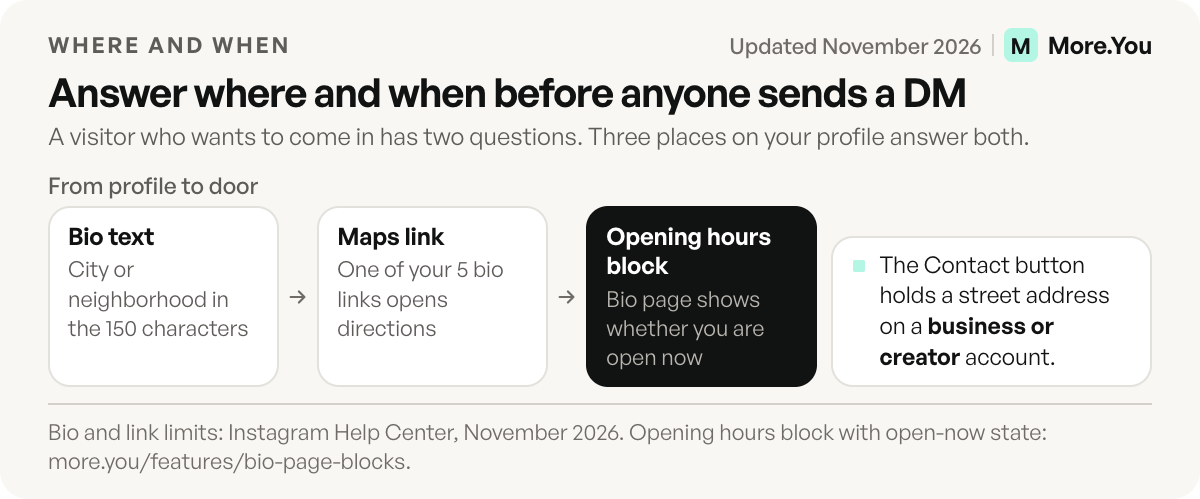
The map link answers where. The question right behind it is when: are you open right now? A bio page answers both in one place. Add a link block titled with your street address that opens your Google Maps link, then put an opening hours block under it. The hours block shows whether you are open now, so nobody has to message you to ask.
Add the blocks your visitors need next. A booking block helps if people book before they come in. An FAQ block can answer parking, accessibility and walk-in questions. A QR code for the page can go on your counter or window, so people in the shop reach the same page as people on Instagram. Free analytics show views and clicks per block by source, device and country for the last 30 days, so you can see whether people tap directions more than the menu.
The restaurant bio page guide shows a full block order for a place people book and visit. The guide to link in bio for small business covers shops and services.
Your Instagram bio tells people where you are. Create your More.You page, add a link block with your Google Maps link and an opening hours block under it, and everyone who taps your bio link sees the way in and whether you are open now. Both blocks are on the Free plan.
FAQ
Why can’t I add a location to my Instagram bio?
Personal accounts have no address field, so the location goes into the bio text or the name field as plain text. Any account can also add a Google Maps link under Links. A street address in the Contact button needs a business or creator account.
How do I add my business address to my Instagram profile?
Switch to a business or creator account, tap Edit profile, and add the address in your business contact info under Public business information. Then open Profile display and choose to display your contact info. Visitors who tap Contact can then get directions.
Can I add more than one location to my Instagram bio?
Yes. Name both cities or neighborhoods in the bio text, and add a Google Maps link for each one in two of your five link slots. A bio page with one link block per location keeps the Instagram profile shorter.
Is it safe to put my location in my Instagram bio?
For a shop or studio people visit, the address is already public. A creator who works from home is safer naming the city or region and leaving the street out, because anyone can see your bio.
Does a location in my bio show on the Instagram Map?
Instagram’s help page ties the Instagram Map to the address on the Facebook Page connected to your professional account. Add the address there, and Instagram says your location appears on the map and becomes taggable within 48 hours.
Sources
- Instagram Help: add a bio to your Instagram profile, November 2026
- Instagram Help: add a website to your Instagram profile, November 2026
- Instagram Help: about professional accounts on Instagram, November 2026
- Instagram Help: edit your business information on Instagram, November 2026
- Instagram Help: set up a professional Instagram account, November 2026
- Instagram: Breaking Down How Instagram Search Works, August 2021
- Google Maps Help: share a map or location, November 2026
- Google Maps Platform: Maps URLs, get started, November 2026
- More.You feature pages: more.you/features/bio-page-blocks, more.you/features/ai-native-pages and more.you/features/qr-sharing (November 2026)
Platform rules and prices checked November 2026.