A link in bio for restaurants is one mobile page behind your Instagram or TikTok bio that answers what a hungry follower wants to know: what’s on the menu, where you are, when you’re open, and how to book a table or order. It puts a booking button at the top, then the menu, directions, delivery links and tonight’s events.
People find restaurants on their phones, often on social. In a Toast survey of 1,466 US adults in October 2025, word of mouth was the top discovery channel at 38%, and TikTok was the number one discovery channel for Gen Z, also at 38% (pos.toasttab.com, November 2026). A Reel of your pasta gets the attention. The bio link decides whether that person books.
This guide covers the 7 blocks of a restaurant bio page, the order to put them in, how to promote events, how to show up on Google, and how to run several locations. It is written for restaurants, cafés, bars and bakeries.
Key Takeaways
- The main action sits on top. “Book a table”, “Order now” or “View menu”, whichever matters most to your business.
- Show the food. A wallpaper or hero image of your signature dish, plus a link to the full menu, sells the meal before anyone arrives.
- Make directions one tap. Address, a map link and opening hours answer “where and when” without a call.
- Use the top slot for what’s on. Live music, a seasonal menu or a weekend offer goes in the spotlight, then comes down.
- The hours block feeds search and AI. On More.You, an opening-hours block with valid hours produces LocalBusiness structured data automatically.
What should a restaurant put in its link in bio?
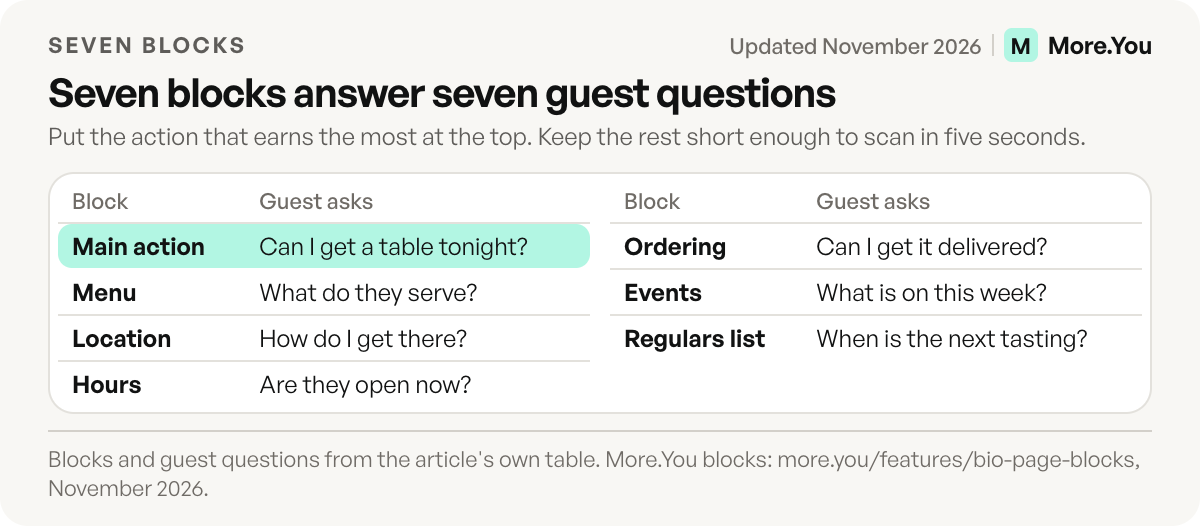
A restaurant’s bio page needs seven blocks: a main action (book, order or menu), the menu with a photo of your signature dish, address and directions, opening hours, delivery or online ordering links, upcoming events, and an email signup for regulars. Put the action that earns you the most at the top and keep the page short enough to scan in five seconds.
Link in bio for small business covers the general setup. Here is the restaurant version:
| Block | Guest question it answers | More.You block |
|---|---|---|
| Main action | ”Can I get a table tonight?” | Booking block or pinned link |
| Menu | ”What do they serve, and is it my style?” | Hero header image, link to full menu |
| Location | ”Where is it, how do I get there?” | Link to directions in maps |
| Hours | ”Are they open now?” | Opening hours |
| Ordering | ”Can I get it delivered?” | Links to delivery apps or your own ordering |
| Events | ”What’s on this week?” | Event blocks, hero header |
| Regulars list | ”How do I hear about the next tasting?” | Link to your email sign-up form |
Put the main action at the center
Every restaurant has one action that matters most. A fine-dining room wants bookings. A pizza place wants orders. A café wants people to walk in. Pick yours and make it the first button, with a plain label: “Book a table”, “Order now”, “View menu”.
If you take reservations, a booking block at the top takes guests to your booking calendar in one tap instead of a phone call. If you use a reservation platform such as OpenTable, Resy or Tock, point the block at your booking page there. The same three platforms can also power the Reserve button on your profile, as the list of Instagram action button partners shows. The guide to bookings through your link in bio shows where the booking block converts best.
Make them hungry before they arrive
Photos sell food faster than words. Use a hero or banner header with your best dish, and give each menu link a short, specific title: “Tonight’s menu: hand-rolled tagliatelle, wild boar ragù.” Visitors know what they will eat before they book.
If a new dish has no good photo yet, DesignerBox, built by the same team as More.You, makes menu photos and short videos for restaurants with AI, with no photo shoot to book.
Keep the full menu one tap away as a link to your menu page. Reorder links by drag when the season changes, so the summer specials leave the page when summer does. Group long lists with collections, such as “Lunch”, “Dinner” and “Drinks”, so each opens on its own.
Guide guests straight to your door
Don’t make anyone search for your address. Add a link titled with your street address that opens directions in their maps app. Put the opening hours block below it, so “where” and “when” sit together. The hours block also shows whether you are open right now. On the Instagram profile itself, put your neighborhood in the bio text and your street address in the Contact button, as the guide on Instagram bio location shows.
The hours block matters twice. Guests read it, and so do machines. On More.You, an opening-hours block with valid hours produces LocalBusiness structured data, so add the hours block even if bookings are your main action. Google lists menu, servesCuisine, openingHoursSpecification and priceRange as recommended properties for restaurants, with name and address required (developers.google.com, November 2026). The guide to structured data for creator pages explains what each type does.
Turn scrolls into orders
If you deliver, add links to every platform you sell on, plus your own ordering system if you have one. Label each with the platform name so guests open the app they already use. If your own ordering costs you less per order, put it first.
Keep it to the platforms you are on today. A dead link to a delivery app you left last year costs you the order and the guest’s trust.
Link to the ordering or reservation tool your restaurant already uses. The bio page sends guests there, and the tool takes the order or the booking. Check each link on your phone once a month, from the bio page, as a guest would. Look for three faults: a link that opens the wrong location, a menu that needs pinch-zoom, and a booking page with no free tables shown.
Announce what’s on
Live music on Friday, a new seasonal menu, a wine tasting, a holiday set menu. The top of the page is the place to announce it. Use a hero or banner header with an image and a headline, or pin the event so it sits above everything else.
Add each event as an event block with the date and a booking or ticket link. Event blocks produce Event structured data, so search engines and AI assistants can read the date and the link. On Pro, Auto-Pin does the routine work: when your scheduled post about Friday’s band goes live, its link pins to the top of the page, then comes down after 24 hours, 3 days or 7 days.
Brand it like your restaurant
The page should feel like walking in. Add your logo as the avatar, set your colors, and pick a theme, wallpaper and font that match the room. A candlelit wine bar and a bright breakfast café should not share a look. Design changes stay in a draft with undo and redo until you publish, so you can test a new style on a quiet afternoon.
Take the page offline too. A QR code for your link in bio on table tents, receipts and the front window sends guests to the same page your followers see.
Get found on Google search
A bio page can be indexed like any web page. To help it show up when people search your name:
- Use a custom domain (a Pro feature on More.You), such as menu.yourrestaurant.com, so the URL carries your name.
- Set the SEO fields: meta title (name, cuisine, city), meta description and an about text.
- Keep the hours and address current, since those are the facts people search for.
Your Google Business Profile still matters most for local search. The bio page supports it with one URL that holds the current menu, hours and booking link. Add the review link from your Google Business Profile as a link block too, so guests can review you from the same page.
Turn visitors into regulars
A guest who liked dinner is your best chance at a second visit. A link to your email tool’s sign-up form collects addresses for tastings, new menus, events and offers for subscribers. “Get the new menu before anyone else” or “Invites to our monthly wine night” gives people a reason to sign up. The guide to growing an email list from your link in bio covers the offers that work.
Send fewer emails than guests expect. One message per new menu and one per event is enough. Name the offer in the sign-up text, so the first email is the one the guest asked for.
See what drives bookings
Check which blocks get the taps. More.You analytics show page views, clicks and CTR per block, with breakdowns by source, device and country, on every plan. If the menu link gets more taps than the booking button, the booking button may be too low. Compare two weeks, not two days: a rainy Tuesday tells you little. If TikTok sends twice the clicks of Instagram, that is where your next video goes. On Pro, post attribution shows which post sent the clicks, such as the kitchen clip that filled Saturday.
Manage several locations
A group with more than one location has two options. One page per location keeps each address, hours and booking link separate, which is what guests need. More.You Premium holds up to 5 pages on one account. One page with a collection per location works when the menu and brand are the same. Either way, name each location by its neighborhood so guests pick the right one. Put the address and the hours on each location’s own page, because a guest who opens the wrong branch loses time.
Example: one week of a restaurant bio page
This week is illustrative. The page keeps the same seven blocks, and only the top slot and one event change.
| Day | Top slot | What changes |
|---|---|---|
| Monday | ”Book a table for Friday” | Weekend menu goes live |
| Wednesday | ”Tonight: live jazz, 8 pm” | Event block with a booking link |
| Friday | ”Order the weekend special” | Delivery links checked |
| Sunday | ”Book a table for Friday” | Event removed, menu reviewed |
Mistakes that send guests away
- A PDF menu that needs zoom. On a phone, a guest gives up. Use a mobile page for the menu.
- Five main actions. Booking, ordering, menu, events and offers cannot all be first. Pick one.
- Old hours. A holiday closing that is not on the page costs a guest a wasted trip.
- A link to a closed restaurant page. Test every link after you change a booking or delivery tool.
Fill tables from the bio
Your bio link is the step between a Reel and a reservation. Build it with the main action on top, the food front and center, directions in one tap, and the hours where people and search engines can read them. Create your More.You page and give guests the menu, hours and booking in one place.
FAQ
What is a link in bio for restaurants?
It is one mobile page linked from your social profiles that holds your menu, booking, location, hours, delivery links and events. Guests tap your bio link and find everything they need to visit or order without leaving their phone.
How can a restaurant get more bookings from Instagram?
Put a “Book a table” booking block at the top of your bio page and point it at your reservation page. Mention the bio link in posts and Reels about tonight’s specials. Check which posts drive booking clicks and make more of them.
Can customers order food from a link in bio page?
Yes. Add links to the delivery apps you use and to your own ordering system. Label each with the platform name so guests open the app they already have.
Should my restaurant menu be a PDF on the bio page?
A mobile web page is easier to read on a phone than a PDF. If you only have a PDF, link it with a clear title such as “Dinner menu”, and update the file when dishes change.
Will my restaurant’s bio page show up on Google?
It can. Use a custom domain, write a meta title with your name, cuisine and city, and keep hours and address current. Your Google Business Profile does most of the local search work, and the bio page supports it.
Sources
- pos.toasttab.com, How guests discover new restaurants, survey of 1,466 US adults, October 2025, accessed November 2026
- developers.google.com, Local business (LocalBusiness) structured data, accessed November 2026
- More.You feature pages: more.you/features/bio-page-blocks, more.you/features/ai-native-pages, more.you/features/auto-pin, more.you/features/custom-domains and more.you/features/analytics-attribution (November 2026)
- More.You plans: more.you/pricing (November 2026)
Platform rules and prices checked November 2026.



