
To make a QR code for free, open the link in Chrome or Edge and use the browser’s built-in “Create QR code” option, then download the image. On a phone, Chrome for Android and iPhone does the same from its Share menu. Canva and Adobe Express make free codes you can style. All of these make static codes, which never expire but can’t change destination.
That last detail is where people get burned. You print 500 flyers, the offer changes, and the code still points at last month’s page. Or a “free” generator’s trial ends and every printed code opens the vendor’s service page.
Below are eight free methods, with menu paths checked against each vendor’s help pages in November 2026, plus static vs dynamic codes, error correction, file formats and testing. For placement and print sizing, see our guide to a QR code for your link in bio.
Key Takeaways
- Your browser already makes QR codes. Chrome and Edge build a code for any open page, free, with no account and no expiry.
- Free tools make static codes. The link is baked into the pattern. To change where it goes, you print a new code.
- “Free” dynamic codes can stop working. Some generators switch off dynamic codes made during a trial when the trial ends. Read the terms before you print.
- Point one code at a page you control. A static code to your bio page never changes, and you edit the page instead of reprinting.
- Test on two phones before printing. Scan from the real distance, in real light, and confirm the right page opens.
How to make a QR code: the 8 free methods compared
Every method below is free and makes a code that works as long as its link stays live. They differ by device, file type and styling.
| Method | Device | File you get | Style options | Edit after printing |
|---|---|---|---|---|
| Chrome | Computer | Downloaded image | No | No |
| Microsoft Edge | Computer | PNG | No | No |
| Chrome for Android | Android phone or tablet | Downloaded image | No | No |
| Chrome for iPhone | iPhone, iPad | Image via Share | No | No |
| Shortcuts app | iPhone, iPad | Image | Colors and styling (iOS 26) | No |
| Canva | Any browser or app | Placed in your design | Colors, margin | No (static tool) |
| Adobe Express | Any browser | PNG, JPEG or PDF | Style, colors | No |
| A bio page’s built-in code | Any browser | From page share settings | Varies by tool | Code no, page yes |
How do you make a QR code on a computer?
On a computer, use the browser you already have. Chrome and Edge both make a code for the page that’s open, so open your link first. You get a downloadable image in seconds, with no account and no expiry date.
1. Chrome on Windows, Mac, Linux or Chromebook
- Open the link you want to share in Chrome.
- Click More (the three dots), then Cast, save, and share, then Create QR code.
- Click Download to save the image (Chrome help, computer, November 2026).
2. Microsoft Edge
- Open the link in Edge.
- Right-click a blank area of the page and choose Create QR code for this page.
- Download the code. Microsoft says it saves as a PNG you can email or print, and a QR icon then appears on the right side of the address bar for reuse (Microsoft Edge learning center, November 2026).
How do you make a QR code on your phone?
On a phone, Chrome makes a code from its Share menu on Android and iPhone, and iPhone has a Shortcuts action too. Google Lens and the camera only read codes; Google’s Lens help page covers scanning, not making.
3. Chrome for Android
- Open the link in Chrome.
- Tap More next to the toolbar, then Share…
- Select QR Code, then follow the prompts to download the code or share the page (Chrome help, Android, November 2026).
4. Chrome for iPhone and iPad
- Open the link in Chrome.
- Tap Share, then Create a QR Code.
- Below the code, tap Share to send the code on (Chrome help, iPhone and iPad, November 2026).
5. The Shortcuts app on iPhone
The Shortcuts app includes a Create QR Code action, and in iOS 26 Apple added options for colors and styling (Apple Support, November 2026). Create a new shortcut, search the actions for Create QR Code, give it your link, and add a Quick Look action to see the result.
How do you make a styled QR code for print?
Browser codes are plain black and white. A design tool lets you match brand colors and place the code in a flyer or menu layout.
6. Canva
In the Canva editor, open Apps, search “QR code”, pick the static option, paste your URL, adjust colors and margin, and save. The code lands in your design. Canva says its static codes have the same features on every plan and that their link can’t change after creation (canva.com/help, November 2026). Canva also runs a separate dynamic QR tool, so check which one you opened.
7. Adobe Express
Adobe Express has a free QR code generator: enter a URL, pick a style and colors, and download as PNG, JPEG or PDF. Adobe says its codes are static and never expire (Adobe Express, November 2026).
8. Your link in bio page’s built-in code
If you already have a link in bio page, check its share settings for a QR code. On More.You, which publishes this blog, the QR code and sharing tools sit next to copy URL and social share cards, on every plan including Free. The code points at your page’s own address, so it keeps working as long as the page is live.
Static vs dynamic QR code: which one do you need?
A static QR code stores your link in the pattern. It works as long as the link does, needs no account and can’t be edited. A dynamic code stores a redirect link owned by a QR service. You can change the destination and count scans, but the code works only while the service keeps that redirect on.
| Static | Dynamic | |
|---|---|---|
| What the pattern stores | Your actual link | The vendor’s redirect link |
| Change destination after printing | No | Yes |
| Scan counts | No | Yes, in the vendor’s dashboard |
| Keeps working if you stop paying | Yes | Depends on the vendor’s terms |
| Cost | Free with the tools above | A paid plan after the trial, at the two vendors cited below |
If the destination will change, either pay for a dynamic code or point a static code at a page you control.
Free trials: why some QR codes stop working
Some QR generators make dynamic codes by default, and switch them off when the trial ends. QR Code Generator’s help center says dynamic codes created during its 14-day free trial are deactivated when the trial ends (support.qr-code-generator.com, November 2026). QRFY’s help center says dynamic codes made during its trial are deactivated and linked to a service page (support.qrfy.com, November 2026).
The vendors disclose this; the damage happens when someone prints first and reads the terms later. Before printing, check three things:
- Does the tool label the code static or dynamic?
- What happens to the code if you never pay?
- Does it ask for an account or card before you download?
One code for everything: point it at your bio page
Make one free static code that points at your link in bio page and print it on business cards, packaging and table signs. When the offer changes, you edit the page, and every printed code shows the new version on the next scan.
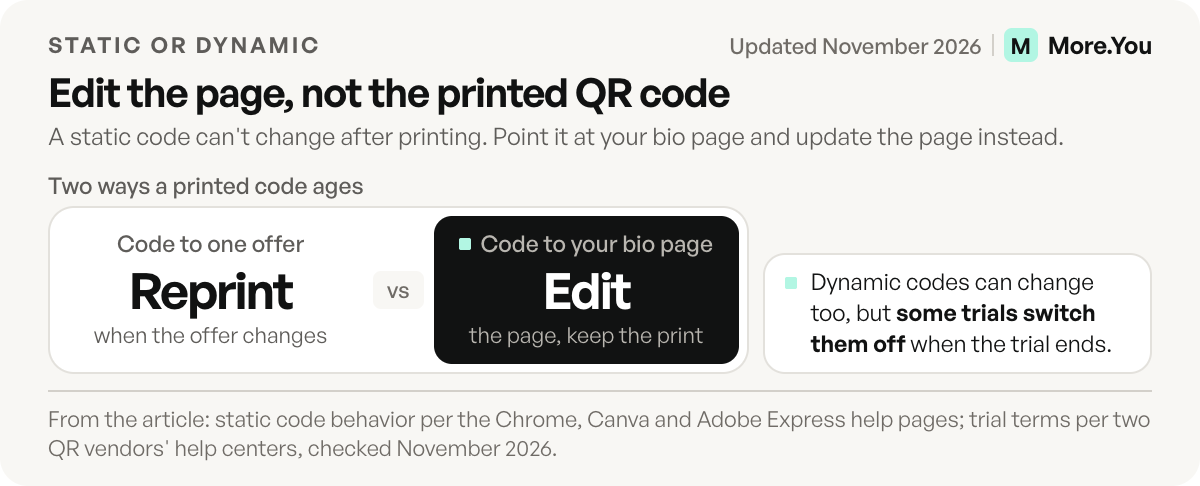
A link in bio page is built for this: reorder blocks, swap the featured link or add an event, and the printed code stays the same. A shop counter can carry one code for hours, bookings and the current menu; our guide to link in bio for small business covers that setup.
One limit: the code stores your page address, so pick an address you’ll keep. A renamed page means reprinting.
Error correction levels and file formats
Error correction lets a scanner read a code that is partly dirty, torn or covered. DENSO WAVE’s QR code site lists four levels (qrcode.com, November 2026), defined in the ISO/IEC 18004:2024 standard.
| Level | Data restored | Use it when |
|---|---|---|
| L | About 7% | Clean screens, long links |
| M | About 15% | Most print; DENSO WAVE calls it the most frequently selected |
| Q | About 25% | Outdoor signs, packaging that gets handled |
| H | About 30% | A logo covers the center of the code |
A higher level makes the code denser for the same link, so it needs more print space. Browser tools pick the level for you.
For file format, PNG is pixels at a fixed size: fine for screens and small print, blurry when stretched onto a poster. SVG is vector and stays sharp at any size, which suits large print. If your tool only offers PNG, never stretch it past the size you downloaded.
How to test a QR code before you print
Print one copy at the real size and scan it with an iPhone and an Android camera, from the distance people will stand, in dim light too. Confirm the right page opens on mobile data.
Also check the margin. DENSO WAVE’s spec requires a blank margin four modules wide on every side of the code (qrcode.com, November 2026). Designs that crop it fail first. To see how many people scan a specific flyer, add UTM parameters to the link before you make the code.
How small can you print a QR code?
DENSO WAVE publishes no single minimum print size. The size a reader can scan depends on how many modules the code has, how sharp the print is and the reader itself. A longer link needs more modules, and codes run from 21 × 21 modules up to 177 × 177 (qrcode.com). DENSO WAVE’s advice is to print the code as large as the space allows (qrcode.com). So test the size instead of guessing it:
- Print the code at three widths on one sheet, for example 2 cm, 3 cm and 4 cm.
- Scan each one from the real distance with an iPhone and an Android phone.
- Keep the smallest size both phones read on the first try, then go one size up for wear and dim light.
A short link helps here. It needs fewer modules, so each square prints bigger at the same width.
Make the code once, change the page
Before you print, decide what a first-time scanner sees at the top of the page: this month’s offer, your hours or next date, and one way to reach you. Any link can be pinned to the top of a More.You page on the Free plan, so you change the top slot without touching the print.
A static code is free and permanent, which is enough when it points at a page you can edit. More.You includes a QR code on every plan, and each scan lands on blocks people can act on and AI agents can read. Create your More.You page, print one code, and update the page instead of the print.
FAQ
How do I make a QR code for a link for free?
Open the link in Chrome or Microsoft Edge. In Chrome, click More, then Cast, save, and share, then Create QR code. In Edge, right-click the page and choose Create QR code for this page. On a phone, use Chrome’s Share menu. All are free and make static codes that don’t expire.
Do free QR codes expire?
Static QR codes don’t expire: the code works as long as the link does. Dynamic codes depend on the service running the redirect, and some generators switch off codes made during a free trial when it ends. Check the terms before you print.
Can I change where a QR code goes after printing?
Not with a static code, because the link is part of the pattern. A dynamic code can be redirected while its service stays active. The free option is to point a static code at a page you control, such as your link in bio page, and edit the page instead of the code.
Is Google’s QR code generator free?
Yes. Chrome’s built-in Create QR code option is free and needs no account, on computers, Android phones and iPhones. It makes a static code, so the code keeps working as long as the link does and can’t be pointed at a new address later.
Can I make a QR code on my iPhone without an app?
Yes, with Chrome or the Shortcuts app. In Chrome, open the page, tap Share, then Create a QR Code. In Shortcuts, build a shortcut with the Create QR Code action, which gained color and styling options in iOS 26. The camera reads codes but doesn’t create them.
Sources
- Google Chrome Help: share pages in Chrome (computer), November 2026
- Google Chrome Help: share pages in Chrome (Android), November 2026
- Google Chrome Help: share pages in Chrome (iPhone and iPad), November 2026
- Google Chrome Help: search with Google Lens in Chrome, November 2026
- Microsoft Edge learning center: how to generate QR codes, November 2026
- Apple Support: what’s new in Shortcuts for iOS 26, November 2026
- DENSO WAVE: QR code error correction, November 2026
- DENSO WAVE: QR code margin (quiet zone), November 2026
- DENSO WAVE: QR code versions and modules, November 2026
- DENSO WAVE: module size and print size, November 2026
- ISO/IEC 18004:2024, QR code bar code symbology specification, November 2026
- Canva Help Center: create and manage QR codes (canva.com/help, November 2026)
- Adobe Express: free QR code generator, November 2026
- QR Code Generator help center: what happens when the trial expires (support.qr-code-generator.com, November 2026)
- QRFY help center: what happens when the trial expires (support.qrfy.com, November 2026)
- More.You QR code and sharing and bio page blocks (more.you/features/qr-sharing, more.you/features/bio-page-blocks, November 2026)
Platform rules and prices checked November 2026.