
A QR code for Instagram is built into the app. Open your profile, tap Share profile next to Edit profile, and Instagram shows a card with your QR code on it. Anyone who scans that code with a phone camera lands on your Instagram profile. The code opens your profile only, so when one scan should reach your shop, bookings and other socials, point a QR code at your bio page instead.
The code usually ends up somewhere physical: a flyer, a table sign, the last slide of a talk, a sticker on a package. Someone scans it, sees your grid, then has to find the link in your bio, tap it and choose again. Each extra step is a place where a person puts the phone away before they reach the thing you wanted them to see.
This guide covers the current steps in the app and on desktop, how to save a print-ready code, how people scan it, and a side-by-side of the 3 options: Instagram’s own code, a code for your bio page, and a dynamic code from a QR service.
Key Takeaways
- Instagram’s code lives under Share profile, next to Edit profile. Before October 2024 it sat in the three-line menu, and earlier on a screen called Nametag.
- It always opens your Instagram profile. You can change its colors and background, but not where it goes.
- Download it from the card to print it, and test the print with two different phones first.
- For one code that opens all your links and socials, use the QR code of your bio page and put the same page in your Instagram bio.
- For a post or a Reel, copy its link and turn that link into a code with any free QR maker.
How to get your QR code for Instagram
Instagram’s QR code sits on your profile card. Open the Instagram app, go to your profile and tap Share profile, the button next to Edit profile. Instagram shows your profile card. The card has two sides: one with the QR code and your handle, the other with your photo, bio and links. Tap the card to flip between them. The steps are the same on iPhone and Android, because the button is part of the app.
Instagram moved the code to this card in October 2024. Social Media Today’s launch report from 15 October 2024 says you reach your QR code through the Share profile option on your profile. Instagram’s Help Center covers the same screen on its page about how to edit and share your Instagram profile card.
On a computer, the code sits in a different place. Make Tech Easier’s walkthrough from December 2024 found it under the gear icon on your profile, as a one-sided card where only the code’s color can change. Menus on the desktop site move more often than in the app, so if the gear does not show a QR option, use your phone.
Before the profile card, you opened the three-line menu and tapped QR code, and earlier the screen was called Nametag. How-To Geek’s 2022 guide shows that version. If you remember those steps, Share profile is the place to look now.
What Instagram’s QR code opens and what you can change
Instagram’s QR code has one destination: your Instagram profile. A person who scans it sees your grid, your bio and your follow button. That makes it a good code for gaining followers in person, at a market stall or a meetup, where the goal is the follow itself.
Android Authority’s report on the October 2024 launch lists what the card shows and what you can edit:
- The profile side: your photo, username, display name, pronouns, bio, a song, your occupation and your linked website.
- The QR side: the code and your handle.
- Your edits: a custom background image and the colors of the card. Social Media Today adds that you can pick a song that plays when someone opens the card.
To edit, open the card and tap the pencil icon in the top corner. None of these settings changes where the code goes. It points at your profile, and your bio link is one more tap away.
How to save your Instagram QR code for print
Instagram lets you download the card instead of taking a screenshot. Open Share profile, then tap Download. Make Tech Easier’s walkthrough says you can change the QR code’s color before you save, and choose whether to save the QR side or the profile side. For print, save the QR side.
The same screen sends your card as a link, a QR code or a short video of both sides through any messaging app, according to Android Authority’s launch report. Make Tech Easier also lists an option to add the card to your Story.
Before you order a print run, check four things:
- Contrast. A dark code on a light background is the safest choice.
- Size. Our guide to a QR code for your link in bio has the minimum print sizes for cards, flyers and signs.
- Margin. Leave clear space around the code, and do not let text or a logo touch it.
- Two phones. Scan the printed proof with an iPhone and an Android phone, in the light where the code will hang.
How do people scan an Instagram QR code?
Most phones scan QR codes with the built-in camera, so nobody needs Instagram open to scan your code. The person points the camera at the code and taps the link that appears.
On an iPhone, Apple’s iPhone User Guide says to open Camera, keep it in Photo mode, point it at the code and tap the link that appears at the bottom of the screen. The Scan Code control in Control Center does the same.
On a Pixel phone, Google’s Pixel Phone Help says to turn on Camera scan suggestions in the Camera settings, point the camera at the code and tap the link that appears. Google Lens scans codes too, which helps on Android phones where the camera app does not show a link.
Instagram’s app can scan codes as well. The Help Center has a page on how to scan a QR code to find someone’s profile on Instagram.
Instagram QR code vs a bio page QR code vs a dynamic QR code
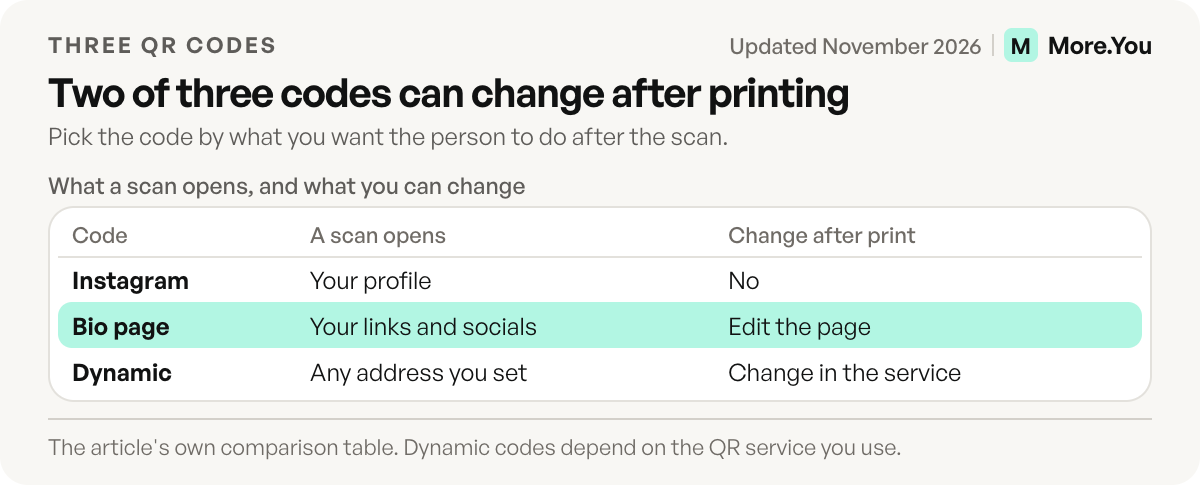
Instagram’s own code, a code for your bio page and a dynamic code from a QR service solve three different jobs. The first gets you a follow, the second sends one scan to everything you do, and the third lets you change the destination and count scans through a service you rely on. Pick by what you want the person to do after the scan.
| Instagram’s built-in code | QR code for your bio page | Dynamic QR code from a QR service | |
|---|---|---|---|
| What a scan opens | Your Instagram profile | Your bio page: links, products, bookings and the social profiles you add | Any address you set in the service |
| Taps from scan to your shop link | One or two: tap the bio link, then pick a link if you list several | One | One, if it points at the shop |
| Change it after printing | No, it always opens your profile | Edit the page; the printed code stays the same | Change the destination in the service’s dashboard |
| Cost | Free in the app | Free on a link in bio tool that includes a code | Depends on the service; some trial codes stop working when the trial ends |
| Best for | Gaining followers in person | Flyers, menus, packaging, slides, one code for all your socials | Campaigns where the destination changes and you need scan counts |
The dynamic option needs care. A dynamic code stores the service’s redirect link, not yours, so it works only while that redirect stays on. Our guide on how to make a QR code explains static and dynamic codes and the trial terms to check before you print.
When one QR code should open all your social media
More.You is an AI-native link in bio platform. Every page comes with its own QR code, and a social icons block puts your Instagram, TikTok, YouTube and other profiles on the same page as your links, products and bookings, on the Free plan. The same icons feed the page’s structured data, which lists those profiles as yours for search engines and AI agents that read the page.
This is the setup to use when you search for a QR code for social media. Download the page’s code from its QR code and sharing settings and print that one. When the offer changes, you edit the page, and the next person who scans the old flyer sees the new version. A scan from a table sign and a tap from your Instagram bio then land in the same place.
Put the same page in your Instagram bio so both routes agree. Our guide on how to add a link to your Instagram bio covers the steps, and multiple links in your Instagram bio compares Instagram’s own link slots with a single bio page. To see whether print works, More.You’s basic analytics show views and clicks for the last 30 days. Compare the days after a print run with a normal week.
How to make a QR code for an Instagram post, Reel or another account
A post or a Reel needs its own link before it can have a QR code. Open the share menu on the post, copy its link and paste it into any free QR maker.
Instagram’s Help Center explains how to get a link to a photo or video on Instagram or Threads. The share tools in Chrome and Edge make a code from a link for free.
The same method works for another account, such as a second business profile: copy the profile’s web address and make a code from it. A code made this way stores the address with the username in it. If the account changes its username later, the printed code still points at the old one, so you print a new code.
What to print next to the code
A code alone does not tell a stranger why to scan. Write one line that names what the scan gives, and place it next to the code. For illustration, a class studio might print this on a flyer:
Scan to see this week's classes and book a spot.
[QR code]
more.you/[yourname]
Print the short page address under the code too, so a person with a phone that cannot scan still reaches you. A sports club can use the same layout on tickets and posters, and social media for athletes shows what to put at the top of the page for each phase of the season.
Print the code that leads to everything
Your Instagram code brings people to your grid. Your bio page brings them to the rest: add a social icons block, your links and a booking or product block, then download the page’s QR code and print that one. Create your More.You page on the Free plan, and every printed code opens the version you edited last. Put the offer you want scanned this month in the first block, because it is the first thing every scan shows. Then scan your own proof and read the page as a stranger would.
FAQ
Where is the QR code on Instagram?
Open your profile in the Instagram app and tap Share profile, next to Edit profile. Instagram shows your profile card, and one side of the card holds your QR code. Tap the card to flip it.
Can I change where my Instagram QR code goes?
No. Instagram’s built-in code always opens your Instagram profile. To send a scan somewhere else, make a QR code from that other address, or use the QR code of your bio page and change the page whenever you need to.
Can someone scan my Instagram QR code without opening Instagram?
Yes. The Camera app on an iPhone and the camera on most Android phones read QR codes. The person points the camera at the code and taps the link that appears.
How do I make one QR code for all my social media?
Put your social profiles on one bio page with a social icons block, then print the QR code of that page. One scan opens the page, and the visitor picks Instagram, TikTok, YouTube or any of your other links from there.
Can I make a QR code for an Instagram post or Reel?
Yes. Copy the link of the post or Reel from its share menu, paste it into a free QR code maker and download the code. Test the code with your phone before you print it.
Sources
- Instagram Help Center: edit and share your Instagram profile card, November 2026
- Instagram Help Center: scan a QR code to find someone’s profile on Instagram, November 2026
- Instagram Help Center: get a link (URL) to a photo or video on Instagram or Threads, November 2026
- Social Media Today: Instagram launches new profile cards, 15 October 2024
- Android Authority: Instagram profile cards released, 16 October 2024
- Make Tech Easier: how to create and share your Instagram profile card, 22 December 2024
- How-To Geek: how to get your Instagram QR code, 6 February 2022
- Apple iPhone User Guide: scan a QR code with your iPhone camera, November 2026
- Pixel Phone Help: scan QR codes with your Pixel phone, November 2026
- More.You QR codes and sharing (more.you/features/qr-sharing, November 2026)
- More.You analytics (more.you/features/analytics-attribution, November 2026)
Platform rules and prices checked November 2026.