
Linktree vs Carrd is a choice between a link page and a small website. Linktree gives you a ready link list with built-in analytics, and Pro adds paid selling and hides the logo for $17 a month in the US. Carrd builds a designed one-page site, billed yearly: $19 a year buys your own domain, forms and embeds. Carrd’s $9 Pro Lite plan does not include custom domains (carrd.com and linktr.ee, November 2026).
Your bio link is the one URL every follower sees. With Linktree you fill in links and you’re live. With Carrd you design a page section by section, and it can look like a personal site rather than a list of buttons. Both are valid. They differ a lot in cost and in the time they ask from you.
This guide compares the two on six jobs a bio link does: routing, branding, your own domain, collecting emails, selling, and measuring clicks. Prices and plan limits come from Carrd’s pricing page and docs and Linktree’s pricing page and help center, read on November 13, 2026.
Key Takeaways
- Linktree is a link page, Carrd is a one-page site builder. Linktree is faster to set up. Carrd gives you more control over layout and design.
- Carrd costs dollars a year, Linktree costs dollars a month. Carrd Pro Standard is $19 a year. Linktree Pro is $17 a month in the US, or $14 a month billed annually.
- Carrd supports your own domain, and Linktree does not. Linktree supports custom domains on no plan. On Carrd they start on Pro Standard at $19 a year, not on the $9 Pro Lite plan.
- Linktree sells natively, Carrd sells through embeds. Linktree Pro lists paid products at 0% Linktree fees. Carrd embeds Stripe, PayPal or Gumroad widgets.
- Linktree has analytics on Free. It keeps 28 days of click history. Carrd analytics start on Pro Standard.
What is the difference between Linktree and Carrd?
Linktree is a link in bio tool: you add links, pick a theme and share one URL, with click analytics built in. Carrd is a site builder for simple one-page sites, landing pages and portfolios. You design the page from sections and elements, and Carrd hosts it. Many creators use a Carrd page as a link in bio, but Carrd is not built only for that job.
That difference drives everything else. Linktree’s paid tiers add creator tools: selling, scheduling, email integrations and longer analytics. Carrd’s paid tiers add website tools: custom domains, forms, embeds, meta tags and more sites per account. If you are still deciding between a bio page and a full site, our guide to link in bio vs a website covers that choice first.
How much do Linktree and Carrd cost?
Carrd bills every paid plan yearly. Pro Lite costs $9 a year, Pro Standard $19 a year and Pro Plus $49 a year, with larger versions for 10 to 1,000 sites (carrd.com/pro, November 2026). Carrd also offers a free 7-day trial of its top Pro features, with no card needed. Linktree bills monthly or annually: Starter $9, Pro $17 and Premium $35 a month in the US. Pro drops to $14 a month on annual billing (linktr.ee/s/pricing, US view, November 2026).
| Plan | Price | What it adds |
|---|---|---|
| Linktree Free | $0 | Unlimited links, QR code, base themes, 28 days of analytics |
| Linktree Starter | $9/mo ($7/mo annually) | Link scheduling, more design options, 90 days of analytics |
| Linktree Pro | $17/mo ($14/mo annually) | Paid products and bookings, logo hidden, SEO settings, email integrations, 365 days of analytics |
| Linktree Premium | $35/mo ($30/mo annually) | All-time analytics, CSV export, faster support |
| Carrd Free | $0 | Up to 3 sites per account, core features, “Made with Carrd” branding; no forms, embeds or analytics |
| Carrd Pro Lite | $9/yr | 3 sites, no Carrd branding, premium URLs (like .crd.co), QR codes, no custom domain |
| Carrd Pro Standard | $19/yr | 10 sites, custom domains with SSL, forms, widgets, embeds, analytics, meta tags |
| Carrd Pro Plus | $49/yr | 25 sites, custom forms that connect to Zapier, Make, n8n and Airtable, downloadable site code |
Sources: carrd.com/pro and carrd.com/docs, linktr.ee/s/pricing and linktr.ee/help, November 2026. Linktree shows prices in local currency; US prices are shown. Carrd lists branding, premium URLs, forms, widgets, analytics and embed code as Pro features, so Free has none of them.
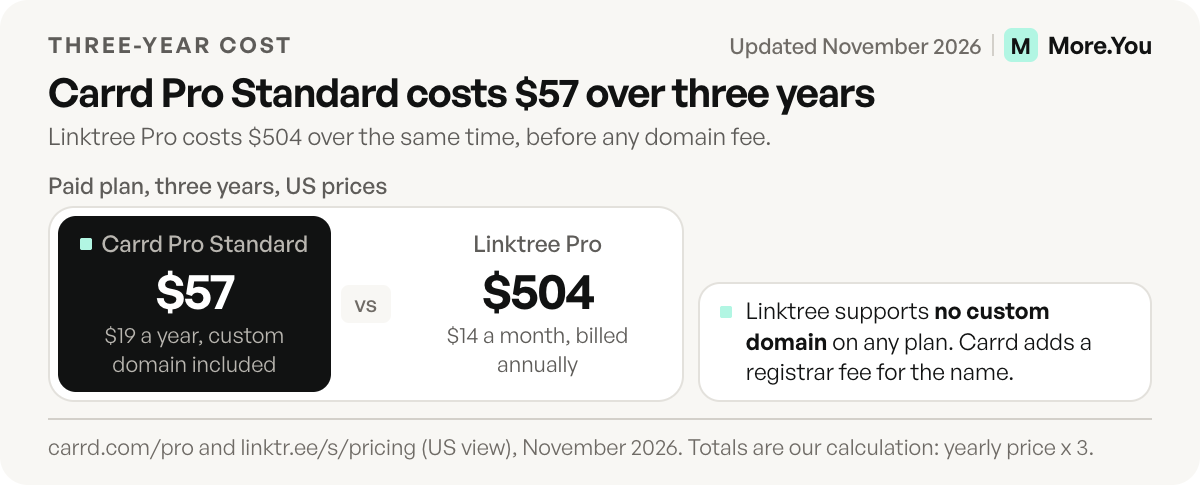
Over a year, the gap is large. Linktree Pro costs $204 on monthly billing ($17 x 12) or $168 on annual billing ($14 x 12). Carrd Pro Standard costs $19, plus whatever you pay a registrar for the domain itself.
| Cost over | Carrd Pro Standard | Linktree Pro, annual billing |
|---|---|---|
| 1 year | $19 | $168 |
| 3 years | $57 | $504 |
Our calculation from the prices above, before any domain fee.
Can you use your own domain on Linktree or Carrd?
On Linktree, no. Its help center says “Linktree doesn’t support custom domains”, so your page stays at linktr.ee/yourname on every plan (linktr.ee/help, November 2026). On Carrd, yes, from Pro Standard at $19 a year. Pro Lite at $9 a year only publishes to premium URLs such as a .crd.co address (carrd.com/docs, November 2026).
Carrd’s docs say Pro Standard can “publish sites to any custom domains you own”, with SSL through Let’s Encrypt, and describe Pro Lite as a plan for “users who don’t use custom domains”. Budget $19 a year if a domain is the reason you’re choosing Carrd. Linktree offers a redirect on Starter, Pro and Premium instead. It sends everyone who opens your Linktree to a link you choose (linktr.ee/help, updated October 2026). Our guide to using a custom domain for your link in bio explains the DNS side on any tool.
Which is better for selling and collecting emails?
Linktree is simpler for selling, and Carrd is more flexible for both. Linktree Pro and Premium let you set a price on digital products and bookings with 0% Linktree fees, plus Stripe’s 2.9% + $0.30 per sale (linktr.ee/help, November 2026). Free can share free products only. Selling works in eligible countries only, so check yours.
Carrd sells through other services. Pro Standard embeds widgets from Stripe, PayPal, Gumroad, Typeform and Facebook (carrd.com/docs, November 2026). Carrd’s pricing page lists no Carrd transaction fee. The payment service you embed charges its own fees.
For email, Carrd Pro Standard adds forms that connect to tools such as Mailchimp, Kit, ActiveCampaign and EmailOctopus (carrd.com/docs, November 2026). Linktree connects to Mailchimp, Kit and Klaviyo from Pro (linktr.ee/s/pricing, November 2026). Carrd gets you a signup form for $19 a year. Linktree’s route costs $17 a month but comes with the selling and analytics features too.
Which is better for analytics and design?
Linktree is better for analytics, and Carrd is better for design control. Linktree tracks views and clicks on every plan, keeping 28 days on Free, 90 on Starter, 365 on Pro and all-time on Premium. Carrd analytics start on Pro Standard and can use Carrd’s own service or a provider such as Google Analytics, Plausible or Matomo (carrd.com/docs, November 2026).
On design, Carrd lets you place sections, images and text where you want them, then embed your own code on Pro Standard. Linktree works from themes and link styles, and Starter adds more design options and animated links. If you want a page that reads as a personal site, Carrd gives you more room. If you want a page that is finished in one sitting, Linktree asks for less. Whichever you pick, how to track link in bio clicks shows which numbers are worth checking each week.
What mistakes do people make when they compare the two?
Four mistakes come up again and again, and each one costs money or time.
- Buying Pro Lite for a domain. Pro Lite at $9 a year has no custom domain. Pick Pro Standard at $19 a year.
- Comparing a yearly price with a monthly one. Carrd bills yearly. Put Linktree on the same basis, $168 a year on annual billing, before you decide.
- Forgetting the domain fee. Carrd Pro Standard connects a domain you own. A registrar charges for the name itself.
- Skipping the trial. Carrd offers 7 days of its top Pro features with no card, so test forms and embeds before you pay.
If you want to see your own numbers first, our guide to free link in bio tools lists what each free plan includes.
Which should you choose?
| If you want to… | Pick |
|---|---|
| Share links with no design work | Linktree Free |
| Remove all branding for the least money | Carrd Pro Lite, $9 a year |
| Use your own domain for the least money | Carrd Pro Standard, $19 a year |
| Sell digital products from the page itself | Linktree Pro, $17 a month |
| Build a small portfolio or landing page | Carrd Pro Standard |
| Keep a full year of click history | Linktree Pro |
If you’re weighing more than these two, our Linktree alternatives guide compares Beacons, Stan Store, Carrd and others on fees and features.
One more reader to plan for is AI. ChatGPT, Perplexity and shopping agents now read creator pages to answer “what does this person sell” and “how do I book them”. Labeled blocks and structured data give them more to work with.
A link in bio page with structure built in
More.You publishes this blog and competes with these tools, so every number below names its source. More.You sits between the two. You build from blocks for links, products, events, bookings and FAQ, so there’s no layout work. The theme gallery, templates and header layouts give the page a designed look. Every page also ships an llms.txt file, an agent manifest and structured data generated from its blocks, so AI assistants can read what you offer.
The Free plan is free forever with one page, every block type, QR codes and basic analytics (more.you/pricing, November 2026). A custom domain and branding removal sit on Pro, next to auto-pin and post-level attribution. To compare, paste your Linktree or Carrd URL into the importer, and More.You proposes your header, socials and links for you to confirm one by one. Create your More.You page and see it next to your current one.
FAQ
Is Carrd cheaper than Linktree?
Yes, for most uses. Carrd Pro Standard costs $19 a year and includes your own domain, forms and embeds. Linktree Pro costs $17 a month in the US, or $168 a year on annual billing. Both have free plans, and both free plans show the tool’s branding (carrd.com, linktr.ee, November 2026).
Can I use a custom domain on Linktree?
No. Linktree’s help center says it doesn’t support custom domains on any plan, and the linktr.ee part of the URL can’t change. You can change the username after the slash. Starter, Pro and Premium can redirect visitors to another URL (linktr.ee/help, November 2026).
Can I use Carrd as a link in bio?
Yes. A Carrd page is a single URL, so you can put it in your Instagram, TikTok or YouTube bio like any link page. You design it from sections instead of a link list. Analytics and a custom domain need Pro Standard at $19 a year.
Does Carrd Pro Lite include a custom domain?
No. Carrd’s plan docs describe Pro Lite as a plan for users who don’t use custom domains. It publishes to premium URLs such as .crd.co without Carrd branding. Custom domains start on Pro Standard at $19 a year (carrd.com/docs, November 2026).
Can you sell products on Carrd?
Yes, through other services. Carrd Pro Standard embeds widgets from Stripe, PayPal and Gumroad, and Pro Plus adds custom forms. Carrd lists no transaction fee of its own. The payment provider charges its usual fees.
Sources
- Carrd Pro page, plans, yearly prices, features and trial terms (carrd.com/pro, November 2026)
- Carrd docs, Pro plans and Pro features (Carrd Pro plans and Pro features pages on carrd.com, November 2026)
- Linktree pricing page, feature table and fee notes (linktr.ee/s/pricing, November 2026)
- Linktree help center, custom domains and redirects (linktr.ee/help/articles/6571689, updated October 2026), transaction fees, logo and selling (linktr.ee/help, November 2026)
- More.You plans, blocks, AI-readable pages and import: more.you/pricing, more.you/features/bio-page-blocks, more.you/features/ai-native-pages and more.you/features/import (November 2026)
Platform rules and prices checked November 2026.