
A one page website puts everything a visitor needs on one scrolling page: who you are, what you offer, proof that it works and one clear way to act. It suits creators, freelancers, local businesses and single launches. You can build one free on Carrd, Wix or a link in bio page builder, and you add pages only when search or a large catalog demands them.
A visitor who arrives from Instagram, a QR code on your counter or a Google Maps listing wants three answers fast: what is this, can I trust it, and how do I book, buy or get in touch. A five-page site hides those answers behind a menu.
This guide gives you the seven sections a one page website needs, in the order people read them, a worked example, a cost table for four builders checked in November 2026, and the signals that tell you it is time for more than one page.
Key Takeaways
- One page, one goal: a one page website works when every visitor should take the same main action, such as book, buy, listen or get in touch.
- Seven sections cover it: header, main action, offer, proof, details, more links and contact. Keep that order.
- Free plans exist: Carrd, Wix and More.You each have a free plan. Squarespace starts with a 14-day free trial instead.
- Your own domain sits on a paid plan: that holds for all four builders compared below, from $19 a year on Carrd to $19 a month billed annually on Squarespace.
- One address ranks as one page: add pages when you want to rank for several different searches, not before.
What is a one page website?
A one page website is a site with a single address where every section sits on one scrolling page. If it has a menu, the menu jumps down the page to a section instead of loading a new page. It is also called a single page website or a mini website.
That design changes how search engines see it. Google’s guidance on URL structure says Google Search generally doesn’t support URL fragments, the #section part of a jump link (checked November 2026). Your “about” and “prices” sections share one address in Google. That is fine for a business people search for by name. It matters once you want to rank for many different topics.
Who a single page website suits
A single page website fits anyone whose visitors arrive with one job. It fits less well when different visitors need different things, or when search is your main source of new people.
| You are | One page is enough when | Add pages when |
|---|---|---|
| Creator or influencer | Visitors come from your social profiles | You start a blog or a catalog of many products |
| Freelancer or consultant | You sell one service with one booking link | You want each service to rank in search on its own |
| Local business | People find you by name, on maps or from a sign | You run several locations with their own hours and staff |
| Launch or event | One date, one offer, one button | The launch turns into an ongoing store |
Shops, salons and studios that sell mostly through social media can start with the link in bio setups for small businesses and grow from there.
The 7 sections every one page website needs
The order follows the questions a stranger asks, top to bottom. Each section answers one of them, so nobody has to scroll back up.
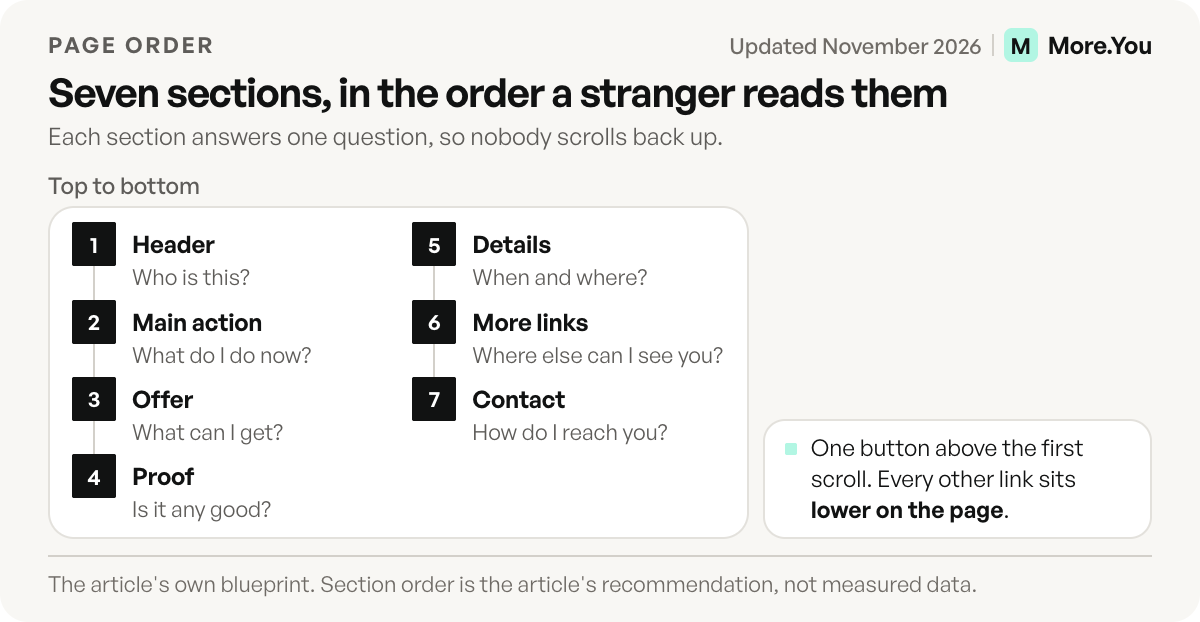
1. Header: name, face and one line
Show your name or logo, a photo, and one line that says what you do and for whom. Keep the line under 15 words.
2. One main action
Put one button above the first scroll: book, shop, listen, message or email. Every other link goes lower, so the main action has nothing to compete with.
3. What you offer
List three items at most. Give each a name, one sentence and a price or a starting price if you have one.
4. Proof
Show real proof: a result with a number, a press mention, or reviews linked to the platform where they were posted. Leave the section out until you have something true to put in it.
5. The details people ask about
Hours, location, delivery area, prices and a short FAQ. This section lets a visitor decide without sending you a message first.
6. More links
Socials, your latest post, a newsletter, other channels. They sit low on the page so they do not pull people away before the main action.
7. Contact and footer
Email, phone or WhatsApp, an address for a local business, and links to your privacy policy and terms if the page collects any data.
Example: the 7 sections for a hair studio
This example is for illustration only, for one local business.
| Section | Question it answers | Hair studio example |
|---|---|---|
| Header | Who is this? | Studio name, a photo of the chair, “Colour and cuts in Leeds, by appointment” |
| Main action | What do I do now? | ”Book a chair” button to the booking calendar |
| Offer | What can I get? | Cut, colour, balayage, each with a “from” price |
| Proof | Is it any good? | Before and after photos, a link to the Google reviews |
| Details | When and where? | Opening hours, street address, parking, a 4-question FAQ |
| More links | Where else can I see you? | Instagram, TikTok, latest Reel |
| Contact | How do I reach you? | Phone, WhatsApp, email, privacy policy |
One page website builders compared
More.You publishes this blog and competes with these tools, so every number below names its source. It is one of the four builders.
| Builder | Free plan | Your own domain from | Built for |
|---|---|---|---|
| Carrd | Yes, up to 3 sites | Pro Standard, $19 a year (10 sites) | One-page sites from a template or a blank page |
| Wix | Yes, on a wixsite.com address | Light, $17 a month billed yearly (US view) | Drag-and-drop sites of any size |
| Squarespace | No, a 14-day free trial | Basic, $25 a month, or $19 a month billed annually | Designer templates, multi-page sites and stores |
| More.You | Yes, one page with every block type | Pro, $7 a month, or $5 a month billed annually | A phone-first page built from blocks |
Carrd’s free plan builds up to three sites per account. Pro Lite at $9 a year removes Carrd branding, and Pro Standard at $19 a year adds custom domains, forms, embeds and analytics (carrd.com/pro, checked November 2026).
Wix gives you a drag-and-drop editor on its free plan, which runs on a wixsite.com address. Light, its first paid plan, costs $17 a month billed yearly in the US view. It includes your own domain, and a free domain for one year on a new name bought from Wix (wix.com/plans, checked November 2026). Prices change by location.
Squarespace has no free plan, and every site starts with a 14-day free trial. Basic costs $25 a month, or $19 a month billed annually, and annual plans include one year of free domain registration on available domains (squarespace.com/pricing, US view, checked November 2026).
More.You covers one page on its Free plan, with every block type, themes and templates. A custom domain is a Pro feature (more.you/pricing, checked November 2026).
Can a link in bio page be your one page website?
More.You is an AI-native link in bio platform. Each page ships its own llms.txt, an agent manifest and structured data built from its blocks, so AI assistants can read who you are and what you offer.
A link in bio page is a one page website built for phones and for visitors from social profiles. The seven sections map onto blocks. A header layout holds your name and photo, a pinned link is your main action, product and booking blocks hold the offer, an opening hours block shows whether you are open now, and an FAQ block answers the details.
You start from the template gallery by occupation and change the theme, fonts and colours from there. Per-page SEO settings set the meta title and meta description that search results can show.
Carrd gives you a free-form canvas for any layout. More.You gives you ready blocks for the jobs visitors come for, such as bookings, events and opening hours, and the More.You and Carrd comparison sets the two side by side.
How to build a free one page website in 6 steps
These steps work on any builder in the table.
- Write the one line first. Who you help and with what. Every other section supports it.
- Pick the main action. One button. Decide where it goes: a booking calendar, a shop, a release or your inbox.
- Pick the builder that matches the job. Use a bio page builder for social traffic, Carrd for a free-form layout, and Wix or Squarespace for a site that will grow.
- Fill the seven sections, top to bottom. Start from a template. In a drag-and-drop builder you reorder sections without code.
- Set the page title and description. Write them for a stranger: your name, what you do, where.
- Connect a domain and test on a phone. Free plans use the builder’s address. To put a bio page on your own domain, you need a paid plan on all four builders above. Then open the page on mobile data and tap every button.
Is a one page website bad for SEO?
A one page website can rank well, as one page. It can rank for your name, your business name and one main topic. It has a harder time ranking for several unrelated searches, because each topic usually needs its own page with its own title. For a business people find by name, on maps or from social profiles, that limit rarely costs you.
Three habits help the single page you have:
- Use real headings. Give each section a heading with the words people search, such as “Opening hours” or “Prices”.
- Keep key facts in text. Hours, address and prices inside an image are hard for search engines and screen readers to read.
- Add structured data. It tells search engines and AI systems what each part of the page is. On More.You, an opening hours block with valid hours adds LocalBusiness data, and an FAQ block adds FAQPage data.
When you need more than one page
Four signals say the single page has reached its limit:
- You want to rank for several different searches, such as each service or each city you serve.
- Your catalog grows past a short list, and each product needs its own photos, description and reviews.
- You publish articles or guides that should be found on their own.
- Different visitors need different things, such as customers, partners and job seekers.
None of these means you delete the single page. The link in bio vs website comparison covers cost and control when you run both.
Build the page your visitors land on first
If most of your visitors come from social profiles or a QR code, start with the page they land on. On More.You you pick a template for your job, add an opening hours block and an FAQ block, and the page publishes structured data from both on the Free plan. Write the seven sections first, in plain text, then place each one in a block. Check the page on your phone before you share it. Then share the link in your bio. Create your More.You page and fill them in one sitting.
FAQ
Is a one page website enough for a small business?
Yes, when people find the business by name, on maps or from social profiles, and the page answers hours, location, prices and how to book. Add pages when you want each service or location to rank in search on its own.
How much does a one page website cost?
It can cost nothing on the free plans of Carrd, Wix or More.You, which use the builder’s own address. Your own domain needs a paid plan, from $19 a year on Carrd Pro Standard to $19 a month billed annually on Squarespace Basic, as checked in November 2026.
What is the difference between a one page website and a landing page?
A landing page is built for one campaign and one conversion, often with no menu. A one page website represents the whole person or business and stays live as the main address.
Can a one page website rank on Google?
Yes. It can rank for your name, your brand and one main topic. Google treats the page as one address, so sections reached by jump links do not rank as separate pages.
Sources
- Google Search Central: URL structure best practices, November 2026
- Carrd free plan and Pro plans (carrd.com and carrd.com/pro, November 2026)
- Wix plans, US view (wix.com/plans, November 2026)
- Squarespace pricing, US view (squarespace.com/pricing, November 2026)
- More.You pricing (more.you/pricing, November 2026)
- More.You features: blocks, templates and AI-native pages (more.you/features/bio-page-blocks, more.you/features/templates, more.you/features/ai-native-pages, November 2026)
Platform rules and prices checked November 2026.