
To create a payment link, open your payment provider’s dashboard, add the product or the amount, and copy the link it gives you. Stripe, PayPal and Square all build a hosted payment page with a QR code at no setup cost. US fees on the six options below range from 1.9% + $0.10 to 3.49% plus a fixed fee per payment.
You sell a coaching call, a preset pack or a custom order, and the payment still happens in DMs. “What’s your PayPal?”, a screenshot, a manual check that the money arrived. A payment link replaces that thread with one page where the buyer pays the amount you set.
This guide compares six ways to create a payment link in the US: the fee each one takes, the account it needs and the steps. Then it shows where to put the link so followers find it when they decide to buy.
Key Takeaways
- Creating the link costs nothing. Stripe, PayPal and Square charge no setup fee for payment links; you pay a fee on each payment.
- US fees range from 1.9% + $0.10 to 3.49% plus a fixed fee, depending on the provider and how the buyer pays (checked November 2026).
- Personal accounts are not for selling. Venmo, Cash App and PayPal each have a rule for goods and services payments.
- Stripe Payment Links handle four kinds of sale: one-time sales, subscriptions, tips and pay-what-you-want amounts.
- The link needs a home. A product block on your bio page names the item and sends buyers to the payment page in one tap.
How do you create a payment link?
A payment link is a web address that opens a checkout page for one product, service or amount. The provider hosts the page and takes the card details, so you never handle card numbers. The steps are close to identical across providers:
- Open an account that can take sales. Stripe asks you to verify your business before live payments; Venmo and Cash App need a business profile or business account.
- Create the item. Add a name, a price and, for a subscription, a billing period. Some providers let the buyer choose the amount.
- Copy the link and the QR code. Every option below gives you a shareable link, and most also give you a QR code.
- Test it with a small payment before you post it. You see exactly what the buyer sees, including the fee line on your side.
6 ways to create a payment link, compared
All six options below are open to US sellers. Fees are what the seller pays to receive a US payment, read on each provider’s own pricing page in November 2026.
| Option | Fee to receive a payment (US) | Account you need |
|---|---|---|
| Stripe Payment Links | 2.9% + 30¢ per domestic card payment | Stripe account with verified business details |
| PayPal.Me | 2.99% on goods and services payments | Any PayPal account |
| PayPal Payment Links | 3.49% plus a fixed fee (PayPal or Venmo); 2.99% plus a fixed fee (cards) | PayPal business account |
| Square Payment Links | 3.3% + 30¢ per online payment on the Free plan | Square account (Free plan works) |
| Venmo business profile | 1.9% + $0.10 | Venmo business profile |
| Cash App for Business | 2.6% + $0.15 | Cash App business account |
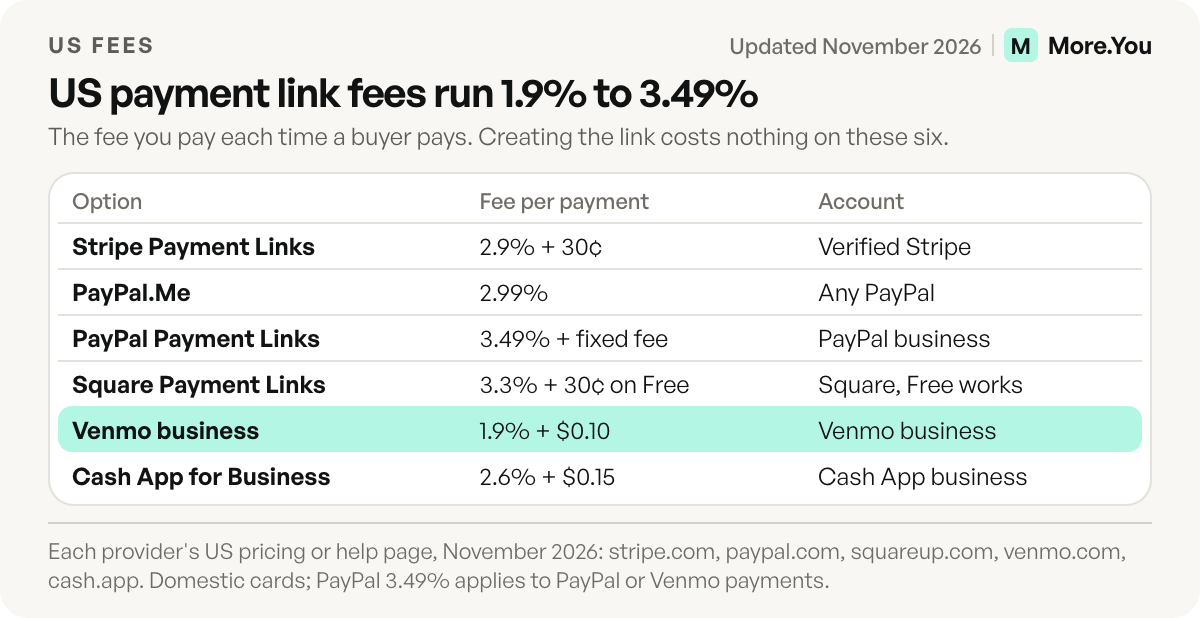
Card processing is built into each fee above, so there is no second processor fee on top. International cards and currency conversion can cost extra, as the Stripe section shows.
1. Stripe Payment Links
Stripe Payment Links create a Stripe-hosted payment page you can share on social media, by email or by text, with a QR code that does not expire. In the Dashboard, go to Payment Links, click New, pick or add a product, and click Create link, per Stripe’s Payment Links guide.
You can create three kinds of link: a product or service, a subscription, or tips and donations. A “customers choose what to pay” option sets a pay-what-you-want amount, but it does not work for recurring payments. Stripe’s pricing page lists 2.9% + 30¢ per successful domestic card payment, with 1.5% more for international cards and 1% more for currency conversion. Payment Links themselves are included at no extra charge (checked November 2026).
Before you take live payments, Stripe asks you to verify your business. Sole proprietors can sign up with a Social Security number instead of an employer ID.
2. PayPal.Me
PayPal.Me gives you one personal payment address, paypal.me/yourname. You create it from PayPal.Me after you log in. According to PayPal’s PayPal.Me FAQ, the name can be up to 20 letters and numbers, each account gets one, and you cannot change it later.
PayPal.Me is open to every account type, but business accounts can accept only goods and services payments. PayPal’s US fee page lists 2.99% for receiving money for goods and services (checked November 2026). A PayPal.Me link has no product or price attached, so the buyer types the amount.
3. PayPal Payment Links
PayPal Payment Links, built in a PayPal business account, create a hosted checkout page for a set product or amount. PayPal’s Payment Links page says the links come with a QR code, can let buyers set the amount, and have no setup cost or monthly fee.
The same page lists 3.49% plus a fixed fee when the buyer pays with PayPal or Venmo, and 2.99% plus a fixed fee for cards. The fixed fee on that page differs from PayPal’s fee schedule, so check the schedule for your account before you set prices (checked November 2026).
4. Square Payment Links
Square Payment Links suit sellers who also take payments in person. In the Square Dashboard, go to Payments & orders, then Payment links, then Create link, and choose to collect a payment, sell an item, or sell an event or class, per Square’s payment links help page. A link can be one-time or recurring.
Square’s US pricing page lists 3.3% + 30¢ per online payment on the Free plan, which has no monthly fee. The Plus plan ($49 a month per location) and Premium ($149 a month per location) lower that to 2.9% + 30¢ (checked November 2026). Each link comes with a buy button and a QR code.
5. Venmo business profile
A Venmo business profile lets US buyers pay you from the Venmo app they already use. Venmo’s fees page lists 1.9% + $0.10 to receive a payment on a business profile (checked November 2026). You can share the profile’s QR code by text or email and set a preset amount on it.
Venmo works where your buyers already use the app. A buyer without it needs another way to pay.
6. Cash App for Business
Cash App gives every account a link in the form cash.app/$yourcashtag. Cash App’s business fees page lists 2.6% + $0.15 per payment on a business account (checked November 2026).
Cash App says personal accounts should not be used to accept business payments. Eligible sole proprietors can opt in to Earn in P2P, which takes sales in a personal account. It needs a full Social Security number, LLCs cannot use it, and Cash App’s terms say it does not currently charge fees on those payments (checked November 2026).
Which payment link should you use?
The right payment link depends on what you sell and where your buyers already have an account. Start from the sale, not the provider.
| You sell | Start with | Why |
|---|---|---|
| Digital products or a monthly subscription | Stripe Payment Links | One-time, subscription and pay-what-you-want links from one dashboard |
| Services to buyers who use PayPal | PayPal Payment Links | A set price on a hosted page, with PayPal, Venmo and card options |
| Products you also sell in person | Square Payment Links | The same account runs your in-person payments |
| Deposits from US buyers on their phones | Venmo or Cash App business | Buyers pay in an app they already use |
| Tips and donations | Stripe tips and donations link | A tip type built into Payment Links |
If tips are the main goal, our guide to a tip jar for creators compares Ko-fi and Buy Me a Coffee, which handle tipping without a store. For services that need a time slot as well as a deposit, taking bookings through your link in bio covers the calendar side.
Personal vs business accounts: the rule to check first
Most payment apps separate paying a friend from paying a seller, and each one writes the rule in its own terms.
- Venmo: its user agreement says you can receive payments for goods and services only with a business profile, or when the sender marks the payment as goods and services.
- Cash App: personal accounts should not be used to accept business payments, unless you opt in to Earn in P2P as an eligible sole proprietor.
- PayPal: its consumer fees page defines a friends and family payment as one that is not for goods or services. A sale goes through as goods and services.
Ask buyers to pay as goods and services when the app gives them the choice. The fee is the price of selling under the provider’s rules.
Put your payment link on your bio page
More.You is an AI-native link in bio platform. Its product blocks also become Product structured data on the page, so AI assistants can read what you sell as well as people can.
A payment link pasted into an Instagram bio says nothing about what it buys. A product block on a bio page names the offer and sends buyers to your Stripe, PayPal or Square page in one tap. That page is where the buyer checks out.
- One block per offer. A coaching call, a preset pack and a deposit each get their own product block and their own payment link.
- Pin the offer you are pushing. Any link can be pinned to the top of the page during a launch.
- Keep the payment page and the block in step. When you change a price at Stripe or Square, change the block the same day.
Basic analytics on the Free plan show views and clicks per block, with 30 days of history. On Pro, attribution ties each click to the post that sent it, so you can see which post sent buyers to the offer. For digital downloads, selling digital products from your link in bio covers delivery, and creator income streams shows how payment links sit next to affiliate links and brand deals.
A payment link gets you paid. A product block tells people what they are paying for. Create your More.You page, add a product block for each offer, and point each one at its payment link.
FAQ
Is it free to create a payment link?
Yes, on the main providers. Stripe includes Payment Links at no extra charge, PayPal lists no setup cost or monthly fee for its Payment Links, and Square’s Free plan has no monthly fee. You pay a fee on each payment you receive.
Which payment link has the lowest fee?
Among the business options here, a Venmo business profile lists the lowest US rate, 1.9% + $0.10 per payment (checked November 2026). It only works for buyers who use Venmo. For card buyers, Stripe lists 2.9% + 30¢ per domestic card payment with no monthly fee.
Can I put a payment link in my Instagram bio?
Yes. Instagram lets you add up to five links to your profile, and a payment link can be one of them. A bio page gives each payment link its own labelled block, so followers see what each link buys.
Can I take payments with a personal PayPal, Venmo or Cash App account?
Each app has its own rule. PayPal.Me works on personal accounts for goods and services payments, which carry a fee. Venmo accepts sales on a personal account only when the sender marks the payment as goods and services. Cash App limits sales in a personal account to sole proprietors who opt in to Earn in P2P.
Can a payment link charge a monthly subscription?
Yes. Stripe Payment Links and Square payment links can both set up recurring payments. A pay-what-you-want amount on Stripe works for one-time payments only.
Sources
- Create a payment link and Share a payment link (Stripe Docs, November 2026)
- Stripe pricing, Activate your account and Signing up as a sole proprietor (Stripe, November 2026)
- PayPal.Me frequently asked questions (PayPal Help Center, November 2026)
- PayPal business fees, updated 4 November 2026, and PayPal consumer fees (PayPal, November 2026)
- PayPal Payment Links (PayPal, November 2026)
- Get started with Square payment links and Square pricing (Square, November 2026)
- Venmo fees and the Venmo user agreement, effective 24 August 2026 (Venmo, November 2026)
- Cash App for Business fees, Cash App for Business FAQs and the Cash App terms of service (Cash App, November 2026)
- Add links to your Instagram profile (Instagram Help Center, November 2026)
- More.You feature pages: more.you/features/bio-page-blocks and more.you/features/analytics-attribution (November 2026)
Platform rules and prices checked November 2026.