Join this week and get Pro free for 6 monthsLiked the free tool? Get your own page with Pro freeMoving to More.You? Get Pro free for 6 monthsPick a template and get Pro free for 6 monthsTry every Pro feature free for 6 monthsPut it into practice with Pro free for 6 months
Get Pro freeSign upTemplatesSee all templatesPricing



Product
Page blocksLinks, products, bookings, events and opening hoursThemes and fonts15 colour themes, 31 fonts, buttons and backgroundsClick analyticsPage views, clicks on each link, countries and devicesLinktree importPaste your Linktree address and pick the links to bringResources
TemplateNight kitchen
Link in bio template for bars, clubs and venues
Four blocks cover a whole night out at Bar Verde. A guest taps 'Book a table', sees that live jazz is on 26 Nov, checks the hours for Wednesday to Saturday and opens the drinks menu. Nothing else competes for the tap.
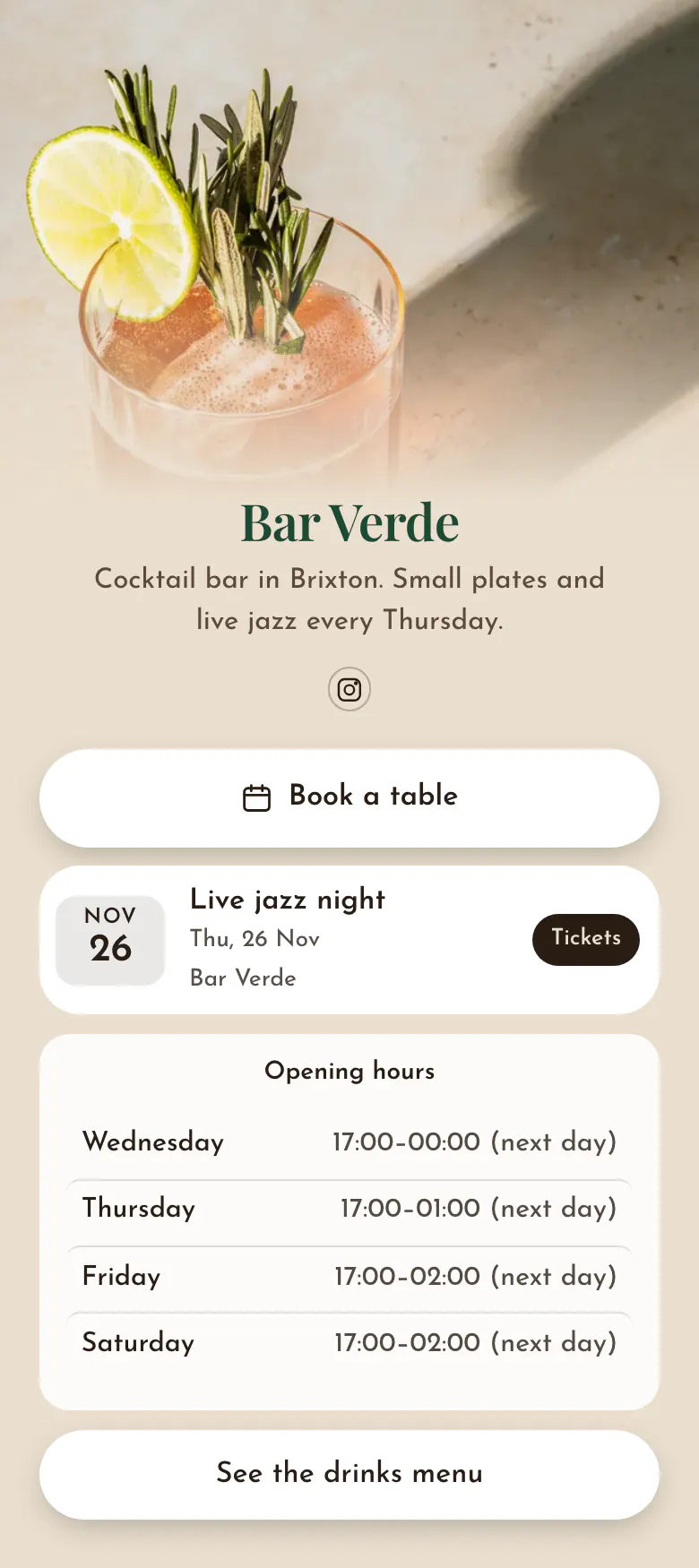
The four blocks a bar or venue needs
A bar, club or venue should put a table booking button first, then the next event with its date and a ticket link, the opening hours, and the drinks menu. People choose where to go on the same day, often from a phone, so the page must answer the plan for tonight first.
What is on this page
- Name and bioBar VerdeCocktail bar in Brixton. Small plates and live jazz every Thursday.
- Social iconsInstagram
- BookingBook a table
A guest's first tap leads to your table booking page on OpenTable, Resy, TheFork or any other service you use.
- EventLive jazz night26 Nov, Bar Verde
Live jazz night, 26 Nov, with a Tickets button on the right. One tap takes a guest to your ticket page.
- Opening hoursWednesday to Saturday
Wednesday to Saturday at Bar Verde, one row for each day. A guest finds today's row marked and reads how late you serve.
- LinkSee the drinks menu
One button to the drinks menu, so a group can choose their first drinks before they reach the door.
Who it is for
Cocktail bars, pubs with music, clubs and small venues can all use it. It suits a place that takes table bookings and runs a regular night, like Bar Verde's jazz on Thursdays. One page covers the whole venue. Where food is the main reason people come, the template for restaurants and cafes fits better, with its menu and food photos.
How to make it yours
Replace Bar Verde's details
Take this template as your draft. Replace Bar Verde with your name and Brixton with your area, and keep one line for your regular night, like live jazz every Thursday.
Give tonight's facts
Put your table booking link behind the first button, then add your hours and the current drinks menu. Create one event for your next music night with its date, place and ticket page.
Post it with every gig
Before the weekend, publish the page and put its address in the bar's Instagram profile. Mention it in every story about a gig, so followers know where the tickets are.
- Replace the event the morning after each night. A venue page that shows last week's gig tells guests that nobody updates it.
- Link the menu you serve now, not last season's file. Guests open it at the table when every printed copy is in use.
- On a ticketed night, move the event above the table button. On other days, keep the table first.
Questions
What should a bar, club or venue put in its link in bio?
A table, a night, the hours and the menu. Guests look for a way to reserve a table, the next event and how to get tickets, your hours for each day, and the drinks menu. Bar Verde's page holds those four blocks and nothing more, which keeps the page short on a phone.
How do we sell tickets for a club night through Instagram?
Add the night as an event with its name, date and place, and paste the address of your ticket page. A guest taps Tickets and buys on the ticket service you already use. Post the line-up in stories and mention the link in your profile each time.
Should a bar put its menu in the bio link?
Yes, a bar should link its current menu. Guests check drinks and prices before they choose a place, and again at the table. Link the menu as a web page or a file, and name the button in plain words, like 'See the drinks menu'.
Is the page free for a bar, and how many blocks can it hold?
It is free to create and publish, with every block type on the Free plan. A page holds up to 50 blocks, so each night of the month can have its own event. Bar Verde's version is beige with white buttons, and you set your own colours, cover photo and font.
Start your page with this template
Type the name you want after more.you/ and create your account. Then change the words and photos to yours.
 more.you/yourname
Before you go
Put everything you share behind one link
More.You is a free link in bio page. No card needed.
- Start from a template made for your work
- Add links, products, bookings and events
- See how many people tap each link