Join this week and get Pro free for 6 monthsLiked the free tool? Get your own page with Pro freeMoving to More.You? Get Pro free for 6 monthsPick a template and get Pro free for 6 monthsTry every Pro feature free for 6 monthsPut it into practice with Pro free for 6 months
Get Pro freeSign upTemplatesSee all templatesPricing



Product
Page blocksLinks, products, bookings, events and opening hoursThemes and fonts15 colour themes, 31 fonts, buttons and backgroundsClick analyticsPage views, clicks on each link, countries and devicesLinktree importPaste your Linktree address and pick the links to bringResources
TemplateClean fade
Link in bio template for salons and barbershops
A chair, the hours and the price. Clients want those three things from a barbershop's profile link, and Rafa's page gives them as its first three blocks. Matte clay and beard oil from the shelf come after.
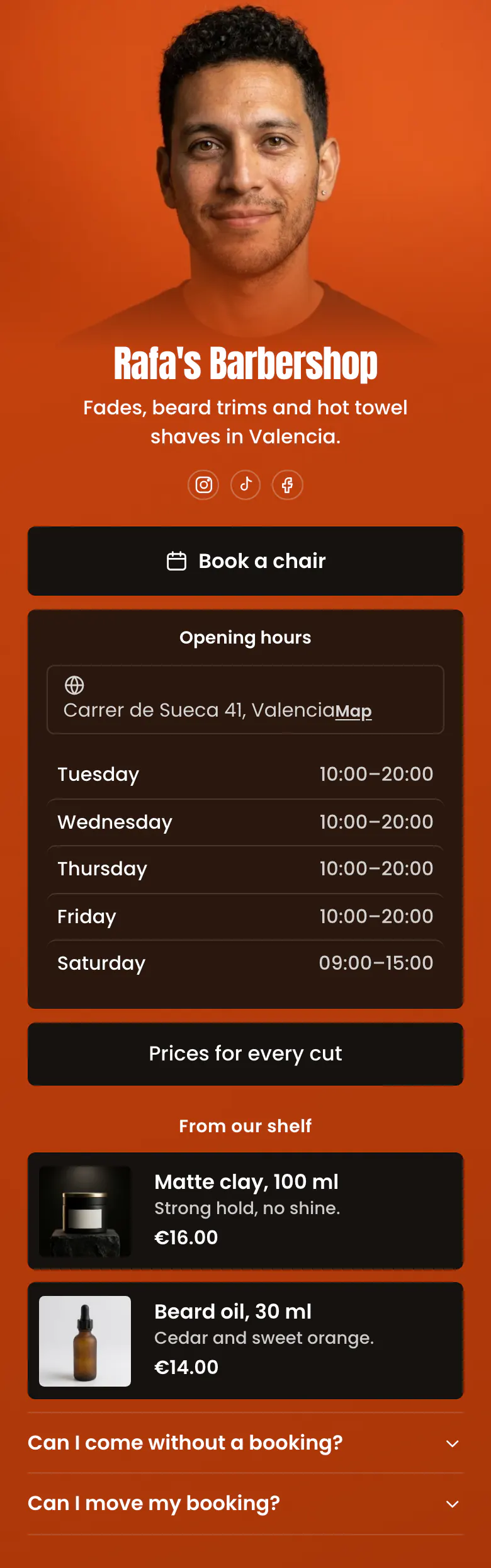
Booking, hours and prices for a barbershop
From the top, the link in bio of a salon or barbershop reads: a booking button, opening hours with the address, the price list, a few products from the shelf, and answers about walk-ins and moving a booking. Most visitors hold a phone and want a chair this week, and each extra tap before the booking button loses some of them.
What is on this page
- Name and bioRafa's BarbershopFades, beard trims and hot towel shaves in Valencia.
- Social iconsInstagram, TikTok, Facebook
- BookingBook a chair
Book a chair stands in black on orange, the strongest contrast on the page. It opens the booking service your shop already uses.
- Opening hoursTuesday to SaturdayCarrer de Sueca 41, Valencia
A client on the way checks two things here: today's row, which is marked, and the address, Carrer de Sueca 41.
- LinkPrices for every cut
The full price list behind one button, so a client knows what a fade or a beard trim costs before they sit down.
- Section titleFrom our shelf
From our shelf divides the page in two: services above the heading, products below it.
- ProductMatte clay, 100 ml€16.00
Clay and beard oil with photo, size and price. One tap opens your store, and a regular knows what to ask for at the counter.
- ProductBeard oil, 30 ml€14.00
- FAQCan I come without a booking?2 questions
Walk-ins and moving a booking, the two questions that fill a barbershop's inbox. Rafa's answers open when a client taps the question.
Who it is for
Your shop has a street address, a few chairs and a diary on Booksy, Fresha, Square or another booking service. This page covers the whole team, with hours, prices and the shelf. A barber or stylist who rents a chair has clients who follow one name. That person should begin with the template for hair stylists, where recent work comes before the hours.
How to make it yours
Make it your shop
Rafa's Barbershop is the name to change first, once you pick this template. Write your best known services in one line under it, as Rafa does with fades, beard trims and hot towel shaves.
Enter booking, hours and prices
Paste your Booksy, Fresha or other booking link behind the first button. Enter your hours for each day, link your price list and replace the clay and oil with products from your own shelf.
Print it on appointment cards
Add the published page's address to the shop's Instagram, TikTok and Facebook profiles. Write it on your appointment cards too, so regulars book the next cut from their phone.
- On quiet days, rewrite the booking button. 'Chairs free this Tuesday' gives a follower a reason to book this week.
- Update the barbershop's hours before every public holiday. A client who walks to a closed shop rarely writes to ask why.
- Keep the shelf section to the two products clients ask about most. The full range belongs in your store, behind one link.
Questions
What should a barbershop or salon put in its link in bio?
Begin with booking, because most people open the link to get a haircut. Under it, list your opening hours and address, link the price list, and show one or two retail products. Close with short answers on walk-ins and on changing a booking, so the phone rings less during cuts.
Can clients book a haircut from our Instagram bio?
Yes, in two taps. The link in your profile opens your page. The booking button there opens your booking page on the service you already use, such as Booksy, Fresha or Square. Any booking link works, so the shop keeps its current diary, reminders and client records.
Where should a barbershop put its price list?
Put it behind one button near the top of your bio link, under booking and hours. Price is the question clients ask most after opening hours, and a client who finds no price often chooses another shop. Rafa's page names the button 'Prices for every cut' and shows two product prices on the page itself.
Is the barbershop page free, and can we change the orange?
A shop can create and publish this page for free, and the Free plan has every block type. The orange background and black buttons are Rafa's colours. Set your own for the background, the buttons and the text, and give the shop name its own font from a list of 31.
Start your page with this template
Type the name you want after more.you/ and create your account. Then change the words and photos to yours.
 more.you/yourname
Before you go
Put everything you share behind one link
More.You is a free link in bio page. No card needed.
- Start from a template made for your work
- Add links, products, bookings and events
- See how many people tap each link