Join this week and get Pro free for 6 monthsLiked the free tool? Get your own page with Pro freeMoving to More.You? Get Pro free for 6 monthsPick a template and get Pro free for 6 monthsTry every Pro feature free for 6 monthsPut it into practice with Pro free for 6 months
Get Pro freeSign upTemplatesSee all templatesPricing



Product
Page blocksLinks, products, bookings, events and opening hoursThemes and fonts15 colour themes, 31 fonts, buttons and backgroundsClick analyticsPage views, clicks on each link, countries and devicesLinktree importPaste your Linktree address and pick the links to bringResources
TemplateFirst meeting
Link in bio template for law firms
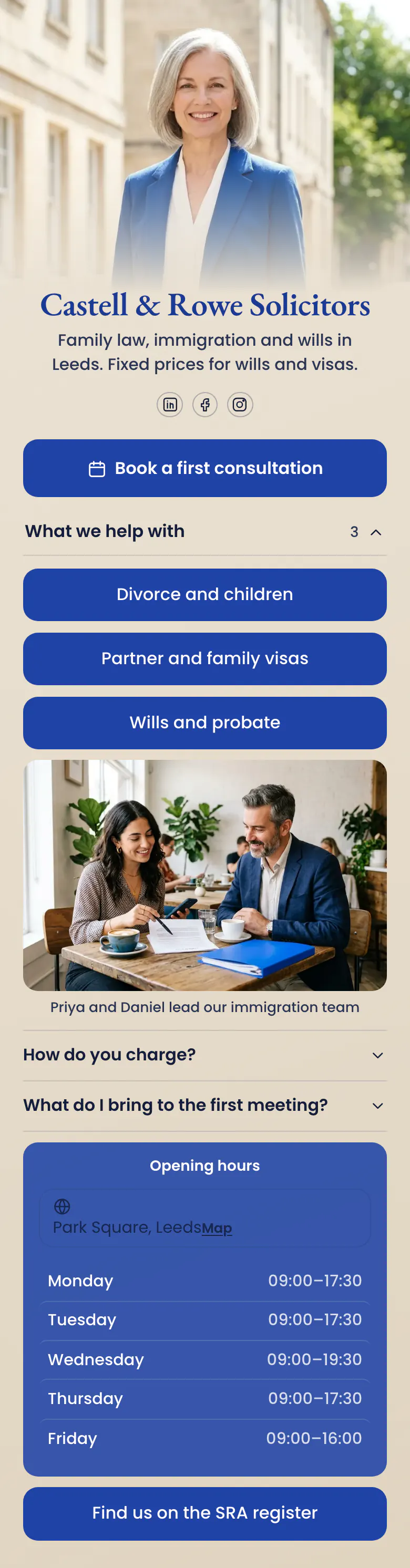
“Book a first consultation” comes first, as one blue button. Three practice areas, a photo of the immigration team and “How do you charge?” follow, the same order as the questions in a first phone call to a firm.
What a law firm's link in bio needs
A law firm's link in bio needs, in this order, a button to book a first consultation, the practice areas in plain words, a short answer on how the firm charges, office hours and a link to its entry on the regulator's register. People look for a lawyer when something has gone wrong, so the next step comes before the firm's story.
What is on this page
- Name and bioCastell & Rowe SolicitorsFamily law, immigration and wills in Leeds. Fixed prices for wills and visas.
- Social iconsLinkedIn, Facebook, Instagram
- BookingBook a first consultation
A worried visitor taps here first. The button opens the booking service the firm already uses, where the client chooses a time.
- CollectionWhat we help with3 links
“What we help with” groups three practice areas under one title that opens and closes. A firm with more areas adds them to the same group.
- LinkDivorce and children
Each practice area opens its own page on your website. The last link on the page goes to the firm's entry on the SRA register.
- LinkPartner and family visas
- LinkWills and probate
- ImagePriya and Daniel lead our immigration team
Priya and Daniel, who lead the immigration team, are named under their photo. Clients choose a person as much as a firm.
- FAQHow do you charge?2 questions
Two questions every new client has, “How do you charge?” and “What do I bring to the first meeting?”, answered before the meeting starts.
- Opening hoursMonday to FridayPark Square, Leeds
Office hours for each day, Monday to Friday, with today's row marked. A client who must sign a will in person knows when to come.
- LinkFind us on the SRA register
Who it is for
Solicitors, lawyers and attorneys in small and mid-sized firms that meet new clients through Instagram, Facebook or LinkedIn, in areas such as family law, immigration, wills or property. A sole practitioner with one office can use it too. If your work is tax returns and filing dates, start from the template for tax advisors or the one for accounting firms.
How to make it yours
Pick the law firm template
Press Use this template and create a page for your firm. The consultation button, the three practice areas and both questions are already in place.
Add your firm's details
Your firm's name comes first, then your practice areas and a photo of the partners a client will meet. Write your own answers on how you charge and what to bring to a first meeting.
Put it where clients look
Publish the page and put the link in your Instagram and Facebook bio and on your LinkedIn page. Add it to the email signature of everyone who speaks to new clients.
- Name the button after the meeting a client gets, like “Book a first consultation”. A button that says “Contact us” tells a worried person nothing about the next step.
- Write practice areas the way a client says them, like “Divorce and children” or “Wills and probate”. Keep the department names for your website.
- End the page with a link to your entry on the regulator's register, as the sample does with the SRA. A stranger can check in one tap that the firm is real.
Questions
What should a law firm put in its link in bio?
A booking button for a first consultation, your practice areas, how you charge, your office hours and a link to your regulator's register. Put the booking button first. A person who taps the link in a law firm's bio usually has a problem today and wants to speak to someone.
Should a law firm show prices on its bio page?
Yes, wherever the price is fixed. The sample firm writes “Fixed prices for wills and visas” in its bio and answers “How do you charge?” in the FAQ. For work billed by the hour, say so plainly and say what the first consultation costs. Many people delay a call to a lawyer because they fear the bill.
Can clients book a consultation with a lawyer from an Instagram bio?
Yes. The first button on this page opens the booking service your firm already uses, such as Calendly or Cal, where the client chooses a time. Someone who finds the firm late in the evening has a meeting agreed before the office opens.
Is this law firm template free, and can we change the colours?
The page is free to create and publish, and the Free plan includes every block type on it. The cream and blue are a starting point. A firm can set its own colours for the background, the buttons and the text, choose from 31 fonts and put a partner's photo or the office on the cover.

Start your page with this template
Type the name you want after more.you/ and create your account. Then change the words and photos to yours.
 more.you/yourname
Before you go
Put everything you share behind one link
More.You is a free link in bio page. No card needed.
- Start from a template made for your work
- Add links, products, bookings and events
- See how many people tap each link