Join this week and get Pro free for 6 monthsLiked the free tool? Get your own page with Pro freeMoving to More.You? Get Pro free for 6 monthsPick a template and get Pro free for 6 monthsTry every Pro feature free for 6 monthsPut it into practice with Pro free for 6 months
Get Pro freeSign upTemplatesSee all templatesPricing



Product
Page blocksLinks, products, bookings, events and opening hoursThemes and fonts15 colour themes, 31 fonts, buttons and backgroundsClick analyticsPage views, clicks on each link, countries and devicesLinktree importPaste your Linktree address and pick the links to bringResources
TemplateSketchbook
Link in bio template for artists
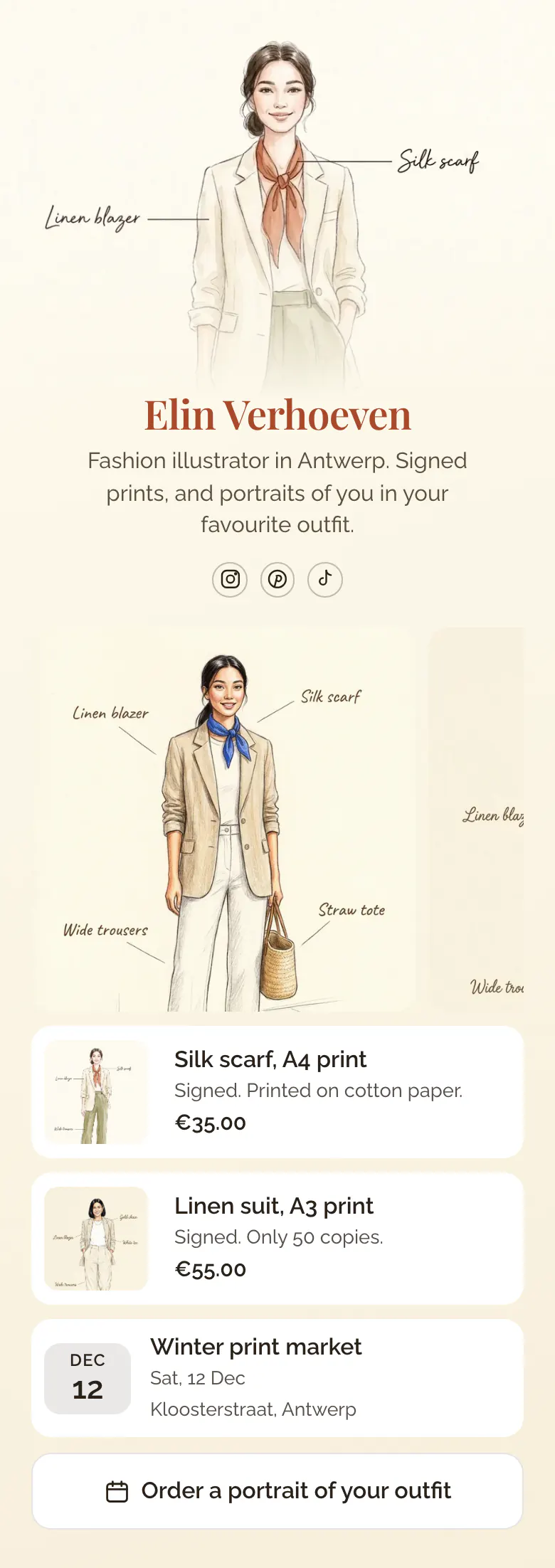
The gallery of three drawings comes before any price, because a follower has to like the work first. Two signed prints with sizes and prices follow, then your next market and a button to order a portrait.
The parts of an artist's link in bio
The order that works for an artist's link in bio is recent work, then prints or originals with sizes and prices, the next market or exhibition date, and a button for commissions. People buy art after they see it, so the pictures come first and every way to buy or order follows with a clear price.
What is on this page
- Name and bioElin VerhoevenFashion illustrator in Antwerp. Signed prints, and portraits of you in your favourite outfit.
- Social iconsInstagram, Pinterest, TikTok
- Gallery3 pictures
Drawings come before any price. A visitor who likes the line and the colours keeps scrolling to the prints.
- ProductSilk scarf, A4 print€35.00
Size, signature and price are on the card, for example A3, signed, €55.00. A buyer who taps it reaches that print in your shop.
- ProductLinen suit, A3 print€55.00
- EventWinter print market12 Dec, Kloosterstraat, Antwerp
The date, the name and the street of your next print market, for followers who like to see paper before they buy.
- BookingOrder a portrait of your outfit
The commission button says what a client gets, a portrait of their outfit, and opens your order or booking page.
Who it is for
Best for one artist with prints to sell: an illustrator, a painter or a printmaker who also takes commissions and shows at markets or small exhibitions. Buyers come from Instagram, Pinterest and TikTok. If your work is client projects for brands, with case studies and a project call, the template for designers is the better start.
How to make it yours
Begin with Sketchbook
Sign up through the Use this template button. A gallery, two print cards, a market date and a commission button are in place for your own work.
Upload art and set prices
Upload three recent pieces, then give each print its size, edition and price. Type your next market or exhibition, and name the commission button after what you draw.
Share it where you post
The address more.you/yourname goes on your Instagram, Pinterest and TikTok profiles after you publish. Write it on the back of each print you sell too.
- State the size and the edition on each print, as the sample does with A3 and 50 copies. A small edition gives buyers a reason to decide today.
- Every published page has a QR code. Show it on your phone at the market, and a visitor who is not ready to buy can open your prints later.
- Name the commission button after the result, like 'Order a portrait of your outfit'. A button that only says 'Commissions' makes people ask what you draw.
Questions
What should an artist put in their link in bio?
Show work first, then say what is for sale. A small gallery, a few prints with prices, your next market or show and a commission button answer nearly every message an artist gets. Keep older series and news articles on your website, and link to it lower on the page.
Should artists show prices in their Instagram bio link?
Yes, put a price next to each print. Many buyers will not write to ask. They leave. On the sample, the A4 print says €35.00 and the A3 print says €55.00, so a follower knows at once whether a signed print fits their budget.
How do I take art commissions through my bio link?
Add one button that names the commission and opens your order page. The sample button says 'Order a portrait of your outfit' and leads to a booking service, where the client leaves details and chooses a date. Tell the client what they get, the size and how long it takes before they write to you.
How much of this design can I change to suit my art?
The cover, the background, the fonts and the colours can all become yours. Use your own drawing or photo as the cover at the top. Set the background to a colour, a gradient, a pattern or a photo, and choose one of 31 fonts for your name. The cream page of the sample suits ink and pencil, and a darker colour suits bold paintings.
Start your page with this template
Type the name you want after more.you/ and create your account. Then change the words and photos to yours.
 more.you/yourname
Before you go
Put everything you share behind one link
More.You is a free link in bio page. No card needed.
- Start from a template made for your work
- Add links, products, bookings and events
- See how many people tap each link