Join this week and get Pro free for 6 monthsLiked the free tool? Get your own page with Pro freeMoving to More.You? Get Pro free for 6 monthsPick a template and get Pro free for 6 monthsTry every Pro feature free for 6 monthsPut it into practice with Pro free for 6 months
Get Pro freeSign upTemplatesSee all templatesPricing



Product
Page blocksLinks, products, bookings, events and opening hoursThemes and fonts15 colour themes, 31 fonts, buttons and backgroundsClick analyticsPage views, clicks on each link, countries and devicesLinktree importPaste your Linktree address and pick the links to bringResources
TemplateDarkroom
Link in bio template for photographers
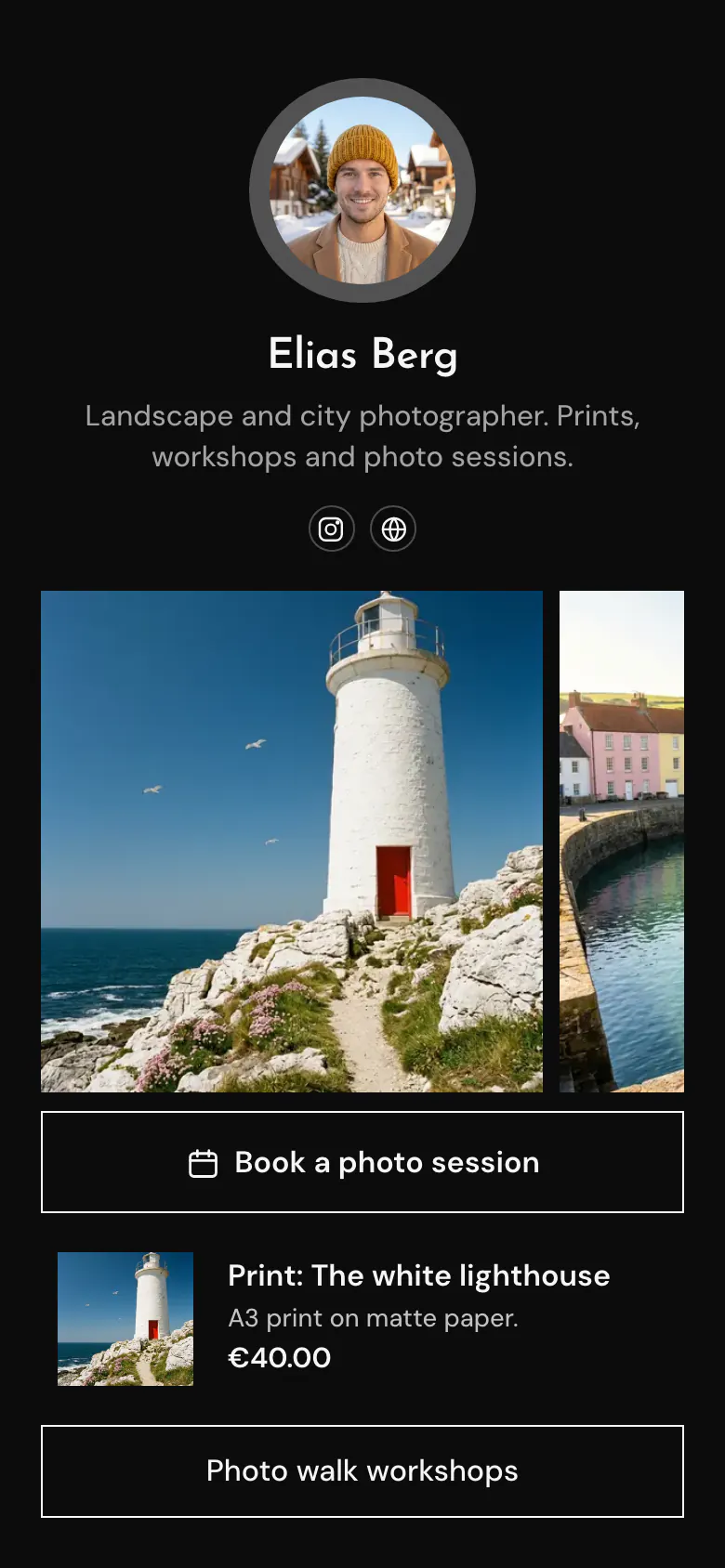
Photos come before any button or price, because the pictures are what a client chooses. Under the gallery are a session to book, one print at €40 and a link to the photo walk workshops.
What belongs in a photographer's link in bio
Photographers should put a few of their best photos first in their link in bio, then a button to book a session, one or two prints with prices and a link to workshops or the full portfolio. Clients hire a photographer for pictures they have seen, so the work goes above the offers. On More.You that first block is a gallery.
What is on this page
- Name and bioElias BergLandscape and city photographer. Prints, workshops and photo sessions.
- Social iconsInstagram, Website
- Gallery3 pictures
Three pictures above every button, here a white lighthouse and a harbour. Choose photos in the style you want to be hired for.
- BookingBook a photo session
Directly under the gallery, so a visitor has seen your work before the offer. “Book a photo session” opens the booking service you use.
- ProductPrint: The white lighthouse€40.00
“Print: The white lighthouse” shows the first gallery photo again, with “A3 print on matte paper” and €40.00. A tap opens your own print store.
- LinkPhoto walk workshops
A plain button for the photo walk workshops. The same kind of button works for a full portfolio or a price list.
Who it is for
Solo photographers who earn from more than one thing, such as sessions, prints and workshops. It suits landscape, portrait and wedding photographers whose Instagram account is the portfolio and whose offers need one place. If you sell prints only and take no bookings, start from the template for artists or the one for Etsy sellers.
How to make it yours
Get the gallery page
Begin with the Use this template button. You get a black page, a gallery of three photos, a session button and one print with its price.
Add your best three
Replace the lighthouse and harbour photos with three of your own, and the round portrait with yours. Name the session you sell most, then add one print and its price.
Put the link in Instagram
Your photos are seen on Instagram, so the published link goes in that bio first, then on your website. Write “prints and sessions in bio” under the photos that get the most questions.
- A new season needs a new gallery. Show autumn sessions in late summer, so the first photo matches the work you want to book next.
- Give a print the same name as the post it came from, like “The white lighthouse”. Followers search the page for the photo they liked.
- If sessions are your main income, keep the booking button directly under the gallery. If prints are, move the print above it.
Questions
What should a photographer put in their link in bio?
A few strong photos, a way to book a session, a print or two with prices and a link to workshops or your full portfolio. Put the photos first. Someone who came from one photo on Instagram wants to see that the rest of your work is as good.
How do I take photo session bookings from Instagram?
Put a booking button directly under your photos. “Book a photo session” on the sample leads to the booking service you already use, for example Square or Calendly, and the date is agreed there. A client no longer has to write “Are you free that Saturday?” and wait for your reply.
Can I sell prints through my link in bio?
You can show each print with its photo, name and price, and send buyers to your store in one tap. The sample shows “The white lighthouse”, an A3 print on matte paper, at €40.00. A print price can be in any of 12 currencies.
Is this photographer template free, and can I change the black background?
Creating and publishing the page is free for a photographer, and the black is a starting point. The top of the page can be Classic, Hero with your photo as a cover, Banner, Cutout or Shape. The background can be a solid colour, a gradient or a photo.

Start your page with this template
Type the name you want after more.you/ and create your account. Then change the words and photos to yours.
 more.you/yourname
Before you go
Put everything you share behind one link
More.You is a free link in bio page. No card needed.
- Start from a template made for your work
- Add links, products, bookings and events
- See how many people tap each link