Join this week and get Pro free for 6 monthsLiked the free tool? Get your own page with Pro freeMoving to More.You? Get Pro free for 6 monthsPick a template and get Pro free for 6 monthsTry every Pro feature free for 6 monthsPut it into practice with Pro free for 6 months
Get Pro freeSign upTemplatesSee all templatesPricing



Product
Page blocksLinks, products, bookings, events and opening hoursThemes and fonts15 colour themes, 31 fonts, buttons and backgroundsClick analyticsPage views, clicks on each link, countries and devicesLinktree importPaste your Linktree address and pick the links to bringResources
TemplateFirst lesson
Link in bio template for tutors
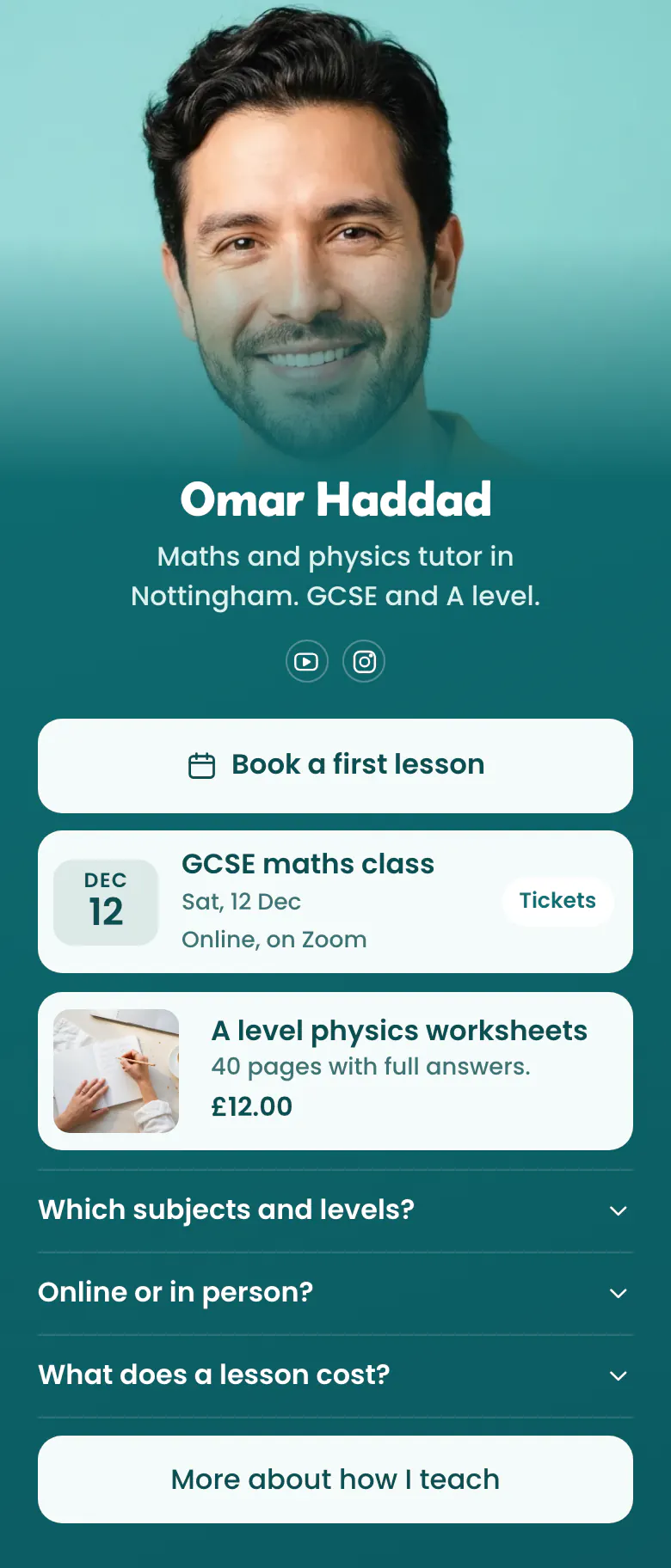
Parents decide, so the page answers parents. Book a first lesson is the first button, the next group class shows its date, and three questions cover subjects, place and price before anyone has to write to you.
What parents need from a tutor's bio link
Tutors should put these in a link in bio, in this order: a button to book a first lesson, the next group class with its date, one paid resource such as worksheets, and answers about subjects, levels, place and price. Parents compare several tutors in one evening and book the one whose page answers them first.
What is on this page
- Name and bioOmar HaddadMaths and physics tutor in Nottingham. GCSE and A level.
- Social iconsYouTube, Instagram
- BookingBook a first lesson
The Book a first lesson button opens your booking page on Calendly, Cal or the service you use, where a parent chooses a day.
- EventGCSE maths class12 Dec, Online, on Zoom
The group class shows its date, name and place, here GCSE maths class on 12 Dec, online on Zoom.
- ProductA level physics worksheets£12.00
Worksheets for A level physics show a photo, a short line and the price, £12.00. One tap opens the worksheets in your own store.
- FAQWhich subjects and levels?3 questions
Three questions parents ask before they book: which subjects and levels, online or in person, and what a lesson costs.
- LinkMore about how I teach
The last link, More about how I teach, is for the careful parent who reads everything before an exam year.
Who it is for
Private tutors who teach school subjects, languages or exam preparation alone, online or in person, and whose students find them on YouTube or Instagram. It fits a tutor with free hours to fill before exam season. If you sell one recorded course to many students, start from the template for course creators instead.
How to make it yours
Choose First lesson
Press Use this template and create a More.You account as a tutor. The booking button, the group class, the worksheets, three parent questions and a link about your teaching are in place.
Write your subjects and price
Replace the sample with your own subjects, levels and exam boards. Answer the cost question with a real price for one lesson.
Share where students watch
Publish your tutor page and paste more.you/yourname into your YouTube channel and your Instagram bio. Students send the link to the parent who books.
- Write the level and the exam in your bio line, as GCSE and A level does on the sample. Parents search by exam as much as by subject.
- Answer the lesson cost question with a real amount. A parent who cannot find a price often books the tutor who shows one.
- Move the group class to the top of the page in the weeks before exams, when parents search for revision classes.
Questions
What should a tutor put in their link in bio?
Put one clear way to book a first lesson at the top. Under it, show what else you offer, such as a group class or worksheets, and answer what parents always ask about subjects, levels, place and price. Your teaching story fits in one link at the end.
Should a tutor show lesson prices in their bio link?
Show at least the price of one lesson. The sample page keeps a question about the cost of a lesson in its FAQ for this reason. A visible price ends the messages that stop when you name it, and the parents who book have already accepted it.
How do parents book a lesson from Instagram or YouTube?
They tap the link in your profile, then tap Book a first lesson. That button opens your booking page on the service you already use, and the parent chooses a day there. You keep one diary for all your students.
Is this tutor link in bio template free?
Creating and publishing your tutor page is free, and the Free plan has every block type the template uses. The teal background and the rounded letters of the name are a starting point. You set your own colours, choose from 31 fonts and put your own photo where Omar's is.
Start your page with this template
Type the name you want after more.you/ and create your account. Then change the words and photos to yours.
 more.you/yourname
Before you go
Put everything you share behind one link
More.You is a free link in bio page. No card needed.
- Start from a template made for your work
- Add links, products, bookings and events
- See how many people tap each link